
Ynlieding
The Melnor 3060 Digital Water Timer Plus is designed to automate your watering schedule, providing convenience and efficient water management for your lawn or garden. This timer allows you to set precise watering times and durations, ensuring your plants receive the right amount of water without constant manual intervention. It features an easy-to-read LCD menu for programming and supports multiple independent watering cycles.
This manual provides detailed instructions for setting up, operating, and maintaining your Melnor 3060 Digital Water Timer Plus. Please read it thoroughly before use to ensure optimal performance and longevity of your device.
Key Features
- Automatisearre wetterjen: Set and forget, program to automatically start and shut off.
- Maklike programmearring: Features an intuitive LCD menu for straightforward setup.
- Alsidige kompatibiliteit: Works effectively with low-pressure drip systems and soaker hoses.
- Fleksibele planning: Program up to 6 independently programmable cycles, allowing watering while away or at night.
- Hânlieding: Includes an on/off function to use like a standard faucet.
- Ekstra útgong: Equipped with a second manual outlet for convenient watering.
Safety Information
WARSKÔGING: Dit produkt kin jo bleatstelle oan gemikaliën, ynklusyf styreen, dy't yn 'e steat Kalifornje bekend is om kanker te feroarsaakjen. Foar mear ynformaasje, gean nei www.P65Warnings.ca.gov.
For outdoor use only. Do not use this timer indoors or for purposes other than watering.
Opsette
1. Batterijen ynstallearje
The Melnor 3060 Digital Water Timer Plus requires two (2) AA batteries (not included) for operation. Ensure batteries are inserted with correct polarity.
- Sykje it batterijfak oan 'e efterkant fan' e timer.
- Iepenje de batterij compartment cover.
- Insert two fresh AA alkaline batteries, matching the (+) and (-) terminals correctly.
- Securely close the battery compartment cover to prevent water intrusion.
2. Attach to Faucet
Connect the timer to a standard outdoor hose faucet.
- Ensure the faucet is turned off.
- Thread the timer's inlet connector onto the faucet. Hand-tighten only to prevent damage.
- Attach your garden hose or watering system to the timer's outlet.
- Slowly turn on the faucet completely. The timer is designed to operate with full water pressure.
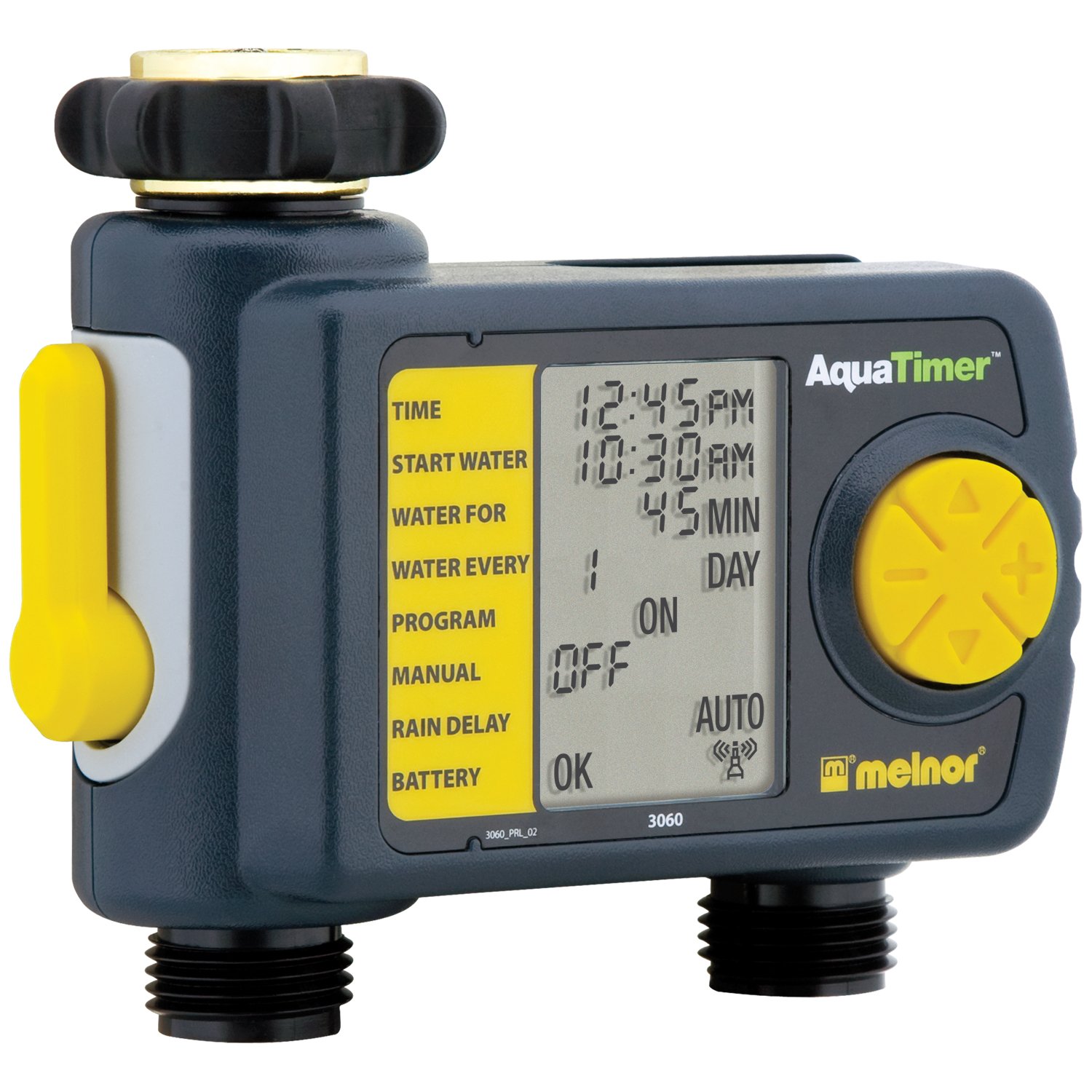
Image: The Melnor 3060 Digital Water Timer Plus, showing its connection points for a faucet and a garden hose.
Operating Instructions
The Melnor 3060 features an LCD display and several buttons for programming. Refer to the on-screen prompts for guidance.
1. Set Current Time
- Druk op de SET KLOK knop.
- Brûk de + en - knoppen om it oere en de minuten oan te passen.
- Parse OK or SET KLOK wer te befêstigjen.
2. Program Watering Schedule
The timer allows for up to six independent watering cycles per day. You can also choose from five preset programs.
- Druk op de PROGRAMMA knop om de programmearring modus yn te gean.
- Brûk de + en - buttons to select a program number (1-6) or a preset option.
- Parse OK om jo seleksje te befêstigjen.
- Follow the on-screen prompts to set the:
- Begjintiid: When watering begins.
- Doer: How long watering will last.
- Frekwinsje: How often watering occurs (e.g., every day, every other day, specific days of the week).
- Repeat for additional watering cycles as needed.
- Once all programs are set, ensure the timer is in AUTO mode for automatic operation.
3. Hânmjittich wetter jaan
To water manually without affecting your programmed schedule:
- Druk op de ON/OFF knop.
- The water will begin to flow.
- To stop manual watering, press the ON/OFF button again. The timer will return to its programmed schedule.
4. Using the Second Manual Outlet
The timer includes a second, un-timed manual outlet. This outlet functions like a standard faucet and is not controlled by the timer's programming. Simply attach a hose and open the valve on the timer to use it.
Ûnderhâld
- Batterij ferfanging: Replace batteries annually or when the low battery indicator appears on the LCD. Always use fresh AA alkaline batteries.
- Winterisaasje: To prevent damage from freezing, remove the timer from the faucet before the first frost. Store it indoors in a dry, protected area.
- Reiniging: Periodically check the inlet screen for debris and clean if necessary to maintain proper water flow.
Troubleshooting
| Probleem | Mooglike oarsaak | Oplossing |
|---|---|---|
| Timer jout gjin wetter. |
|
|
| Wetter lekt út ferbiningen. |
|
|
| It skerm is leech of dim. |
|
|
Spesifikaasjes
- Model Oantal: 3060 (also referred to as 3100 in some documentation)
- Power Boarne: 2 x AA Alkaline Batterijen (net ynbegrepen)
- Produkt Ofmjittings: 4.5 x 5.2 x 4.5 inch
- Item Gewicht: 12.8 oz
- Fabrikant: Melnor
- Wettersyklusen: Up to 6 independently programmable cycles
- Foarynstelde programma's: 5
Warranty Information
The Melnor 3060 Digital Water Timer Plus comes with a Twa-jierrige beheinde garânsje. This warranty covers defects in materials and workmanship under normal use. For specific terms and conditions, or to make a warranty claim, please refer to the warranty card included with your product or contact Melnor customer service.
Klant Support
If you have any questions, require assistance with setup or programming, or encounter any issues not covered in this manual, please contact Melnor Customer Service. Contact information can typically be found on the product packaging or on the official Melnor website.