
1. Oerview
The Canon PowerShot SD450 Digital ELPH camera is a compact digital camera designed for ease of use and high-quality imaging. It features a 5.0-megapixel sensor, a 3x optical zoom lens, and a 2.5-inch LCD display. The camera incorporates Canon's DIGIC II processor for efficient image processing and offers various shooting modes to suit different photographic situations.

figuer 1.1: Front view of the Canon PowerShot SD450 Digital ELPH camera with its lens retracted.
2. Wat sit der yn 'e doaze
Kontrolearje oft alle folgjende items yn jo pakket opnommen binne:
- PowerShot SD450 body
- Lithium battery pack NB-4L
- Battery charger CB-2LV
- 16 MB SD memory card SDC-16M
- Wrist strap WS-600
- Digital Camera Solution CD-ROM
- USB interface cable IFC-400PCU
- Audio-video cable AVC-DC300
3. Opsette
3.1. It opladen fan de batterij
- Insert the Lithium battery pack NB-4L into the battery charger CB-2LV.
- Stek de lader yn in stopkontakt. It oplaadindikatorljocht sil oangean.
- Once charging is complete, the indicator light will change or turn off. Remove the battery.
3.2. Inserting the Battery and SD Card
- Iepenje it deksel fan it batterij-/kaartfak oan 'e ûnderkant fan' e kamera.
- Insert the charged battery pack into the compartment, ensuring correct orientation.
- Insert the SD memory card into the card slot until it clicks into place.
- Slút de dekking fan it fak feilich.
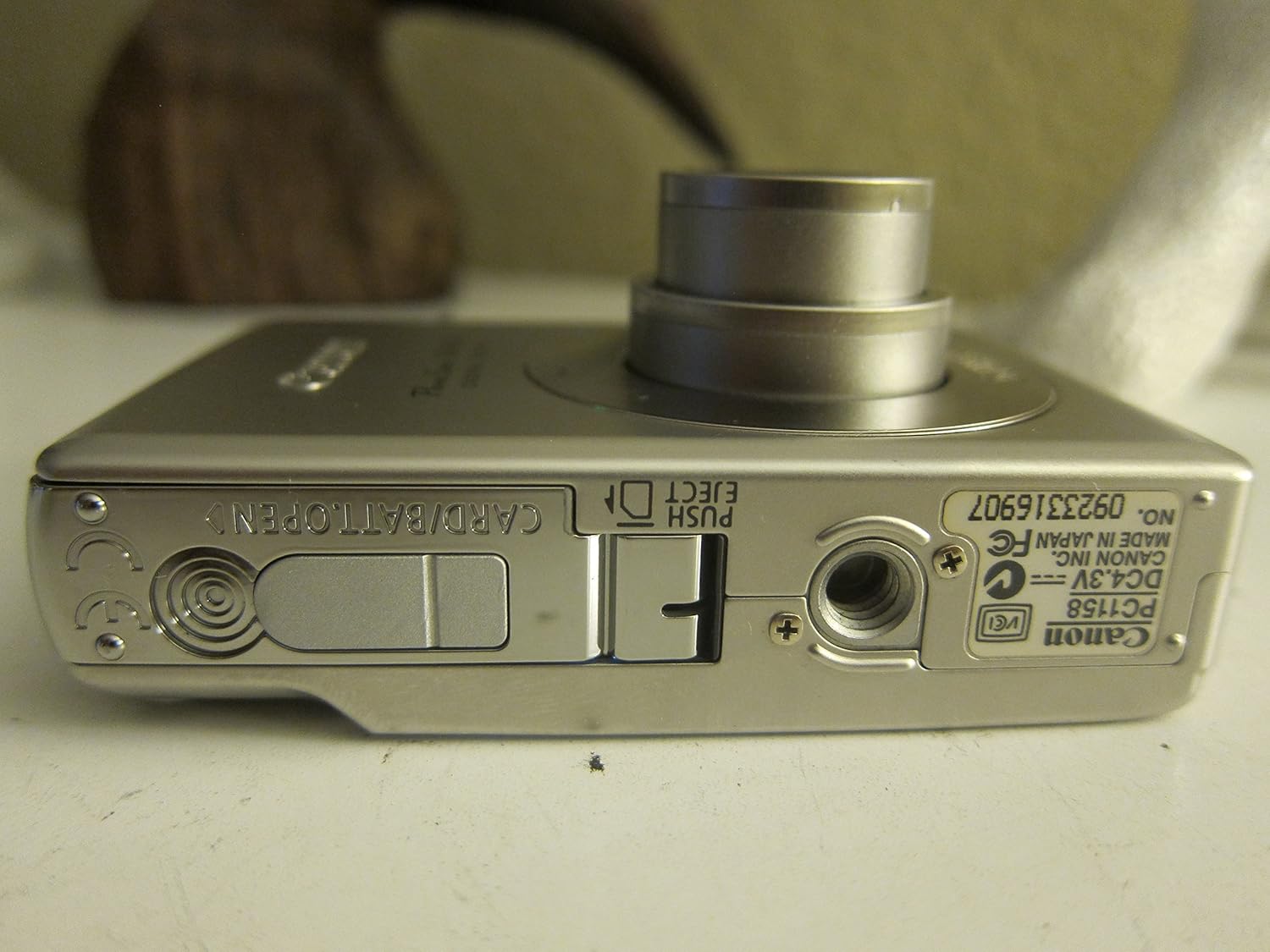
figuer 3.1: Under view of the camera, illustrating the battery and SD card compartment.
3.3. Earste ynskeakeling en basisynstellingen
- Druk op de ON/OFF knop om de kamera yn te skeakeljen.
- Folgje de ynstruksjes op it skerm om de datum, tiid en taal yn te stellen.

figuer 3.2: Top view of the camera, highlighting the power button and shutter release.
4. De kamera betsjinje
4.1. Basisfotografy
- Power On/Off: Druk op de ON/OFF knop.
- In foto meitsje: Druk de sluterknop healwei yn om te fokusjen, en druk dan folslein yn om de ôfbylding te meitsjen.
- Zoom: Brûk de zoomhendel om de sluterknop om de 3x optyske zoom oan te passen.

figuer 4.1: Front view of the camera with the optical zoom lens extended.
4.2. Shooting Modes
The PowerShot SD450 offers various shooting modes to optimize settings for different scenes. Rotate the mode dial to select:
- Auto: Camera automatically sets optimal exposure and focus.
- Hantlieding: Allows for more control over settings like white balance and color tones (black and white, sepia, vivid, neutral).
- Portret: Blurs the background to emphasize the subject.
- Lânskip: Ensures sharp focus on distant subjects.
- Night Snapshot: Foar it sjitten yn omstannichheden mei leech ljocht.
- Sêne Modes: Includes specific settings for Kids & Pets, Foliage, Fireworks, Snow, Underwater, Beach, and Indoor.
- Myn kleuren: Apply special effects like Color Swap or Custom Color directly in-camera.
4.3. Focusing and Exposure
- AiAF: The 9-point Artificial Intelligence Auto Focus system automatically focuses on subjects, even if off-center.
- Eksposysje kontrôle: Select from Evaluative, Center-weighted, or Spot metering.
- ISO gefoelichheid: Adjustable to Auto, 50, 100, 200, or 400 to control light sensitivity.
4.4. Fideo -opname
The camera can record high-quality movies:
- Resolúsjes: VGA (640x480) or QVGA (320x240) at 30 or 15 frames per second.
- Fast Frame Rate Movie Mode: Records at 60 frames per second for slow-motion playback.
- Compact Movie Mode (QQVGA): 160x120 at 15 frames per second, suitable for email sharing.
- Continuous filming is available until the file size reaches 1 GB or 60 minutes.
4.5. Ofspyljen en opnij ôfspieljeview
Om review dyn foto's en fideo's:
- Druk op de Wiedergabe knop.
- Use the directional pad to navigate through images and videos.
- Intelligent Orientation Sensor: Automatically rotates stored images for correct playback when the camera is rotated.
- Slideshow Functions: Create impressive slideshows with transition effects directly on the camera.

figuer 4.2: Rear view of the camera, showing the LCD display during image playback.
4.6. Printing Images
The PowerShot SD450 supports direct printing:
- PictBridge: Connect directly to PictBridge-compatible printers (e.g., Canon PIXMA printers) for printing without a PC.
- Knop Print/Diel: Simplifies direct printing and image uploading to Windows XP or Mac OS X.
5. Underhâld
5.1. Skjinmeitsjen fan de kamera
- Brûk in sêfte, droege doek om de kamerabody skjin te meitsjen.
- For the lens and LCD screen, use a lens cleaning cloth and specialized cleaning solution if necessary. Avoid harsh chemicals.
5.2. Batterij Soarch
- Bewarje batterijen yn in koel, droech plak as se net yn gebrûk binne.
- Foarkom it faak folslein ûntladen fan 'e batterij om de libbensdoer te ferlingjen.
- Recharge the battery using only the provided Canon charger.
5.3. Opslach
- As jo de kamera foar langere perioaden opslaan, ferwiderje dan de batterij.
- Store the camera in a protective case to prevent dust and scratches.
6. Probleemoplossing
| Probleem | Oplossing |
|---|---|
| "Memory Error" message appears. |
|
| Ofbyldings binne wazig. |
|
| Flash is too strong or washes out subjects. |
|
| Batterij drain fluch. |
|
| Kamera giet net oan. |
|
7. Spesifikaasjes
| Merk | Canon |
| Model Namme | Canon PowerShot SD450 |
| Effektive noch resolúsje | 5 Megapixels |
| Optyske zoom | 3x |
| Skermgrutte | 2.5 ynms |
| Image Stabilisaasje | Digitaal, optysk |
| ISO berik | Auto, 50, 100, 200, 400 |
| Min Shutter Speed | 15 sekonden |
| Max Shutter Speed | 1/1500 Sekonden |
| Video Capture Resolúsje | SD VGA 480p |
| Video Capture Format | AVI |
| File Formaat | JPEG, RAW |
| Ofmjittings (L x B x H) | 3.39 x 0.87 x 2.13 inch |
| Item Gewicht | 5.44 oz |
| Kleur | Sulver |
| Hat Self-Timer | Ja |
| Wetter Resistance Level | Net wetterbestindich |
8. Garânsje en stipe
Foar detaillearre garânsje-ynformaasje, sjoch de garânsjekaart dy't by jo produkt heart of besykje de offisjele Canon-webside. website. The camera comes bundled with Canon software (ZoomBrowser EX 5.5, PhotoRecord 2.2, ImageBrowser 5.5, PhotoStitch 3.1, Movie Edit Task) for image management and editing. Purchasers are also eligible for membership to Canon iMAGE Gateway for additional support and services.
For technical support, driver downloads, or service inquiries, please visit the official Canon support webside of nim kontakt op mei de klanttsjinst fan Canon.