
1. Ynlieding
This manual provides comprehensive instructions for the safe and effective use of your DÖRR DAF-14 Ring Flash. The DAF-14 is specifically designed for Nikon DSLR cameras, offering automatic TTL flash control and a guide number of 14 (ISO 100, 105mm). It is ideal for macro photography and other applications requiring even, shadow-free illumination.
Lês dizze hantlieding goed troch foardat jo it apparaat brûke om te soargjen dat it goed funksjonearret en skea te foarkommen.
2. Safety Information
- Batterijfeiligens: Use only specified AA batteries (alkaline, NiCd, or NiMH). Do not mix old and new batteries, or different types of batteries. Ensure correct polarity when inserting. Remove batteries if the flash will not be used for an extended period.
- Wetter en focht: This device is not water-resistant. Do not expose the flash to rain, moisture, or high humidity.
- Hjitte: Avoid exposing the flash to direct sunlight or high temperatures. Do not cover the flash head during operation, as this may cause overheating.
- Behanneling: Handle the flash unit with care. Avoid dropping or subjecting it to strong impacts.
- Demontage: Besykje de flitser net sels útinoar te heljen of te reparearjen. Lit alle ûnderhâldswurk oer oan kwalifisearre personiel.
- Oogbeskerming: Do not fire the flash directly into eyes at close range, as this may cause temporary vision impairment.
3. Package Ynhâld
Kontrolearje oft alle hjirûnder neamde items yn jo pakket oanwêzich binne:
- DÖRR DAF-14 Ring Flash Unit
- Adapter Rings (55mm, 58mm, 67mm)
- Lens Filter Thread (52mm)
- Ynstruksjehânlieding (dit dokumint)

Ofbylding 3.1: The DÖRR DAF-14 Ring Flash packaging, showing the flash unit and included accessories.
4. Produkt Overview
The DÖRR DAF-14 Ring Flash is a dedicated macro flash unit designed to provide even and consistent illumination for close-up photography. Its ring-shaped design minimizes shadows, making it ideal for detailed subjects.
Key Features:
- Guide Number of 14 (ISO 100, 105mm)
- Fully Automatic TTL Flash Control
- Automatic TTL Range: 0.9 to 7 meters
- Auto Exposure Confirmation
- Flash Duration: 1/700 second (at full power)
- Kleur temperatuer: 5600K
- Compatible with Nikon DSLR cameras
- Includes adapter rings for various lens filter threads

Ofbylding 4.1: The DÖRR DAF-14 Ring Flash unit, showing the main control box and the ring flash head connected by a cable.

Ofbylding 4.2: Rear view of the DAF-14 control unit, displaying the TTL Dedicated Macro Digital Flash label, power switch (OFF/ON), and ready indicator light.

Ofbylding 4.3: Detail of the hot shoe mount on the DAF-14 control unit, used for attaching the flash to a Nikon DSLR camera.
5. Opsette
5.1 Batterij Ynstallaasje
- Locate the battery compartment on the DAF-14 control unit.
- Iepenje de batterij compartment cover.
- Insert 4 x AA batteries (alkaline, NiCd, or NiMH) according to the polarity indicators inside the compartment. Ensure batteries are inserted correctly to avoid damage.
- Slút it deksel fan it batterijfak feilich.
5.2 Mounting the Flash to the Camera
- Soargje derfoar dat jo kamera is útskeakele.
- Slide the hot shoe mount of the DAF-14 control unit into your Nikon DSLR camera's hot shoe.
- Secure the flash by tightening the locking wheel on the hot shoe mount until it is firmly attached. Do not overtighten.
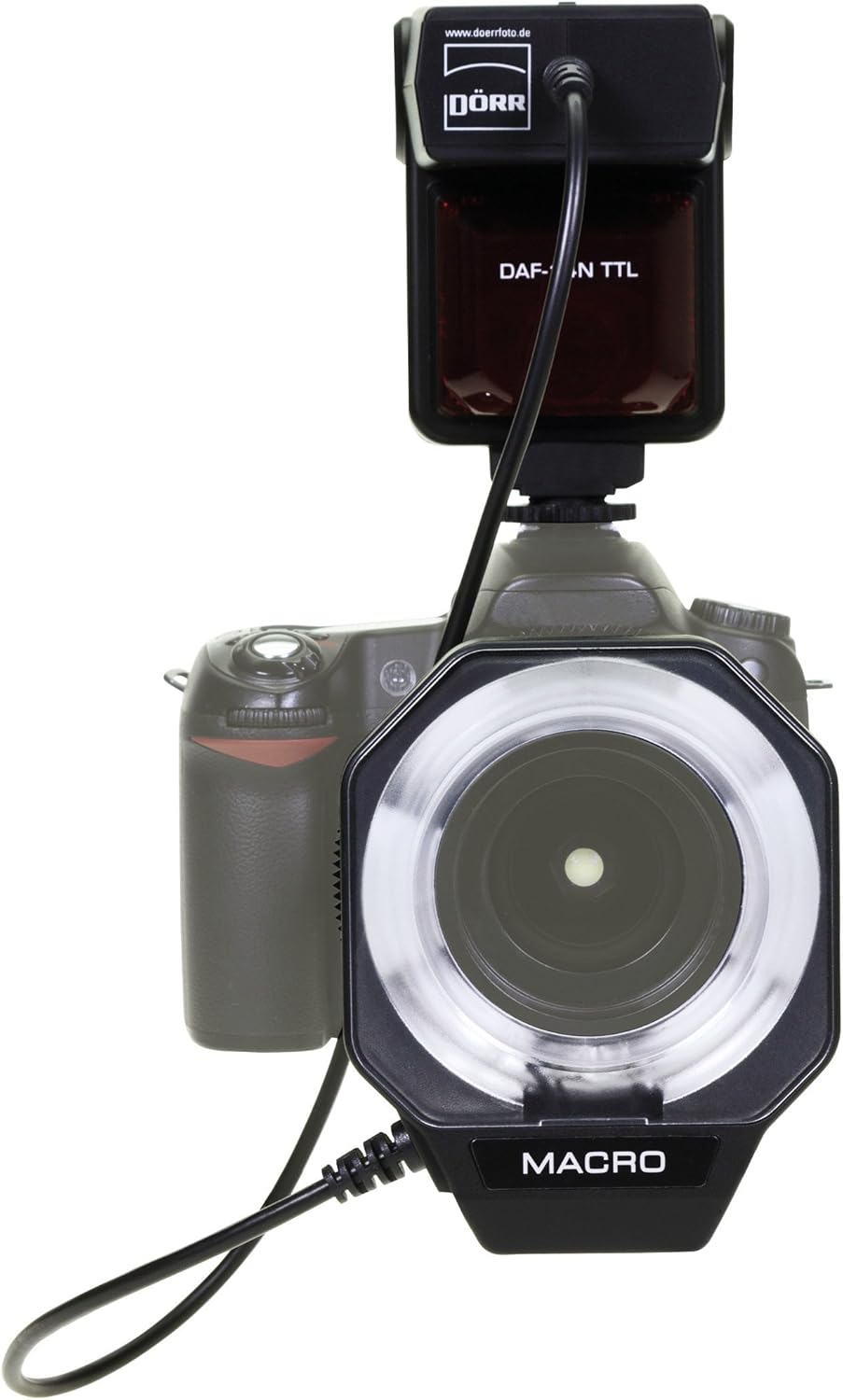
Ofbylding 5.1: The DAF-14 Ring Flash head attached to a camera lens, with the control unit mounted on the camera's hot shoe.

Ofbylding 5.2: Side view of the DAF-14 Ring Flash mounted on a Nikon DSLR, illustrating the connection between the flash head and the control unit.
5.3 Adapterringen befestigje
The DAF-14 Ring Flash head connects to your camera lens via adapter rings. The flash includes a 52mm lens filter thread and additional adapter rings for 55mm, 58mm, and 67mm lens filter threads.
- Determine the filter thread size of your camera lens. This is usually printed on the front of the lens or on the lens cap.
- Select the appropriate adapter ring (52mm, 55mm, 58mm, or 67mm) that matches your lens filter thread.
- Skroef de keazen adapterring op 'e foarste filtertried fan jo kameralens.
- Attach the DAF-14 Ring Flash head to the adapter ring by aligning it and twisting gently until it locks into place.

Ofbylding 5.3: The included adapter rings (55mm, 58mm, 62mm, 67mm) for attaching the ring flash head to various lens filter threads.
6. Bedriuwsinstruksjes
6.1 Yn-/útskeakelje
- To turn on the flash, slide the OFF/ON switch on the rear of the control unit to the ON posysje.
- De KLEAR indicator light will illuminate when the flash is charged and ready to fire.
- To turn off the flash, slide the OFF/ON oerskeakelje nei de ÚT posysje.
6.2 Automatic TTL Flash Control
The DAF-14 Ring Flash features fully automatic TTL (Through-The-Lens) flash control. This means the flash output is automatically adjusted by your camera to achieve optimal exposure. Simply set your camera to a compatible flash mode (e.g., Program, Aperture-priority, Shutter-priority, or Manual with flash enabled) and the flash will synchronize with the camera's metering system.
- Gids nûmer: 14 (at ISO 100, 105mm equivalent).
- Automatic TTL Range: The effective range for automatic TTL operation is approximately 0.9 to 7 meters (3.0 to 23.0 feet).
- Auto Exposure Confirmation: The flash system provides confirmation when correct exposure has been achieved. Refer to your camera's manual for specific indicators.
6.3 Foto's nimme
- Ensure the flash is securely mounted and powered on, and the KLEAR ljocht wurdt ferljochte.
- Set your camera to the desired shooting mode. For macro photography, Aperture-priority mode (A/Av) is often recommended to control depth of field.
- Focus on your subject. The camera's autofocus system will typically work with the flash.
- Press the shutter button halfway to allow the camera to meter and the flash to pre-flash (if applicable for TTL).
- Press the shutter button fully to take the picture. The flash will fire automatically.
7. Underhâld
- Reiniging: Use a soft, dry cloth to clean the exterior of the flash unit. For stubborn dirt, a slightly damp In doek kin brûkt wurde, folge troch in droege doek. Brûk gjin oplosmiddels of skuurmiddels.
- Lensreiniging: The front of the ring flash head can be cleaned with a lens cleaning cloth and solution, similar to a camera lens.
- Batterij soarch: Ferwiderje de batterijen as de flitser foar in langere perioade net brûkt wurdt om lekkage te foarkommen. Bewarje de batterijen op in koel, droech plak.
- Opslach: Store the flash unit in a dry, dust-free environment, away from extreme temperatures.
8. Probleemoplossing
If you encounter issues with your DAF-14 Ring Flash, please refer to the following common problems and solutions:
- Flits giet net ôf:
- Ensure the flash is turned ON.
- Kontrolearje oft de KLEAR light is illuminated. If not, the batteries may be low or incorrectly inserted. Replace batteries or check polarity.
- Verify the flash is securely mounted to the camera's hot shoe and the locking wheel is tightened.
- Check camera settings to ensure flash is enabled and in a compatible mode.
- Photos are too dark (underexposed):
- The subject may be outside the effective TTL range (0.9 to 7 meters). Move closer to the subject.
- Batteries may be low, affecting flash power. Replace with fresh batteries.
- Check camera's ISO setting. A higher ISO can help in low light conditions.
- Ensure the lens aperture is not too small (high f-number), which limits light reaching the sensor.
- Photos are too bright (overexposed):
- The subject may be too close to the flash. Increase distance or use flash exposure compensation on your camera if available.
- Check camera's ISO setting. A lower ISO can help reduce overall brightness.
- Inconsistent flash firing or power:
- This can sometimes be caused by loose battery contacts. Ensure batteries are firmly seated.
- Clean the hot shoe contacts on both the flash and the camera with a clean, dry cloth.
- If the issue persists, batteries may be faulty or nearing end-of-life. Try a new set of high-quality batteries.
If these steps do not resolve the issue, please contact DÖRR customer support.
9. Spesifikaasjes
| Eigenskip | Spesifikaasje |
|---|---|
| Merk | DÖRR |
| Model Number | 371016 (DAF-14) |
| Guide Number | 14 (ISO 100, 105mm) |
| Flash Control | Automatic TTL |
| Automatic TTL Range | 0.9 - 7 meters (3.0 - 23.0 feet) |
| Flash Duration | 1/700 second (full power) |
| Kleur Temperatuer | 5600K |
| Power Boarne | 4 x AA batteries (Alkaline, NiCd, or NiMH) |
| Lens Filter Thread | 52mm (built-in) |
| Included Adapter Rings | 55 mm, 58 mm, 67 mm |
| Mounting Type | Hot Shoe Mount |
| Kompatibele Mountings | Nikon SB 700 (indicative of Nikon compatibility) |
| Konnektivität Technology | Wireless (implied by hot shoe mount and TTL) |
| Package Ofmjittings | 21.6 x 17.6 x 7 sm |
| Pakket Gewicht | 422 g |
| Wetter Resistance Level | Net wetterbestindich |
10. Garânsje en stipe
For information regarding warranty coverage, technical support, or service, please refer to the warranty card included with your product or visit the official DÖRR webside. Bewarje jo bewiis fan oankeap foar garânsjeclaims.