
Ynlieding
The VTech Sing and Discover Story Piano is an interactive musical toy designed to engage young children with instruments, animals, numbers, and nursery rhymes. It features colorful piano keys, light-up musical notes, a pretend microphone, a drum pad, and a moving puppy joystick to encourage musical exploration and fine motor skill development.
Wat is yn 'e doaze
- 1 x VTech Sing and Discover Story Piano
Features
- Five colorful piano keys and five light-up music notes engage children.
- Pretend microphone, sheet music, and drum pad encourage role-play.
- Moving the puppy joystick increases and decreases the tempo of the melody.
- Pressing the drum pad plays musical phrases and a variety of drum beats.
- Includes more than 90 sing-along songs, music, sounds, and phrases.
Opsette
Batterij Ynstallaasje
The VTech Sing and Discover Story Piano requires 3 AA batteries (included). To install or replace batteries:
- Sykje it batterijfak oan 'e ûnderkant fan it apparaat.
- Mei in skroevedraaier, meitsje de skroef los en iepenje it deksel fan it batterijfak.
- Doch 3 nije AA-batterijen yn, en soargje derfoar dat de polariteit (+/-) goed is.
- Ferfang it deksel en draai de skroef oan.
Noat:
- Net-oplaadbere batterijen moatte net opladen wurde.
- Oplaadbare batterijen moatte allinich opladen wurde ûnder tafersjoch fan folwoeksenen.
- Net mix âlde en nije batterijen.
- Meitsje gjin alkaline, standert (koalstof-sink), of oplaadbare (nikkel-kadmium) batterijen.
- Fuortsmite batterijen út it produkt.
Operating Instructions
Power oan / út en folume kontrôle
Locate the power switch and volume control on the unit. Slide the switch to turn the piano on or off, and adjust the volume to a comfortable level.
Modes of Play
The Sing and Discover Story Piano features two modes of play: Learning Mode and Music Mode. Turn the book pages to switch between these modes and change the curriculum of the piano keys and twinkling music notes.
1. Learmodus
In Learning Mode, pressing the light-up music note buttons will play a variety of songs, animal names and sounds, shapes, and vocabulary words. The book pages will guide the learning content.
2. Muzyk Mode
In Music Mode, children can press the piano keys to hear piano notes or a variety of melodies. Young musicians can press the light-up music note buttons while a melody is playing to hear the related animal sound play over the melody.
Ynteraktive eleminten
- Piano toetsen: Press the five colorful piano keys to play individual notes or trigger melodies depending on the selected mode.
- Light-Up Music Notes: These five notes flash to the beat and provide visual stimulation. They also trigger specific sounds or songs in Learning Mode.
- Puppy Joystick: Move the friendly puppy joystick to increase or decrease the tempo of the melody when playing in Music Mode. Holding the puppy in one position will decrease the tempo.
- Drum Pad: Press the drum pad to hear musical phrases and a variety of drum beats.
- Mikrofoan: Use the attached microphone to sing along with the many songs and melodies.
- Music Sheet Book: Turn the pages of the music sheet book to change the curriculum and button responses in both modes of play. A magical sound and phrase will be heard when a page is turned.

Image: A child happily playing with the VTech Sing and Discover Story Piano, demonstrating its interactive features.
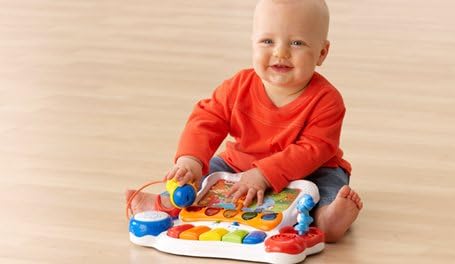
Image: A young child sitting on the floor, engaging with the colorful keys and elements of the VTech Sing and Discover Story Piano.

Image: A child seated at a small green table, actively playing with the VTech Sing and Discover Story Piano, highlighting its tabletop usability.
Ûnderhâld
To ensure the longevity of your VTech Sing and Discover Story Piano, follow these maintenance guidelines:
- Hâld de ienheid skjin troch wipe it mei in bytsje damp doek. Brûk gjin hurde gemikaliën of abrasive skjinmakkers.
- Avoid exposing the toy to direct sunlight or any direct heat source.
- Remove batteries if the unit will not be used for an extended period to prevent battery leakage.
- Do not drop the toy or subject it to strong impacts.
Troubleshooting
No Power or Intermittent Sound
- Check that the batteries are installed correctly with the proper polarity.
- Replace with fresh batteries if the current ones are low or depleted.
- Soargje derfoar dat de oan/út-skeakel yn 'e 'Oan'-posysje stiet.
Knoppen reagearje net
- Verify that the toy is powered on.
- Try turning the unit off and then on again to reset it.
- Ensure there is no debris obstructing the buttons.
Spesifikaasjes
| Model Number | 80-076541 |
| Produkt Ofmjittings | 14 x 4 x 11 inch |
| Item Gewicht | 2.5 pyk |
| Oanrikkemandearre Age | 12 moannen - 3 jier |
| Batterijen nedich | 3 AA-batterijen (ynbegrepen) |
Garânsje en stipe
VTech products are designed to provide educational and entertaining experiences. For warranty information or technical support, please refer to the contact details provided on the product packaging or visit the official VTech webside. Bewarje jo oankeapbewiis as bewiis fan oankeap.