
Ynlieding
The DIGITUS Professional DN-19 TRAY-1-400-SW is a 1U fixed shelf designed for secure installation within 19-inch network or server cabinets. This shelf provides a stable and robust surface for housing various non-rack-mountable components, such as modems, small servers, or other networking equipment. Its perforated design ensures adequate airflow, contributing to the thermal management of your cabinet. This manual provides essential information for the correct installation, operation, and maintenance of your fixed shelf.

Figure 1: DIGITUS Professional DN-19 TRAY-1-400-SW 1U Fixed Shelf. This image shows the black perforated shelf designed for 19-inch rack mounting.
Safety Information
Please read and understand all safety instructions before installation and use. Failure to follow these instructions may result in injury or damage to the product or other equipment.
- Laadkapasiteit: Do not exceed the maximum load capacity of 15 kg (33 lbs) for this shelf. Overloading can cause structural failure and damage.
- Proper ynstallaasje: Ensure the shelf is securely fastened to the 19-inch cabinet rails using all provided mounting hardware. Loose installation can lead to instability.
- Kabinetkompatibiliteit: This shelf is designed for 19-inch cabinets with a minimum depth of 600 mm. Verify your cabinet's specifications before installation.
- Gewicht ferdieling: Distribute the weight of equipment evenly across the shelf surface to maintain stability.
- Tools: Use appropriate tools for installation. Avoid overtightening screws, which can strip threads or damage components.
Pakketynhâld
Kontrolearje oft alle items oanwêzich en net beskeadige binne by it iepenjen fan it pakket. As der items ûntbrekke of beskeadige binne, nim dan direkt kontakt op mei jo leveransier.
- 1 x DIGITUS Professional DN-19 TRAY-1-400-SW 1U Fixed Shelf
- Mounting Material (screws, cage nuts, washers)
Opset en ynstallaasje
Follow these steps to properly install the fixed shelf in your 19-inch network or server cabinet.
- It kabinet tariede: Ensure your 19-inch cabinet has a minimum depth of 600 mm and is clear of any obstructions at the desired installation height. Identify the front 19-inch profile rails where the shelf will be mounted.
- Plak de planke: Align the mounting ears of the DN-19 TRAY-1-400-SW shelf with the desired 1U (1.75 inches or 44.45 mm) height on the front 19-inch profile rails of your cabinet.
- Befeiligje de plank: Using the provided mounting screws, cage nuts, and washers, attach the shelf to the front profile rails. Insert cage nuts into the square holes of the rack rails at the desired height. Then, align the shelf's mounting ears and secure them with the screws. Tighten all screws firmly but do not overtighten.
- Stabiliteit ferifiearje: Gently test the installed shelf to ensure it is stable and securely fastened before placing any equipment on it.
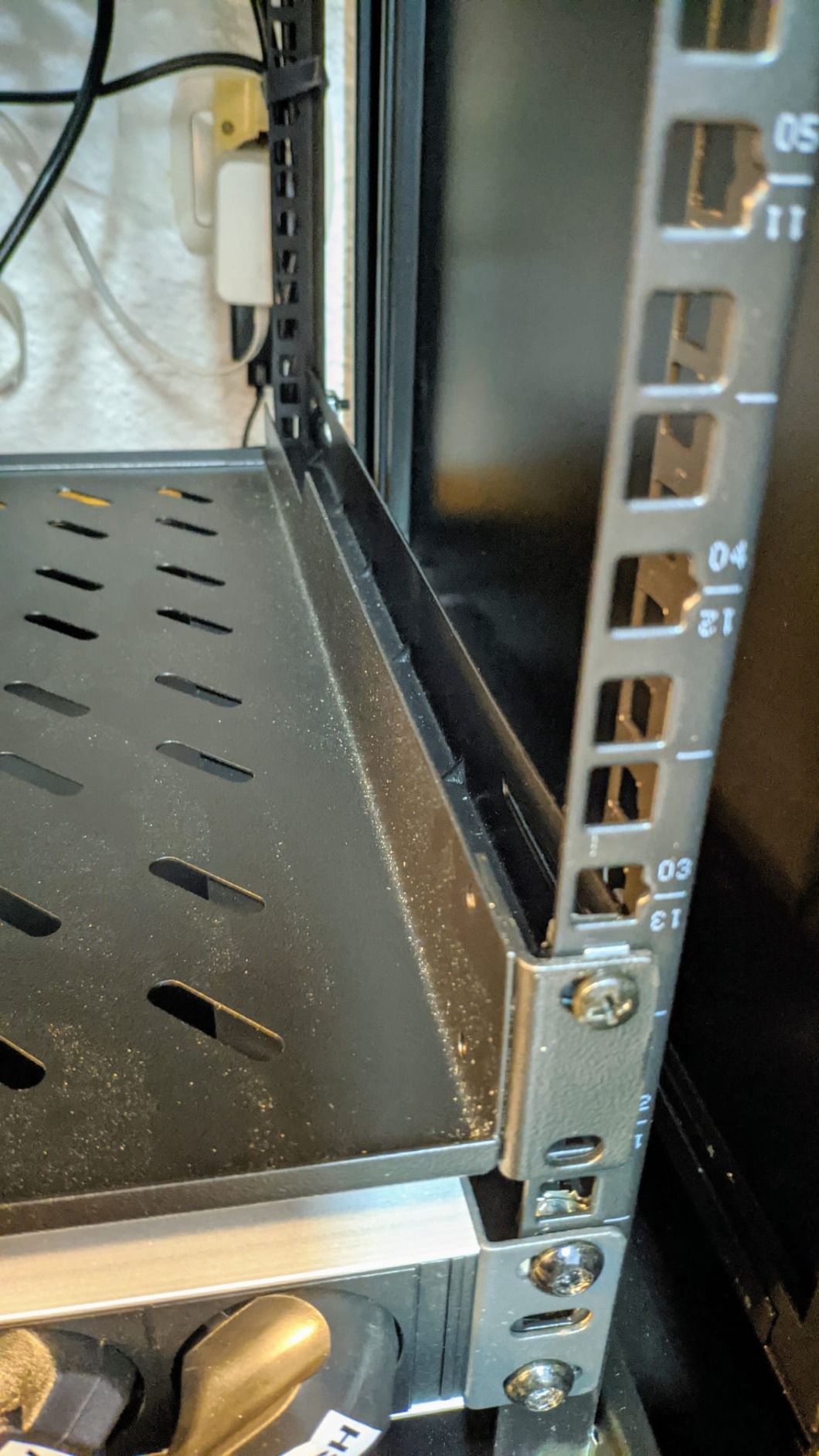
Figuer 2: Example of the fixed shelf installed in a 19-inch rack. This image illustrates how the shelf is mounted to the front rails of a server cabinet.
Operating Instructions
Once installed, the DIGITUS Professional DN-19 TRAY-1-400-SW shelf is ready for use.
- Pleatsing fan apparatuer: Carefully place your non-rack-mountable equipment onto the shelf. Ensure that the weight is distributed as evenly as possible.
- Load Limit: Always adhere to the maximum load capacity of 15 kg. Do not place items exceeding this weight on the shelf.
- Luchtstream: The perforated design of the shelf promotes airflow. Avoid blocking the perforations with equipment or cables to maintain proper ventilation within the cabinet.
Ûnderhâld
The DIGITUS Professional DN-19 TRAY-1-400-SW requires minimal maintenance to ensure its longevity and continued performance.
- Reiniging: Periodically clean the shelf surface with a soft, dry cloth to remove dust and debris. Avoid using abrasive cleaners or solvents.
- Ynspeksje: Regularly inspect the mounting screws to ensure they remain tight. Over time, vibrations or changes in temperature can cause screws to loosen.
- Skea kontrôle: Check for any signs of damage, suchs as bends, cracks, or corrosion. If significant damage is found, consider replacing the shelf.
Troubleshooting
Dizze seksje behannelet faak foarkommende problemen dy't jo tsjinkomme kinne.
- Shelf is not stable after installation:
- Soargje derfoar dat alle befestigingsskroeven goed oandraaid binne.
- Verify that the shelf is correctly aligned with the 19-inch rack rails.
- Check if the cabinet itself is stable and on a level surface.
- Cannot install the shelf into the cabinet:
- Confirm that your cabinet is a standard 19-inch rack.
- Ensure the cabinet depth is at least 600 mm, as this shelf requires sufficient depth for proper fitment.
- Check for any obstructions within the cabinet that might prevent the shelf from being installed at the desired position.
- Shelf appears to sag under load:
- Immediately remove some weight from the shelf.
- Verify that the total weight of the equipment does not exceed the 15 kg load capacity.
- Soargje derfoar dat it gewicht evenredich ferdield wurdt.
Spesifikaasjes
| Merk: | DIGIT |
| Model: | DN-19 TRAY-1-400-SW |
| Form Factor: | 1U |
| Ofmjittings (H x B x D): | 44 mm x 482 mm x 399 mm |
| Laadkapasiteit: | 15 kg |
| Montage Type: | Fixed installation, front only |
| Suitable Cabinet Depth: | Fan 600 mm |
| Materiaal: | Alloyed Steel (Legierter Stahl) |
| Kleur: | Swart (RAL 9005) |
Warranty Information
Specific warranty terms and conditions for the DIGITUS Professional DN-19 TRAY-1-400-SW shelf may vary by region and retailer. Please refer to the official DIGITUS website or contact your point of purchase for detailed warranty information.
Stypje
For technical assistance, product inquiries, or further support, please visit the official DIGITUS website or contact your local DIGITUS distributor or reseller. You can often find FAQs, driver downloads, and contact information on their support pages.