
1. Ynlieding
This manual provides instructions for the safe and efficient operation of your Intermatic TN111CL Lamp & Appliance Timer. Please read these instructions thoroughly before using the device and retain them for future reference. The TN111CL timer is designed to automatically turn lamps and appliances ON and OFF at preset times, offering convenience and energy management.
2. Safety Ynstruksjes
- Allinnich gebrûk binnen: This timer is intended for indoor use in dry locations. Do not expose to rain or moisture.
- Elektryske wurdearring: Do not exceed the electrical ratings of the timer. Refer to the 'Specifications' section for details. Overloading the timer can cause overheating and fire.
- Grounding: Soargje derfoar dat de timer yn in goed ierdske stopkontakt sit.
- Bern: Bûten berik fan bern hâlde. Dit is gjin boartersguod.
- Reiniging: Unplug the timer from the wall outlet before cleaning. Use a dry cloth; do not use liquid cleaners.
- Reparaasjes: Do not attempt to repair or disassemble the timer. Refer all servicing to qualified service personnel.
3. Produkt Overview
The Intermatic TN111CL is a mechanical timer featuring an easy-set dial for scheduling ON/OFF operations. It is designed for use with various lamps and small appliances.
Key Features:
- 2 ON/OFF settings per 24-hour period.
- Easy-Set Dial for simple programming.
- Minimum ON/OFF time: 1/2 hour.
- Maximum ON/OFF time: 23 1/2 hours.
Produktdiagram:
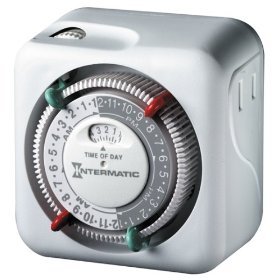
figuer 1: Front view of the Intermatic TN111CL Lamp & Appliance Timer, showing the central dial and outlet.
4. Opsette
- Stek de timer yn: Stek de timer yn in standert 125V AC-stopkontakt.
- Aktuele tiid ynstelle: Rotate the entire dial clockwise until the current time aligns with the arrow indicator on the timer's face. The dial is marked in 15-minute increments. Ensure you distinguish between AM and PM hours (e.g., 3 PM is 15:00 on a 24-hour clock).
- Plug In Appliance: Stek de lamp or appliance you wish to control into the outlet on the side of the timer. Ensure the appliance's power switch is in the ON position.
5. Bedriuwsinstruksjes
The TN111CL timer uses a series of pins around the dial to set ON and OFF times.
- Identifisearje pinnen: The dial has segments that can be pushed inwards or pulled outwards. Each segment represents 15 minutes.
- Ynstelle ON-tiid: To set a period when the appliance should be ON, push the corresponding segments (pins) inwards. For example, if you want the appliance ON from 6:00 PM to 10:00 PM, push in all the pins between the 18:00 and 22:00 marks on the dial.
- Útskeakele tiid: To set a period when the appliance should be OFF, pull the corresponding segments (pins) outwards. These are the default positions for the pins.
- Hânlieding oerskriuwe: The timer typically has a manual override switch (often a small slider or button) that allows you to turn the connected appliance ON or OFF independently of the timer settings. Refer to the markings on your specific unit for its location and function (e.g., 'Timer ON', 'Timer OFF', 'Always ON').
The timer will cycle through the programmed ON/OFF settings daily. The minimum ON or OFF duration is 30 minutes (two 15-minute segments).
6. Underhâld
- Reiniging: Om de timer skjin te meitsjen, lûk de stekker út it stopkontakt. Feie de bûtenkant ôf mei in sêfte, droege doek. Brûk gjin skurende reinigingsmiddels, oplosmiddels en dompel it apparaat net yn wetter.
- Opslach: If storing the timer for an extended period, unplug it and keep it in a cool, dry place away from direct sunlight and extreme temperatures.
- Ynspeksje: Ynspektearje de timer en it snoer geregeldwei op tekens fan skea, lykas rafele triedden of barsten. As der skea fûn wurdt, stopje dan mei gebrûk en ferfang it apparaat.
7. Probleemoplossing
- Appliance does not turn ON/OFF at programmed times:
- Ensure the timer is plugged firmly into a working outlet.
- Verify the appliance plugged into the timer is switched to the ON position.
- Check that the current time is correctly set on the dial.
- Confirm that the ON/OFF pins are correctly pushed in (ON) or pulled out (OFF) for the desired times.
- Check the manual override switch position.
- Timer makes a ticking sound:
- This is normal for mechanical timers and indicates the internal clock mechanism is operating.
- Appliance remains ON or OFF constantly:
- Check the manual override switch. It may be set to 'Always ON' or 'Always OFF'.
- Re-verify the pin settings for your desired ON/OFF schedule.
8. Spesifikaasjes
| Spesifikaasje | Wearde |
|---|---|
| Model Number | TN111CL |
| Voltage | 125 Volts AC |
| Frekwinsje | 60 Hz |
| Resistive Load (R) | 15 Amps, 1750 watt |
| Tungsten Load (T) | 1750 watt |
| Inductive Load (H) | 1750 watt |
| Motor Load (TV-5) | 1/3 HP |
| Number of ON/OFF Settings | 2 per 24-hour period |
| Minimale OAN/ÚT-tiid | 1/2 oere |
| Maximum ON/OFF Time | 23 1/2 Oeren |
9. Garânsje en stipe
Garânsje:
This Intermatic TN111CL Lamp & Appliance Timer comes with a LIFETIME GARANTIEBewarje jo oankeapbewiis foar garânsjeclaims.
Klantstipe:
For technical assistance, troubleshooting beyond this manual, or warranty inquiries, please contact Intermatic customer support directly. Refer to the official Intermatic webside of produktferpakking foar de meast aktuele kontaktgegevens.