
1. Produkt Overview
The Silverstone Air Penetrator AP181 is a high-performance air channeling case fan designed to provide focused airflow for efficient cooling within computer systems. This 180mm fan operates at speeds of 700 or 1200 RPM, delivering substantial airflow while maintaining a manageable noise level.
Key Features:
- Luchtstream: Up to 100.27 CFM for effective cooling.
- Noise Level: Operates at a maximum of 30 decibels.
- Air Channeling Design: Industry-leading design for focused and directed airflow.
- Wide Fan Blades: Engineered to reduce air resistance and optimize performance.
- Integrated Grille: Air channeling grille doubles as a fan guard, reducing overall size.
- Leech enerzjyferbrûk: Enerzjy-effisjint operaasje.
Fideo: SilverStone Air Penetrator Fans Introduction. This video provides an overview of the Air Penetrator series, highlighting its unique air channeling technology and performance benefits.
2. Package Ynhâld
Kontrolearje asjebleaft oft alle ûnderdielen yn jo pakket oanwêzich binne:
- 1x Silverstone Air Penetrator AP181 Case Fan
3. Produkt Spesifikaasjes
| Spesifikaasje | Wearde |
|---|---|
| Produkt Ofmjittings | 7.09"L x 1.26"B x 7.09"H (180 mm x 32 mm x 180 mm) |
| Merk | SilverStone |
| Stromkonnektortype | 3-Pin (with speed switch) |
| Voltage | 12 Volt |
| Wattage | 3.7 watt |
| Cooling metoade | Loft |
| Kompatibele apparaten | Buroblêd |
| Noise Level | 30 Desibel (Maks.) |
| Materiaal | Plastic, Lead (internal components) |
| Maksimum Rotational Speed | 1200 RPM |
| Luchtstreamkapasiteit | 100.27 Cubic Feet Per Minute (Max) |
| Item Gewicht | 1 pûn |
| UPC | 844761006846 |
4. Ynstallaasje
Proper installation is crucial for optimal performance and longevity of your fan. Ensure your computer is powered off and unplugged before beginning installation.
4.1 Identifisearje de montagelokaasje
Locate an available 180mm fan mounting position within your computer case. Common locations include front intake, bottom intake, or top exhaust, depending on your case design.
4.2 Mount the Fan
- Position the fan in the desired mounting location, ensuring the airflow direction is correct (typically intake for front/bottom, exhaust for top/rear).
- Secure the fan using appropriate fan screws (not included with this specific model, typically provided with the case or purchased separately). Tighten screws evenly to prevent warping.

Byld: Front view of the Silverstone Air Penetrator AP181 case fan. This image shows the front side of the fan with its unique blade design and air channeling grille.
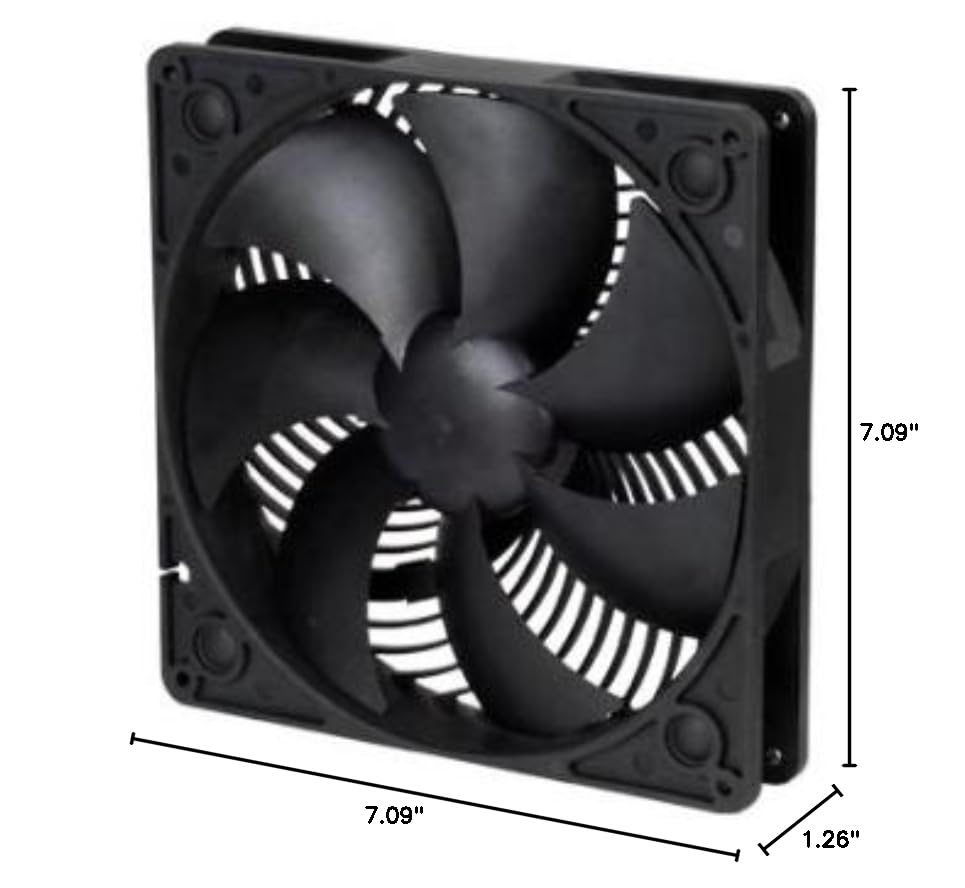
Byld: Dimensions of the Silverstone Air Penetrator AP181 case fan. This image illustrates the fan's dimensions (7.09"L x 1.26"W x 7.09"H) for compatibility checks.
4.3 Connect Power and Speed Control
- Connect the fan's 3-pin power connector to an available 3-pin fan header on your motherboard or a fan controller.
- Connect the separate speed switch cable to the fan. This switch allows you to manually select between the 700 RPM and 1200 RPM settings.

Byld: Rêch view of the Silverstone Air Penetrator AP181 case fan. This image displays the rear of the fan, including the 3-pin power connector and the connection point for the speed switch.

Byld: Close-up of the fan speed switch. This image details the physical switch used to adjust the fan's rotational speed.
Fideo: SilverStone AP Series Fans. This video provides a general overview of the Air Penetrator series, including various models and their features, which can be helpful for understanding the product line.
5. Operaasje
Once installed and powered on, the fan will begin to operate. The AP181 features a manual speed switch to adjust performance based on your cooling needs.
5.1 Ventilatorsnelheid oanpasse
- Use the included speed switch to toggle between the two available speeds: 700 RPM (for quieter operation) and 1200 RPM (for maximum airflow).
- Select the speed that best balances cooling performance and noise level for your system's current workload.
5.2 Rjochting fan 'e loftstream
The Air Penetrator fan is designed to create a focused column of air. Ensure the fan is oriented correctly to either draw cool air into the case (intake) or expel hot air out of the case (exhaust) as intended for your system's airflow strategy.

Byld: Close-up of the Air Penetrator fan's air channeling grille. This image highlights the unique grille design that helps focus the airflow.
6. Underhâld
Regular maintenance helps ensure your fan operates efficiently and extends its lifespan.
6.1 Cleaning
- Frekwinsje: Clean your fan every 3-6 months, or more frequently if your environment is dusty.
- Proseduere:
- Power off your computer and unplug it from the wall outlet.
- Carefully remove the fan from its mounting position if necessary for thorough cleaning.
- Use compressed air to blow dust off the fan blades and frame. Hold the fan blades to prevent them from spinning rapidly during cleaning, which can damage the bearing.
- For stubborn dirt, gently wipe the blades with a soft, damp cloth. Ensure the fan is completely dry before reinstallation or powering on.
7. Probleemoplossing
If you encounter issues with your fan, refer to the following common troubleshooting steps:
7.1 Ventilator draait net
- Kontrolearje Power Connection: Ensure the 3-pin power connector is securely plugged into the motherboard or fan controller.
- Check Fan Header: Try connecting the fan to a different fan header on your motherboard to rule out a faulty header.
- BIOS/UEFI-ynstellings: Verify that the fan header is enabled and configured correctly in your system's BIOS/UEFI settings.
7.2 Oermjittige lûd
- Kontrolearje op obstruksjes: Ensure no cables or other components are touching the fan blades.
- Clean Fan: Dust buildup can cause increased noise. Refer to the Maintenance section for cleaning instructions.
- Fan snelheid: If operating at 1200 RPM, switch to 700 RPM using the speed switch to reduce noise.
- Montage: Ensure the fan is securely mounted and not vibrating against the case.
7.3 Insufficient Airflow
- Check Fan Speed: Ensure the fan is set to 1200 RPM for maximum airflow using the speed switch.
- Luchtstream rjochting: Verify the fan is oriented correctly for its intended purpose (intake or exhaust).
- Ferwiderje obstruksjes: Ensure there are no blockages in front of or behind the fan that could impede airflow.
8. Garânsje en stipe
This Silverstone Air Penetrator AP181 Case Fan comes with a 1-jierrige garânsje út de datum fan oankeap.
For technical support, warranty claims, or further inquiries, please visit the official SilverStone webside of nim kontakt op mei harren klanttsjinstôfdieling. Bewarje jo oankeapbewiis foar garânsjevalidaasje.
SilverStone Official Website: www.silverstonetek.com