
1. Ynlieding
This manual provides essential instructions for the safe and efficient operation of your Sharp CD-DH950P 240W Mini-Component System. This system features a 5-disc CD changer, a cassette deck, an iPod/iPhone docking station, a USB host for digital audio playback, and an AM/FM tuner. Please read this manual thoroughly before using the system and retain it for future reference.
2. Safety Information
- Power Boarne: Ferbine it apparaat allinich mei in AC-stopkontakt fan it oantsjutte folumetage.
- Ventilaasje: Soargje foar foldwaande fentilaasje. Blokkearje gjin fentilaasje-iepeningen.
- Wetter en focht: Do not expose the unit to rain, moisture, or dripping/splashing liquids.
- Hjitte: Hâld it apparaat fuort fan waarmteboarnen lykas radiatoren, waarmteregisters, kachels of oare apparaten dy't waarmte produsearje.
- Reiniging: Lûk de stekker fan it apparaat út it stopkontakt foardat jo it skjinmeitsje. Brûk in sêfte, droege doek.
- Betsjinning: Besykje net dit produkt sels te tsjinjen. Ferwize alle service oan kwalifisearre servicepersoniel.
3. Package Ynhâld
Kontrolearje dat jo pakket de folgjende items befettet:
- Main Unit (CD-DH950P)
- Lofts Speaker
- Rjochter Speaker
- Remote Control mei Batterijen
- AM Loop Antenne
- FM Wire Antenne
- Power Cord
4. Opsette
4.1 De sprekkers ferbine
Connect the speaker wires from the main unit to the corresponding terminals on the back of each speaker. Ensure correct polarity (red to red, black to black) for optimal sound quality. The left speaker connects to the left speaker output, and the right speaker to the right speaker output.
4.2 Connecting the Antennas
- FM-antenne: Connect the supplied FM wire antenna to the FM antenna terminal on the rear of the main unit. Extend the wire for better reception.
- AM Antenne: Connect the supplied AM loop antenna to the AM antenna terminals on the rear of the main unit. Position the antenna for best reception.
4.3 Stromferbining
Plug the power cord into the AC IN jack on the rear of the main unit, then plug the other end into a standard AC wall outlet.
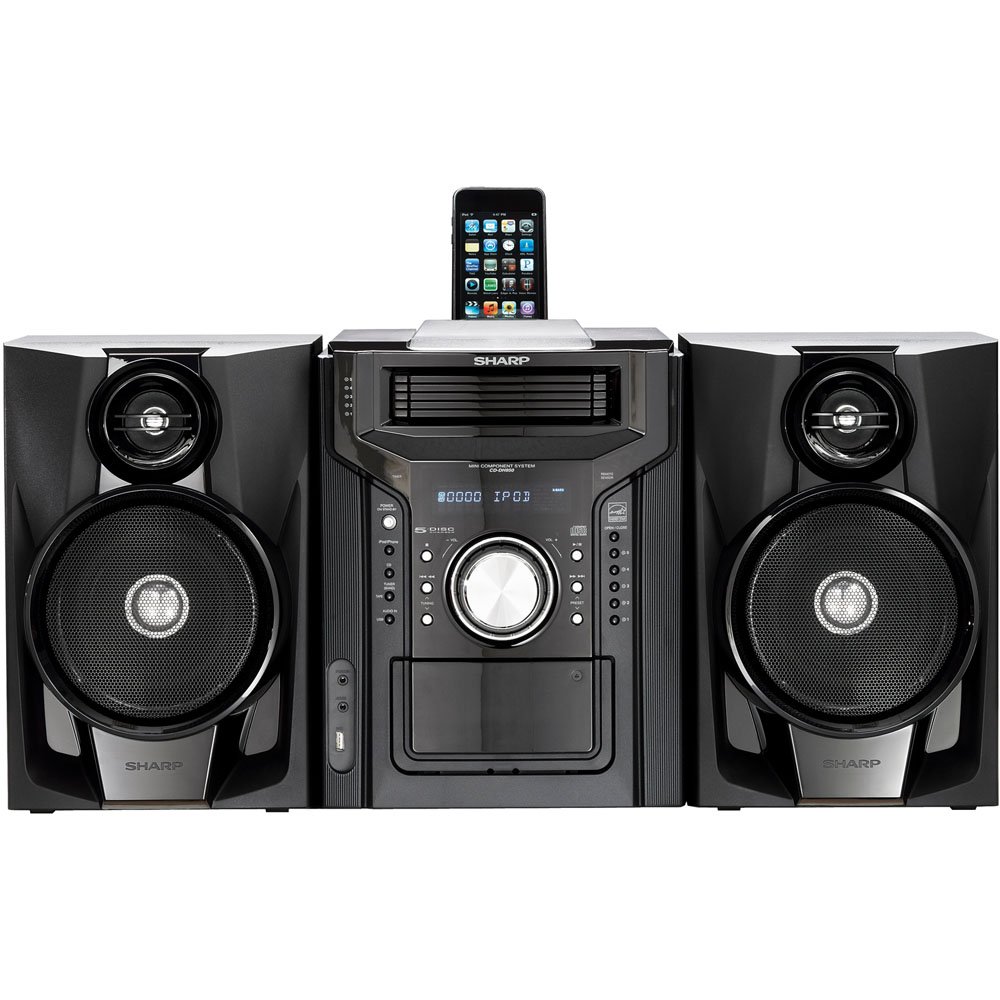
figuer 4.3.1: Overall view of the Sharp CD-DH950P Mini-Component System, showing the main unit flanked by two speakers, with an iPhone docked on top of the main unit.
5. Bedriuwsinstruksjes
5.1 Oan/út en folumekontrôle
- Druk op de KRÊFT knop op it foarpaniel of op 'e ôfstânsbetsjinning om it apparaat oan of út te skeakeljen.
- Draai de FOLUME knop op it foarpaniel of brûk de VOL +/- knoppen op 'e ôfstânsbetsjinning om it lûdsnivo oan te passen.
5.2 CD Wiedergabe
This system features a 5-disc CD changer.
- Druk op de IEPEN / SLUITEN knop om de CD lade te iepenjen.
- Place up to five CDs on the disc trays, label side up.
- Parse IEPEN / SLUITEN wer om de bak te sluten.
- Druk op de CD button to select the CD function.
- Druk op de PLAY / PAUZE knop om it ôfspieljen te begjinnen.
- Brûk de OERSLAAN buttons to navigate between tracks or discs.
5.3 Bediening fan it kassettedek
- Druk op de TAPE OPEN/CLOSE button to open the cassette deck.
- Foegje in kassette tape.
- Druk op de BÂN button to select the cassette function.
- Parse TOANIELSTIK om it ôfspieljen te begjinnen.
- To record, ensure the source is selected (e.g., CD, Tuner) and press the OPNIMME button on the cassette deck.
5.4 iPod/iPhone-dockingstasjon
The system includes a top-mounted docking slot for compatible iPod and iPhone devices (30-pin connector).
- Carefully place your iPod or iPhone into the docking slot.
- The system will automatically switch to iPod/iPhone mode or you may need to press the iPod / iPhone knop.
- Use the system's controls or your device's controls to play music. The device will also charge while docked.
5.5 USB Host Playback
Connect a USB storage device containing MP3 or WMA audio files to the USB port on the front panel.
- Foegje it USB-apparaat yn 'e USB-poarte.
- Druk op de USB button to select the USB function.
- Use the playback controls to navigate and play files.
5.6 AM/FM Tuner
- Druk op de TUNER button to select AM or FM radio.
- Brûk de TUNING +/- knoppen om mei de hân ôf te stimmen op in stasjon.
- To auto-scan, press and hold the TUNING +/- knoppen.
- To store a preset, tune to the desired station, then press OANTINKEN followed by a preset number.
5.7 Audio-yngong
Connect an external audio device (e.g., MP3 player, smartphone) to the AUDIO IN jack on the front panel using a 3.5mm stereo cable.
- Connect your device to the AUDIO IN jack.
- Druk op de AUDIO YN button to select this source.
- Bestjoer it ôfspyljen fan jo ferbûne apparaat.
6. Underhâld
6.1 De ienheid skjinmeitsje
Wipe the exterior of the unit with a soft, dry cloth. Do not use abrasive cleaners, waxes, or solvents. Ensure the unit is unplugged before cleaning.
6.2 CD and Cassette Care
- Handle CDs by their edges to avoid fingerprints and scratches. Clean discs with a soft, lint-free cloth from the center outwards.
- Store cassette tapes away from strong magnetic fields and direct sunlight.
7. Probleemoplossing
| Probleem | Mooglike oarsaak | Oplossing |
|---|---|---|
| Gjin macht | Netsnoer net oansletten; Stopkontakt defekt | Soargje derfoar dat it netsnoer goed ynstutsen is; Besykje in oar stopkontakt |
| Gjin lûd | Volume too low; Speakers not connected; Incorrect source selected | Increase volume; Check speaker connections; Select correct input source |
| CD spilet net ôf | Disc inserted incorrectly; Disc is dirty or scratched | Insert disc correctly (label side up); Clean or replace disc |
| Min radio-ûntfangst | Antenna not positioned correctly; Weak signal | Adjust position of AM/FM antennas; Try auto-tuning or manual fine-tuning |
| iPod/iPhone not charging/playing | Device not properly docked; Device not compatible (e.g., newer connector) | Re-dock the device; Note that this system uses a 30-pin connector, newer devices may require an adapter (not included) |
8. Spesifikaasjes
- Merk: Skerp
- Model: CD-DH950P
- Totale útfierkrêft: 240 Watts RMS (85W/ch FTC)
- Speaker konfiguraasje: 2.1 Kanaal
- Stipe audioformaten: CD, MP3, WMA
- Ferhâlding sinjaal / lûd: 100 dB
- Kompatibele apparaten: MP3 Player, Smartphone (via 30-pin dock or USB/Audio In)
- Ofmjittings (L x B x H): 27.6 x 13.6 x 13.5 inch
- Item Gewicht: 24.4 pûn sterling
- UPC: 074000369863, 074000369290
9. Warranty Information
This product is covered by a 1-year limited warranty from the date of purchase. Please refer to the warranty card included with your product for full terms and conditions, or contact Sharp customer service for details.
10. Stipe
For further assistance, technical support, or service inquiries, please contact Sharp customer service. Contact information can typically be found on the Sharp official webside of yn 'e dokumintaasje dy't by jo produkt levere is.