Thank you for choosing the AMS Pendule 211/1 wall clock. This manual provides comprehensive instructions for the safe and efficient setup, operation, and maintenance of your new clock. Please read this manual thoroughly before use and retain it for future reference.
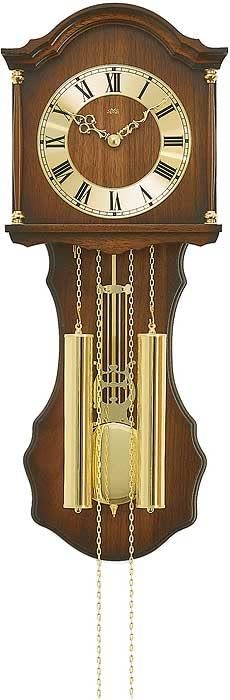
Figure 1: AMS Pendule 211/1 Wall Clock
2. Opsette
2.1 Útpakke
Helje de klok foarsichtich út 'e ferpakking.
Inspect the clock for any signs of damage. If damaged, do not proceed with setup and contact customer support.
Remove all protective films or packaging materials from the clock face, hands, and pendulum.
Bewarje de ferpakking foar takomstich ferfier of opslach.
2.2 Batterij Ynstallaasje
The AMS Pendule 211/1 requires batteries (not included) for operation. Please use the specified battery type.
Sykje it deksel fan it batterijfak oan 'e efterkant fan' e klok.
Remove the cover by sliding or unlatching it.
Insert the required batteries (e.g., 1x AA or 1x C, refer to the compartment label for exact type) according to the polarity indicators (+ and -).
Ferfange de batterij compartment cover feilich.
2.3 De klok ynstallearje
Ensure the clock is mounted securely on a stable wall surface.
Choose a suitable location on a wall, away from direct sunlight, extreme temperatures, or vibrations.
Use an appropriate wall anchor and screw for your wall type (e.g., drywall, concrete). The mounting point should be strong enough to support the clock's weight.
Hang the clock securely using the keyhole slot on the back. Ensure it is level.
2.4 De tiid ynstelle
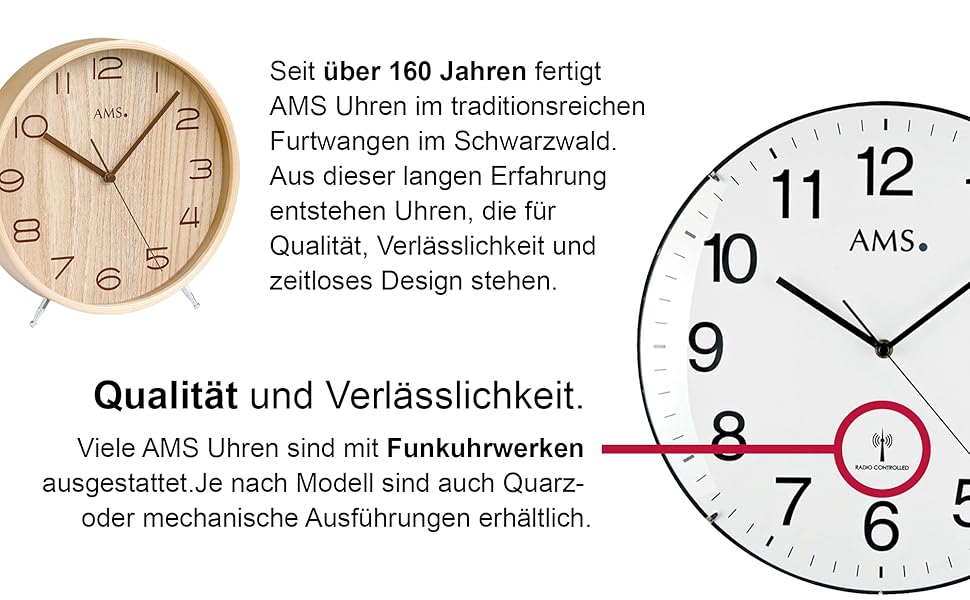
Your AMS Pendule 211/1 clock features an analog display. Some models may include a radio-controlled mechanism for automatic time synchronization.
Figuer 2: Example Clock Face with Radio Controlled Symbol
Hânlieding ynstelling: Locate the time-setting knob or wheel on the back of the clock. Gently turn this knob to move the minute and hour hands clockwise until the correct time is displayed. Avoid turning the hands counter-clockwise.
Radio-Controlled (if applicable): If your clock is radio-controlled, it will attempt to synchronize with a time signal after battery installation. Place the clock near a window for better signal reception. This process may take several minutes or hours. Once synchronized, the clock will automatically display the correct time.
2.5 Pendulum Setup
The pendulum is a decorative and functional element of your clock.
Carefully unpack the pendulum if it was separate from the main clock body.
Attach the pendulum to its hook or hanging mechanism inside the clock case. Ensure it hangs freely and does not touch the sides of the case.
Gently push the pendulum to one side to start its swing. It should swing evenly.
3. Bedriuwsinstruksjes
3.1 De tiid lêze
The AMS Pendule 211/1 features a clear analog display with hour, minute, and second hands for precise timekeeping.
De short hand indicates the hour.
De long hand indicates the minute.
De thin sweeping hand indicates the second.
3.2 Alarm Funksje
Your clock is equipped with an alarm function. Refer to the specific controls on the back or side of your clock for alarm setting.
Alarmtiid ynstelle: Locate the alarm setting knob/dial (often separate from the main time setting). Turn it to set the desired alarm time.
Alarm aktivearje: Find the alarm ON/OFF switch or button. Move it to the "ON" position to activate the alarm.
Alarm útskeakelje: To turn off the alarm sound, move the alarm switch to the "OFF" position.
3.3 Pendeloperaasje
Once the pendulum is installed and started, it should swing continuously. If it stops, gently restart it.
Ensure the clock is level on the wall to allow for an even pendulum swing.
Avoid obstructing the pendulum's movement.
4. Underhâld
4.1 Cleaning
Regular cleaning will help maintain the appearance of your clock. The frame is made of Acrylonitrile Butadiene Styrene (ABS).
Wipe the clock's exterior with a soft, dry, lint-free cloth.
Foar koppige merken, in bytsje dampMeitsje de doek net wiet mei wetter. Brûk gjin agressive gemikaliën, skurende reinigingsmiddels of oplosmiddels, om't dizze de finish beskeadigje kinne.
Do not spray cleaning solutions directly onto the clock.
Keep the clock away from excessive dust and moisture.
4.2 Batterijferfanging
Replace batteries when the clock starts losing time or stops functioning.
Follow the steps in Section 2.2 "Battery Installation" to replace old batteries with new ones of the correct type.
Ferwiderje brûkte batterijen ferantwurde neffens lokale regeljouwing.
5. Probleemoplossing
If you encounter issues with your AMS Pendule 211/1, refer to the table below for common problems and solutions.
Probleem
Mooglike oarsaak
Oplossing
Klok rint net
Deade of ferkeard ynstalleare batterijen.
Kontrolearje de polariteit fan 'e batterij; ferfange troch nije batterijen.
Replace batteries. For radio-controlled, move to a location with better signal. If problem persists, contact support.
Pendulum swaait net
Not properly installed; obstruction; clock not level.
Ensure pendulum is correctly hooked and swings freely. Check if the clock is level. Gently restart the pendulum.
Alarm klinkt net
Alarm not activated; incorrect alarm time set; low battery.
Soargje derfoar dat de alarmskeakel oan stiet. Kontrolearje de ynstellings foar de alarmtiid. Ferfang de batterijen.
6. Spesifikaasjes
Eigenskip
Detail
Merk
AMS
Model
211/1
ASIN
B005DRWNZ0
Display Type
Analog
Foarm
Rjochthoekich
Frame Materiaal
Acrylonitril Butadien Styrene (ABS)
Alarm
Ja
Batterijen ynbegrepen
Nee
7. Garânsje en stipe
Foar ynformaasje oer garânsje of technyske stipe, rieplachtsje de dokumintaasje dy't by jo oankeap levere is of nim kontakt op mei de winkelier. Bewarje jo bewiis fan oankeap foar alle garânsjeclaims.
For further assistance, you may visit the official AMS website of nim kontakt op mei harren klanteservice ôfdieling.
Ask a question about this manual
Ask about setup, troubleshooting, compatibility, parts, safety, or missing instructions. Manuals+ will review the question and use this page’s manual context to help answer it.