
1. Ynlieding
This instruction manual provides essential information for the safe and efficient operation of your Nuwave Pro Plus Infrared Oven. Please read all instructions thoroughly before initial use to ensure proper function and to prevent injury or damage. Keep this manual for future reference.
2. Wichtige Safety Ynstruksjes
By it brûken fan elektryske apparaten moatte basisfeiligens foarsoarchsmaatregels altyd wurde folge om it risiko fan brân, elektryske skok en ferwûnings oan persoanen te ferminderjen, ynklusyf de folgjende:
- Lês alle ynstruksjes foardat jo it apparaat brûke.
- Net oanreitsje waarme oerflakken. Brûk handgrepen of knoppen.
- Om te beskermjen tsjin elektryske skokken, dompelje it snoer, de stekkers of it apparaat net yn wetter of oare floeistof.
- Nauwe tafersjoch is nedich as elk apparaat wurdt brûkt troch of tichtby bern.
- Trek de stekker út it stopkontakt as net yn gebrûk en foar skjinmeitsjen. Lit ôfkuolje foardat jo dielen oansette of ôfnimme.
- Betsjinje gjin apparaat mei in skansearre snoer of stekker, of neidat it apparaat defekt is of op ien of oare manier skansearre is.
- It brûken fan aksessoires taheaksels net oanrikkemandearre troch de fabrikant fan it apparaat kin feroarsaakje blessueres.
- Brûk net bûten.
- Lit it snoer net oer de râne fan tafel of oanrjocht hingje, of oanreitsje waarme oerflakken.
- Net pleatse op of tichtby in heule gas- of elektryske burner, of yn in ferwaarme oven.
- Ekstreem foarsichtich moat brûkt wurde by it ferpleatsen fan in apparaat dat hjitte oalje of oare hjitte floeistoffen befettet.
- Stek de stekker altyd earst yn it apparaat, en stek dan it snoer yn it stopkontakt. Om de stekker los te meitsjen, set in knop op 'út' en helje dan de stekker út it stopkontakt.
- Brûk it apparaat net foar oars as bedoeld gebrûk.
3. Produkt Components
The Nuwave Pro Plus Infrared Oven consists of several key components designed for efficient cooking.

Figure 3.1: The Nuwave Pro Plus Infrared Oven, shown with its instruction manual and a recipe CD.
- Krêftkop: Contains the heating element, fan, and control panel.
- Koepel: A transparent, heat-resistant dome that covers the cooking area.
- Kookrek: Used to elevate food for even cooking.
- Base Pan: Collects drippings and holds the cooking rack.
- Digitaal kontrôlepaniel: For setting time, temperature, and other functions.

figuer 3.2: Close-up view of the heating element and internal fan located within the power head.
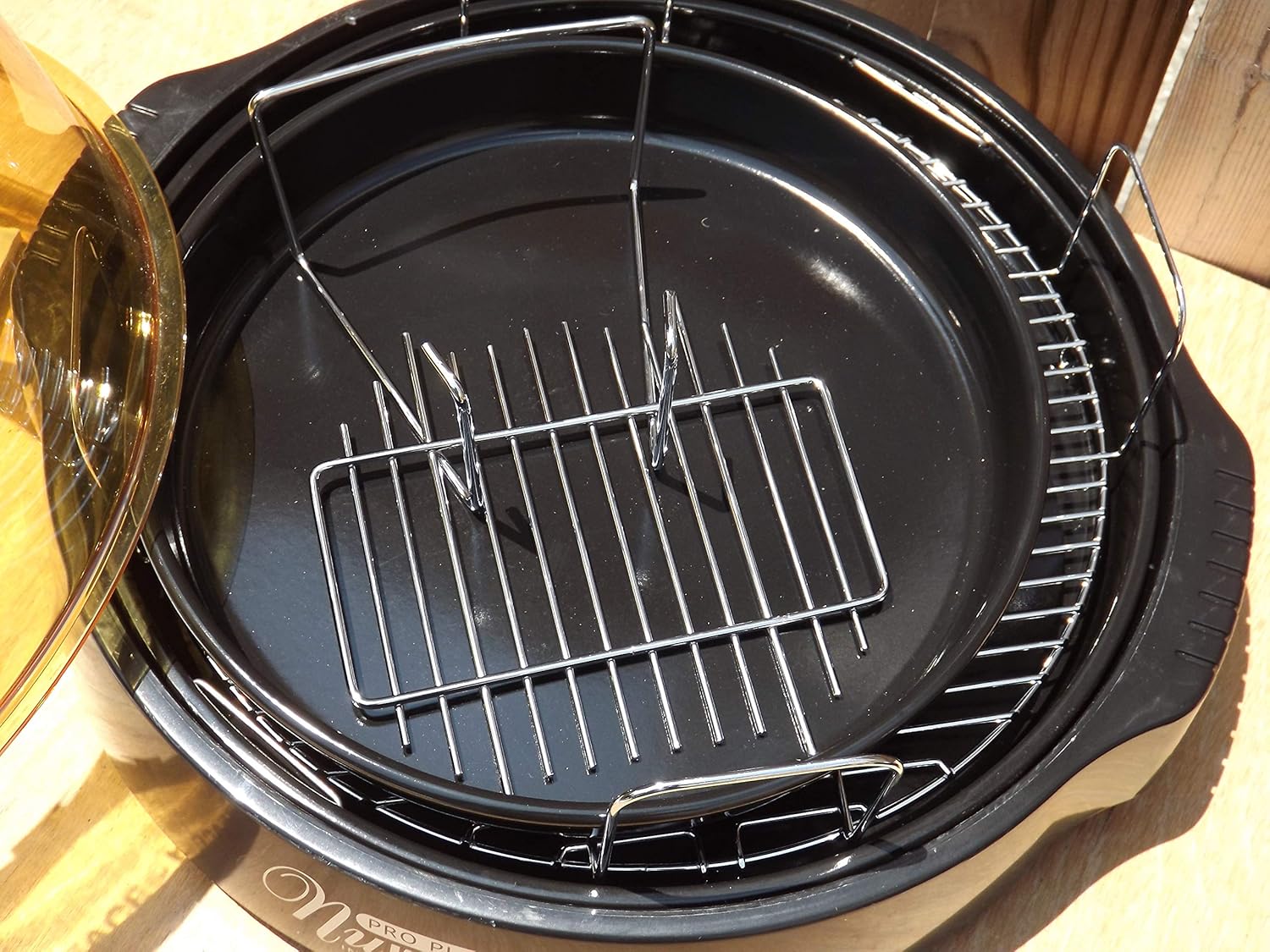
Figure 3.3: The cooking racks positioned within the oven's base pan, ready for food placement.
4. Opsette
Before first use, ensure all packaging materials are removed and the appliance is assembled correctly.
- Utpakke: Ferwiderje alle komponinten foarsichtich út 'e ferpakking.
- Skjin: Wash the dome, cooking rack, and base pan with warm, soapy water. Rinse thoroughly and dry completely. The power head should only be wiped with a damp doek.
- Sammelje: Place the base pan on a stable, heat-resistant surface. Insert the desired cooking rack into the base pan. Place the food on the rack. Carefully position the dome over the base pan. Finally, place the power head securely on top of the dome.
- Power Connection: Stek it netsnoer yn in standert 120V AC-elektrysk stopkontakt.
5. Bedriuwsinstruksjes
The Nuwave Pro Plus Infrared Oven features a digital control panel for precise cooking.

Figure 5.1: The digital control panel with buttons for Cook Time, Cook Temp, Reheat, Warm, Delay, Pause/Clear, Start, and numerical input.
- Power On: Once plugged in, the display will illuminate.
- Kooktiid ynstelle: Press the 'Cook Time' button. Use the numerical keypad to enter the desired cooking duration in minutes. Press 'Start' to confirm.
- Set Cooking Temperature: Press the 'Cook Temp' button. Use the numerical keypad to enter the desired temperature in degrees Fahrenheit. Press 'Start' to confirm.
- Begjin koken: After setting time and temperature, press the 'Start' button to begin the cooking cycle.
- Pause/Clear: To temporarily stop cooking, press 'Pause/Clear'. Press 'Start' to resume. To cancel the current program, press 'Pause/Clear' twice.
- Reheat funksje: Press the 'Reheat' button for a preset reheating cycle. Adjust time if necessary using 'Cook Time'.
- Warm Funksje: Press the 'Warm' button to keep food warm after cooking.
- Fertragingsfunksje: Press the 'Delay' button to set a delayed start time for cooking. Follow on-screen prompts to set the delay duration.
Always monitor food during cooking. Cooking times may vary based on food type, quantity, and desired doneness.
6. Underhâld en Cleaning
Regular cleaning ensures optimal performance and extends the life of your Nuwave Pro Plus Infrared Oven.
- Untkoppelje en koelje: Always unplug the oven from the power outlet and allow all components to cool completely before cleaning.
- Dome, Rack, and Base Pan: These components are dishwasher safe or can be washed by hand with warm, soapy water. Use a non-abrasive sponge or cloth. Rinse thoroughly and dry completely.
- Krêftkop: The power head contains electrical components and should NEVER be immersed in water. Wipe the exterior with a damp cloth. For stubborn stains, use a mild detergent on the cloth, then wipe with a clean, damp cloth. Ensure it is completely dry before storage or next use.
- Opslach: Bewarje de oven op in skjinne, droege plak as er net yn gebrûk is.
7. Probleemoplossing
Sjoch dit diel foar faak foarkommende problemen en har oplossingen.
| Probleem | Mooglike oarsaak | Oplossing |
|---|---|---|
| Oven giet net oan. | Net ynstutsen; stroom úttage; defekt stopkontakt. | Soargje derfoar dat it netsnoer goed ynstutsen is. Kontrolearje de stroomûnderbrekker. Besykje in oar stopkontakt. |
| Iten wurdt net evenredich gaarmakke. | Improper food placement; too much food; incorrect temperature/time. | Ensure food is placed on the rack and not directly on the base. Do not overcrowd the oven. Adjust cooking time or temperature as needed. |
| Rook of ûngewoane geur tidens operaasje. | Itensdruppels op it ferwaarmingselement; resten fan earder koken. | Unplug immediately. Allow to cool and clean all components thoroughly. Ensure no food particles are on the heating element. |
| Kontrôlepaniel reagearret net. | Temporary electrical glitch; power head not seated correctly. | Unplug the oven for 1 minute, then plug back in. Ensure the power head is securely placed on the dome. |
8. Spesifikaasjes
Detailed technical specifications for the Nuwave Pro Plus Infrared Oven.
- Merk: Nuwave
- Model Namme: Nu-Wave Oven
- Control Type: Knob (Digital Keypad)
- Door Style: Side Swing (Dome Lift)
- Ynbegrepen komponinten: Crumb Tray (Base Pan), Cooking Rack
- Finish Type: Skildere
- Door Materiaal Type: Stainless Steel (referring to internal components/accents)
- Power Boarne: AC adapter
- Oantal planken: 1 (Cooking Rack)
- Grutte: Medium
- Item Gewicht: 14.26 pyk
- Ofmjittings fan it pakket: 15.8 x 14.9 x 12.1 inch
- ASIN: B00IXC09QC
- UPC: 652185206021
9. Garânsje en stipe
For warranty information and customer support, please refer to the documentation included with your purchase or visit the official Nuwave webside. Bewarje jo oankeapbewiis as bewiis fan oankeap foar alle garânsjeclaims.
For further assistance, you may contact Nuwave customer service directly. Contact details are typically found on the product packaging or the manufacturer's official website.