
Ynlieding
Thank you for choosing the Technoline WT 745 Radio Controlled Alarm Clock. This digital alarm clock features precise timekeeping, dual alarms with snooze, date and weekday display, and indoor temperature monitoring. Please read this manual carefully to ensure proper setup and operation.
Pakketynhâld
- Technoline WT 745 Radio Controlled Alarm Clock
- User Manual
Note: 2x AAA batteries are required and not included.
Produkt oerview
Familiarize yourself with the main components of your WT 745 alarm clock.
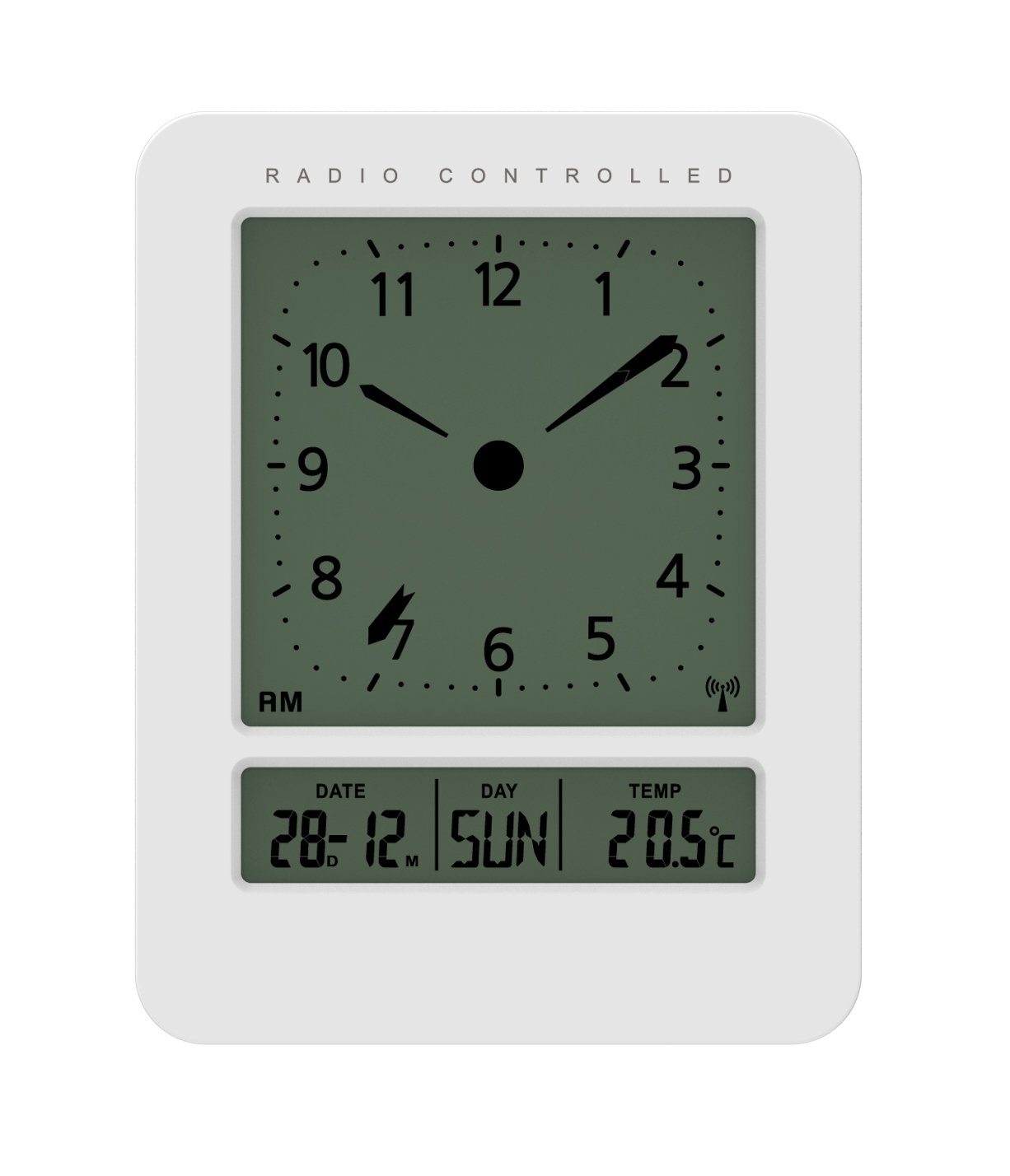
Ofbylding: Foar- en sydkant view of the Technoline WT 745 Radio Controlled Alarm Clock, showing the digital display with time, date, day, and temperature, and the analog clock face. The clock is white with a light grey display.
- Analog Clock Face: Displays current time with hour, minute, and second hands.
- Digital werjefte: Shows date, day of the week, and indoor temperature.
- Radio Controlled Indicator: Symbol indicating successful radio signal reception.
- Kontrôle knoppen: Buttons for setting time, alarm, and other functions, typically located on the back or side.
- Batterijfak: Located on the back for 2x AAA batteries.
Opsette
1. Ynstekken Batterijen
- Iepenje it deksel fan it batterijfak oan 'e efterkant fan 'e wekker.
- Doch 2 nije AAA-batterijen yn, en hâld rekken mei de juste polariteit (+/-).
- Slút it deksel fan it batterijfak feilich.
Note: The clock will automatically start searching for the radio time signal after battery insertion. This process may take several minutes.
2. Initial Radio Signal Reception
- Place the clock near a window for optimal signal reception.
- Foarkom it pleatsen tichtby elektroanyske apparaten dy't ynterferinsje feroarsaakje kinne.
- Once the signal is received, the time, date, and day will be automatically set. The radio controlled indicator will appear on the display.
If the signal is not received within 10 minutes, try repositioning the clock or manually setting the time (see "Manual Time Setting").
Operating Instructions
It alarm ynstelle
- Druk op de ALARM SET button (location not specified, assume standard placement). The alarm time will flash.
- Brûk de UP or OMLEECH knoppen om it oere oan te passen.
- Parse ALARM SET nochris om it oere te befêstigjen en nei minuten te gean.
- Brûk de UP or OMLEECH knoppen om de minuten oan te passen.
- Parse ALARM SET om de wekkertiid te besparjen.
- Om it alarm te aktivearjen/deaktivearjen, druk op de ALARM AAN / UIT knop. In alarmikoan sil ferskine/ferdwine op it skerm.
The WT 745 supports two independent alarms. Repeat the steps above to set the second alarm.
Snooze Funksje
- As it alarm klinkt, druk dan op de SNOOZE button (usually a large button on top). The alarm will pause for approximately 5 minutes and then sound again.
- To stop the alarm completely, press any other button (e.g., ALARM ON/OFF) or let it ring for its full duration.
Aktivearring fan efterljochting
- Druk op de LJOCHT or SNOOZE button to temporarily illuminate the display for easy viewyn betingsten mei leech ljocht.
Viewing Date, Day, and Temperature
- The digital display continuously shows the current date, day of the week, and indoor temperature. No specific action is required to view dizze.
Manuele tiidynstelling (as radiosinjaal net beskikber is)
- Druk en hâld de TIID SET button for a few seconds until the hour digits flash.
- Brûk de UP or OMLEECH knoppen om it oere oan te passen.
- Parse TIID SET nochris om it oere te befêstigjen en nei minuten te gean.
- Brûk de UP or OMLEECH knoppen om de minuten oan te passen.
- Trochgean te drukken TIID SET to cycle through and adjust year, month, and day as needed.
- Parse TIID SET one last time to exit manual setting mode.
Ûnderhâld
- Reiniging: Feie de klok ôf mei in sêfte, droege doek. Brûk gjin abrasive reinigingsmiddels of oplosmiddels.
- Batterij ferfanging: Replace batteries when the display dims or functions become erratic. Always replace both batteries simultaneously with new ones.
- Opslach: As jo de klok foar in langere perioade opslaan, ferwiderje dan de batterijen om lekkage te foarkommen.
- Miljeu: Hâld de klok fuort fan direkt sinneljocht, ekstreme temperatueren en hege fochtigens.
Troubleshooting
| Probleem | Mooglike oarsaak | Oplossing |
|---|---|---|
| It skerm is leech of dim. | Batterijen binne leech of ferkeard ynfoege. | Ferfange de batterijen mei nije AAA-batterijen, en soargje derfoar dat de polariteit korrekt is. |
| Clock does not receive radio signal. | Interference, poor location, or signal too weak. | Move the clock closer to a window, away from electronic devices. Try manual time setting. |
| It alarm giet net ôf. | It alarm is net aktivearre of ferkeard ynsteld. | Ensure the alarm icon is visible on the display. Recheck alarm time settings. |
| Ferkearde tiid werjûn. | Radio signal lost or manual time set incorrectly. | Allow the clock to resynchronize with the radio signal. If persistent, manually set the time. |
Spesifikaasjes
- Model: wt 745
- Merk: Technoline
- Ofmjittings: 7.1 x 4.5 x 9.2 sm (L x B x H)
- Gewicht: 150 g
- Materiaal: Plestik
- Display Type: Digital with Analog Clock Face
- Power Boarne: 2 x AAA-batterijen (net ynbegrepen)
- Spesjale eigenskippen: Radio Controlled Time, Dual Alarms, Snooze Function, Date Display, Day of Week Display, Indoor Temperature Display, Backlight.
- Gebrûk: Binnen
Garânsje en stipe
For warranty information or technical support, please refer to the warranty card included with your product or visit the official Technoline webside. Bewarje jo oankeapbewiis as bewiis fan oankeap.
Offisjeel Website: www.technoline.eu