
Ynlieding
This manual provides detailed instructions for the setup, operation, and maintenance of your A4tech Bloody Light Strike B314 Gaming Keyboard. Please read this manual thoroughly before using the product to ensure optimal performance and longevity.
Key Features
- Bloody 4 Light Strike Mechanical Switches: Experience ultra-fast response times of 0.2ms with infrared optic switches, providing a competitive edge in gaming.
- Ferbettere duorsumens: Designed for intensive use, featuring A,S,D,W silicon keys with a convex shape for improved control and longevity.
- Neon Glare System LED Backlighting: Customize your gaming environment with vibrant LED backlighting, making keys easy to locate in low-light conditions.
- 9 Programmeerbere toetsen: Personalize your gaming experience by assigning custom functions to 9 individually programmable keys.
- Double Secure Water-Resistance: The keyboard is electronically sealed with a water drain hole, protecting it from accidental spills and extending its lifespan.
Pakketynhâld
Kontrolearje oft alle items yn it pakket oanwêzich binne:
- Bloody Light Strike B314 Gaming Keyboard
- User Manual (dit dokumint)

Image: The retail packaging for the Bloody Light Strike B314 Gaming Keyboard, showing the keyboard with LED backlighting and key features highlighted.
Setup Guide
- Ferbine it toetseboerd: Stek de USB-ferbining fan it toetseboerd yn in beskikbere USB-poarte op jo kompjûter.
- Driver ynstallaasje: The keyboard is typically plug-and-play. Your operating system should automatically detect and install the necessary drivers. If prompted, follow the on-screen instructions.
- Software-ynstallaasje (opsjoneel): For advanced customization, including programming keys and managing backlighting, download and install the official Bloody software from the A4tech website.
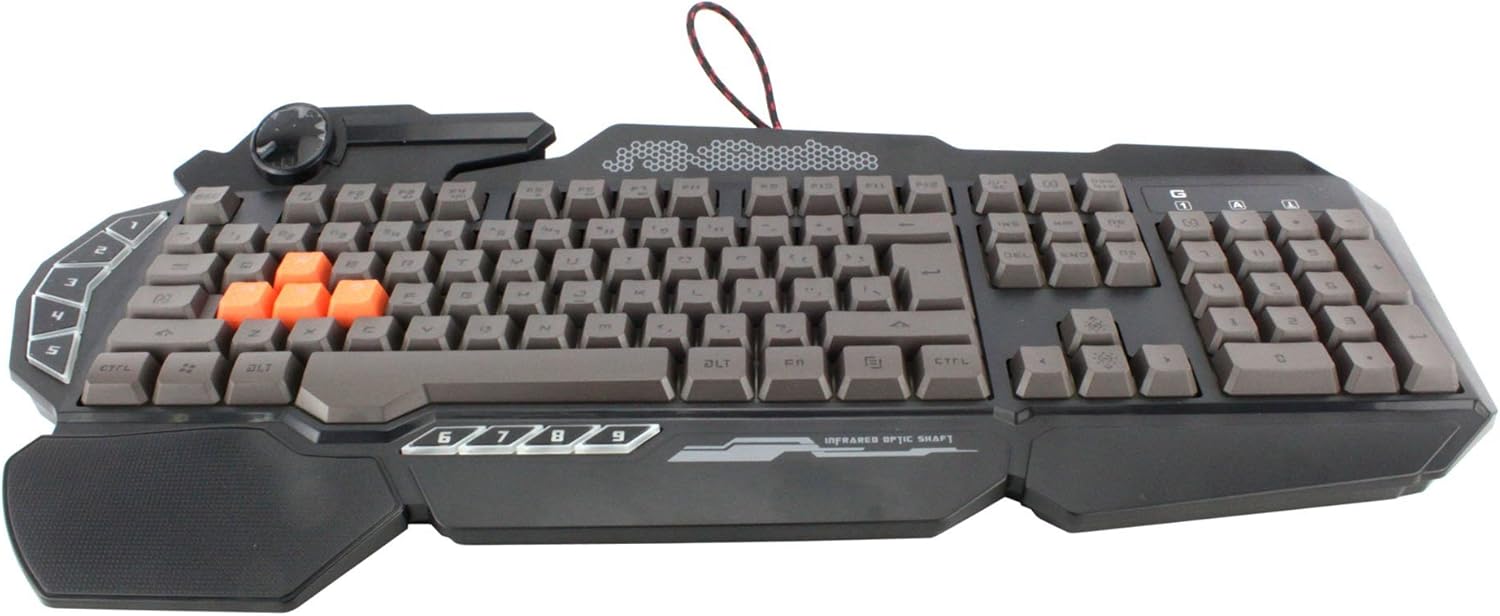
Ofbylding: In top-down view of the Bloody Light Strike B314 Gaming Keyboard, showcasing the full QWERTY layout with orange WASD keys and dedicated macro keys on the left.
Operating Instructions
Basisgebrûk
The Bloody B314 functions as a standard QWERTY keyboard for everyday typing and gaming. Its infrared mechanical switches provide a fast and responsive typing experience.
Programmierbare toetsen
The keyboard features 9 programmable keys, typically located on the left side. To customize these keys:
- Install the official Bloody software from the A4tech website.
- Launch the software and navigate to the key customization section.
- Select the desired programmable key (e.g., G1-G9 or similar).
- Assign macros, key functions, or multimedia controls as needed.
- Bewarje jo profile de wizigingen tapasse.
LED Backlighting Control
The Neon Glare System LED backlighting can be adjusted using function key combinations:
- Fn+F12: Cycle through different backlighting modes (e.g., static, breathing, off).
- Fn + Omheech/Omleech pylk: Pas de helderheid fan efterljochting oan.
- Fn + pylk lofts/rjochts: Adjust backlight speed or direction (if applicable to the mode).
Game Mode
Activate Game Mode to disable the Windows key and prevent accidental interruptions during gameplay.
- Fn+F8: Toggle Game Mode oan/út.

Ofbylding: In hoeke view of the Bloody Light Strike B314 Gaming Keyboard, highlighting the ergonomic wrist rest and the distinct orange WASD keys.
Ûnderhâld
Cleaning
- Koppel it toetseboerd los fan jo kompjûter foardat jo it skjinmeitsje.
- Brûk in sêft, damp cloth to wipe the surface of the keyboard. Avoid harsh chemicals or abrasive materials.
- Brûk perslucht foar stof en pún tusken de kaaien.
- The water-resistant design helps protect against spills, but it is still recommended to clean up liquids promptly.
Opslach
Bewarje it toetseboerd op in koel, droech plak, fuort fan direkt sinneljocht en ekstreme temperatueren as it foar langere perioaden net brûkt wurdt.
Troubleshooting
Toetseboerd reagearret net
- Soargje derfoar dat de USB-kabel goed yn sawol it toetseboerd as de kompjûter ynstutsen is.
- Besykje it toetseboerd yn in oare USB-poarte te stekken.
- Restart jo kompjûter.
- Check if the keyboard is recognized in your computer's Device Manager (Windows) or System Information (macOS).
Efterljochting wurket net
- Ensure the backlighting is not turned off using the Fn + F12 combination.
- Adjust brightness using Fn + Up Arrow.
- As jo oanpaste pro brûkefiles, ensure the backlighting settings are correctly configured in the Bloody software.
Programmable Keys Not Working
- Verify that the Bloody software is installed and running.
- Ensure your custom profiles are loaded and active within the software.
- Check for any software updates for the Bloody keyboard utility.
Spesifikaasjes
| Eigenskip | Detail |
|---|---|
| Merk | A4tech |
| Model Number | A4TKLA45173 |
| Konnektivität Technology | Ynfraread |
| Toetseboerdbeskriuwing | Meganysk |
| Switch Type | Mechanical (Light Strike Optic) |
| Special Feature | Backlit, Programmable Keys, Water Resistant |
| Kleur | Swart |
| Keyboard Backlighting Color Support | RGB (Neon Glare System) |
| Oantal Keys | 104 |
| Programmierbare knoppen | 9 |
| Wetter Resistance Level | Wetter Resistant |
| Item Gewicht | 2.9 pûn sterling |
Garânsje en stipe
For warranty information and technical support, please refer to the official A4tech webside of nim direkt kontakt op mei harren klanttsjinst. Bewarje jo oankeapbewiis as bewiis fan oankeap foar garânsjeclaims.
Official A4tech Website: www.a4tech.com