
Ynlieding
This manual provides detailed instructions for the safe operation and maintenance of your Contixo F3 RC Drone. Please read this manual thoroughly before operating the drone to ensure proper use and to prevent damage or injury. The Contixo F3 features an integrated 720p WiFi FPV camera, Altitude Hold, 2.4GHz control, 6-Axis Gyro, and One-Key Landing/Take-Off functions.
Safety Guidelines
- Brûk de drone altyd yn iepen gebieten, fuort fan minsken, bisten en obstakels.
- Do not fly near airports, power lines, or restricted airspace.
- Soargje derfoar dat de batterij fan 'e drone folslein opladen is foar elke flecht.
- Hâld fingers en hier fuort fan draaiende propellers.
- Tafersjoch fan folwoeksenen wurdt oanrikkemandearre foar brûkers ûnder de 14 jier.
- Net wurkje by sterke wyn of minne waarsomstannichheden.
- Skeakelje de drone en ôfstânsbetsjinning út as se net yn gebrûk binne.
Pakketynhâld
Kontrolearje oft alle ûnderdielen yn jo pakket oanwêzich binne:
- Contixo F3 RC Drone
- Sender foar ôfstânsbetsjinning
- USB-oplaadkabel
- Spare propellers
- Propellerwachten
- Landing Gear
- Schroevendraaier
- User Manual

Image: Contixo F3 Drone, remote control, and packaging. This image shows the drone, its remote, and the retail box, indicating the main components included.
Opsette
1. Drone Battery Installation & Charging
- Sykje it batterijfak oan 'e ûnderkant fan' e drone.
- Insert the drone battery, ensuring correct polarity.
- Slút it batterijfak feilich.
- Connect the USB charging cable to the drone battery and a USB power source (e.g., computer, USB adapter).
- Lit de batterij folslein oplade foardat jo it foar it earst brûke. De oplaadtiid kin ferskille.
2. Remote Control Batterij Ynstallaasje
- Iepenje de batterij cover op 'e rêch fan' e ôfstânsbetsjinning.
- Doch 3 AAA-batterijen (net ynbegrepen) yn neffens de polariteitsmarkeringen.
- Slút it batterijdeksel.
3. Propeller Guard and Landing Gear Installation
- Attach the propeller guards to each motor arm for protection.
- Securely attach the landing gear to the drone's underside.

Image: Contixo F3 Drone with propeller guards and landing gear installed. This image displays the drone fully assembled with its protective propeller guards and landing gear.
4. De drone en ôfstânsbetsjinning keppelje
- Plak de drone op in flak, flak oerflak.
- Skeakelje de drone oan. De yndikatorljochten sille knipperje.
- Skeakelje de ôfstân kontrôle.
- Push the left joystick (throttle) all the way up, then all the way down. The drone lights will become solid, indicating successful pairing.
5. App Download and FPV Setup
- Download the Contixo FPV app from your smartphone's app store (iOS or Android).
- Turn on the drone and connect your smartphone to the drone's Wi-Fi network (usually named "Contixo-F3-XXXX").
- Open the Contixo FPV app to view the live camera feed and access advanced controls.

Image: Contixo F3 Drone, remote control, and a smartphone showing the FPV app interface. This image illustrates the complete setup for FPV flight.
Operating Instructions
Basiskontrôles (ôfstânsbetsjinning)
- Linker joystick (gashendel): Up/Down for altitude, Left/Right for yaw (rotation).
- Rjochter joystick: Up/Down for forward/backward flight, Left/Right for left/right sideward flight.
- Ien-kaai knop foar opstigen/lâning: Press once to automatically take off or land.
- Trimknoppen: Adjust for stable hovering if the drone drifts.
- Speed Mode Button: Cycle through different flight speeds (beginner, intermediate, advanced).
- 360° Flip Button: Press and then move the right joystick in the desired direction to perform a flip.

Image: Contixo F3 Drone remote control. This image shows the layout of the remote control with its various buttons and joysticks.
Avansearre eigenskippen
- Altitude Hold: The drone maintains its current altitude automatically, allowing for easier control and stable video recording.
- FPV (Earste Persoan) View) Camera: Stream live 720p video to your smartphone via the Contixo FPV app. Record videos and capture photos directly to your device.
- G-Sensor Control (via App): Use your smartphone's accelerometer to control the drone's flight direction by tilting your phone.
- Track-Controlled Flight (via App): Draw a flight path on your smartphone screen, and the drone will follow the designated route automatically.
Ûnderhâld
- Reiniging: Brûk in sêfte, droege doek om de drone-romp en kameralens skjin te meitsjen. Foarkom it brûken fan floeistoffen.
- Propeller ferfanging: If a propeller is damaged, carefully remove it and replace it with a new one, ensuring the correct propeller type (A or B) is installed in the corresponding position.
- Batterij soarch: Bewarje batterijen op in koel, droech plak. Net te folle oplade of te folle ûntlade.
- Opslach: When not in use for extended periods, remove batteries from both the drone and remote control.
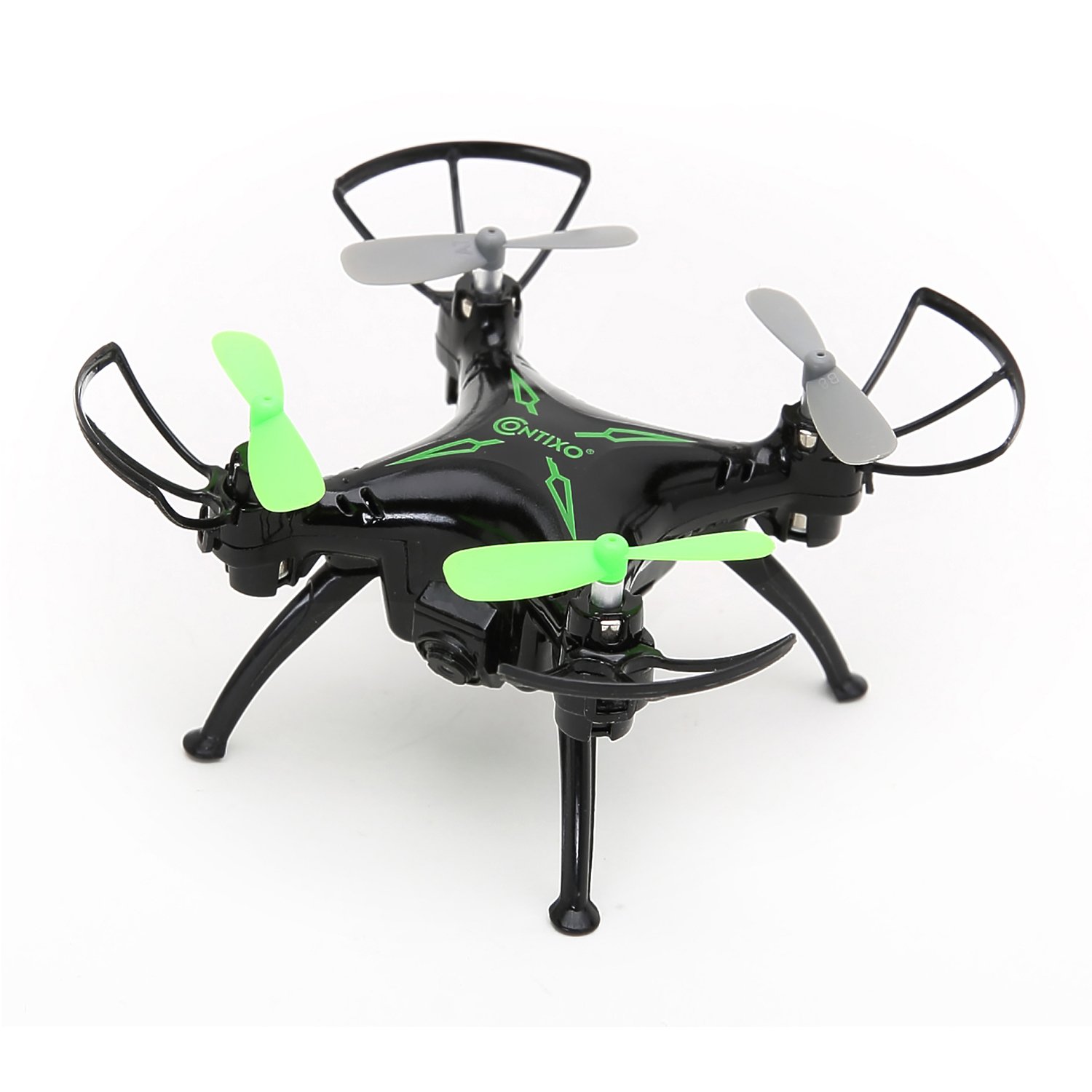
Ofbylding: Boppe view of the Contixo F3 Drone. This image provides a clear view of the drone's propellers and body for maintenance reference.
Troubleshooting
| Probleem | Mooglike oarsaak | Oplossing |
|---|---|---|
| Drone reagearret net op ôfstânsbetsjinning. | Not paired; low battery; interference. | Re-pair the drone and remote; charge batteries; move to an open area. |
| Drone driuwt tidens flecht. | Not calibrated; trim settings incorrect. | Calibrate the drone on a flat surface; use trim buttons to adjust. |
| FPV video is choppy or disconnected. | Weak Wi-Fi signal; too far from drone; app issue. | Ensure strong Wi-Fi connection; fly closer to the drone; restart app/drone. |
| Drone giet net op. | Low battery; propellers blocked; not paired. | Charge battery; check for obstructions; re-pair drone. |
Spesifikaasjes
- Merk: Contixo
- Model: F3
- Kleur: Swart
- Feardigensnivo: Beginner, Professional
- Item Gewicht: 3.52 ounces (sawat 100 gram)
- Batterij Kapasiteit: 220 miljamp Oeren (Lithiumpolymeer)
- Control Type: Remote Control
- Video útfier resolúsje: 1280x720 Pixels (720p HD FPV)
- Konnektivität: 2.4GHz (Remote Control), Wi-Fi (FPV)
- Gyroscoop: 6-as Gyro
- Spesjale eigenskippen: Altitude Hold, One-Key Landing/Take-Off, FPV Camera, G-Sensor Control, Track-Controlled Flight
Garânsje en stipe
For warranty information, technical support, or replacement parts, please visit the official Contixo webside of nim kontakt op mei harren klanttsjinst. Bewarje jo oankeapbewiis as bewiis fan oankeap.
Contixo Official Website: www.contixo.com
Opmerking: Spesifike garânsjebetingsten kinne ferskille per regio en winkelier.