
1. Ynlieding
Thank you for choosing the 2BOOM HPBT500K Wireless Headphone System. This manual provides essential information for the proper setup, operation, and maintenance of your new headphones. Please read it thoroughly before use to ensure optimal performance and longevity of the product.
The HPBT500K headphones offer a wireless audio experience with a built-in microphone for hands-free calling, enhanced bass sound, and comfortable wear.
2. Wat sit der yn 'e doaze
- 2BOOM HPBT500K Wireless Headphone
- USB-oplaadkabel
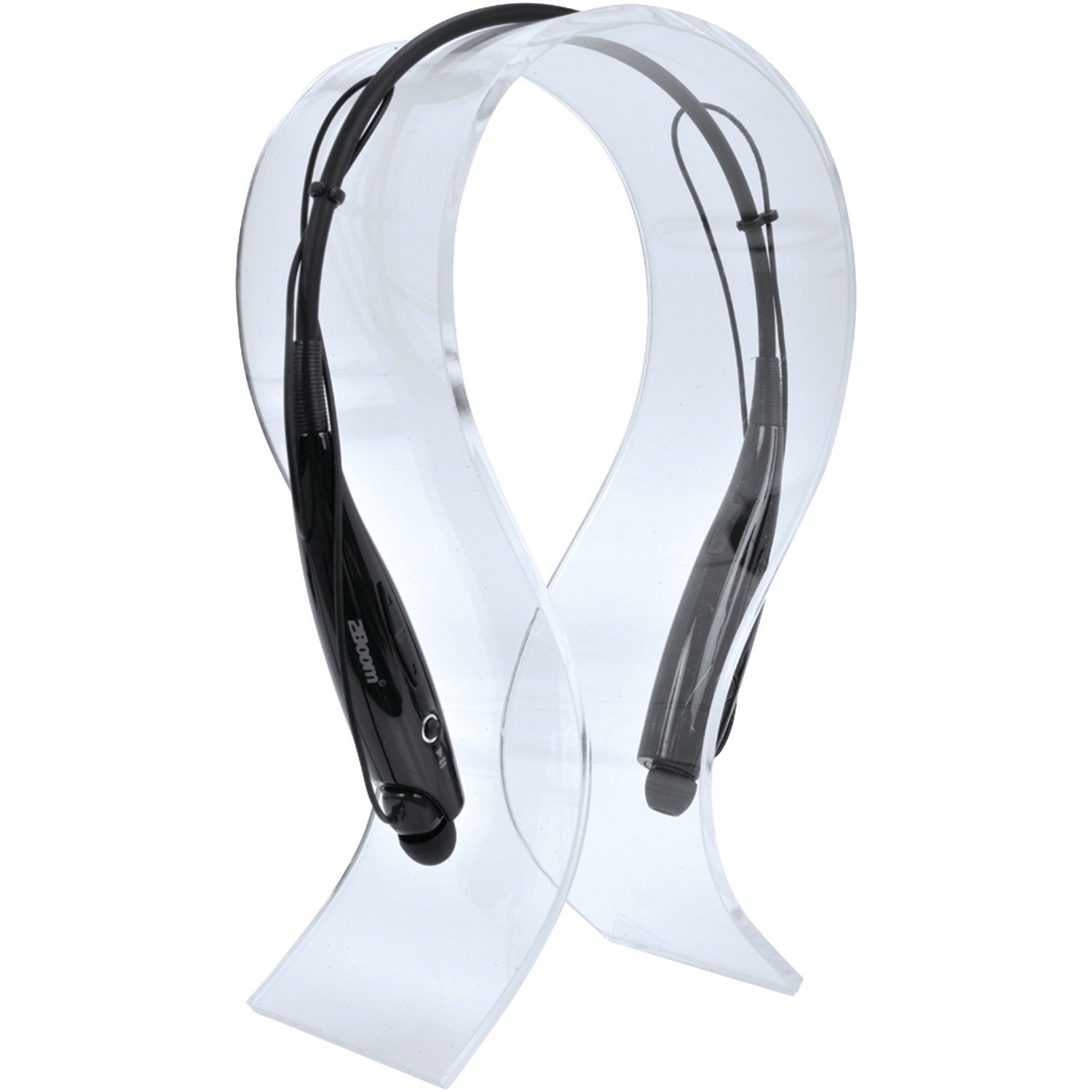
Image: The 2BOOM HPBT500K Wireless Headphone, showcasing syn ûntwerp.
Image: The included USB charging cable for the headphones.
3. Produkt Overview
Familiarize yourself with the various parts and controls of your HPBT500K headphones.

Ofbylding: Side view of the 2BOOM HPBT500K Wireless Headphone, highlighting control buttons and ports.
Kontrôles en yndikatoaren:
- Power knop: Used to turn the headphones on/off and for pairing.
- Volume Up/Folgjende Track: Increases volume or skips to the next song.
- Volume Down/Foarige Track: Decreases volume or goes to the previous song.
- Multifunksjonele knop (MFB): Play/Pause, Answer/End Call.
- Mikrofoan: Foar hannenfrije kommunikaasje.
- LED-yndikator: Toant stroomstatus, koppelingsmodus en oplaadstatus.
- Micro USB -oplaadpoort: Foar it oansluten fan 'e oplaadkabel.
4. De koptelefoan opladen
Before first use, fully charge your headphones. A full charge typically takes about 2-3 hours.
- Connect the small end of the USB charging cable to the Micro USB charging port on your headphones.
- Connect the larger end of the USB charging cable to a USB power source (e.g., computer USB port, USB wall adapter). Ensure the power source provides DC 5V.
- The LED indicator will illuminate during charging and change color or turn off once charging is complete.
Noat: Brûk gjin laders mei in voluminttage higher than DC 5V, as this may damage the headphones.
5. Setup and Bluetooth Pairing
Follow these steps to pair your HPBT500K headphones with your Bluetooth-enabled device.
- Power On: Press and hold the Power button on the headphones until the LED indicator flashes, usually alternating blue and red, indicating pairing mode.
- Bluetooth aktivearje: On your smartphone, tablet, or other Bluetooth device, go to the Bluetooth settings and ensure Bluetooth is turned on.
- Sykje nei Apparaten: Your device will scan for available Bluetooth devices.
- Select 'HPBT500K': From the list of found devices, select 'HPBT500K'.
- Pairing befêstigje: Once paired, the LED indicator on the headphones will typically flash blue slowly or remain solid blue, and your device may confirm the connection.
The operating distance for Bluetooth connectivity is up to 33 feet (10 meters) in an open environment. Obstacles may reduce this range.
6. Bedriuwsinstruksjes
Muzyk ôfspielje:
- Spylje / Pauze: Druk ien kear op de multifunksjeknop (MFB).
- Folgjende track: Druk en hâld de knop Folume omheech.
- Foarige spoar: Druk en hâld de Volume Down knop.
- Folume omheech: Druk koart op de knop Folume omheech.
- Folume omleech: Druk koart op de knop Folume omleech.
Music playback time is up to 3 hours on a full charge.
Hânfrij skilje:
- Oprop antwurdzje: Druk ien kear op de MFB as der in oprop binnenkomt.
- Oprop einigje: Druk ien kear op de MFB tidens in oprop.
- Oprop ôfwize: Druk de MFB sawat 2 sekonden yn as in oprop binnenkomt.
- Lêste nûmer opnij kieze: Dûbeldrukke op de MFB.
Talk time is up to 3 hours on a full charge.
7. Underhâld
Om de lange libbensdoer en optimale prestaasjes fan jo koptelefoan te garandearjen, folgje dizze ûnderhâldsrjochtlinen:
- Keep the headphones dry. Avoid exposure to moisture, rain, or liquids.
- Clean the headphones with a soft, dry cloth. Do not use harsh chemicals or abrasive cleaners.
- Bewarje de koptelefoan op in koel, droech plak, fuort fan ekstreme temperatueren.
- Foarkom dat de koptelefoan falt of oan sterke stoten bleatsteld wurdt.
- Besykje de koptelefoan net útinoar te heljen of te feroarjen, om't dit de garânsje ûnjildich makket.
8. Probleemoplossing
If you encounter issues with your HPBT500K headphones, refer to the following common problems and solutions:
- Koptelefoanen geane net oan:
Ensure the headphones are fully charged. Connect them to a power source using the provided USB cable. - Kin net keppele wurde mei apparaat:
Make sure Bluetooth is enabled on your device and the headphones are in pairing mode (LED flashing blue/red). Move the headphones closer to your device. Try turning both devices off and on again. - Gjin lûd of leech folume:
Kontrolearje it folume op sawol de koptelefoan as jo ferbûne apparaat. Soargje derfoar dat de koptelefoan goed keppele is. - Minne lûdskwaliteit of ûntbining fan ferbiningen:
Ensure there are no obstructions between the headphones and your device. Move closer to your device. Avoid environments with strong Wi-Fi or other wireless interference. - Mikrofoan wurket net:
Ensure the headphones are properly connected and selected as the audio input device on your phone/computer.
9. Spesifikaasjes
| Eigenskip | Spesifikaasje |
|---|---|
| Bluetooth Ferzje | 2.1 + EDR |
| Operating Ofstân | Oant 33 feet (10 meter) |
| Muzyk Playback Tiid | Oant 3 oeren |
| Sprektiid | Oant 3 oeren |
| Ladeynfier Voltage | DC 5V |
| Oplaadtiid | Likernôch 2-3 oeren |
| Speaker Output | 2 x40mw |
| Ynboude batterij | 3.7V, 150 mAh |
| Item Gewicht | 113 g |
| Produkt Ofmjittings (LxWxH) | 23.11 x 16.76 x 3.81 sm |
| Ynbegrepen komponinten | Headphone with charging cable |
| Control Metoade | Oanreitsje |
| Special Features | Lightweight, Microphone Included |
10. Garânsje en stipe
For warranty information or technical support, please refer to the documentation provided at the time of purchase or contact 2BOOM customer service. Keep your proof of purchase for warranty claims.