
Comix CS-3302
Comix CS-3302 12-Digit Desktop Calculator User Manual
Model: CS-3302 (P/N: 11821063)
Brand: Comix
1. Ynlieding
This user manual provides comprehensive instructions for the Comix CS-3302 12-Digit Desktop Calculator. Please read this manual thoroughly before using the calculator to ensure proper operation and to maximize its lifespan. This calculator is designed for general office and school use, featuring a large LCD display, dual power source, and various calculation functions.
2. Safety Information
- Stel de rekkenmasine net bleat oan ekstreme temperatueren, direkt sinneljocht of hege fochtigens.
- Foarkom dat de rekkenmasine falt of oan sterke stoten bleatsteld wurdt.
- Do not attempt to disassemble or modify the calculator. This will void the warranty.
- Use a soft, dry cloth for cleaning. Do not use liquid cleaners or abrasive materials.
- Hâld bûten it berik fan lytse bern.
3. Produkt Overview

Ofbylding 3.1: Front view of the Comix CS-3302 Desktop Calculator, showing the large LCD display and full keypad.
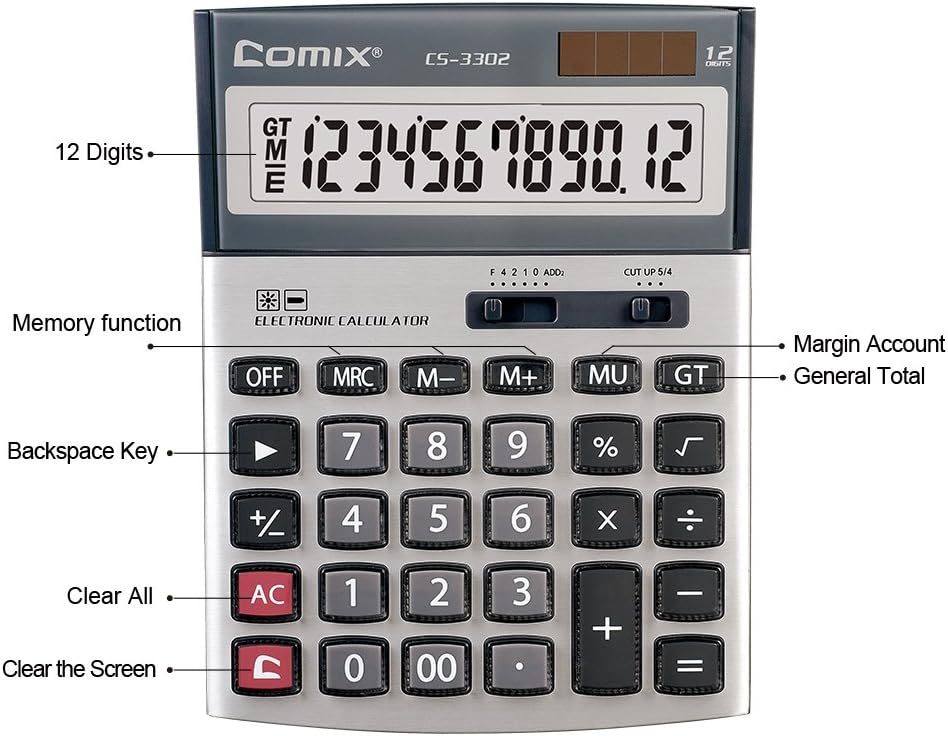
Ofbylding 3.2: Key functions and display features of the Comix CS-3302 Calculator, including 12 digits display, memory functions, and clear keys.

Ofbylding 3.3: Dimensions of the Comix CS-3302 Calculator, showing its compact and ergonomic design.

Ofbylding 3.4: Angled view of the Comix CS-3302 Calculator, highlighting its sleek profile and key layout.

Ofbylding 3.5: Side profile of the Comix CS-3302 Calculator, showing its slim design.

Ofbylding 3.6: Retail packaging of the Comix CS-3302 Calculator, highlighting key features like 12 digits, dual power, and acrylic keys.
4. Opsette
4.1 Power Boarne
The Comix CS-3302 calculator operates on a dual power system: solar and battery. The solar panel provides power in well-lit environments, while a single AA battery (not included) serves as an auxiliary power source for low-light conditions or when solar power is insufficient.
- Batterij ynstallaasje: Locate the battery compartment on the back of the calculator. Open the cover and insert one AA battery, ensuring correct polarity (+/-). Close the battery compartment cover securely.
- Initial Power On: The calculator should power on automatically when sufficient light is available or with the battery installed. If not, press the ON/AC knop.
5. Bedriuwsinstruksjes
5.1 Basis operaasjes
- Tafoeging (+): Fier it earste nûmer yn, druk op +, fier it twadde nûmer yn, en druk dan op =.
- Subtraksje (-): Fier it earste nûmer yn, druk op -, fier it twadde nûmer yn, en druk dan op =.
- Fermannichfâldiging (×): Fier it earste nûmer yn, druk op ×, fier it twadde nûmer yn, en druk dan op =.
- Dieling (÷): Fier it earste nûmer yn, druk op ÷, fier it twadde nûmer yn, en druk dan op =.
- Percenttage (%): Fier it nûmer yn, druk op × (of ÷), enter the percentage-wearde, druk dan op %. Bygelyksample, om 10% fan 200 te berekkenjen, fier 200 yn × 10 %.
- Fjouwerkante woartel (√): Enter the number, then press √.
5.2 Spesjale funksjes
- ÚT: Skeakelt de rekkenmasine út.
- AC (Alles dúdlik): Wisket alle yngongen en it ûnthâld, en set de rekkenmasine werom nei syn oarspronklike steat.
- C (Ynfier wiskje): Clears the last entered number or the current display value without affecting previous calculations or memory.
- Backspace (►): Wisket it lêst ynfierde sifer.
- M+ (Memory Plus): Foeget de werjûne wearde ta oan it ûnthâld.
- M- (ûnthâld minus): Lukt de werjûne wearde ôf fan it ûnthâld.
- MRC (Memory Recall/Clear): Druk ien kear om de ûnthâldwearde op te roppen. Druk twa kear om it ûnthâld te wiskjen.
- MU (Mark Up / Margin Account): Used for profit margin calculations. Enter cost, press MU, enter selling price, then press = to get the profit margin.
- GT (Gruttotaal): Accumulates the results of all calculations. Pressing GT displays the grand total.
- +/- (feroarje teken): Feroaret it teken fan it werjûne getal (posityf nei negatyf, of negatyf nei posityf).
5.3 Decimal and Rounding Settings
The calculator features two slide switches at the top for controlling decimal places and rounding:
- Decimal Selector (F 4 2 1 0 ADD2):
- F (Floating Decimal): Toant alle beskikbere desimale plakken.
- 4, 2, 1, 0: Sets the number of decimal places to 4, 2, 1, or 0 respectively.
- ADD2 (Add Mode): Automatically adds two decimal places to all results, useful for currency calculations.
- Rounding Selector (CUT UP 5/4):
- CUT (Cut Off): Truncates the number, discarding all digits beyond the set decimal places.
- UP (Round Up): Rounds up the last digit if there are any non-zero digits beyond the set decimal places.
- 5/4 (Round Half Up): Rounds up if the first discarded digit is 5 or greater, otherwise rounds down.
6. Underhâld
- Reiniging: Wipe the calculator surface with a soft, dry cloth. For stubborn dirt, slightly dampen the cloth with water, but ensure no liquid enters the calculator. Do not use chemical cleaners.
- Opslach: When not in use for extended periods, store the calculator in a cool, dry place away from direct sunlight and extreme temperatures.
- Batterij ferfanging: If the display becomes dim or unresponsive in low light, replace the AA battery. Ensure the calculator is off before replacing the battery.
7. Probleemoplossing
| Probleem | Mooglike oarsaak | Oplossing |
|---|---|---|
| It skerm is leech of dim. | Net genôch ljocht foar sinne-enerzjy, of in lege batterij. | Move to a brighter area or replace the AA battery. |
| Ferkearde berekkeningsresultaten. | Incorrect input, incorrect decimal/rounding settings, or memory interference. | Parse AC to clear all and restart. Check decimal and rounding switch positions. Ensure correct key presses. |
| De toetsen reagearje net. | Calculator frozen or physical damage. | Besykje te drukken ÚT dan ON/AC. If problem persists, remove and reinsert battery. If still unresponsive, contact support. |
8. Spesifikaasjes
| Merk | Comix |
| Model Number | CS-3302 (P/N: 11821063) |
| Skerm | 12-Sifer LCD |
| Power Boarne | Dual Power (Solar & 1x AA Battery - not included) |
| Materiaal | Acrylic, Metal |
| Ofmjittings (L x B x H) | Likernôch 23.6 x 15.7 x 4.3 sm (9.3 x 6.2 x 1.7 inch) |
| Gewicht | Ungefear 322 g (0.71 lbs) |
| Operating Temperatuer | -25 ℃ to +60 ℃ (-13 ℉ to +140 ℉) |
| UPC | 842064102524 |
9. Garânsje en stipe
Comix products are designed for quality and durability. This product comes with a 3-jierrige garânsje fan 'e datum fan oankeap, dy't defekten yn materialen en fakmanskip by normaal gebrûk dekt.
For warranty claims, technical support, or any inquiries regarding your Comix CS-3302 calculator, please contact Comix customer service through their official website or the retailer where the product was purchased. Please have your proof of purchase and the product model number ready when contacting support.
For more information, visit the official Comix website: www.comix.com
Relatearre dokuminten - CS-3302
 |
Hollyland LARK M1 Draadloos Mikrofoansysteem Brûkershânlieding Útwreide brûkershantlieding foar it Hollyland LARK M1 draadloze mikrofoansysteem, mei details oer de funksjes, ynstelling, wurking, spesifikaasjes en feiligensrjochtlinen. |
 |
TRP VISTAR 系列使用者手冊 TRP VISTAR 使用者手冊提供了 VISTAR 系列自行車零件的安裝、操作和維護指南,包括變速器、煞車、飛輪、BB 和曲柄組等組件的詳細說明。 |
 |
TRP VISTAR 使用者手冊:自行車零件安裝與操作指南 詳細的使用者手冊,涵蓋 TRP VISTAR 系列自行車零件(包括變速器、煞車、飛輪、曲柄組等)的安裝、設定、維護和操作說明。提供專業騎行者與自行車維修技師的完整指南。 |
 |
TRP VISTAR 電子變速與煞車系統使用者手冊 TRP VISTAR 電子變速與油壓煞車系統的完整安裝、設定、配對與維護指南。包含 RD-G8000E、HD-S8130ES 與 SW-C8000E 等型號的詳細操作說明與安全規範。 |
 |
TRP VISTAR Electronic Shifting and Braking System User Manual Comprehensive user manual for the TRP VISTAR electronic shifting and braking system, including installation, pairing, maintenance, and compatibility guides for RD-C8000E, RD-G8000E, and HD-S8000E models. |
 |
TRP VISTAR 使用者手冊 TRP VISTAR 電子變速與油壓煞車系統的安裝、設定、配對及維護指南。包含 RD-C8000E、RD-G8000E、HD-S8000E 及 SW-C8000E 型號的詳細操作說明。 |
Ask a question about this manual
Ask about setup, troubleshooting, compatibility, parts, safety, or missing instructions. Manuals+ will review the question and use this page’s manual context to help answer it.