
1. Ynlieding
This manual provides comprehensive instructions for the safe and effective use of the PCE Instruments PCE-170 A Light Meter. This device is designed for measuring illuminance (lux or foot-candles) in various environments, such as offices, factories, and outdoor settings. It features a wide measurement range, fast response time, and a compact design for ease of use.
Lês dizze hantlieding goed troch foardat jo it apparaat brûke en bewarje it foar takomstige referinsje.
2. Safety Information
Observe the following safety precautions to prevent injury and avoid damage to the device:
- Bliuw it apparaat net oan ekstreme temperatueren, fochtigens of direkte sinneljocht.
- Foarkom sterke trillingen of ynfloeden.
- Besykje it apparaat net te iepenjen of te feroarjen. Lit alle ûnderhâldswurk oer oan kwalifisearre personiel.
- Keep the light sensor clean and free from obstructions to ensure accurate readings.
- Ferwiderje de batterij as it apparaat foar in langere perioade net brûkt wurdt om lekkage te foarkommen.
- Smyt batterijen en it apparaat fuort neffens lokale regeljouwing.
3. Produkt Overview
The PCE-170 A Light Meter consists of a main unit with a display and control buttons, and an integrated light sensor.

Ofbylding 1: Front view of the PCE-170 A Light Meter, showing the display, control buttons, and light sensor at the top.
3.1 komponinten
- Ljochtsensor: Located at the top of the device, protected by a white dome. This silicon photodiode measures incident light.
- LCD Display: A 5-digit display showing measurement values, units (lux/fc), and function indicators (e.g., AUTO RANGE, HOLD, MIN, MAX).
- Oan/út-knop: Skeakelt it apparaat oan of út.
- CAL-knop: Used for zero adjustment.
- HOLD knop: Befriest de aktuele lêzing op it display.
- fc/lx Button: Toggles between foot-candle (fc) and lux (lx) measurement units.
- RANGE knop: Manually selects measurement ranges or activates auto-ranging.
- Batterijfak: Located at the rear, houses the 9V battery.

Ofbylding 2: Close-up view of the LCD display, showing a reading of "534 lx" and "AUTO RANGE 4 000".
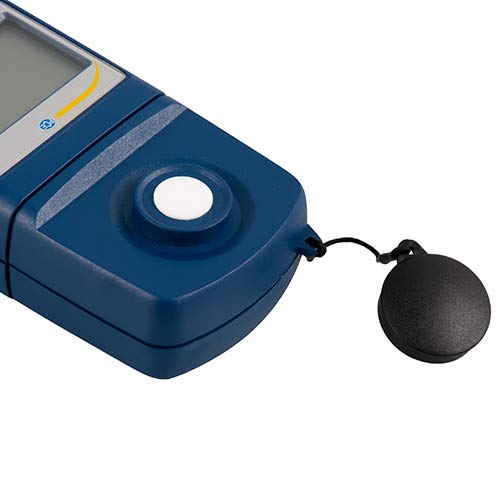
Ofbylding 3: Detaillearre view of the light sensor at the top of the device, with its protective cap removed.
4. Opsette
4.1 Batterij Ynstallaasje
- Sykje it deksel fan it batterijfak oan 'e efterkant fan it apparaat.
- Slide the cover open or unscrew it, depending on the model.
- Insert one 9V battery, observing the correct polarity (+/-).
- Ferfange de batterij compartment cover feilich.
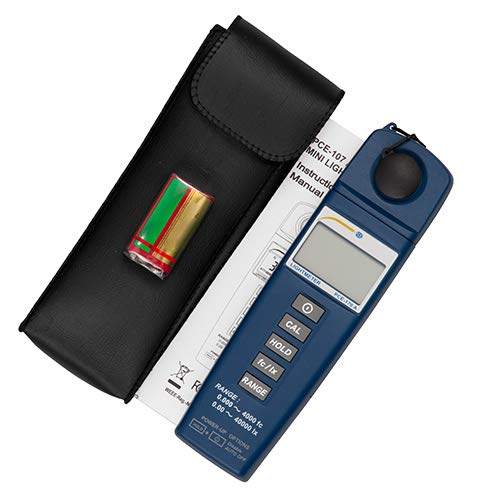
Ofbylding 4: The PCE-170 A Light Meter shown with its carrying case and the included 9V battery, ready for installation.
4.2 Initial Power-On
Druk op de Krêft button to turn on the device. The display will illuminate and show a reading. If the battery symbol appears, replace the battery.
5. Bedriuwsinstruksjes
5.1 In mjitting nimme
- Skeakelje it apparaat yn mei de Krêft knop.
- Ensure the light sensor is clean and unobstructed.
- Position the light sensor at the location where illuminance is to be measured. Ensure the sensor is facing the light source directly for accurate readings.
- The current illuminance value will be displayed on the LCD.

Ofbylding 5: A user measuring light levels in an office environment with the PCE-170 A Light Meter.
5.2 Changing Measurement Units (fc/lx)
Druk op de fc/lx button to toggle between foot-candles (fc) and lux (lx) units. The selected unit will be indicated on the display.
5.3 HOLD Funksje
Druk op de HÂLDE knop om de aktuele mjitting op it display te befriezen. Druk der nochris op om de wacht los te litten en de live mjittingen te hervatten.
5.4 Zero Adjustment (CAL)
Om in nuloanpassing út te fieren:
- Place the light sensor in a completely dark environment (e.g., cover it with the protective cap or place it in a dark box).
- Druk op de CAL button. The display should show "0.00" or a value very close to zero.
- If the display does not show zero, repeat the process.
5.5 Berikseleksje
The device typically operates in auto-ranging mode. To manually select a range or cycle through available ranges, press the BERIK button. The display will indicate the active range. Press and hold the BERIK button to return to auto-ranging mode.
5.6 Min/Max Function (Power-Up Option)
The PCE-170 A supports Min/Max recording. To activate this feature, refer to the power-up options indicated on the device label (e.g., press and hold a specific button during power-on). This function records the minimum and maximum illuminance values detected during a measurement session.
6. Underhâld
6.1 Cleaning
Wipe the device with a soft, dry cloth. Do not use abrasive cleaners or solvents. Keep the light sensor clean and free of dust or smudges, as this can affect measurement accuracy.
6.2 Opslach
When not in use, store the PCE-170 A Light Meter in its carrying case in a cool, dry place, away from direct sunlight and extreme temperatures. Remove the battery if storing for extended periods.
7. Probleemoplossing
| Probleem | Mooglike oarsaak | Oplossing |
|---|---|---|
| Apparaat docht net oan. | Deade of ferkeard ynstalleare batterij. | Kontrolearje de polariteit fan 'e batterij of ferfang de batterij troch in nije 9V-batterij. |
| It display lit "OL" (Oerbelêsting) sjen. | Light intensity exceeds the current measurement range. | Switch to a higher measurement range using the BERIK button, or move to a less intensely lit area. |
| Unkrekte lêzingen. | Dirty sensor, incorrect zero adjustment, or sensor not facing light source correctly. | Clean the sensor, perform zero adjustment in darkness, and ensure the sensor is properly oriented. |
| It skerm is leech of flikkert. | Lege batterij. | Ferfang de 9V batterij. |
8. Spesifikaasjes
| Parameter | Wearde |
|---|---|
| Measurement Ranges | 0.00 ... 40,000 lux / 0.000 ... 4000 fc |
| Resolúsje | 0.01 lux / 0.001 fc |
| Krektens | ±3% of measurement value + 5 digits |
| Overload Indicator | "OL" |
| Measurement Rate | Elke 2 sekonden |
| Operating Temperatuer | 0 ... 40°C / 32 ... 104°F |
| Ljocht Sensor | Silicon photodiode, corrected cosine angle |
| Skerm | 5-sifers LCD |
| Power Boarne | 9V batterij (ynbegrepen) |
| Ofmjittings | 33 x 54 x 196 mm / 1.3 x 2.1 x 7.7 yn |
| Gewicht | 180 g / <1 lb (approx. 9.17 ounces) |
8.1 Leveringsomfang
The standard delivery package includes:
- 1 x PCE-170 A Lux Meter
- 1 x 9V batterij
- 1 x Draagtas
- 1 x brûkershantlieding (dit dokumint)
9. Garânsje en stipe
PCE Instruments provides a warranty for this product against defects in materials and workmanship. For specific warranty terms and conditions, please refer to the warranty card included with your purchase or visit the official PCE Instruments website. For technical support, service, or calibration inquiries, please contact PCE Instruments customer service.
PCE Instruments US: Winkel besykje