
Ynlieding
This manual provides detailed instructions for the installation, configuration, and operation of your Multilaser RE085 Dual Band Wireless Router. Please read this guide carefully to ensure proper setup and optimal performance of your device. The RE085 router offers dual-band connectivity (2.4GHz and 5GHz) with speeds up to 750 Mbps, featuring three external antennas and four LAN ports for reliable network access.
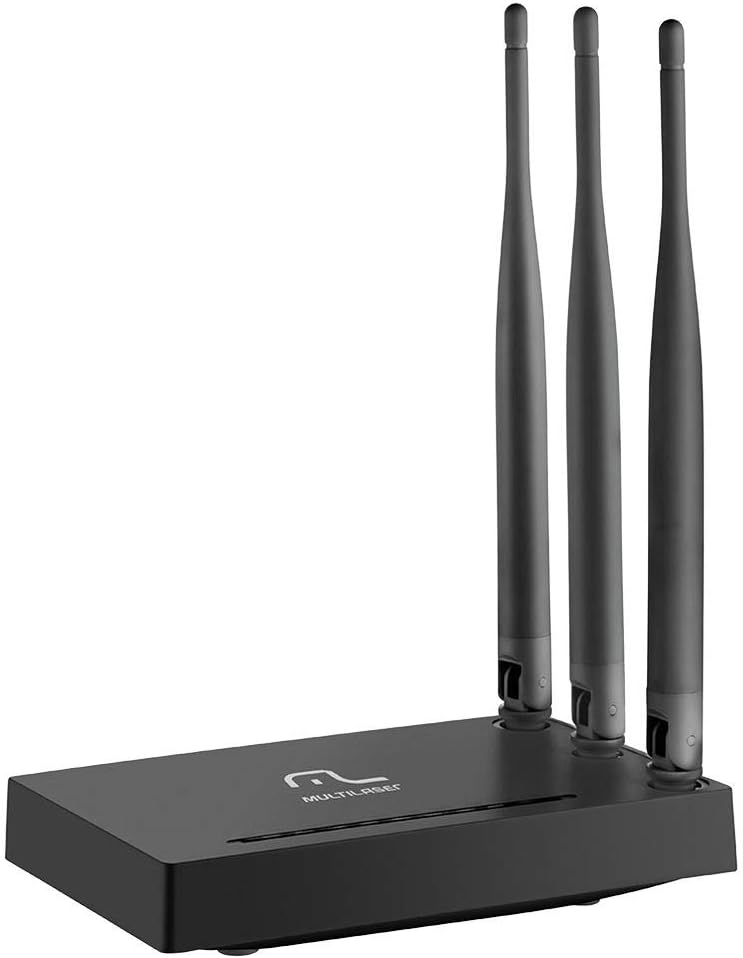
Ofbylding: Front view of the Multilaser RE085 router with its three external antennas in an upright position, showcasing syn kompakte ûntwerp.
Pakketynhâld
Foardat jo trochgean mei de ynstallaasje, kontrolearje asjebleaft oft jo pakket de folgjende items befettet:
- Multilaser RE085 Dual Band Wireless Router
- Stromadapter
- Ethernet Kabel
- Quick Installation Guide (this document serves as a comprehensive guide)
Opset en ynstallaasje
Follow these steps to set up your Multilaser RE085 router:
1. Fysike ferbining
- Posysje: Plak de router op in sintraal plak yn jo hûs of kantoar, fuort fan obstakels en apparaten dy't ynterferinsje feroarsaakje kinne (bygelyks, draadloze tillefoans, magnetrons).
- Ferbine de antennes: Ensure the three external antennas are securely attached and oriented for optimal signal coverage.
- Ferbine mei Power: Plug the power adapter into the router's power port and then into a wall outlet. The power indicator LED on the router should light up.
- Ferbine mei modem: Connect one end of the provided Ethernet cable to the WAN port (often colored differently, e.g., blue) on the Multilaser RE085 router. Connect the other end to the LAN port on your modem or existing internet source.
- Apparaten ferbine (opsjoneel): For wired connections, connect one end of an Ethernet cable to any of the four LAN ports (usually yellow) on the router and the other end to your computer or other network device.

Ofbylding: Efterkant view of the Multilaser RE085 router, highlighting the WAN port (typically blue) and four yellow LAN ports for wired connections.
2. Inisjele konfiguraasje (Web Ynterface)
- Ferbine mei router: Connect your computer to the router either via an Ethernet cable (to a LAN port) or wirelessly using the default Wi-Fi network name (SSID) printed on the router's label.
- Tagong Web Browser: Iepenje a web browser (bygelyks Chrome, Firefox, Edge) en typ it standert IP-adres fan 'e router yn 'e adresbalke. Dit is typysk
192.168.0.1or192.168.1.1Sjoch it label op jo router foar it krekte adres. - Oanmelde: Fier de standert brûkersnamme en wachtwurd yn. Algemiene standertynstellingen binne
adminfor both username and password. If these do not work, check the router's label or the quick installation guide. - Ynstellingswizard útfiere: Upon successful login, you will likely be prompted to run a Quick Setup Wizard. Follow the on-screen instructions to configure your internet connection type (e.g., PPPoE, Dynamic IP, Static IP). Your Internet Service Provider (ISP) can provide this information if you are unsure.
- Draadloze ynstellings konfigurearje:
- SSID (Netwurknamme): Change the default Wi-Fi network names for both 2.4GHz and 5GHz bands to something unique and easily identifiable.
- Password (Security Key): Set a strong, secure password for each Wi-Fi network. Use a combination of uppercase and lowercase letters, numbers, and symbols.
- Feiligens type: WPA2-PSK (AES) is recommended for optimal security.
- Ynstellings bewarje: After configuring, save your settings. The router may restart to apply the changes.
Operating Instructions
Once your Multilaser RE085 router is set up, you can connect your devices and manage your network.
Ferbine apparaten
- Draadloze apparaten: On your smartphone, tablet, laptop, or smart TV, search for available Wi-Fi networks. Select the SSID you configured (e.g., "MyHomeNetwork_2.4GHz" or "MyHomeNetwork_5GHz") and enter the password.
- Bedrade apparaten: Connect devices like desktop computers, gaming consoles, or smart TVs directly to the router's LAN ports using Ethernet cables for a stable and fast connection.
Dual Band Funksjonaliteit
The RE085 supports both 2.4GHz and 5GHz wireless bands:
- 2.4GHz Band: Offers wider coverage and better penetration through walls, suitable for general internet use, browsing, and devices further away from the router.
- 5GHz Band: Provides faster speeds and lower latency, ideal for bandwidth-intensive activities like online gaming, 4K video streaming, and devices closer to the router.
You can connect different devices to the band that best suits their needs and location.
Gast netwurk
The router allows you to create up to 6 additional guest networks. This feature provides internet access to guests while isolating them from your main network, enhancing security. Access the router's web interface to configure guest networks.
Repeater Funksje
The Multilaser RE085 can also function as a wireless repeater, extending the range of an existing Wi-Fi network. Refer to the advanced settings in the router's web interface for repeater mode configuration.
Ûnderhâld
Regelmjittich ûnderhâld helpt de lange libbensdoer en optimale prestaasjes fan jo router te garandearjen.
- Regelmjittich opnij starte: Periodically restart your router (unplug from power for 10 seconds, then plug back in) to clear its memory and refresh network connections. This can resolve minor performance issues.
- Firmware -updates: Check the Multilaser official website for firmware updates. Keeping your router's firmware up-to-date can improve performance, add new features, and enhance security. Follow the instructions provided by Multilaser carefully when performing updates.
- Fysike skjinmeitsjen: Keep the router free from dust. Use a soft, dry cloth to gently clean the exterior. Ensure ventilation holes are not blocked.
- Wachtwurdbehear: Change your Wi-Fi and router login passwords periodically for enhanced security.
Troubleshooting
If you encounter issues with your Multilaser RE085 router, try the following troubleshooting steps:
Gjin ynternetferbining
- Kontrolearje kabels: Ensure all Ethernet cables (WAN, LAN) are securely connected to both the router and your modem/devices.
- Kontrolearje modem: Verify that your modem is working correctly and has an active internet connection. Try restarting your modem.
- Routerstatusljochten: Check the LED indicators on the front of the router. The internet/WAN light should be solid or blinking, indicating an active connection.
- Router opnij starte: Power cycle the router (unplug, wait 10 seconds, plug back in).
- Ynstellings foar ynternetprovider: Confirm your internet connection type and settings (PPPoE, Dynamic IP, Static IP) in the router's web interface match those provided by your ISP.
Weak or Unstable Wi-Fi Signal
- Routerpleatsing: Ferpleats de router nei in sintraler lokaasje, fuort fan muorren, grutte metalen objekten en oare elektroanyske apparaten dy't ynterferinsje feroarsaakje kinne.
- Antenne Oriïntaasje: Adjust the antennas for better signal direction.
- Band seleksje: For devices closer to the router, try connecting to the 5GHz band for faster speeds. For devices further away, the 2.4GHz band might offer better range.
- Ynterferinsje: Identify and minimize sources of interference (e.g., microwaves, cordless phones, Bluetooth devices).
- Kanaal seleksje: Yn 'e router syn web interface, try changing the Wi-Fi channel for both 2.4GHz and 5GHz bands to a less congested one.
Forgotten Wi-Fi Password or Router Login Password
- Check Router Label: The default Wi-Fi password and router login credentials are often printed on a label on the bottom or back of the router.
- Weromsette nei fabrieksstanderts: If you cannot access the router's web interface or have forgotten your Wi-Fi password and cannot retrieve it, you may need to perform a factory reset. Locate the small reset button (often recessed) on the router. With the router powered on, use a paperclip or pin to press and hold the reset button for about 10-15 seconds until the lights flash. The router will restart with its factory default settings, including default Wi-Fi names and passwords. You will then need to reconfigure it from scratch.
Spesifikaasjes
Key technical specifications for the Multilaser RE085 Dual Band Wireless Router:
| Eigenskip | Spesifikaasje |
|---|---|
| Merk | Multilaser |
| Model Number | RE085 |
| Triedleaze kommunikaasje standert | 802.11ac |
| Frekwinsje Band Klasse | Dual-Band (2.4GHz & 5GHz) |
| Data Transfer Rate | Oant 750 megabits per sekonde |
| Oantal havens | 4 (LAN) |
| Konnektivität Technology | Wi-Fi |
| Kompatibele apparaten | Gaming Consoles, Tablets, Smart Televisions |
| Oanrikkemandearre gebrûk | Thús |
Garânsje en stipe
For warranty information, technical support, or further assistance, please refer to the official Multilaser webside of nim direkt kontakt op mei harren klanttsjinst. Bewarje jo oankeapbewiis as bewiis fan oankeap foar garânsjeclaims.
Multilaser Official Website: www.multilaser.com.br