
1. Ynlieding
The Victron Energy SmartSolar MPPT 100/20 is an advanced solar charge controller designed to maximize energy harvest from solar panels and efficiently charge batteries. It features Maximum Power Point Tracking (MPPT) technology to ensure optimal power output, even under varying light conditions. Integrated Bluetooth allows for convenient monitoring and configuration via the VictronConnect app.
Key Features:
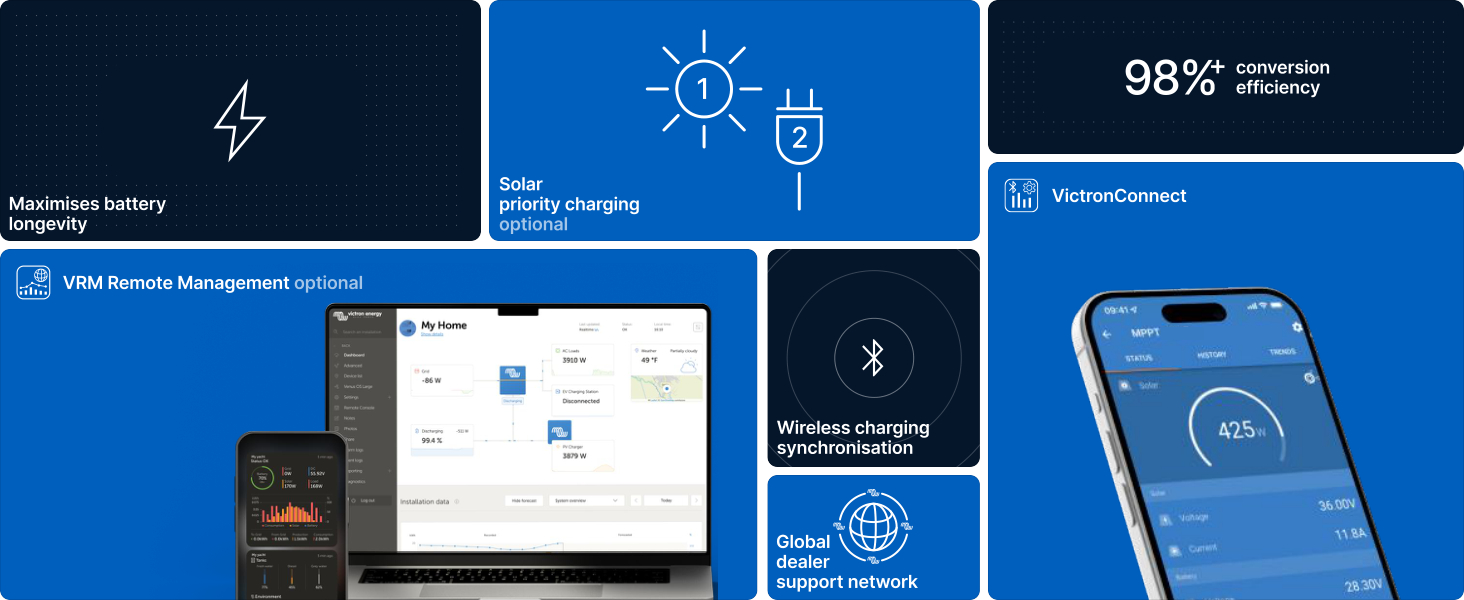
- Smart Solar Charging: Optimizes battery longevity by converting available sunlight into usable energy.
- Maksimum Power Output: Lightning-fast MPPT ensures maximum power, even with partial shading.
- Synchronized Charging: Multiple SmartSolar MPPT controllers can synchronize for system-wide energy optimization.
- Bluetooth-ferbining: Use the VictronConnect app for real-time data, 30-day performance history, configuration, and firmware updates.
- Intelligent Load Output: Directly power devices with configurable voltage disconnects to protect batteries.
2. Safety Information
Please read all safety instructions before installing or operating the device. Failure to follow these instructions may result in electric shock, fire, or serious injury.
- Elektryske feiligens: Installation must be performed by qualified personnel. Ensure all power sources are disconnected before making any connections.
- Batterijfeiligens: Work in a well-ventilated area. Wear eye protection and protective clothing. Avoid short-circuiting battery terminals.
- Overcurrent beskerming: Ensure proper fusing is in place for both solar and battery circuits as specified in the installation guide.
- Ventilaasje: Soargje foar foldwaande luchtstream om it apparaat hinne om oerferhitting te foarkommen.
- Miljeubetingsten: Do not expose the device to water, excessive humidity, or extreme temperatures outside its operating range.
3. Package Ynhâld
Kontrolearje oft alle items yn it pakket oanwêzich binne:
- Victron Energy SmartSolar MPPT 100/20 Solar Charge Controller
- User Manual (dit dokumint)
4. Ynstallaasje en Ferbinings
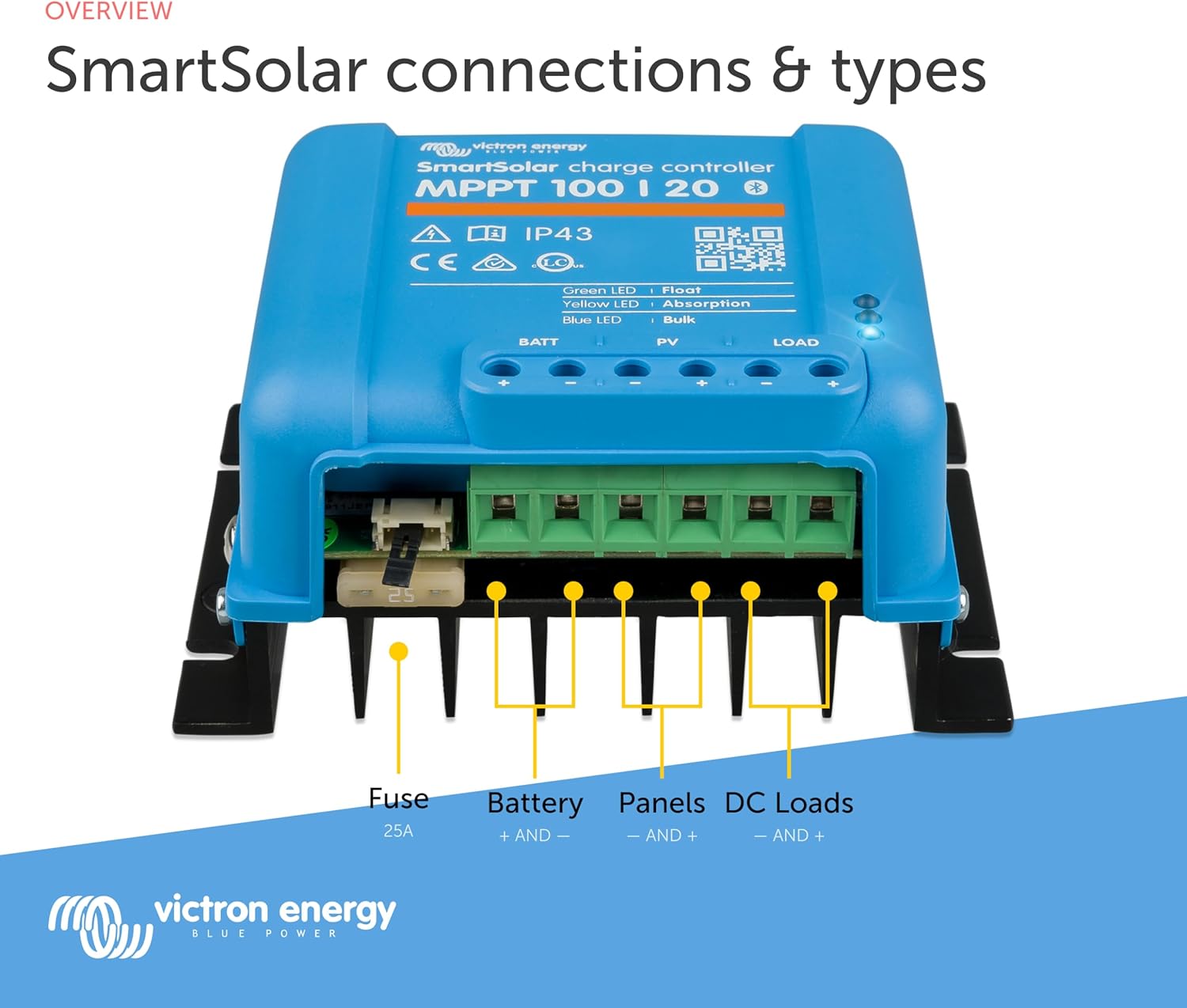
Proper installation is crucial for the safe and efficient operation of your SmartSolar MPPT controller. Refer to the detailed wiring diagram below for connection points.
Montage:
Mount the controller vertically on a non-flammable surface, ensuring sufficient clearance for ventilation. Avoid direct sunlight exposure to prevent overheating.
Wiring Sequence:
- Connect the battery to the BATT terminals. Ensure correct polarity.
- Connect the solar panels to the PV terminals. Ensure correct polarity.
- Connect DC loads to the LOAD terminals (optional). Ensure correct polarity.
Always connect the battery first and disconnect the solar panels first when disassembling.
5. Bedriuwsinstruksjes
The SmartSolar MPPT controller operates automatically once correctly installed. For monitoring and advanced configuration, use the VictronConnect app.
Bluetooth Connectivity and VictronConnect App:
The integrated Bluetooth module allows wireless connection to your smartphone or tablet via the VictronConnect app. This app provides access to real-time data, historical performance, and settings.
- Download the VictronConnect app from your device's app store.
- Soargje derfoar dat Bluetooth ynskeakele is op jo smartphone/tablet.
- Open the VictronConnect app and select your SmartSolar MPPT device from the list.
- If prompted, enter the default PIN (usually 000000).
Fia de app kinne jo:
- Monitor batterij voltage, solar power, charge current, and load status.
- View 30-day historical data.
- Configure battery presets (e.g., Lithium, Lead-acid, AGM, Gel, Flooded).
- Adjust charge settings and set alarms.
- Update firmware.

Oplaadmodi:
The controller automatically manages the charging process through several stages to optimize battery health and lifespan:
- Bulk: Maximum current is delivered to rapidly charge the battery.
- Absorpsje: Voltage is held constant to fully charge the battery and balance cells.
- Driuwe: Voltage is reduced to a lower level to maintain the battery at full charge.
- Opslach: A slightly lower float voltage to minimize gassing and corrosion for batteries in storage.
6. Underhâld
The SmartSolar MPPT controller is designed for minimal maintenance. Regular checks can help ensure optimal performance and longevity.
- Visuele ynspeksje: Periodically inspect the unit for any signs of damage, loose connections, or corrosion.
- Netheid: Keep the unit clean and free from dust and debris. Use a dry cloth for cleaning. Do not use solvents or abrasive cleaners.
- Ventilaasje: Soargje derfoar dat de koelribben net blokkearre binne, sadat de waarmte goed ôffierd wurde kin.
- Firmware -updates: Regularly check for and install firmware updates via the VictronConnect app to benefit from improvements and new features.
7. Probleemoplossing
If you encounter issues with your SmartSolar MPPT controller, refer to the following common troubleshooting steps:
- Gjin stroom/gjin werjefte: Check all wiring connections, especially the battery connection and fuse. Ensure the battery voltage is binnen it wurkgebiet.
- Low Solar Output: Verify solar panel connections and ensure panels are clean and not shaded. Check for proper panel voltage using the VictronConnect app.
- Batterij net opladen: Confirm battery type settings in the VictronConnect app match your battery. Check battery health and connections.
- Problemen mei Bluetooth-ferbining: Ensure the controller is powered on and within range. Restart the VictronConnect app and your device's Bluetooth.
- Oververhitting: Ensure adequate ventilation around the unit. Reduce load if necessary.
For more detailed troubleshooting or persistent issues, consult the comprehensive manual available on the Victron Energy website of nim kontakt op mei klantstipe.
8. Spesifikaasjes
Technical specifications for the Victron Energy SmartSolar MPPT 100/20 Solar Charge Controller:
| Spesifikaasje | Wearde |
|---|---|
| Merk | De bedriuw Victorron Energy |
| Model | SmartSolar MPPT 100/20 |
| Voltage | 100 Volts (Max PV open circuit voltage) |
| Max Charge Aktuele | 20 Amps |
| Batterij Voltage | 12/24/48 Volts (Auto-select) |
| Item Gewicht | 1.6 pûn (sawat 0.73 kg) |
| Display Type | None (Bluetooth for app display) |
| UPC | 859042007061 |
| ASIN | B07FCSTM43 |

9. Garânsje en stipe
Victron Energy products are manufactured to high standards and come with a standard warranty. For specific warranty terms and conditions, please refer to the documentation included with your product or visit the official Victron Energy website.
For technical support, product information, or service inquiries, please visit the Victron Energy Store on Amazon of harren offisjele website.
10. Produktfideo's
Watch these official videos for additional information on the Victron Energy SmartSolar MPPT controller and related systems.
VRM: Victron Remote Management Portal
Video: This video demonstrates the Victron Remote Management (VRM) portal, showcasing how users can monitor and manage their Victron Energy systems remotely from various devices, including smartphones and laptops. It highlights features like system performance tracking, device management, and programmable alerts and alarms.
VictronConnect App for Monitoring Performance
Fideo: Dizze fideo jout in oersjochview of the VictronConnect app, detailing its capabilities for instant monitoring of key data, viewing device performance, easy configuration, and firmware updating for Victron Energy products.