
Canyon CND-GPW5
Canyon Gaming Gamepad CND-GPW5 Wireless with Touchpad User Manual
Model: CND-GPW5
Ynlieding
This manual provides comprehensive instructions for the Canyon Gaming Gamepad CND-GPW5, a wireless controller designed for PlayStation 4 with an integrated touchpad. Please read this manual carefully before using the product to ensure proper operation and to maximize your gaming experience.

Ofbylding: Front view of the Canyon Gaming Gamepad CND-GPW5, showcasing its ergonomic design, dual analog sticks, directional pad, action buttons, and central touchpad.
Pakketynhâld
- Canyon Gaming Gamepad CND-GPW5
- USB-oplaadkabel
- User Manual (dit dokumint)

Image: The Canyon Gaming Gamepad CND-GPW5 displayed within its retail packaging, highlighting key features like wireless connectivity, touchpad, and vibration feedback.
Opsette
1. It opladen fan 'e gamepad
- Connect the small end of the USB charging cable to the charging port on the gamepad.
- Connect the larger end of the USB charging cable to a USB port on your PlayStation 4 console or a compatible USB wall adapter.
- The indicator light on the gamepad will illuminate to show it is charging. It will turn off or change color when fully charged.
2. Koppelje mei PlayStation 4
- Soargje derfoar dat jo PlayStation 4-konsole oan is.
- For initial pairing, connect the gamepad to the PS4 console using the USB charging cable.
- Druk op de PS knop (located in the center of the gamepad). The gamepad will power on and automatically pair with the console.
- Sadree't it keppele is, kinne jo de USB-kabel loskeppelje foar draadloos spieljen.
- To pair wirelessly after initial setup, simply press the PS knop on the gamepad. It will attempt to connect to the last paired console.
Operating Instructions
Gamepad Layout and Functions

Ofbylding: Efterkant view of the Canyon Gaming Gamepad CND-GPW5, showing the M1, M2, M3, and M4 programmable buttons, along with regulatory information.
- Analoge stokken: Used for precise movement and camera control.
- Rjochtingspad (D-Pad): Foar menunavigaasje en spesifike aksjes yn it spul.
- Aksjeknoppen (Trijehoek, Sirkel, Krús, Fjouwerkant): Perform various in-game actions.
- Skouderknoppen (L1, R1) en Triggers (L2, R2): For aiming, firing, and other contextual actions.
- PS-knop: Powers on the gamepad, accesses the PS4 home menu, and switches users.
- Knop DIEL: Shares screenshots and video clips.
- OPSJES Knop: Jout tagong ta menu's en opsjes yn it spul.
- Touchpad: Functions as a clickable surface for navigation and specific game interactions.
- M1, M2, M3, M4 Knoppen: These are additional programmable buttons located on the rear of the gamepad. Refer to your game's settings or the PS4 system settings for customization options.
Vibraasje Feedback
The gamepad features vibration feedback to enhance immersion during gameplay. This function is automatically enabled when supported by the game.
Ûnderhâld
Cleaning
- Wipe the gamepad with a soft, dry cloth.
- Do not use liquid cleaners, solvents, or abrasive materials, as these can damage the surface and internal components.
Opslach
- Bewarje de gamepad op in koel, droech plak, fuort fan direkt sinneljocht en ekstreme temperatueren.
- Avoid placing heavy objects on the gamepad.
Batterij Soarch
- To prolong battery life, avoid fully discharging the gamepad frequently.
- If storing for an extended period, charge the gamepad to approximately 50% before storage.
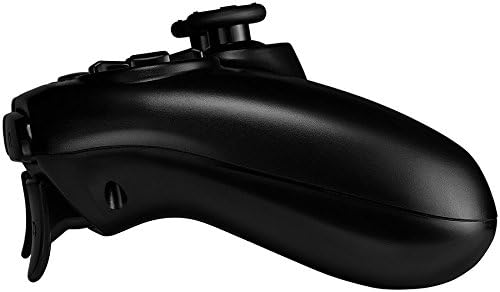
Ofbylding: Side profile of the Canyon Gaming Gamepad CND-GPW5, illustrating its contoured grip and trigger button placement.
Troubleshooting
- Gamepad ferbynt net:
- Ensure the gamepad is charged.
- Connect the gamepad to the PS4 console with the USB cable and press the PS button to re-establish connection.
- Kontrolearje op ynterferinsje fan oare draadloze apparaten.
- Buttons or analog sticks unresponsive:
- Restart the gamepad by holding the PS button for 10 seconds, then press it again to power on.
- Ensure the gamepad's firmware is up to date (check Canyon's official website for updates if available).
- Oplaadproblemen:
- Try a different USB cable or USB port on the console/adapter.
- Ensure the charging port on the gamepad is clean and free of debris.
If problems persist, please refer to the support section or contact Canyon customer service.
Spesifikaasjes
| Eigenskip | Detail |
|---|---|
| Model Number | CND-GPW5 (Item Model Number: 9598241) |
| Konnektivität | Wireless |
| Kompatibiliteit | PlayStation 4 |
| Features | Touchpad, Vibration Feedback |
| Batterij | 1 Lithium-ion battery (required) |
| Produkt Ofmjittings (L x B x H) | 50 x 50 x 28 sm |
| Gewicht | 224 gram |
| ASIN | B07G37JCMC |
| Release Date | 1 july 2020 |
Garânsje en stipe
For information regarding warranty coverage, please refer to the warranty card included with your product or visit the official Canyon website. For technical support or further assistance, please contact Canyon customer service through their official support channels.
Official Canyon Website: https://canyon.eu/