
TOUMEI C800S
TOUMEI C800S Mini Portable Projector User Manual
Model: C800S
Ynlieding
Tankewol foar de oankeapasing the TOUMEI C800S Mini Portable Projector. This manual provides essential information for setting up, operating, and maintaining your device. Please read it thoroughly before use to ensure optimal performance and longevity of your projector.
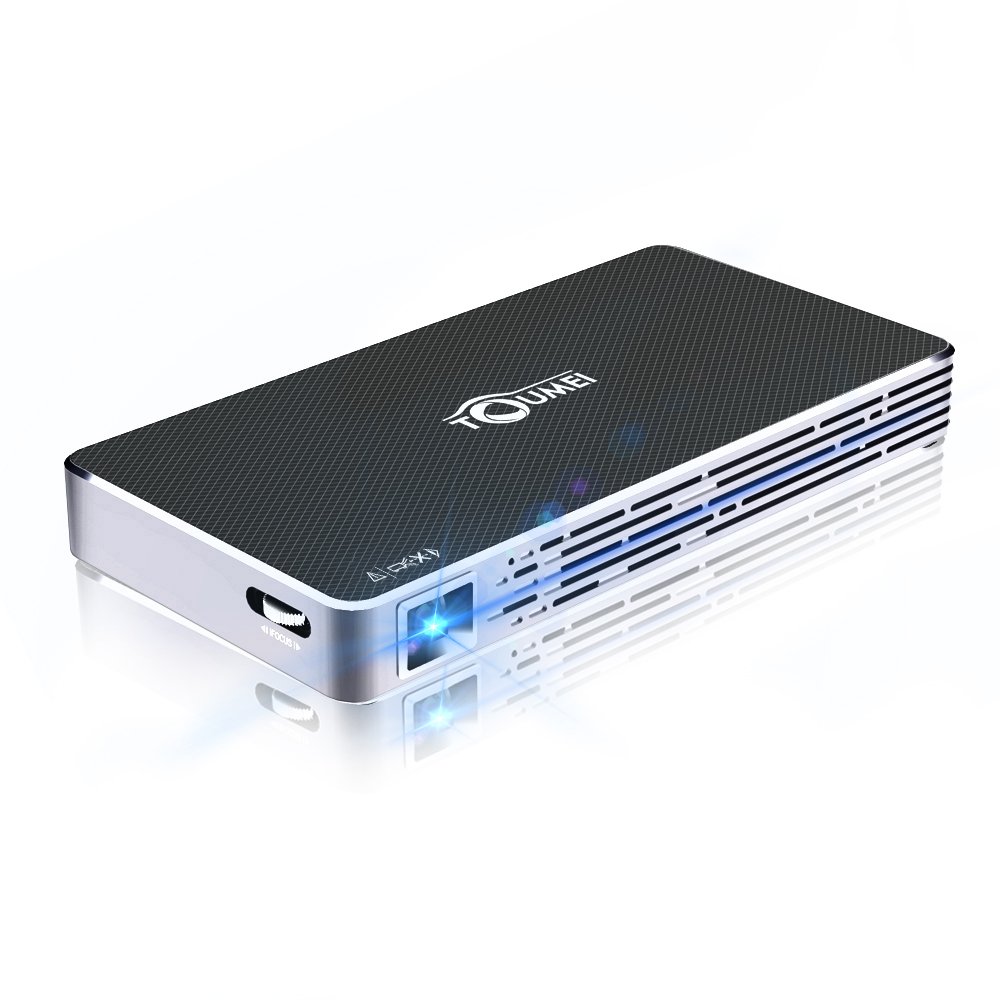
Image: The TOUMEI C800S Mini Portable Projector, showcasing its compact design and projection lens.
Pakketynhâld
Soargje derfoar dat alle items yn it pakket oanwêzich binne:
- TOUMEI C800S DLP Projector
- Streamtafier
- Remote Control
- Mini tripod
- HDMI Kabel
- Wolkomgids (dizze hantlieding)
Produkt oerview
Familiarize yourself with the main components and features of your TOUMEI C800S projector.
Key Features:
- DLP Projection Technology
- Automatyske keystone korreksje
- LED Light Source with up to 30,000 hours lifespan
- Android 7.1 bestjoeringssysteem
- 2.4G / 5G Dual-band WiFi and Bluetooth Connectivity
- Ynboude Stereo Speaker
- 4200mAh Lithium-ion Battery for portable use
- Support for HDMI, USB, TF Card inputs
Opsette
1. Oan- / útskeakelje
- Om oan te setten: Connect the power supply to the projector and a power outlet. Press and hold the power button on the projector or remote control until the device powers on.
- Om út te skeakeljen: Press and hold the power button until the shutdown options appear, then select "Power Off". Alternatively, a short press might initiate shutdown depending on settings.
2. Initial Setup and Focus Adjustment
- Place the projector on a stable surface or mount it using a tripod.
- Point the projector towards a flat, light-colored wall or projection screen.
- Adjust the focus using the focus wheel located on the side of the projector until the image is clear and sharp.
- The projector features automatic keystone correction to adjust for distorted images when the projector is not perfectly perpendicular to the screen.
3. Netwurkferbining (Wi-Fi)
- Navigearje nei it menu "Ynstellings" op 'e ynterface fan' e projektor.
- Selektearje "Wi-Fi" en skeakelje it yn.
- Kies jo winske 2.4G- of 5G Wi-Fi-netwurk út 'e list.
- Fier it Wi-Fi-wachtwurd yn mei it toetseboerd op it skerm en befêstigje.
Operating Instructions
1. Connecting to iOS Devices (Airplay)
- Ensure the projector's Wifidisplay application is updated to the latest version. Open Wifidisplay on the projector's desktop; it will prompt for updates automatically.
- Connect both your iPhone/iPad and the TOUMEI C800S projector to the itselde Wi-Fi-netwurk.
- Open the Wifidisplay application on the projector.
- On your iOS device, open Control Center and tap "Screen Mirroring" (or "AirPlay Mirroring").
- Select the name of your projector from the list of available devices to begin mirroring.
2. Connecting to Android Devices (Multiscreen)
- Ensure both your Android device and the TOUMEI C800S projector are connected to the itselde Wi-Fi-netwurk.
- On the projector, open the Wifidisplay application (Menu -> Wifidisplay -> click to enter the app). The system will automatically search for mobile phone models.
- On your Android device, open the "Multiscreen" (or "Smart View", "Screen Cast", "Wireless Display" depending on your device model) feature. Your mobile model will be searched for on the projector.
- Select the projector's name from the list on your Android device and confirm the connection.
3. Connecting via HDMI
- Ferbine it iene ein fan 'e HDMI-kabel mei de HDMI-poarte op 'e projektor.
- Connect the other end of the HDMI cable to the HDMI output port of your source device (e.g., laptop, gaming console, TV box).
- On the projector, select the HDMI input source from the main menu or input selection option.
4. Connecting via USB/TF Card
- Insert your USB drive or TF card into the respective port on the projector.
- The projector's file manager will typically open automatically, allowing you to browse and play media files (videos, photos, documents) directly from the storage device.
Ûnderhâld
1. De projektor skjinmeitsje
- Lins: Brûk in sêfte, pluisfrije doek dy't spesifyk ûntworpen is foar optyske lenzen. Feie de lens foarsichtich ôf yn in sirkelfoarmige beweging. Brûk gjin skurende reinigingsmiddels of tefolle krêft.
- Casing: Wiskje de bûtenkant casinmei in sêfte, droege doek. Foar koppige plakken, in bytsje dampen the cloth with water. Avoid using chemical cleaners.
- Fentilaasjes: Periodically check the ventilation vents for dust accumulation. Use a soft brush or compressed air (held upright and at a distance) to clear any blockages. Ensure the projector is turned off and unplugged before cleaning vents.
2. Opslach
As de projektor foar langere perioaden net brûkt wurdt, bewarje it dan op in koel, droech plak, fuort fan direkt sinneljocht en ekstreme temperatueren. Brûk de orizjinele ferpakking of in beskermjende hoes om stof en skea te foarkommen.
3. Batterij Soarch
- Om de libbensdoer fan 'e batterij te ferlingjen, foarkom it faak folslein ûntladen fan 'e batterij.
- As jo it foar lange tiid opslaan, laad de batterij dan op oant sawat 50% foardat jo it opslaan.
- Recharge the battery every 3-6 months if not in use to prevent deep discharge.
Troubleshooting
| Probleem | Mooglike oarsaak | Oplossing |
|---|---|---|
| Gjin ôfbylding projektearre | Power not connected; Projector off; Incorrect input source; Lens cap on. | Check power connection; Turn on projector; Select correct input (HDMI, USB, etc.); Remove lens cap. |
| Ofbylding is wazig | Fokus net oanpast; Projektor te ticht/fier fan it skerm. | Adjust the focus wheel; Adjust projection distance (1-5M). |
| Gjin lûd | Volume too low; Muted; External speakers not connected properly; Source device volume low. | Increase projector volume; Unmute; Check external speaker connection; Increase source device volume. |
| Kin gjin ferbining meitsje mei Wi-Fi | Incorrect password; Out of range; Network issue. | Re-enter password carefully; Move projector closer to router; Restart router and projector. |
| Skermspegeljen wurket net | Devices on different networks; Wifidisplay app not open/updated; Device compatibility. | Ensure both devices are on the same Wi-Fi; Open/update Wifidisplay app; Check device's mirroring function. |
Spesifikaasjes
| Eigenskip | Detail |
|---|---|
| Projection Technique | DLP |
| Ljocht Boarne | LED |
| LED Lifespan | Oant 30,000 oeren |
| Helderheid | 100 ANSI lumen |
| Kontrast Ratio | 2000:1 |
| Native Resolúsje | 854 x 480 piksels |
| Projecting Distance | 1 - 5 meter |
| Projecting Image Size | 30 - 120 inch |
| Keystone korreksje | Automatysk |
| Bestjoeringssysteem | Android 7.1 (support upgrade) |
| Wi-Fi | 2.4G / 5G Dual-band |
| Bluetooth | Stipe |
| Ynterne opslach | 8GB |
| TF-kaartstipe | Oant 32GB |
| Batterij | 4200mAh Lithium-ion |
| Wurktiid (Batterij) | Ca. 150 minuten |
| Standby Time (Battery) | 4 oeren |
| Audio | Ynboude Stereo Speaker |
| Ynput Schnittstellen | HDMI, USB, TF Card |
| Ofmjittings (L x B x H) | 15.8 x 8 x 1.8 sm |
| Gewicht | 285 gram |
Garânsje en stipe
TOUMEI provides a worry-free 18-month warranty for the C800S DLP projector. For technical support, warranty claims, or any inquiries, please contact TOUMEI customer service through the official channels provided at the time of purchase or on the TOUMEI website.
Bewarje jo oankeapbewiis foar garânsjevalidaasje.
Ask a question about this manual
Ask about setup, troubleshooting, compatibility, parts, safety, or missing instructions. Manuals+ will review the question and use this page’s manual context to help answer it.