
Ynlieding
The MUSKY DY28 is a versatile device combining a Bluetooth speaker, smart touch lamp, alarm clock, and MP3 player into a single unit. This manual provides instructions for its setup, operation, and maintenance to ensure optimal performance.
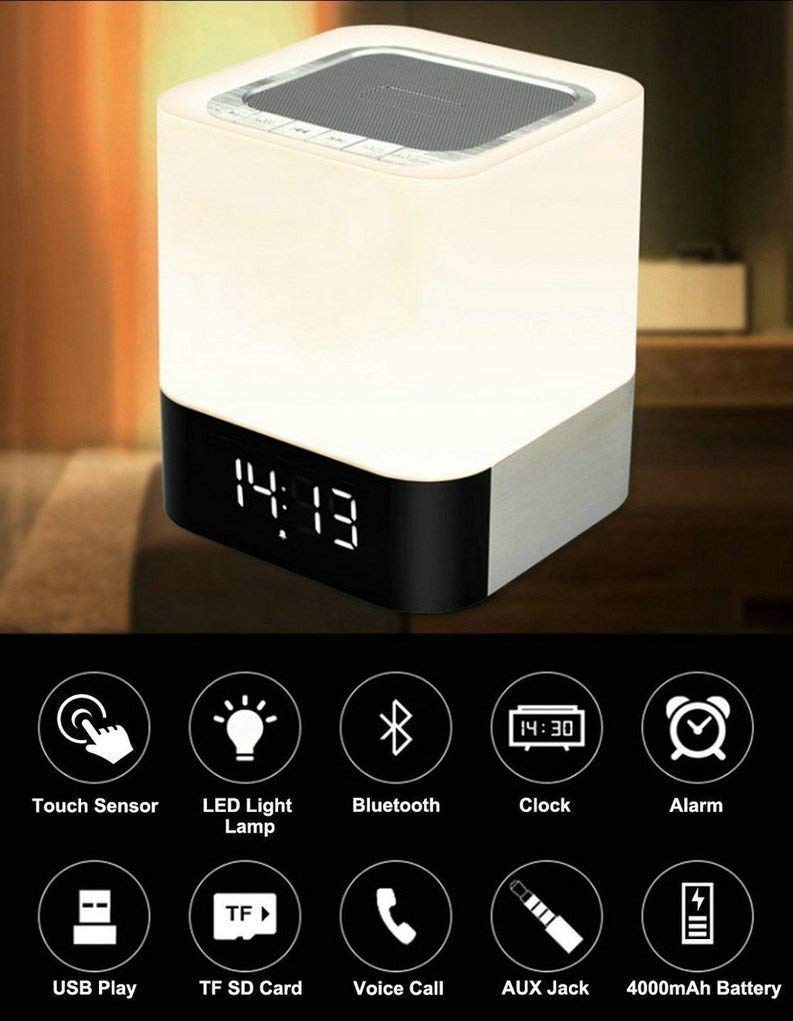
Image: The MUSKY DY28 device, showcasing its integrated clock display and touch-sensitive light panel.
Box Ynhâld
- MUSKY DY28 Bluetooth Speaker
- User Manual
- Oplaadkabel
Produkt Features
- Multifunksjoneel: Bluetooth speaker, smart touch lamp, alarm clock, and MP3 player.
- Bluetooth 4.0: Easy and stable connection with Bluetooth-enabled devices.
- Ferstelber LED-ljocht: Warm LED light with adjustable brightness (Max 20 Lumen) via touch sensor.
- Digital Clock & Alarm: Big digit 12/24H alarm clock with calendar, alarm, and sleep mode functions.
- Meardere ôfspielmodi: Supports MP3 playback via USB, micro TF/SD Card, and 3.5mm AUX input.
- Audio kwaliteit: 5W single acoustic driver with enhanced passive low-frequency radiator for clear sound and solid bass.
- Lange batterijlibben: Built-in 4000mAh battery provides up to 15 hours of lighting or 9 hours of music playback (depending on usage).
- Handsfree skilje: Yntegreare mikrofoan foar it beantwurdzjen fan oproppen.
Opsette
1. It opladen fan it apparaat
Before first use, fully charge the speaker. Connect the provided USB charging cable to the charging port on the device and to a standard USB power adapter (not included) or a computer's USB port. The charging indicator will show the charging status.
2. Power On / Off
Locate the Power On/Off switch on the device. Slide the switch to the 'ON' position to power on the speaker. Slide it to 'OFF' to power off.
3. Bluetooth-keppeling
- Ensure the speaker is powered on and in Bluetooth mode (indicated by a flashing blue light or voice prompt).
- Op jo mobyl apparaat, ynskeakelje Bluetooth en sykje nei beskikbere apparaten.
- Select 'MUSKY DY28' from the list of devices.
- Once paired, the speaker will indicate a successful connection (e.g., solid blue light or voice prompt).
4. Tiid en alarm ynstelle
Refer to the detailed control diagram for button locations. Use the 'Mode' button to cycle through functions until the clock setting is displayed. Use the 'Previous' and 'Next' buttons to adjust hours and minutes, and the 'Play/Pause' button to confirm. For alarm settings, follow a similar procedure, activating the alarm function and setting the desired time.

Ofbylding: Detaillearre view of the MUSKY DY28's control panel, highlighting buttons for power, charging, audio inputs, playback, volume, and the touch sensor.
Operating Instructions
1. Muzyk Wiedergabe
The DY28 supports multiple music sources:
- Bluetooth-modus: After successful pairing, play music from your connected device. Use the speaker's 'Play/Pause', 'Previous', and 'Next' buttons to control playback.
- USB-ynfier: Fier in USB flash drive mei MP3 files yn 'e USB-poarte. De sprekker sil automatysk oerskeakelje nei USB-modus en begjinne mei it ôfspyljen.
- Micro TF/SD Card: Insert a micro TF/SD card with MP3 files into the Micro SD Slot. The speaker will automatically switch to TF/SD card mode and play music.
- AUX-ynfier: Connect an external audio device using a 3.5mm AUX cable to the AUX port. The speaker will switch to AUX mode. Control playback from your external device.

Image: Visual guide demonstrating the three primary ways to play music on the DY28: via Bluetooth, Micro SD card, and USB drive.
2. Ljochtoperaasje
The top panel of the speaker features a touch sensor for controlling the LED light. Tap the touch sensor to turn the light on/off and cycle through different brightness levels. The light offers a warm glow suitable for various environments.

Image: The MUSKY DY28 speaker illuminated, serving as a night light with its digital clock display visible in a low-light environment.
3. Wekkerfunksjes
Once the alarm is set, it will sound at the designated time. To snooze, tap the touch sensor. To turn off the alarm, press the 'Mode' button or power off the device. The sleep mode feature allows the lamp and speaker to automatically turn off after a set period.
4. Hannenfrij skilje
When a call comes in while connected via Bluetooth, the speaker will ring. Press the 'Play/Pause' button to answer the call. Press it again to end the call. The integrated microphone allows for hands-free conversation.
Spesifikaasjes
| Eigenskip | Detail |
|---|---|
| Merk | MUSKY |
| Model Number | DY28 |
| Konnektivität Technology | Hulp, Bluetooth, USB |
| Wireless Technology Type | Bluetooth |
| Mounting Type | Tabletop Mount |
| Speaker Type | Boekeplank |
| Produkt Features | Light for emergency use |
| Controller Type | Touchpad |
| Control Metoade | Oanreitsje |
| Kleur | Wyt |
| Batterij Kapasiteit | 4000mAh (ynboud) |
| Battery Life (Lighting) | Oant 15 oeren |
| Batterijlibben (Muzykôfspiel) | Oant 9 oeren |
| Oplaadtiid | 2-4 oeren |
| Bluetooth berik | 33ft / 10 meter |
| Power Boarne | Batterij Powered |
| Oantal audiokanalen | 5 watt |
| Is Waterproof | WIER |
| Item Gewicht | 700g wy |
| Kompatibele apparaten | MP3 Player, Smartphone, Tablet |
Troubleshooting
- Gjin macht: Ensure the device is fully charged. Check the power switch is in the 'ON' position.
- Kin Bluetooth net keppelje: Make sure the speaker is in Bluetooth pairing mode. Ensure your device's Bluetooth is enabled and within range (10 meters). Try restarting both devices.
- Gjin lûd: Check the volume level on both the speaker and your connected device. Ensure the correct input mode (Bluetooth, USB, TF/SD, AUX) is selected.
- Ljocht wurket net: Tap the touch sensor on the top of the speaker. Ensure the device has sufficient battery charge.
- Alarm klinkt net: Verify the alarm time is set correctly and the alarm function is activated.
Ûnderhâld
- Meitsje it apparaat skjin mei in sêfte, droege doek. Brûk gjin abrasive reinigingsmiddels of oplosmiddels.
- Foarkom dat de sprekker bleatsteld wurdt oan ekstreme temperatueren, direkt sinneljocht of hege fochtigens.
- Bewarje it apparaat op in koel, droech plak as it foar langere perioaden net brûkt wurdt.
- Besykje it apparaat net sels te demontearjen of te reparearjen, om't dit de garânsje ûnjildich makket.
Offisjele produktfideo
Video: Official product video demonstrating the key features and functions of the MUSKY DY28 Bluetooth Speaker, Smart Touch Lamp, and Alarm Clock.
Garânsje en stipe
Foar ynformaasje oer garânsje en klantestipe, sjoch de dokumintaasje dy't by jo oankeap levere is of nim direkt kontakt op mei de fabrikant. Bewarje jo bewiis fan oankeap foar alle garânsjeclaims.