
2BOOM BX390
2BOOM BX390 Bass King Draadloze Bluetooth Boombox Stereo Sprekker Brûkershânlieding
Model: BX390
1. Ynlieding
Tankewol foar de oankeapasing the 2BOOM BX390 Bass King Wireless Bluetooth Boombox Stereo Speaker. This manual provides essential information for setting up, operating, and maintaining your speaker to ensure optimal performance and longevity. Please read this manual thoroughly before using the product.

Image 1.1: The 2BOOM BX390 Bass King Wireless Bluetooth Boombox Stereo Speaker.
This image shows the 2BOOM BX390 Bass King speaker in blue, featuring a cylindrical design with a handle/strap attached. The front panel displays the control interface and speaker grille.
2. Package Ynhâld
Kontrolearje asjebleaft it pakket op de folgjende items:
- 1 x 2BOOM BX390 Bass King Speaker
- 1 x 3.5 mm Aux kabel
- 1 x USB-oplaadkabel
- 1 x brûkershantlieding (dit dokumint)
- 1 x Attachable Shoulder Strap

Image 2.1: The 2BOOM BX390 speaker shown with its detachable shoulder strap, 3.5mm Aux cable, and USB charging cable.
This image displays the blue 2BOOM BX390 speaker from an angled perspective, highlighting the included shoulder strap attached to its side rings. The USB charging cable and 3.5mm Aux cable are visible in the foreground.
3. Produktfunksjes
- Powerful Bass Sound: Equipped with 4-inch subwoofers and vibrating disks for crisp, clear, loud sound, booming low tones, and dynamic sound effects.
- Bluetooth-ferbining: Connects wirelessly to smartphones, tablets, and other Bluetooth-enabled devices up to 33 ft.
- Ynboude mikrofoan: Supports hands-free calls.
- Duorsum en draachber ûntwerp: Features a rugged, rubberized exterior and an attachable strap for easy carrying.
- Meardere ynfieropsjes: Includes FM Radio, Aux-in Line, USB port, and SD Card slot.
- Yntegreare kontrôlepaniel: Direct control over volume, bass, and sound equalizer.

Image 3.1: The 2BOOM BX390 speaker with visual callouts for Deep Digital Bass, FM Radio, Long-Lasting Battery, and Straps Included.
This image shows the blue 2BOOM BX390 speaker from the front, with graphic overlays pointing out its key features: deep digital bass, FM radio capability, long-lasting battery, and the inclusion of straps for portability.
4. Kontrôles en poarten
Familiarize yourself with the control panel and input ports of your BX390 speaker:

Image 4.1: Detailed diagram of the 2BOOM BX390 control panel and input ports.
Dizze ôfbylding jout in close-up view of the speaker's front panel, clearly labeling each button, port, and indicator. Labels include USB, DC 5V (charging), AUX, Previous, Play/Pause, Next, Mode, EQ, SD card slot, LED display, Power ON/OFF switch, Volume controls, and Bass controls.
- USB-poarte: Foar it ôfspyljen fan in USB-stasjon.
- DC 5V (Oplaadpoarte): Connect the USB charging cable here to charge the speaker.
- AUX-ynfier: 3.5mm jack for connecting external audio devices via an Aux cable.
- Previous / Volume -: Koart yndrukke foar foarich nûmer; lang yndrukke om it folume te ferminderjen.
- Spylje / Pauze: Press to play or pause audio. In FM mode, short press to auto-scan.
- Next / Volume +: Koart yndrukke foar it folgjende nûmer; lang yndrukke om it folume te ferheegjen.
- Wize: Press to switch between Bluetooth, FM Radio, USB, SD Card, and AUX modes.
- EQ (Equalizer): Press to cycle through different equalizer presets.
- SD Card Slot: Insert an SD card for audio playback.
- LED-skerm: Toant de hjoeddeiske modus, spoarnûmer of FM-frekwinsje.
- Power ON / OFF-skeakel: Slide to turn the speaker on or off.
- Volume +/-: Knoppen om it totale folume te fergrutsjen of te ferminderjen.
- Bas +/-: Buttons to increase or decrease the bass level.
5. Opsette
5.1 De sprekker oplade
Before first use, fully charge the speaker. Connect the supplied USB charging cable to the DC 5V port on the speaker and the other end to a USB power adapter (not included) or a computer's USB port. The LED display may indicate charging status.
- De oplaadtiid kin ferskille.
- Koppel de lader los as de batterij folslein opladen is om de libbensduur te behâlden.
5.2 Yn-/útskeakelje
Om de sprekker oan te setten ON, slide the Power ON/OFF switch to the 'ON' position. You will hear an audible prompt, and the LED display will light up.
Om de sprekker oan te setten ÚT, slide the Power ON/OFF switch to the 'OFF' position.
6. Bedriuwsinstruksjes
6.1 Bluetooth-modus
The speaker automatically enters Bluetooth pairing mode when powered on if no other input source is connected, or after pressing the WIZE button until "Bluetooth" is indicated.
- Soargje derfoar dat de sprekker ynskeakele is.
- Skeakelje Bluetooth yn op jo apparaat mei Bluetooth (smartphone, tablet, ensfh.) en sykje nei beskikbere apparaten.
- Selektearje "2BOOM BX390" or similar from the list.
- Once paired, the speaker will confirm with an audible prompt.
- Jo kinne no audio fan jo apparaat ôfspylje fia de sprekker.
Noat: The speaker will automatically reconnect to the last paired device if it's within range and Bluetooth is enabled.

Image 6.1: The 2BOOM BX390 speaker highlighting its Bluetooth connectivity.
This image shows the blue 2BOOM BX390 speaker with a prominent "Bluetooth" logo and "PORTABLE WIRELESS BASS KING SPEAKER" text, emphasizing its wireless audio capabilities.
6.2 FM Radio Mode
To switch to FM Radio mode, press the WIZE button until "FM" or the radio frequency is displayed.
- Yn FM-modus, druk koart op de Play / Pause button to automatically scan and save available FM stations. The speaker will cycle through frequencies and store them.
- Brûk de Foarige en Folgjende knoppen om te navigearjen tusken opsleine stasjons.
- For better reception, extend the antenna (if applicable, or reposition the speaker).
6.3 USB / SD Card Mode
The speaker supports audio playback from USB flash drives and SD cards.
- Foegje in USB flash drive yn de USB Port or an SD card into the SD Card Slot.
- The speaker will automatically switch to the corresponding mode (USB or SD) and begin playing audio files. As dat net sa is, druk dan op de WIZE knop om te selektearjen.
- Brûk de Foarige, Play / Pause, en Folgjende knoppen om it ôfspieljen te kontrolearjen.
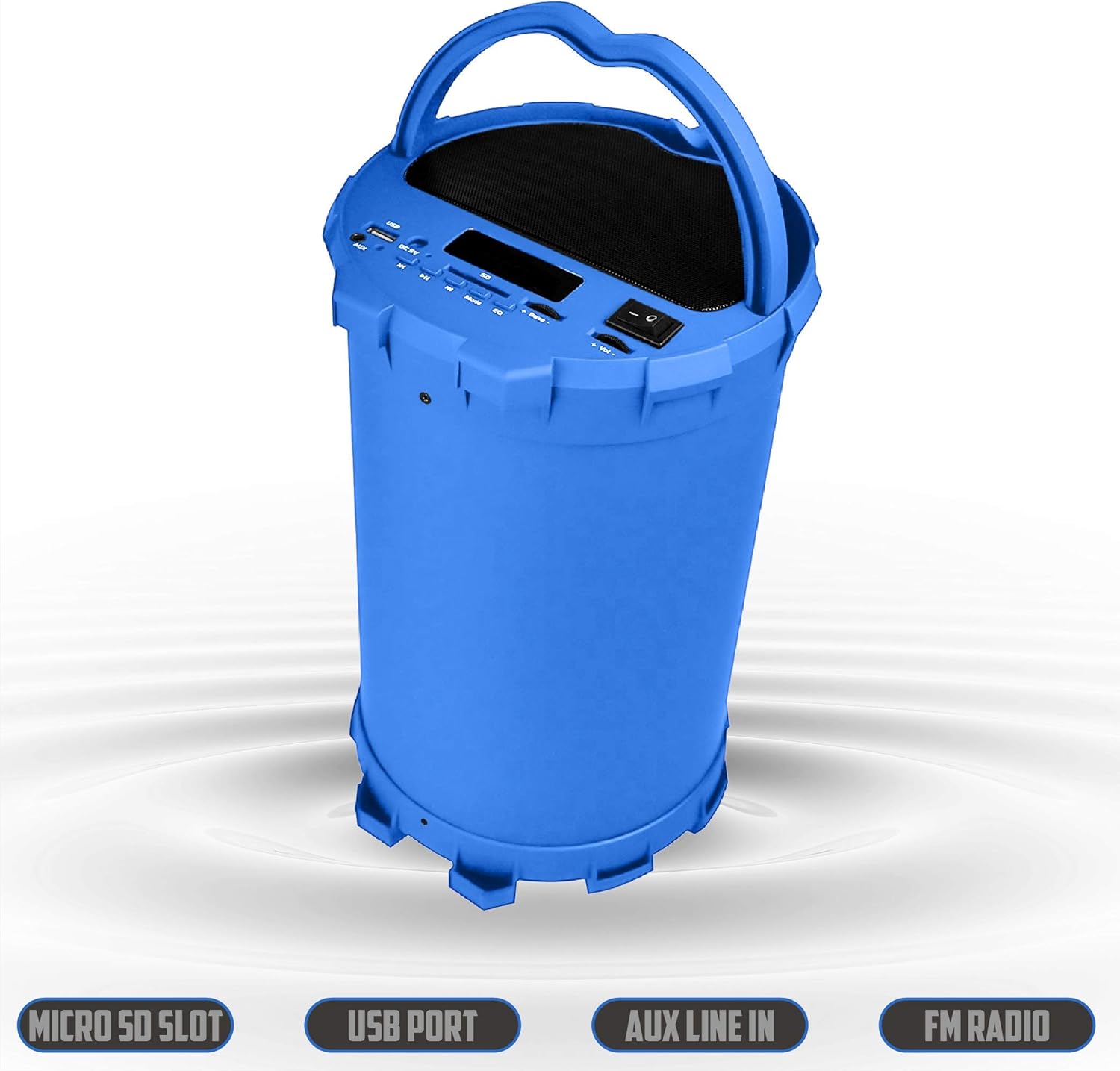
Image 6.2: The 2BOOM BX390 speaker shown upright, emphasizing the Micro SD Slot, USB Port, Aux Line In, and FM Radio capabilities.
This image displays the blue 2BOOM BX390 speaker in an upright position, with graphic overlays highlighting the Micro SD Slot, USB Port, Aux Line In, and FM Radio features on its control panel.
6.4 AUX-ynfiermodus
Connect external audio devices (e.g., MP3 players, computers) using the supplied 3.5mm Aux cable.
- Connect one end of the 3.5mm Aux cable to the AUX ynfier poarte op 'e sprekker.
- Connect the other end to the audio output jack of your external device.
- De sprekker sil automatysk oerskeakelje nei AUX-modus. As dat net sa is, druk dan op de WIZE knop om te selektearjen.
- Kontrolearje it ôfspieljen fan jo eksterne apparaat.
6.5 Adjusting Volume, Bass, and Equalizer
- Folume: Brûk de Volume +/- buttons (long press Previous/Next) to increase or decrease the overall volume.
- Bas: Brûk de Bas +/- buttons to adjust the bass level to your preference.
- Equalizer (EQ): Druk op de EQ button to cycle through various preset equalizer modes (e.g., Pop, Rock, Jazz, Classical, Normal) to optimize sound for different music genres.
7. Underhâld
- Reiniging: Brûk in sêfte, droege doek om de bûtenkant fan 'e sprekker skjin te meitsjen. Brûk gjin abrasive reinigingsmiddels of oplosmiddels.
- Opslach: Bewarje de sprekker op in koel, droech plak, fuort fan direkt sinneljocht en ekstreme temperatueren as er foar langere perioaden net brûkt wurdt.
- Batterij soarch: Om de batterijlibben te ferlingjen, foarkom it faak folslein ûntladen fan 'e batterij. Laad de sprekker regelmjittich op, sels as er net yn gebrûk is.
- Wetter Resistance: Dizze sprekker is net wetterdicht. Foarkom bleatstelling oan wetter of oermjittich focht.
8. Probleemoplossing
| Probleem | Mooglike oarsaak | Oplossing |
|---|---|---|
| Gjin macht | Batterij is leech of dea. | Laad de sprekker folslein op mei de levere USB-kabel. |
| Gjin lûd | Volume is too low; incorrect mode selected; device not connected properly. | Increase volume on speaker and connected device. Press WIZE to select correct input. Reconnect Bluetooth or Aux cable. |
| Bluetooth-kearing mislearre | Sprekker net yn koppelingsmodus; apparaat te fier fuort; ynterferinsje. | Ensure speaker is in Bluetooth mode. Move device closer to speaker. Turn off other Bluetooth devices. Forget "2BOOM BX390" on your device and re-pair. |
| Slechte FM-ûntfangst | Weak signal; speaker position. | Reposition the speaker. Try auto-scanning again. |
| USB/SD-kaart spilet net ôf | Net stipe file formatearje; kaart/stasjon net goed ynfoege; beskeadige files. | Fersekerje files are in a supported format (e.g., MP3). Reinsert the USB drive/SD card. Try a different drive/card. |
9. Spesifikaasjes
| Eigenskip | Detail |
|---|---|
| Merk | 2BOOM |
| Model | BX390 Bass King |
| Konnektivität Technology | Hulp, Bluetooth, USB |
| Speaker Type | Stereo |
| Kompatibele apparaten | Laptop, smartphone, tablet |
| Subwoofers | 4-inch (Quantity not specified, but implied by "subwoofers" and "dual subwoofers" in image) |
| Bluetooth berik | Oant 33 ft (10 meter) |
| Ynfier havens | USB, SD Card, 3.5mm AUX |
| Radio | FM Radio |
10. Garânsje en stipe
The 2BOOM BX390 Bass King speaker comes with an UNLIMITED 2BOOM WARRANTY.
For warranty claims or technical support, please contact 2BOOM customer service. Refer to the product packaging or 2BOOM's official website foar kontakt ynformaasje.
Bewarje jo bewiis fan oankeap foar garânsjedoelen.