
RCYAGO Coffee Scale with Timer
RCYAGO Coffee Scale with Timer - Instruction Manual
Model: Coffee Scale with Timer
1. Ynlieding
Thank you for choosing the RCYAGO Coffee Scale with Timer. This high-precision kitchen scale is designed to provide accurate measurements for various culinary needs, including coffee brewing, baking, and general food weighing. It features an LCD backlight display, a built-in timer, and a tare function for enhanced usability.
2. Produktfunksjes
- Akkurate mjittingen: High-precision sensors ensure accuracy from 0.1 oz / 1 g up to 3000g/ml.
- Meardere ienheden: Supports 5 different units of measurement: OZ, LB, G, ML, G/ML.
- Grutte LCD-display: Features a green backlight for easy readability, even in low light conditions.
- Ynboude timer: Timer function up to 99 minutes and 59 seconds, ideal for precise coffee brewing.
- Tare funksje: Lit jo it gewicht fan in kontener ôflûke foar it mjitten fan nettogewicht.
- Auto-út funksje: Automatically turns off after 180 seconds of no operation to conserve battery.
- Safe Silicone Mat: Protects the weighing pan from spills and heat, easy to clean and disassemble.
- Beskermende dekking: Hard plastic cover protects the scale from dust and can also be used as a weighing tray.
3. Opsette
3.1 Batterij Ynstallaasje
The scale is powered by 2 AAA batteries (included). To install or replace batteries:
- Iepenje it deksel fan it batterijfak dat oan 'e ûnderkant fan' e weegskaal leit.
- Doch 2 AAA-batterijen yn, en soargje derfoar dat de polariteit goed is (+/-).
- Slút it deksel fan it batterijfak feilich.
3.2 Silicone Mat Placement
Place the provided silicone mat on the weighing platform. This mat offers heat resistance and prevents items from slipping, making it ideal for hot items like coffee carafes.

Image: Close-up of the scale showing the waterproof silicone pad and non-slip mat.
4. Bedriuwsinstruksjes
4.1 kontrôles oerview
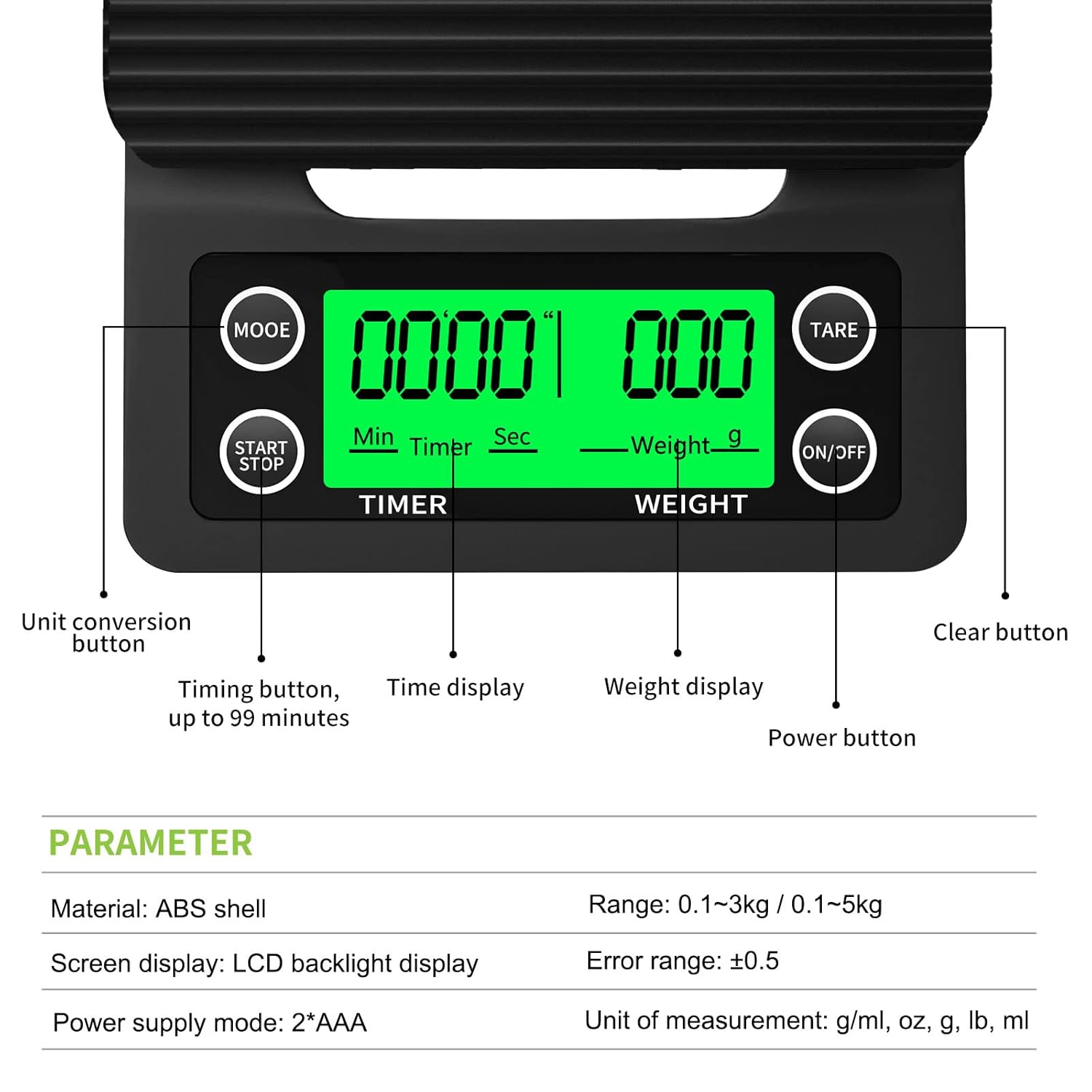
Image: Diagram illustrating the functions of each button and display area on the scale.
- ON/OFF knop: Press to turn the scale on or off.
- MODE knop: Press to cycle through different units of measurement (G, ML, OZ, LB, G/ML).
- TARE knop: Press to reset the display to zero, subtracting the weight of any container.
- START/STOP knop: Controls the built-in timer.
4.2 Power On / Off
Druk op de ON/OFF button to turn the scale on. The LCD display will light up. Press and hold the ON/OFF button for a few seconds to turn the scale off.
4.3 Unit Conversion
Mei de skaal oan, druk op de WIZE button repeatedly to switch between the available units: grams (G), milliliters (ML), ounces (OZ), pounds (LB), and grams/milliliters (G/ML).

Image: Demonstrating how to change measurement units using the MODE button.
4.4 Tarafunksje
The tare function allows you to weigh items in a container without including the container's weight. Place an empty container on the weighing platform, then press the TARE button. The display will reset to zero. You can then add your ingredients to the container, and only their weight will be displayed.
4.5 Timer Funksje
The built-in timer is useful for precise brewing methods like pour-over coffee. Press the START/STOPP button to begin the timer. Press it again to pause, and a third time to stop. The timer can count up to 99 minutes and 59 seconds.
4.6 Auto-Off Funksje
To conserve battery life, the scale will automatically turn off after 180 seconds (3 minutes) of inactivity. If the timer is running, the scale will not auto-off until the timer reaches 99 minutes and 59 seconds or is manually stopped.
4.7 Gebrûk Examples
This versatile scale is suitable for a variety of applications:
- Kofje brouwen: Measure coffee grounds and water precisely for pour-over, espresso, or French press. Use the timer for optimal extraction.
- Bakken: Accurately weigh ingredients like flour, sugar, and liquids for consistent results.
- Food Portioning: Control portion sizes for dietary needs or meal preparation.

Image: The scale in use for pour-over coffee, demonstrating its timer and weighing capabilities.

Image: Visual representation of the scale's versatility for different weighing tasks.
Video: Official RCYAGO video demonstrating the coffee scale with timer in action.
5. Underhâld
5.1 Cleaning
The silicone mat is removable and can be easily washed with soap and water. For the scale body, wipe it with a damp cloth. Avoid submerging the scale in water or using abrasive cleaners, as this may damage the electronic components.
5.2 Opslach
When not in use, place the hard plastic cover over the weighing platform to protect it from dust and potential damage. Store the scale in a dry place at room temperature.
6. Probleemoplossing
- Unkrekte lêzings: Ensure the scale is placed on a flat, stable surface. Avoid placing it near strong electromagnetic fields or vibrations. Recalibrate if necessary (refer to specific calibration instructions if provided with your model, or contact support).
- Display Not Working/Flickering: Check battery levels and replace if low. Ensure batteries are installed correctly.
- Piepgeluid: The scale typically beeps with button presses. Some models allow disabling the beep by pressing the TARE button three times in a row. Note that the timer function may still beep every minute.
- Water Exposure: While the silicone mat offers some protection, the scale is not fully waterproof. Avoid excessive water exposure to prevent internal corrosion or malfunction.
7. Spesifikaasjes
| Eigenskip | Detail |
|---|---|
| Merk | RCYAGO |
| Gewichtslimyt | 3 Kilograms (6.6 LB) |
| Readout Accuracy | 0.1g wy |
| Display Type | LCD with Green Backlight |
| Maat ienheden | OZ, LB, G, ML, G/ML |
| Special Features | Timer, Tare Function, Auto-Off |
| Streamtafier | 2 x AAA-batterijen (ynbegrepen) |
| Materiaal | Plastic (ABS shell) |
| Produkt Ofmjittings | 7.87 x 5.12 x 1.18 inch |
| Item Gewicht | 10.4 ounces (296 gram) |
8. Garânsje en stipe
RCYAGO provides a 12-month warranty for this product. If you have any questions, concerns, or require assistance with your coffee scale, please contact RCYAGO customer support for exchange, refund, or return options.
Ask a question about this manual
Ask about setup, troubleshooting, compatibility, parts, safety, or missing instructions. Manuals+ will review the question and use this page’s manual context to help answer it.