
HoldPeak HP-870P
HoldPeak HP-870P KW Power Meter Clamp Meter brûkershânlieding
Model: HP-870P (YF-US-870P)
1. Ynlieding
The HoldPeak HP-870P is a versatile and robust KW Power Meter Clamp Meter designed for comprehensive electrical testing. This device combines the functions of an AC/DC Voltmeter, Ammeter, and Multimeter, capable of measuring active power, apparent power, reactive power, active energy, temperature, and frequency. Its high accuracy, large LCD display with backlight, and auto power-off feature make it an essential diagnostic tool for professionals and enthusiasts in various fields, including electronic product manufacturing, computer component inspection, automobile maintenance, home appliance installation, and general electrical maintenance.
2. Safety Information
Please read and understand all safety information and operating instructions before using this meter. Failure to do so may result in injury or damage to the meter or equipment under test.
Algemiene feiligensmaatregels:
- Always observe local and national safety codes.
- Brûk de meter net as er skansearre liket of as de isolaasje op 'e testkabels kompromittearre is.
- Net tapasse mear as de rated voltage, lykas markearre op 'e meter, tusken de terminals of tusken elke terminal en ierde grûn.
- Wês ekstreem foarsichtich as jo wurkje mei voltages boppe 60V DC of 30V AC RMS. Sokke voltages foarmje in skokgefaar.
- Keep your fingers behind the finger guards on the test leads during measurements.
- Remove the test leads from the meter before opening the battery cover.
- Ensure the rotary switch is in the correct position for the desired measurement before connecting the test leads.
- Brûk de meter net yn eksplosive omjouwings mei gas, damp of stof.
3. Produkt Overview
Key Features:
- Multifunksjonaliteit: Measures active power, apparent power, reactive power, AC/DC voltage, AC/DC current, temperature, frequency, power factor, and active energy.
- High Display Count: 9999 counts display for precise readings.
- LCD efterljochting: Ensures clear visibility of data even in low-light conditions.
- Data Hold: Freezes the displayed reading for convenient recording.
- Automatysk berik: Selektearret automatysk it passende mjitberik.
- Maks/Min-funksje: Records maximum and minimum values during a measurement session.
- Auto Power Off: Besparret batterijlibben troch automatysk út te skeakeljen nei in perioade fan ynaktiviteit.
- Large Jaw Caliber: 1.77 inches (45mm) jaw opening to accommodate thick cables.
- Feiligens wurdearring: Double insulation safety rating.
Pakketynhâld:
The HoldPeak HP-870P package includes the following items:
- 1 x Digital Clamp Multimeter (HP-870P)
- 2 x testkabels (read en swart)
- 1 x Draagtas
- 1 x Temperatuerprobe
- 1 x 9V (6F22) Battery

Ofbylding 3.1: The HoldPeak HP-870P Clamp Meter shown with its complete set of accessories, including test leads, temperature probe, 9V battery, and carrying bag.
Paneelyndieling:
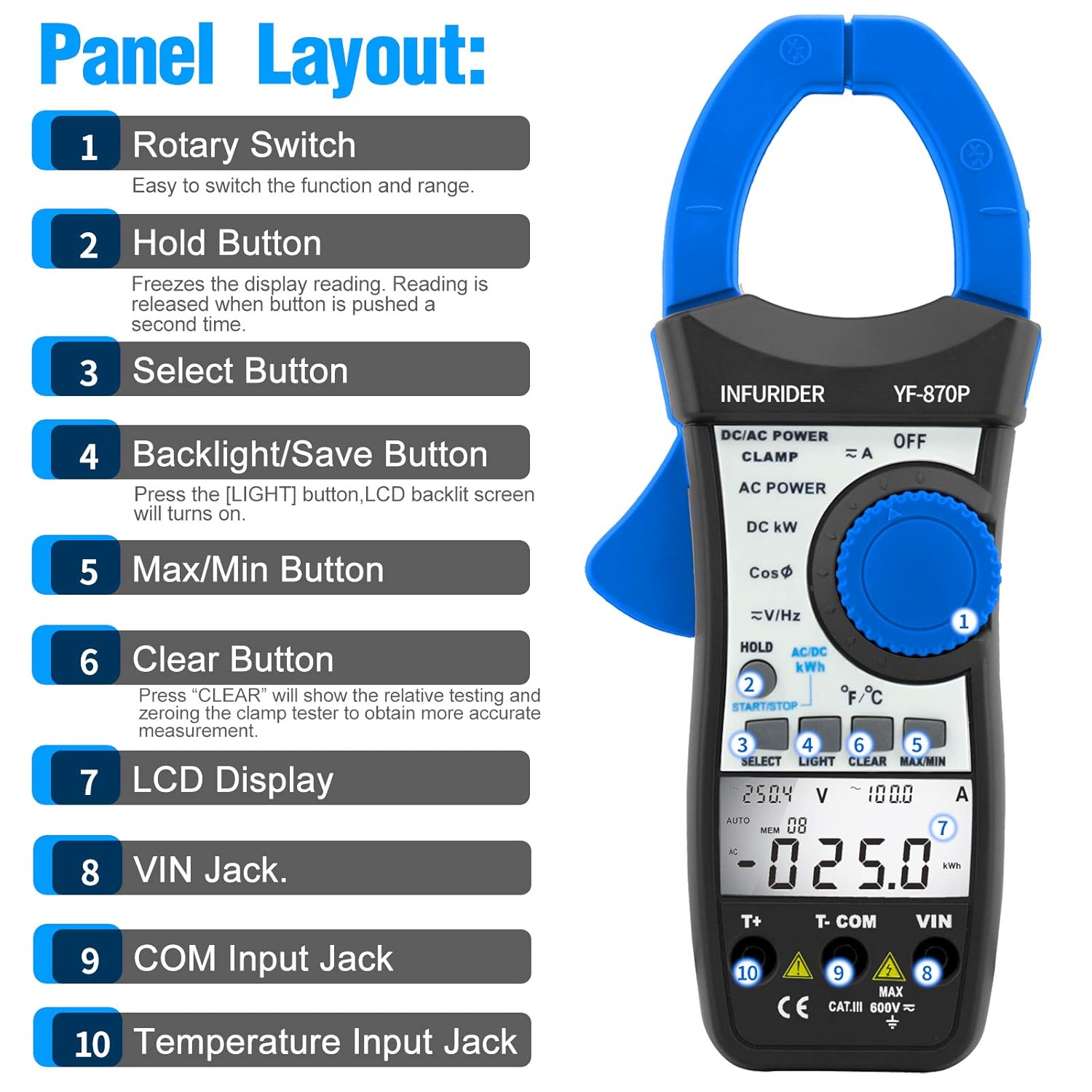
Ofbylding 3.2: Detaillearre view of the HP-870P clamp meter's front panel, indicating the location and function of each control and input jack.
- Rotary Switch: Brûkt om de winske mjitfunksje en it berik te selektearjen.
- Hâld knop: Freezes the current display reading. Press again to release.
- Selektearje knop: Toggles between different measurement modes within a single rotary switch position (e.g., AC/DC, temperature units).
- Backlight/Save Button: Press to turn on the LCD backlight.
- Max/Min knop: Toggles between maximum, minimum, and current readings.
- Knop wiskje: Used to clear relative testing or zero the clamp tester for more accurate measurements.
- LCD Display: Toant mjitlêzingen, ienheden en funksje-yndikatoaren.
- VIN Jack: Ynput terminal foar voltage and other measurements (typically for red test lead).
- COM Input Jack: Common input terminal (typically for black test lead).
- Temperature Input Jack: Dedicated input for the temperature probe.
4. Opsette
Batterij ynstallaasje:
- Soargje derfoar dat de meter ÚT is.
- Sykje it batterijfak oan 'e efterkant fan' e meter.
- Brûk in schroevendraaier om it batterijdeksel te iepenjen.
- Insert the provided 9V (6F22) battery, observing the correct polarity (+ and -).
- Ferfang it batterijdeksel en befestigje it mei de skroef.
Testkabels ferbine:
- Foar voltage, resistance, frequency, and other measurements requiring test leads: Insert the black test lead into the COM input jack en de reade test lead yn 'e VIN ynfier jack.
- For temperature measurements: Insert the temperature probe into the dedicated Temperatuer Input Jack.
5. Bedriuwsinstruksjes
Algemiene operaasje:
- Power On/Off: Rotate the rotary switch from the OFF position to any desired function to turn the meter ON. To turn OFF, rotate the switch back to the OFF position.
- LCD efterljochting: Druk op de LJOCHT button to activate the display backlight. Press again to turn it off.
- Data Hold: Druk op de HÂLDE knop om de aktuele lêzing op it display te befriezen. Druk nochris om los te litten.
- Auto Power Off: The meter will automatically power off after a period of inactivity to save battery. To disable this feature temporarily, refer to the full user manual.
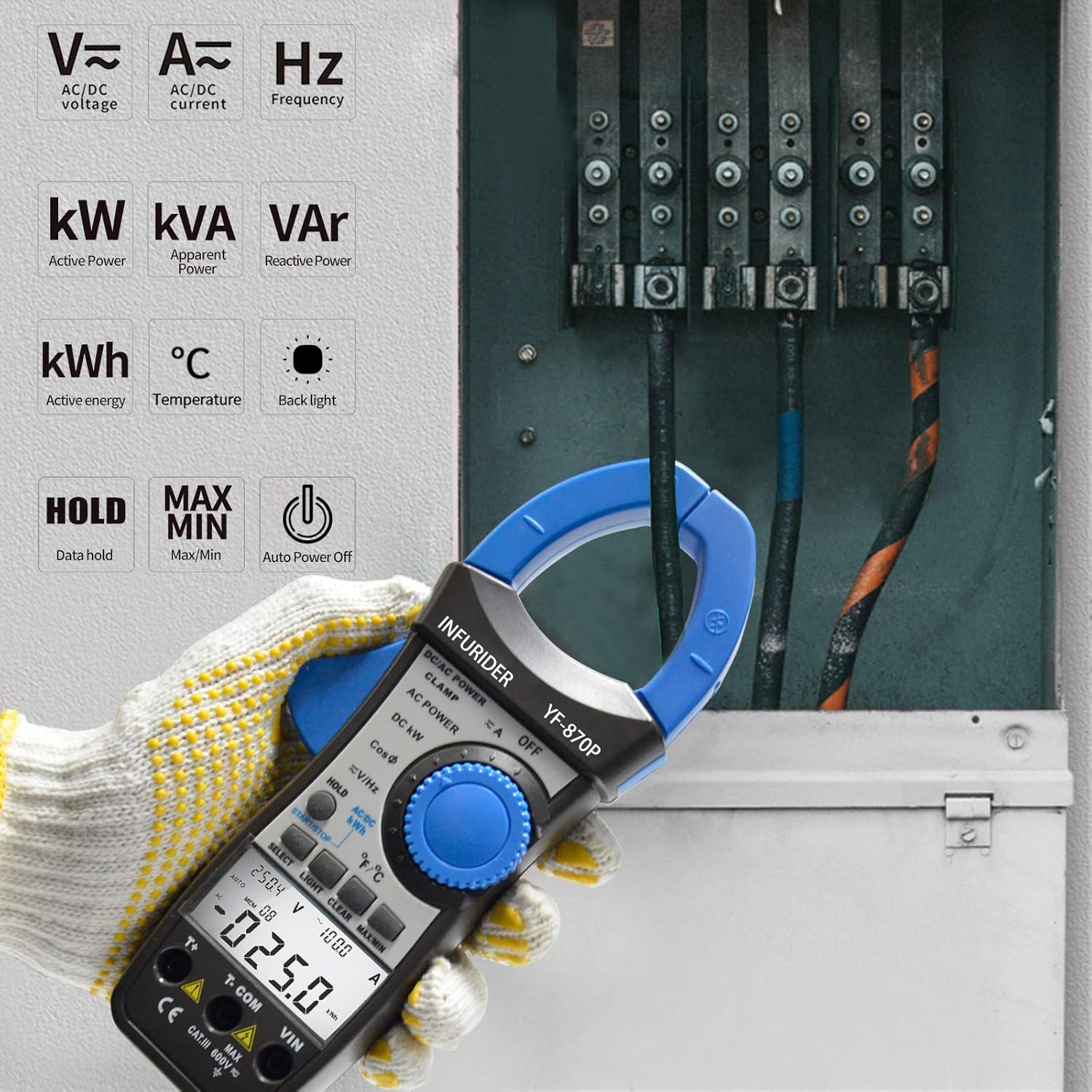
Ofbylding 5.1: The HP-870P clamp meter displaying various measurement functions such as AC/DC voltage, current, frequency, active power (kW), apparent power (kVA), reactive power (VAr), active energy (kWh), and temperature (°C).
Mjitfunksjes:
AC/DC Voltage mjitting:
- Set de draaiskakelaar op de V≈ (AC-folumetage) of V— (DC Voltage) posysje.
- Ferbine de swarte test lead oan 'e COM jack en de reade testlieding nei de VIN jack.
- Connect the test probes in parallel to the circuit or component under test.
- Lês de voltage wearde op it LCD -display.
AC/DC Stroommjitting (Clamp Function):
- Set de draaiskakelaar op de A≈ (AC Current) or IN- (DC Current) position.
- Iepenje de clamp kaken troch op de trekker te drukken.
- Enclose only one conductor of the circuit within the clamp jaws. Ensure the jaws are fully closed.
- Lês de aktuele wearde op it LCD-display.
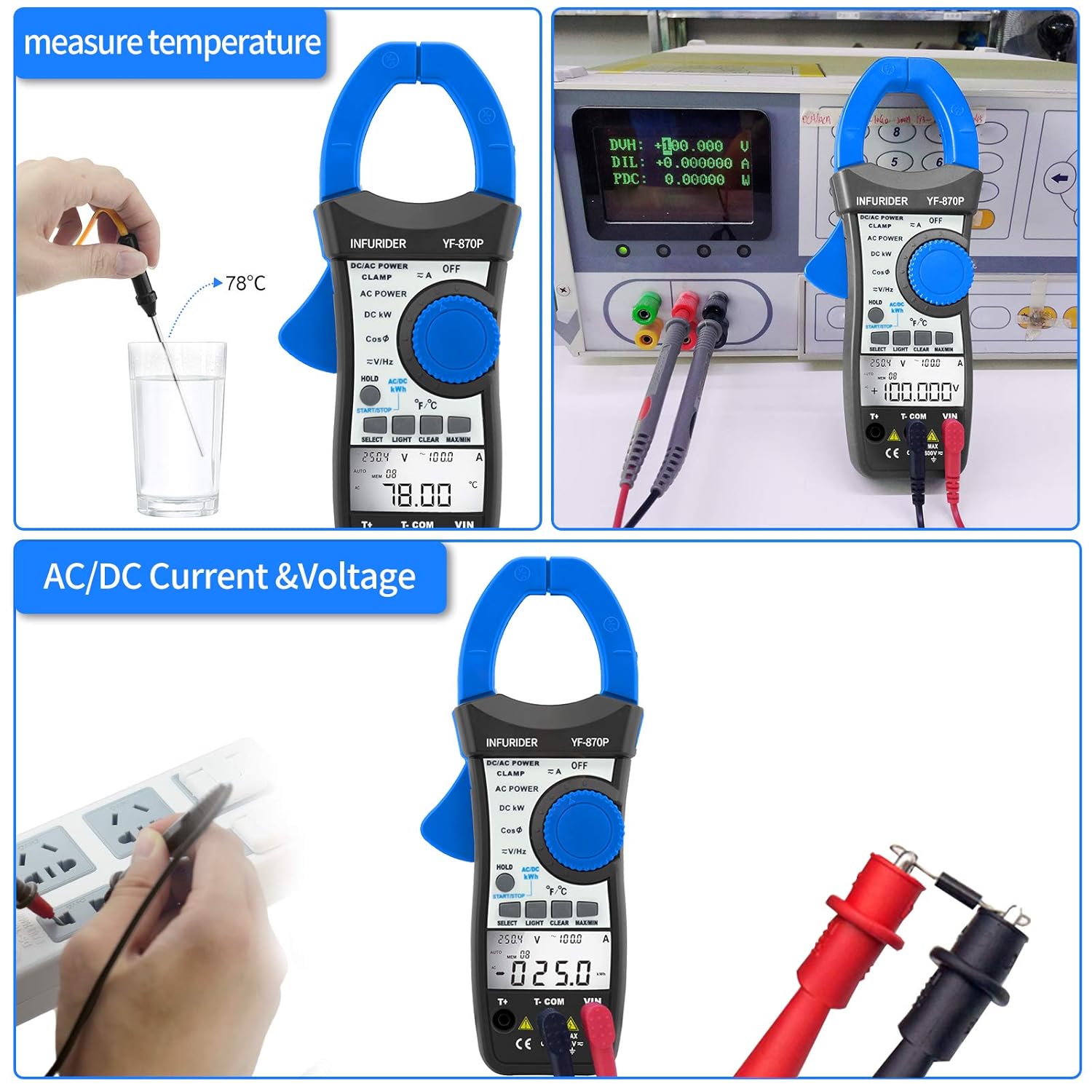
Ofbylding 5.2: Demonstrates the HP-870P's capability to measure temperature using the included probe and to measure AC/DC current and voltage by connecting the test leads to a power outlet.
Power Measurement (Active, Apparent, Reactive):
- Set de draaiskakelaar op de DC KW or AC KRACHT posysje.
- Connect the test leads as required for voltage measurement and clamp the jaws around the current-carrying conductor.
- Brûk de SELECT button to cycle through Active Power (KW), Apparent Power (KVA), and Reactive Power (KVAr) readings.
Active Energy Measurement (kWh):
- Set de draaiskakelaar op de AC/DC KWH posysje.
- Connect the test leads and clamp the jaws as for power measurement.
- The meter will display the accumulated active energy.
Temperatuer mjitting:
- Set de draaiskakelaar op de ℃ / ℉ posysje.
- Insert the temperature probe into the dedicated temperature input jack.
- Plak de punt fan 'e temperatuersonde op of yn it objekt wêrfan de temperatuer mjitten wurde moat.
- Brûk de SELECT knop om te wikseljen tusken Celsius (℃) en Fahrenheit (℉).
Frekwinsje mjitting:
- Set de draaiskakelaar op de V≈/Hz posysje.
- Ferbine de testkabels mei it sirkwy dêr't de frekwinsje mjitten wurde moat.
- Read the frequency value in Hertz (Hz) on the LCD display.
Power Factor Measurement:
- Set de draaiskakelaar op de CosΦ posysje.
- Connect the test leads and clamp the jaws as for power measurement.
- The power factor value will be displayed.

Ofbylding 5.3: Illustrates the 40mm jaw caliber of the HP-870P, allowing measurement on larger conductors, and highlights the large LCD screen for clear observation of measurement data, along with the meter's overall dimensions.
6. Underhâld
Reiniging:
- Wiskje de saak mei adamp doek en mild wasmiddel. Brûk gjin abrasiven as solvents.
- Keep the terminals clean to ensure proper contact.
Batterij ferfanging:
When the battery symbol appears on the LCD display, the battery needs to be replaced. Refer to the Battery Installation section (4.1) for instructions.
Opslach:
- If the meter is not to be used for a long period, remove the battery to prevent leakage and damage to the meter.
- Bewarje de meter op in koel, droech plak, fuort fan direkt sinneljocht en ekstreme temperatueren.
- Use the provided carrying bag for protection during storage and transport.
7. Probleemoplossing
If the meter does not operate correctly, check the following common issues before seeking service.
| Probleem | Mooglike oarsaak | Oplossing |
|---|---|---|
| De meter giet net oan. | Deade of ferkeard ynstalleare batterij. | Ferfange batterij of kontrolearje de polariteit. |
| No reading or "OL" displayed. | Overload, incorrect range, or open circuit. | Select higher range (if not auto-ranging), check circuit continuity, ensure proper connection. |
| Unkrekte lêzingen. | Low battery, dirty terminals, or external interference. | Replace battery, clean terminals, move away from strong electromagnetic fields. |
| Efterljocht wurket net. | Low battery or backlight function not activated. | Replace battery, press the LIGHT button. |
8. Spesifikaasjes
| Mjitfunksje | Range / Accuracy |
|---|---|
| Aktive krêft | 99.99KW / 100KW~300KW (3% of rdg + 12dgt) |
| Skynbere krêft | 99.99KVA~245KVA (3% of rdg + 15dgt) |
| Reactive Power | 0.01VAr~120KVAr (3% of rdg + 15dgt) |
| AC/DC Voltage | 1.0~600V (1.0% of rdg + 8dgt) |
| AC / DC Strom | 1.0~999.9A (2.5% of rdg + 15dgt) |
| Temperatuer | -20℃~1370℃ (-4℉~2498℉) (3% of rdg + 2dgt) |
| Frekwinsje | 45Hz~250MHz (0.1% + 5dgt) |
| Power Factor | ±0.05 |
| Aktive Enerzjy | 0~99.99kwh (3% of rdg + 10dgt), 100~700kwh (3% of rdg + 5dgt) |
Algemiene spesifikaasjes:
- Skerm: 9999 tellen LCD
- Jaw Caliber: 1.77 inch (45 mm)
- Batterij Type: 9V (6F22)
- Ofmjittings: 225 x 97 x 40 mm
- Gewicht: 450g
- Feiligens standert: CE
9. Warranty Information
Ferwize asjebleaft nei de offisjele ynformaasje fan 'e fabrikant website or the warranty card included with your product for detailed warranty terms and conditions. Typically, HoldPeak products come with a limited warranty covering defects in materials and workmanship for a specified period from the date of purchase.
10. Klant Support
For technical assistance, troubleshooting beyond this manual, or service inquiries, please contact HoldPeak customer support through their official website or the contact information provided in your product packaging. When contacting support, please have your product model number (HP-870P) and purchase details ready.
Ask a question about this manual
Ask about setup, troubleshooting, compatibility, parts, safety, or missing instructions. Manuals+ will review the question and use this page’s manual context to help answer it.