
1. Ynlieding
This manual provides essential instructions for the safe and efficient operation of your Multilaser MINI TORRE 900W SP380 audio system. Please read this manual thoroughly before using the product and retain it for future reference. Proper use will ensure optimal performance and extend the lifespan of your device.
2. Safety Ynstruksjes
- Power Boarne: Soargje derfoar dat de macht oanbod oerienkomt mei de voltage easken spesifisearre op it produkt label.
- Ventilaasje: Do not block ventilation openings. Maintain adequate space around the unit for proper airflow.
- Wetter en focht: Keep the device away from water, rain, and excessive humidity. Do not operate with wet hands.
- Heat boarnen: Avoid placing the unit near heat sources such as radiators, stoves, or other heat-producing appliances.
- Reiniging: Skeakelje de stroom út foardat jo skjinmeitsje. Brûk in droege, sêfte doek. Brûk gjin floeibere skjinmakkers of spuitbussen.
- Betsjinning: Do not attempt to repair the unit yourself. Refer all servicing to qualified service personnel.
- Bern: Hâld it apparaat en syn accessoires bûten it berik fan bern.
- Pleatsing: Plak it apparaat op in stabyl, flak oerflak om te foarkommen dat it falt.
3. Produkt Overview
The Multilaser MINI TORRE 900W SP380 is a powerful audio system designed for versatile sound reproduction. It features dual speakers, LED lighting, and multiple connectivity options.
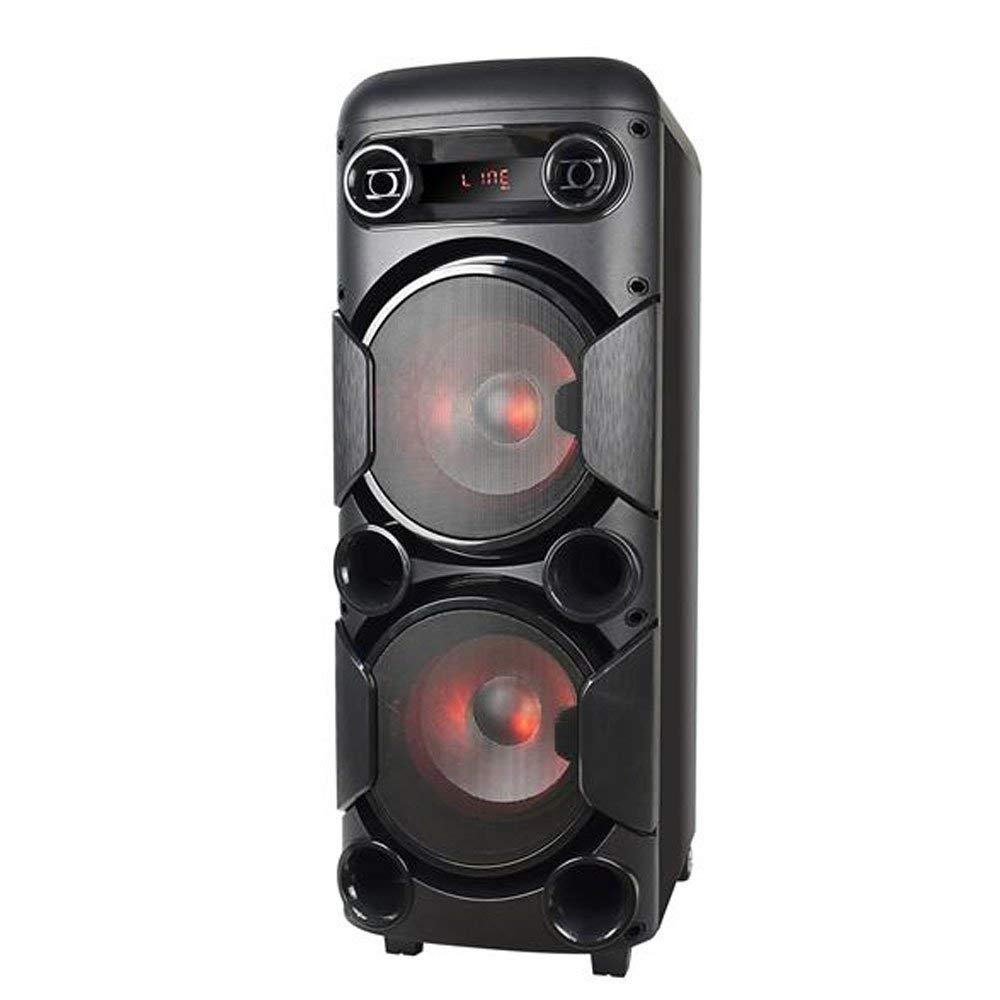
Ofbylding 3.1: Front view of the Multilaser MINI TORRE 900W SP380, showcasing its dual speaker design and illuminated LED woofers.
The control panel, located on the top of the unit, provides access to all functions and inputs.

Ofbylding 3.2: Detaillearre view of the control panel, including volume knob, equalizer sliders, input ports (USB, TF/Memory Card, Line, Mic 1, Mic 2), and control buttons for mode, light, and playback.
4. Opsette
- Utpakke: Carefully remove the MINI TORRE from its packaging. Retain the packaging for future transport or storage.
- Pleatsing: Position the speaker on a flat, stable surface. Ensure there is adequate space around the unit for ventilation. The integrated wheels facilitate easy transport.
- Power Connection: Connect the power cable to the AC input on the unit and then to a suitable power outlet. The device supports bivolt automatic voltage.
- Initial Power On: Flip the power switch (usually located on the control panel) to the "ON" position. The display will illuminate.
5. Bedriuwsinstruksjes
5.1. Power On / Off
To power on the device, locate the power switch on the control panel and set it to the "ON" position. To power off, set the switch to "OFF".
5.2. Volume Control
Adjust the main volume using the large central FOLUME knob on the control panel. Turn clockwise to increase volume and counter-clockwise to decrease.
5.3. Seleksje fan modus
Druk op de WIZE button repeatedly to cycle through available input modes: Bluetooth (BT), FM Radio, USB, Memory Card (TF), and Auxiliary (LINE).
5.4. LED Lighting
Druk op de LJOCHT button to toggle the LED lighting effects on the speakers. Multiple light modes may be available.
5.5. Mikrofoan Ynfier
Connect a microphone to either the MIC 1 or MIC 2 input. Adjust the microphone volume using the MIC.VOL slider and add echo effect with the ECHO slider.
5.6. Sound Equalization
Brûk de TREBLE en BASS sliders to adjust the high and low frequencies of the audio output, respectively, to suit your preference.
6. Konnektivität
6.1. Bluetooth-keppeling
- Turn on the MINI TORRE and select Bluetooth (BT) modus mei help fan de WIZE button. The display will show "BT" and a pairing indicator.
- Skeakelje Bluetooth yn op jo smartphone, tablet of oar kompatibel apparaat.
- Sykje nei available devices and select "MULTILASER SP380" (or similar name) from the list.
- Once paired, the device will confirm the connection, and you can begin playing audio wirelessly.
6.2. USB / Memory Card Playback
Foegje in USB flash drive yn de USB poarte of in TF (MicroSD) kaart yn 'e TF/USB slot. The unit will automatically switch to USB or TF mode and begin playing compatible audio files. Use the playback control buttons (PLAY / PAUZE, FOARIGE, FOLGJENDE) to manage your music.
6.3. Auxiliary Input (LINE IN)
Ferbine in ekstern audioapparaat (bygelyks MP3-spieler, laptop) mei de RIGEL input using a 3.5mm audio cable. Select RIGEL modus mei de WIZE button. Audio will play from the connected device.
6.4. FM Radio
Wikselje nei FM modus mei help fan de WIZE knop. Druk en hâld de PLAY / PAUZE button to initiate an automatic scan for FM stations. The unit will save detected stations. Use the FOARIGE en FOLGJENDE knoppen om troch bewarre stasjons te navigearjen.
7. Underhâld
- Reiniging: Before cleaning, ensure the device is powered off and unplugged. Use a soft, dry, lint-free cloth to wipe the exterior surfaces. Do not use abrasive cleaners, waxes, or solvents.
- Opslach: If storing the unit for an extended period, unplug it from the power outlet and store it in a cool, dry place, away from direct sunlight and extreme temperatures.
- Foarkom obstruksjes: Regularly check that the speaker grilles and ventilation openings are free from dust and debris.
8. Probleemoplossing
| Probleem | Mooglike oarsaak | Oplossing |
|---|---|---|
| Gjin macht | Power cable not connected; Power outlet not working; Power switch off. | Ensure power cable is securely connected. Test the outlet with another device. Turn the power switch to "ON". |
| Gjin lûd | Volume too low; Incorrect input mode selected; External device not playing. | Ferheegje it folume. Druk. WIZE to select the correct input. Ensure the external device is playing and its volume is up. |
| Bluetooth net keppelje | Device too far; Bluetooth not enabled on external device; Incorrect mode. | Move devices closer. Ensure Bluetooth is enabled on your external device. Select BT mode on the speaker. |
| USB/TF-kaart spilet net ôf | Kaart/stasjon net goed ynfoege; Ynkompatibel file format; Incorrect mode. | Reinsert the USB drive or TF card. Ensure audio files are in a compatible format (e.g., MP3). Select USB or TF wize. |
| FM-radio statysk | Weak signal; No antenna connected (if applicable). | Reposition the unit or extend the antenna (if present). Perform an auto-scan for stations again. |
9. Spesifikaasjes
Below are the technical specifications for the Multilaser MINI TORRE 900W SP380:

Ofbylding 9.1: Packaging of the Multilaser MINI TORRE 900W SP380, highlighting its main features and technical specifications.
| Eigenskip | Detail |
|---|---|
| Merk | Multilaser |
| Model | SP380 |
| Maksimale sprekkerútfierkrêft | 900 Watt RMS |
| Konnektivität Technology | Auxiliary, Bluetooth 5.0 |
| Speaker Type | Tower (2x 8" drivers) |
| Special Features | USB Port, LED Lighting, Microphone Input, Memory Card Slot, FM Radio, Bass Boost, Transport Wheels |
| Item Ofmjittings (D x B x H) | 33 sm x 37 sm x 82 sm |
| Item Gewicht | 11.95 kilogram |
| Kompatibele apparaten | Notebook, smartphone, tablet |
| Power Boarne | Bivolt automatic (AC) |
| Frequency Response | 60Hz-20KHz |
| Gefoelichheid | 89 dB |
| Impedânsje | 4 ohms |
| Components Included | 1x Mini Torre 900W SP380, 1x Cable Set, 1x User Manual |
10. Garânsje en stipe
The Multilaser MINI TORRE 900W SP380 comes with a 1-jierrige garânsje fanôf de datum fan oankeap. Dizze garânsje dekt produksjefouten ûnder normale gebrûksomstannichheden.
For warranty claims, technical support, or service inquiries, please contact Multilaser customer support through their official channels. Please have your proof of purchase and product model number (SP380) ready when contacting support.
Noat: The warranty does not cover damage caused by misuse, accidents, unauthorized modifications, or failure to follow the instructions in this manual.