
Maxcom MM471
Maxcom MM471 Senior Draachbere Tillefoan Brûkershânlieding
1. Ynlieding
This manual provides detailed instructions for the safe and efficient use of your Maxcom MM471 Senior Portable Phone. Designed with ease of use in mind, this device features large characters, big buttons, and an ergonomic design, making it ideal for seniors. Please read this manual thoroughly before operating your phone.

figuer 1: Front view of the Maxcom MM471 Senior Portable Phone.
2. Opsette
2.1 Pakketynhâld
Soargje derfoar dat alle items yn it pakket oanwêzich binne:
- Maxcom MM471 Senior Portable Phone
- Batterij
- Oplaadadapter
- User Manual
2.2 De SIM-kaart en batterij ynfoegje
The Maxcom MM471 supports dual SIM cards. Follow these steps to install your SIM card(s) and battery:
- Turn off the phone and disconnect it from any power source.
- Ferwiderje foarsichtich de efterkant fan 'e tillefoan.
- Doch jo SIM-kaart(en) yn 'e oanwiisde slot(len) mei de gouden kontakten nei ûnderen.
- Doch de batterij yn, soargje derfoar dat de kontakten goed útrjochte binne.
- Doch de efterkant werom oant er feilich op syn plak klikt.

figuer 2: Efterkant view with battery and SIM card area.
2.3 De batterij opladen
Before first use, fully charge the phone's battery:
- Connect the charging adapter to the phone's charging port or place the phone in its charging dock.
- Stek de adapter yn in stopkontakt.
- De batterij-yndikator op it skerm sil de oplaadstatus sjen litte.
- Sadree't folslein opladen, losmeitsje de lader.
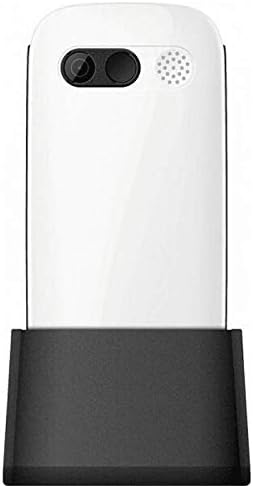
Figure 3: Phone in charging dock.
3. Bedriuwsinstruksjes
3.1 Yn-/útskeakelje
- Om oan te setten: Druk en hâld de Oan/Beëinigje oprop knop oant it skerm opljochtet.
- Om út te skeakeljen: Druk en hâld de Oan/Beëinigje oprop button until the power-off options appear, then select 'Power Off'.
3.2 Oproppen meitsje
- Fier fanút it thússkerm it tillefoannûmer yn mei it toetseboerd.
- Druk op de Belje button (green button) to initiate the call.
- Om de oprop te beëinigjen, druk op de Oan/Beëinigje oprop button (red button).
3.3 Oproppen ûntfange
- When a call comes in, the phone will ring and display the caller's number or name.
- Druk op de Belje button (green button) to answer.
- Druk op de om de oprop te wegerjen Oan/Beëinigje oprop button (red button).
3.4 Berjochten ferstjoere en ûntfange
- Navigearje nei it menu 'Berjochten' fanút it haadskerm.
- Select 'New Message' to compose a text message.
- Enter the recipient's number and your message.
- Druk op 'Ferstjoere'.
- Received messages will appear in your 'Inbox'.
3.5 Kontakten beheare
The phonebook can store up to 300 names.
- Go to the 'Contacts' or 'Phonebook' menu.
- Select 'Add New Contact' to save a new number.
- Fier de namme en it tillefoannûmer yn, en bewarje dan.
- Om in kontaktpersoan te skiljen, selektearje harren namme út 'e list en druk op de Belje knop.
3.6 Bluetooth brûke
Om ferbining te meitsjen mei Bluetooth-apparaten:
- Gean nei 'Ynstellings' > 'Bluetooth'.
- Skeakelje Bluetooth 'Oan'.
- Selektearje 'Sykje nei devices' to find available Bluetooth accessories.
- Select the desired device and pair them.
3.7 De zaklamp brûke
The phone includes a built-in flashlight for convenience.
- To turn on the flashlight, locate the dedicated flashlight button (if available) or access it through the 'Tools' menu.
- Press the button or select the option again to turn it off.
4. Underhâld en soarch
To ensure the longevity and optimal performance of your Maxcom MM471 phone, follow these maintenance guidelines:
- Reiniging: Brûk in sêfte, droege doek om it oerflak fan 'e tillefoan skjin te meitsjen. Foarkom floeibere reinigingsmiddels of skurende materialen.
- Temperatuer: Do not expose the phone to extreme temperatures (hot or cold) or direct sunlight for extended periods.
- Focht: Keep the phone dry. Do not immerse it in water or expose it to high humidity.
- Opslach: When not in use for a long time, store the phone in a cool, dry place with the battery partially charged.
- Impact: Foarkom dat de tillefoan falle lit of ûnderwurpen wurdt oan sterke stoten.
5. Probleemoplossing
If you encounter issues with your phone, refer to the table below for common problems and solutions:
| Probleem | Mooglike oarsaak | Oplossing |
|---|---|---|
| Tillefoan giet net oan | Batterij is leech of net goed ynfoege. | Laad de batterij op. Soargje derfoar dat de batterij goed ynfoege is. |
| Kin gjin oprop meitsje of ûntfange | No network signal, SIM card not inserted, or SIM card faulty. | Check network coverage. Reinsert SIM card(s). Contact your service provider. |
| Min oprop kwaliteit | Weak network signal, interference. | Gean nei in gebiet mei better sinjaal. Foarkom obstakels. |
| Batterij drain fluch | Excessive usage, background applications, old battery. | Ferminderje de helderheid fan it skerm. Slút net brûkte applikaasjes. Tink oan it ferfangen fan de batterij as dy âld is. |
| Toetseboerd reagearret net | Softwarefout, fysike skea. | Restart the phone. If the problem persists, contact support. |
6. Technyske spesifikaasjes
Key technical details of the Maxcom MM471 Senior Portable Phone:
- Model: MM471
- Merk: Maxcom
- Kleur: Wyt
- Konnektivität: Bluetooth
- SIM-stipe: Dual SIM
- Tillefoanboekkapasiteit: 300 names
- Sprektiid: Oant 14 oeren
- Ynterface: Fysike knoppen
- Spesjale eigenskippen: Large characters, Big buttons, Ergonomic design, Speaker, Flashlight
7. Garânsje- en stipeynformaasje
For detailed warranty information, please refer to the warranty card included with your product or visit the official Maxcom webside. Foar fragen oer technyske stipe of tsjinst, nim dan kontakt op mei jo winkelier of de klanttsjinstôfdieling fan 'e fabrikant.
Ask a question about this manual
Ask about setup, troubleshooting, compatibility, parts, safety, or missing instructions. Manuals+ will review the question and use this page’s manual context to help answer it.