1. Ynlieding
Thank you for choosing the Benks M13 Lightning to USB-C Fast Charging Cable. This cable is designed to provide efficient and reliable charging for your Apple devices, including iPhones and iPads, utilizing Power Delivery (PD) technology. It features MFi certification, ensuring compatibility and safety with your devices. This manual will guide you through the proper use and care of your new cable.
2. Produkt Overview
The Benks M13 cable is engineered for fast charging and durability. It supports up to 18W Power Delivery when paired with a compatible USB-C power adapter, significantly reducing charging times for your iPhone or iPad. The cable features a robust design with reinforced connectors to withstand daily wear and tear.

Image: Benks M13 Lightning to USB-C Cable, highlighting its MFi certification and 120cm length.

Image: Comparison of charging speed, showing 50% charge in 30 minutes with an 18W PD charger.
Key Features:
- MFi Certified: Ensures full compatibility and safe charging with Apple Lightning devices.
- Snel opladen: Supports Power Delivery (PD) for rapid charging up to 18W.
- Duorsume konstruksje: Designed to withstand over 10,000 bends, featuring reinforced stress points.
- Universele kompatibiliteit: Works with various iPhone and iPad models that use a Lightning port.
- Kabel Type: USB-C to Lightning.
3. Opsette
Setting up your Benks M13 cable is straightforward. Follow these steps to begin charging your device:
- Ferbine mei Power Adapter: Insert the USB-C end of the Benks M13 cable into a compatible USB-C Power Delivery (PD) wall adapter or power bank. For optimal fast charging, ensure the adapter supports at least 18W PD output.
- Ferbine mei apparaat: Insert the Lightning end of the cable into the charging port of your iPhone or iPad.
- Ferbine ferbining: Your device should indicate that it is charging. If using a fast charging adapter, your device may display a fast charging indicator.

Image: The Benks cable connected to a power adapter and a smartphone, illustrating proper setup.
4. Bedriuwsinstruksjes
The Benks M13 cable operates automatically once connected. Its primary function is to charge and sync your compatible Apple devices.
Opladen:
- Connect the cable as described in the 'Setup' section.
- The cable will automatically detect your device and begin charging.
- For fast charging, ensure both your power adapter and device support USB Power Delivery.
Data Syncing:
- Connect the USB-C end of the cable to a computer with a USB-C port.
- Connect the Lightning end to your iPhone or iPad.
- Your device should appear in your computer's file management or iTunes/Finder application, allowing for data transfer and syncing.

Image: Universal compatibility of the Benks cable with various iPhone and iPad models, as well as PD chargers and power banks.
5. Underhâld
Proper maintenance will extend the lifespan of your Benks M13 cable.
- Opslach: Bewarje de kabel op in koel, droech plak as er net yn gebrûk is. Foarkom ekstreme temperatueren.
- Behanneling: Always grasp the connector head when plugging or unplugging the cable. Avoid pulling directly on the cable itself to prevent damage to the internal wires and connectors.
- Reiniging: If the connectors become dirty, gently wipe them with a dry, soft cloth. Do not use liquids or abrasive cleaners.
- Foarkom bûgen: While the cable is designed for durability, avoid sharp or excessive bending, especially near the connector points, to prevent long-term damage.
- Wetter Resistance: The cable features a water-resistant design. However, it is not waterproof. Avoid prolonged exposure to water or submersion. Ensure connectors are dry before use.
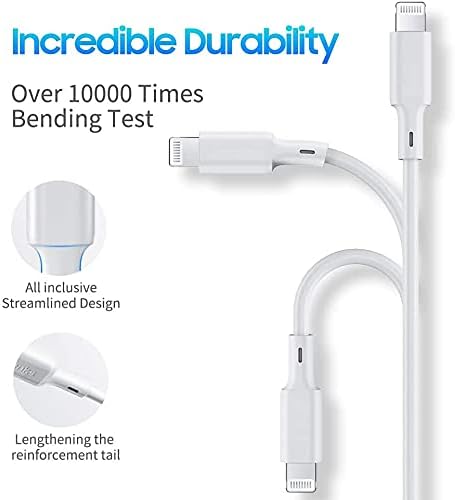
Ofbylding: Detaillearre view of the cable's reinforced design, highlighting its incredible durability and bend resistance.
6. Probleemoplossing
If you encounter issues with your Benks M13 cable, try the following troubleshooting steps:
- Apparaat net opladen:
- Soargje derfoar dat beide úteinen fan 'e kabel binne feilich ferbûn.
- Try a different USB-C power adapter or power source.
- Test the cable with a different compatible device to rule out a device issue.
- Check the charging port on your device for any debris or damage.
- Stadich opladen:
- Verify that your power adapter supports Power Delivery (PD) and provides sufficient wattage (e.g., 18W or higher).
- Ensure your device's battery is not critically low, as some devices charge slower at very low percentages.
- Gegevenssyngronisaasjeproblemen:
- Ensure the USB-C end is connected to a computer with a functional USB-C port.
- Start sawol jo apparaat as jo kompjûter opnij op.
- Update your computer's operating system and iTunes/Finder software.
- Kabel skea:
- Visually inspect the cable for any cuts, fraying, or bent connectors. Discontinue use if damage is found.
7. Spesifikaasjes
| Eigenskip | Detail |
|---|---|
| Merk | Benks |
| Model | M13 |
| Connector Type | Lightning, USB Type C (Male to Male) |
| Kabel Type | USB |
| Kompatibele apparaten | iPhone, iPad, Smartphone |
| Oanrikkemandearre gebrûk | Charging, Data Syncing |
| Special Feature | Wetter Resistant |
| Foarm | Rûn |
| Package Ofmjittings | 9.2 x 8 x 2.2 sm |
| Item Gewicht | 60 gram |
| ASIN | B0894TYTL7 |
8. Garânsje en stipe
Benks products are manufactured to high-quality standards. For information regarding warranty coverage, please refer to the warranty card included with your purchase or visit the official Benks website. If you require technical assistance or have questions not covered in this manual, please contact Benks customer support through their official channels.
Bewarje jo oankeapbewiis foar alle garânsjeclaims.