
1. Produkt Overview
The AMD Ryzen 5 3600XT is a high-performance 6-core, 12-thread desktop processor designed for the AM4 platform. It features a base clock speed of 3.8 GHz and a maximum boost clock of 4.5 GHz. This processor is unlocked for overclocking and supports PCIe 4.0 on compatible X570 and B550 motherboards. It also includes 35 MB of GameCache and supports DDR4-3200 memory.
The AMD Ryzen 5 3600XT comes bundled with the AMD Wraith Spire cooler, an air cooling solution designed to maintain optimal operating temperatures under typical workloads.

Ofbylding 1.1: Retail packaging for the AMD Ryzen 5 3600XT processor. The box displays the Ryzen logo and processor series.
2. Opset en ynstallaasje
Proper installation is crucial for the functionality and longevity of your processor. Ensure your motherboard is compatible with the AM4 socket and supports Ryzen 3000 series processors. For optimal performance, X570 or B550 chipsets are recommended to utilize PCIe 4.0 capabilities.
2.1. Motherboard Compatibility
The AMD Ryzen 5 3600XT processor requires a motherboard with an AM4 socket. It is compatible with various chipsets, including X570, B550, X470, B450, X370, B350, and A320. For full feature support, including PCIe 4.0, X570 or B550 motherboards are recommended. Ensure your motherboard's BIOS is updated to support Ryzen 3000 series processors.
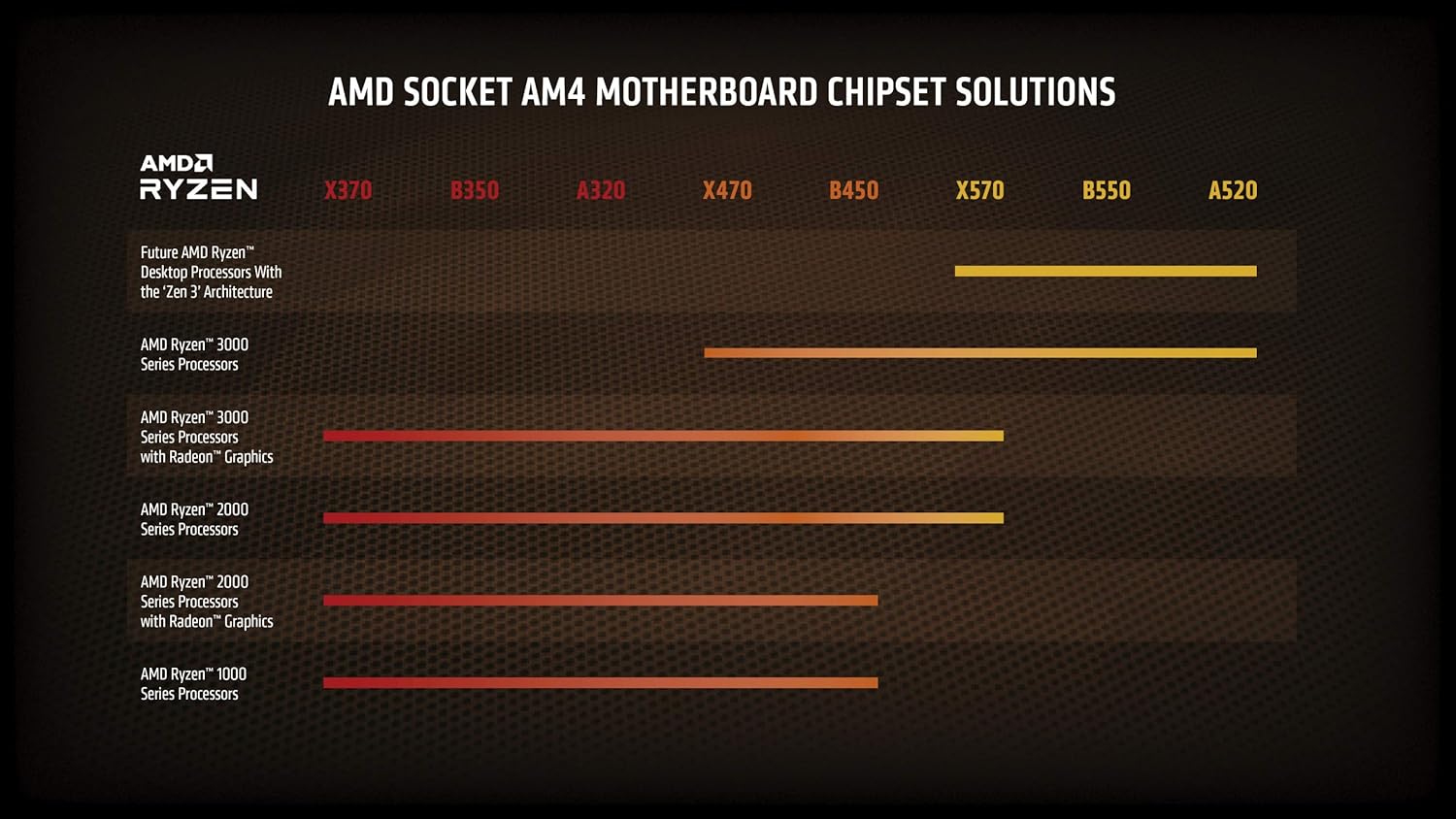
Ofbylding 2.1: Chart illustrating AMD Socket AM4 motherboard chipset compatibility with different Ryzen processor generations. The Ryzen 3000 series is compatible with a wide range of chipsets.
2.2. Ynstallaasje fan prosessor
- It moederbord tariede: Soargje derfoar dat de hendel fan 'e CPU-socket iepen is.
- Rjochtsje de prosessor út: Carefully align the gold triangle on the corner of the processor with the corresponding triangle on the motherboard's AM4 socket.
- De prosessor ynfoegje: Lit de prosessor foarsichtich rjocht nei ûnderen yn 'e socket sakje. Brûk gjin krêft. As it net maklik yn it slot past, kontrolearje dan de útrjochting opnij.
- Befeiligje de prosessor: Close the socket lever to secure the processor in place.

Ofbylding 2.2: Top view of the AMD Ryzen processor, showing the integrated heat spreader (IHS) and branding.

Ofbylding 2.3: Angled view of the AMD Ryzen processor, highlighting its physical form factor and pin grid array (PGA) design.
2.3. Cooler Installation (Wraith Spire)
The AMD Ryzen 5 3600XT includes a Wraith Spire cooler. This cooler comes with pre-applied thermal paste. If you are reusing a cooler or applying new thermal paste, ensure the CPU surface is clean before application.
- Remove Motherboard Brackets: For AM4 sockets, remove the plastic retention brackets on either side of the CPU socket. Keep the backplate installed.
- Position the Cooler: Place the Wraith Spire cooler onto the CPU, aligning the four spring-loaded screws with the holes on the motherboard's backplate.
- Secure the Cooler: Tighten the screws in a diagonal pattern (e.g., top-left, bottom-right, top-right, bottom-left) until they are finger-tight. Do not overtighten.
- Ferbine de fankabel: Connect the cooler's 4-pin fan cable to the "CPU_FAN" header on your motherboard.

Ofbylding 2.4: The AMD Wraith Spire CPU cooler, included with the Ryzen 5 3600XT processor, featuring a fan and heatsink assembly.
3. Bedriuwsinstruksjes
Once installed, the AMD Ryzen 5 3600XT processor operates automatically within your system. Ensure your operating system and drivers are up to date for optimal performance.
3.1. Driver Ynstallaasje
After installing your operating system, download and install the latest chipset drivers from the AMD official website. These drivers ensure proper communication between the processor and the motherboard, optimizing performance and stability.
3.2. Performance Monitoring
You can monitor your processor's temperature, clock speeds, and utilization using various software tools. AMD provides the Ryzen Master utility for advanced monitoring and configuration, including overclocking.
3.3. Oerklokken (Avansearre brûkers)
The Ryzen 5 3600XT processor is unlocked for overclocking, allowing experienced users to potentially achieve higher clock speeds. Overclocking can increase performance but also increases power consumption and heat output. It may also void your warranty if not performed correctly. Refer to advanced guides and ensure adequate cooling before attempting to overclock.
4. Underhâld
Regelmjittich ûnderhâld helpt de lange libbensdoer en optimale prestaasjes fan jo prosessor en koeloplossing te garandearjen.
- Stof fuortsmite: Periodically clean dust from the Wraith Spire cooler's heatsink fins and fan blades using compressed air. Ensure the system is powered off and unplugged before cleaning.
- Termyske pasta: The thermal paste applied between the CPU and cooler may degrade over several years. If you notice consistently high temperatures, consider reapplying fresh thermal paste. This requires carefully removing the cooler, cleaning both surfaces, and applying a new layer of thermal paste before reinstallation.
- Software Updates: Keep your motherboard BIOS and chipset drivers updated to benefit from performance improvements and bug fixes.
5. Probleemoplossing
Dizze seksje behannelet faak foarkommende problemen dy't jo tsjinkomme kinne.
5.1. System Not Booting / No Display
- Kontrolearje Power Connections: Soargje derfoar dat alle stroomkabels (24-pins ATX, 8-pins CPU) feilich ferbûn binne mei it moederbord en de stroomfoarsjenning.
- Komponinten opnij pleatse: Carefully reseat the CPU, RAM modules, and graphics card.
- Ferifiearje de ynstallaasje fan koeler: Ensure the CPU cooler is properly installed and its fan cable is connected to the CPU_FAN header.
- BIOS/UEFI: Confirm your motherboard's BIOS/UEFI version supports the Ryzen 3000 series processor. An outdated BIOS can prevent booting.
5.2. Problemen mei oerferhitting
- Check Cooler Contact: Ensure the CPU cooler is making proper contact with the CPU's integrated heat spreader (IHS). Verify screws are tightened correctly.
- Termyske pasta: Confirm thermal paste was applied correctly and is not dried out.
- Luchtstream: Ensure adequate airflow within your PC case. Clean any dust buildup from the cooler and case fans.
- Fan snelheid: Check fan speed settings in your motherboard's BIOS/UEFI or using monitoring software.
5.3. Performance Degradation
- Drivers and BIOS: Ensure all chipset drivers and motherboard BIOS are up to date.
- Eftergrûnprosessen: Check for excessive background applications consuming CPU resources.
- Termyske fersnelling: Monitor CPU temperatures. High temperatures can cause the CPU to reduce its clock speed to prevent damage.
- Power ynstellings: Verify your operating system's power plan is set to "High Performance" or a similar setting that allows the CPU to boost.
6. Spesifikaasjes
| Eigenskip | Detail |
|---|---|
| CPU Model | AMD Ryzen 5 3600XT |
| CPU-kearnen / triedden | 6 Kearnen / 12 Triedden |
| Basiskloksnelheid | 3.8 GHz |
| Max Boost Klok | Oant 4.5 GHz |
| CPU Socket | AM4 |
| Totale L3-cache | 32 MB |
| Totale L2-cache | 3 MB |
| Standert TDP | 95W |
| Untskoattele foar Overklokken | Ja |
| PCIe-ferzje | PCIe 4.0 |
| Systeem ûnthâld Type | DDR4 |
| Unthâld Channel | 2 |
| Maksimale ûnthâldsnelheid | 3200 MHz |
| Included Cooler | AMD Wraith Spire |
| Product Dimensions (Processor) | 1.57 x 0.24 x 5.28 inch |
| Item Weight (Processor) | 1.1 pyk |

Ofbylding 6.1: Performance comparison chart for the AMD Ryzen 5 3600XT, illustrating its capabilities in various computing tasks such as 3D rendering, video rendering, gaming, and single-thread performance.
7. Warranty Information
AMD processors typically come with a limited manufacturer's warranty. The duration and terms of the warranty may vary by region and retailer. Please retain your proof of purchase for warranty claims.
For detailed warranty information, including terms and conditions, please visit the official AMD webside of rieplachtsje de garânsjedokumintaasje dy't by jo produkt heart.
8. Stipe
For further assistance, technical support, driver downloads, and additional product information, please visit the official AMD support resources:
- AMD Stipe Website: Access drivers, software, and troubleshooting guides.
- AMD Ryzen Master Utility: For advanced processor control and monitoring.
- AMD Community Forums: Engage with other users and AMD experts.