
1. Ynlieding
Welcome to the user manual for your HK Audio Premium PR:O Move 8 Powered Full Range Speaker. This manual provides essential information for the safe and efficient operation of your new audio system. Please read it thoroughly before initial use and retain it for future reference. The PR:O Move 8 is a versatile, battery-powered speaker designed for various applications, offering high-quality sound and integrated mixing capabilities.
2. Safety Ynstruksjes
Om feilige wurking te garandearjen en skea te foarkommen, nim de folgjende feilichheidsmaatregels yn acht:
- Power Boarne: Brûk allinnich de stroomadapter dy't by it apparaat levere wurdt. Soargje derfoar dat it folumetage komt oerien mei jo lokale stroomfoarsjenning.
- Batterijfeiligens: Do not expose the battery to excessive heat, direct sunlight, or fire. Do not attempt to open or modify the battery. Dispose of batteries according to local regulations.
- Pleatsing: Place the speaker on a stable, level surface. Ensure adequate ventilation around the unit to prevent overheating. Avoid placing it near heat sources or in direct sunlight.
- Focht: Do not expose the unit to rain, moisture, or any liquids. This product is not waterproof.
- Reiniging: Disconnect the power before cleaning. Use a dry, soft cloth. Do not use liquid cleaners or aerosols.
- Betsjinning: Besykje net dit produkt sels te tsjinjen. Ferwize alle service oan kwalifisearre servicepersoniel.
- Gehoorbeskerming: Langere bleatstelling oan hege folumenivo's kin permaninte gehoarskea feroarsaakje. Wês foarsichtich by it ynstellen fan folumenivo's.
3. Package Ynhâld
Kontrolearje asjebleaft oft alle items yn jo pakket oanwêzich binne:
- HK Audio Premium PR:O Move 8 Powered Full Range Speaker
- Stromadapter
- User Manual (dit dokumint)
As guon items ûntbrekke of beskeadige, nim dan kontakt op mei jo dealer fuortendaliks.
4. Produkt Overview
The HK Audio PR:O Move 8 is a compact and powerful battery-powered speaker featuring an 8-inch bass/midrange speaker and a 1-inch driver with horn. It includes a 4-channel mixer with Bluetooth 5.0 audio streaming.

Figuer 4.1: Foar- en sydkant View. This image displays the speaker from the front and a slight side angle, highlighting the protective metal grille covering the speaker components and a recessed handle on the top side for portability.

Figure 4.2: Rear and Side View mei Kontrôles. This image shows the rear panel of the speaker, which houses the integrated 4-channel mixer. Visible elements include input jacks, volume and tone controls, reverb knobs, and the HK Audio branding.
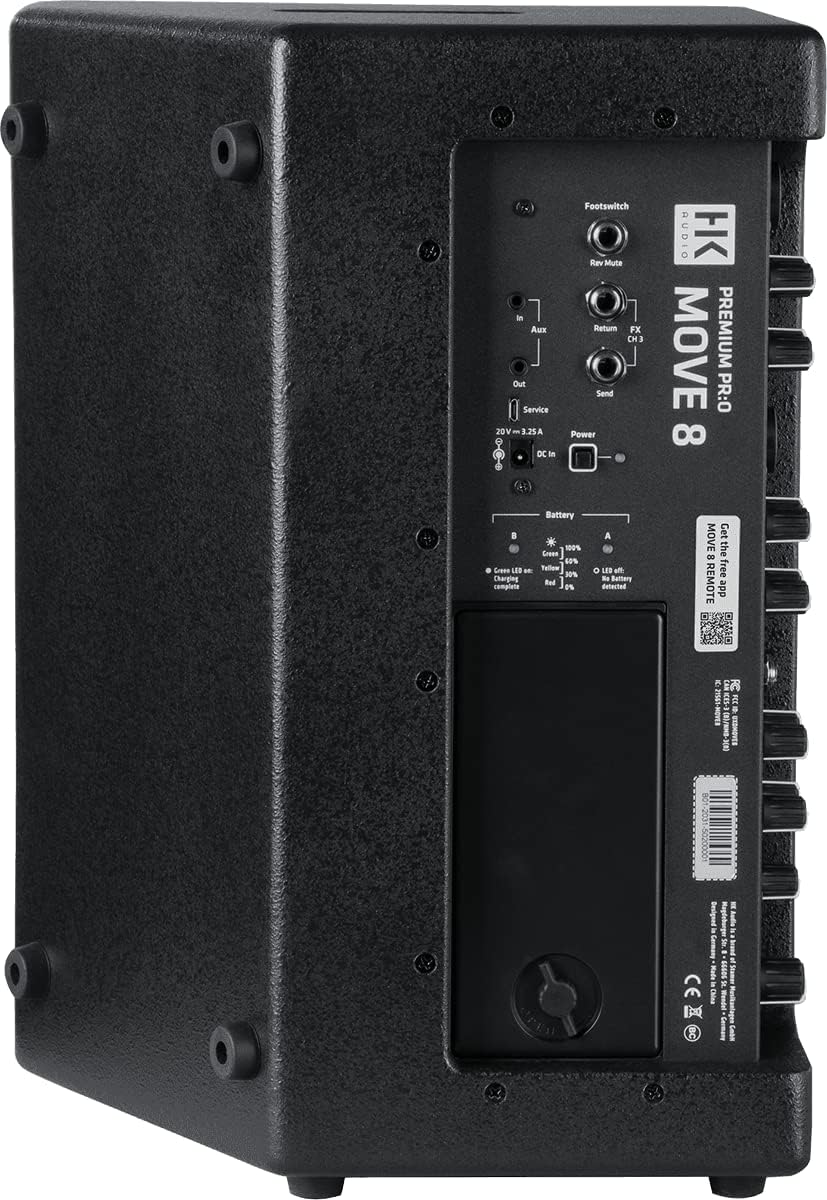
Figure 4.3: Detailed Rear Panel. A closer look at the rear panel, detailing the various input/output connections, the DC power input, battery status indicators, and the removable battery compartment cover.

Figure 4.4: Mixer Control Panel Detail. Dizze ôfbylding jout in detaillearre view of the mixer section, illustrating the individual controls for each of the four channels, including volume, treble, bass, and reverb adjustments, along with the master volume knob.
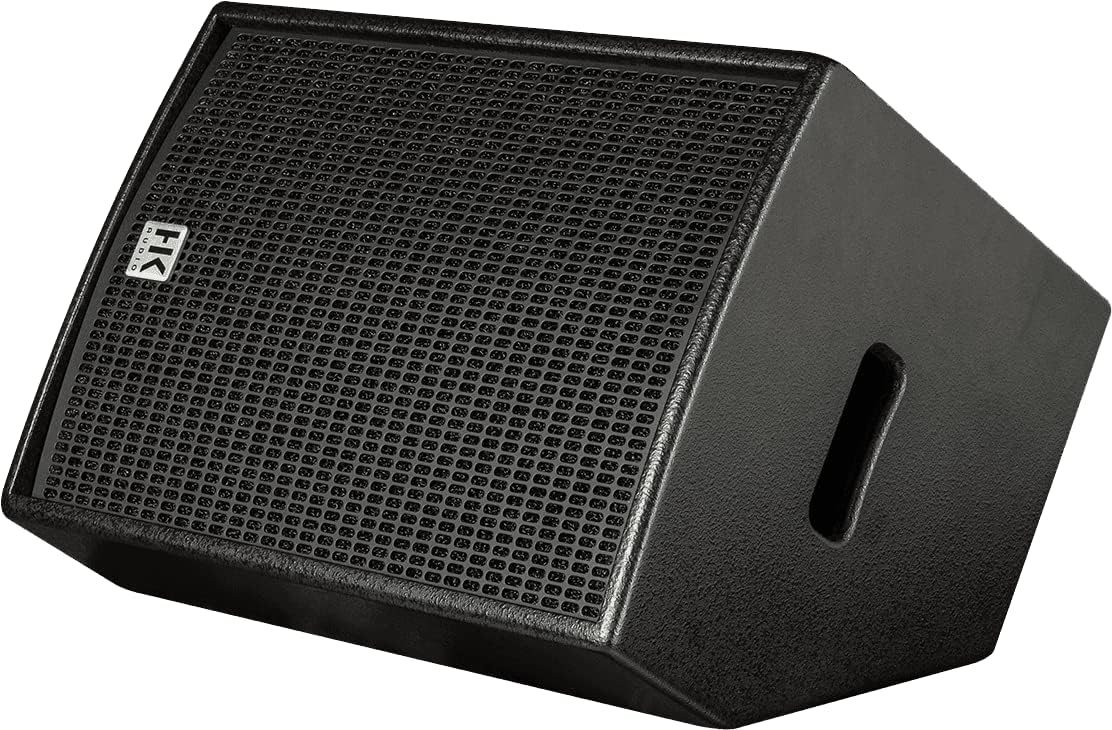
Figure 4.5: Floor Monitor Position. The speaker is shown lying on its side, angled upwards, demonstrating its capability to function as a floor monitor for stage or practice use.

Figure 4.6: Pole Mount Socket. This image highlights the integrated pole mount socket located on the bottom of the speaker, allowing it to be mounted on a standard speaker stand for elevated sound projection.
5. Opsette
5.1 Initial Charging
- Connect the supplied power adapter to the DC IN port on the rear panel of the speaker.
- Stek de stroomadapter yn in gaadlik stopkontakt.
- The battery indicator LEDs on the rear panel will show the charging status. A full charge is indicated when all LEDs are lit and stable.
- Allow the speaker to fully charge before its first battery-powered use.
5.2 Pleatsingsopsjes
- Vertical Stand Mount: Use the integrated pole mount socket on the bottom of the speaker to place it on a standard speaker stand.
- Floor Monitor: The speaker can be placed horizontally on the floor, angled upwards, to serve as a stage monitor.
- Tafelblad/Flier: Place the speaker vertically on a stable, flat surface.
5.3 Yn-/útskeakelje
Locate the power switch on the rear panel. Press it to turn the speaker ON or OFF. The power LED will illuminate when the unit is on.
6. Bedriuwsinstruksjes
6.1 Ferbine apparaten
The PR:O Move 8 features a 4-channel mixer:
- Channels 1 & 2 (Mic/Line): These channels feature XLR/TRS combo jacks, suitable for microphones or line-level instruments. Adjust the input sensitivity using the respective switch.
- Kanaal 3 (Ynstrumint): This channel is optimized for instruments like acoustic guitars, featuring a 1/4-inch jack and a switchable cabinet simulation for authentic sound.
- Channel 4 (Aux/Bluetooth): This channel handles auxiliary input via a 3.5mm jack or Bluetooth audio streaming.
6.2 Bluetooth -keppeling
Om in Bluetooth-apparaat te ferbinen:
- Soargje derfoar dat de sprekker ynskeakele is.
- Aktivearje Bluetooth op jo audioapparaat (smartphone, tablet, ensfh.).
- Press and hold the 'Pairing' button on Channel 4 of the speaker's mixer until the Bluetooth indicator LED flashes.
- On your device, search for 'HK Audio MOVE 8' in the Bluetooth settings and select it to pair.
- Once successfully paired, the Bluetooth indicator LED on the speaker will glow solid.
6.3 Mixer Controls
Each channel (1-3) includes:
- Folume: Adjusts the input level for the respective channel.
- Treble: Kontrolearret de hege frekwinsje antwurd.
- Bas: Kontrolearret de leechfrekwinsjerespons.
- Reverb: Adds a reverberation effect to the channel's signal.
Channel 4 has a single Volume control for both Aux and Bluetooth inputs.
De Master knob controls the overall output volume of the speaker.
6.4 Batterij operaasje
The PR:O Move 8 is designed for extended battery operation. The battery status LEDs on the rear panel indicate the remaining charge:
- Green LED: 100% - 50% charge
- Yellow LED: 50% - 20% charge
- Red LED: Below 20% charge (recharge soon)
When the battery is critically low, the speaker may automatically reduce output or shut down to protect the battery.
7. Underhâld
7.1 Cleaning
Regularly clean the speaker's exterior with a soft, dry, lint-free cloth. Do not use abrasive cleaners, solvents, or waxes. Ensure no moisture enters the speaker grille or control panel.
7.2 Opslach
When not in use for extended periods, store the speaker in a cool, dry place, away from direct sunlight and extreme temperatures. For optimal battery health, ensure the battery is charged to approximately 50% before long-term storage and recharge it every few months.
8. Probleemoplossing
If you encounter issues with your PR:O Move 8 speaker, refer to the following table for common problems and solutions:
| Probleem | Mooglike oarsaak | Oplossing |
|---|---|---|
| Gjin lûdútfier | Speaker not powered on; Master volume too low; Input channel volume too low; Incorrect input selected; Cable issue. | Check power switch and power adapter; Increase Master volume; Increase individual channel volume; Verify correct input connection; Test with different cables. |
| Minne lûdskwaliteit / Ferfoarming | Input signal too high (clipping); Volume levels too high; Damaged cable; Speaker placed too close to a wall. | Reduce input gain or source volume; Lower Master or channel volume; Replace faulty cables; Adjust speaker placement. |
| Bluetooth makket gjin ferbining | Sprekker net yn koppelingsmodus; Apparaat te fier fuort; Ynterferinsje; Earder keppele apparaat ferbûn. | Press and hold 'Pairing' button; Move device closer to speaker; Turn off other Bluetooth devices; Disconnect from other devices. |
| Batterij net opladen | Power adapter not connected properly; Faulty power outlet; Damaged power adapter. | Ensure power adapter is securely connected; Test outlet with another device; Contact support for adapter replacement if suspected faulty. |
If the problem persists after trying these solutions, please contact HK Audio customer support or your dealer.
9. Spesifikaasjes
| Eigenskip | Spesifikaasje |
|---|---|
| Model Namme | MOVE 8 |
| Speaker Type | Portable Speaker, Full Range |
| Mounting Type | Floor Standing, Pole Mount |
| Speaker Grutte | 8 Inches (Woofer/Subwoofer Diameter) |
| Audio Driver Type | Dynamic Driver |
| Speaker Maksimum Output Power | 60 watt |
| Frequency Response | Oant 20 KHz |
| Ferhâlding sinjaal-nei-lûd | 60 dB |
| Power Boarne | Batterij Powered |
| Konnektivität Technology | Hulp, Bluetooth |
| Wireless Communication Technology | Bluetooth 5.0 |
| Bluetooth berik | 10m |
| Audioútfiermodus | Stereo |
| Kompatibele apparaten | Smartphone, Tablet, MP3 Player, Desktop, Laptop |
| Item Gewicht | 8.5 kilogram (18.7 pûn) |
| Produkt Ofmjittings | 0.39 x 0.39 x 0.39 inches (Note: These dimensions appear to be placeholder values and may not reflect the actual product size.) |
| Binnen / bûtengebrûk | Binnen |
| Control Metoade | Touch (Knobs/Buttons) |
| Wetter Resistance Level | Net wetterbestindich |
10. Garânsje en stipe
The HK Audio Premium PR:O Move 8 speaker comes with a limited warranty. Please refer to the warranty card included with your product or visit the official HK Audio webside foar detaillearre garânsjebetingsten en -kondysjes.
For technical support, service inquiries, or replacement parts, please contact your authorized HK Audio dealer or visit the HK Audio official support page. When contacting support, please have your product model number (MOVE 8) and serial number available.