
1. Ynlieding
The Magewell Ultra Encode SDI (Model 53050) is a versatile live stream encoder designed for professional AV applications. It supports high-quality H.264, H.265 (HEVC), and NDI|HX encoding, along with multiple streaming protocols. This manual provides detailed instructions for setting up, operating, maintaining, and troubleshooting your Ultra Encode SDI device.
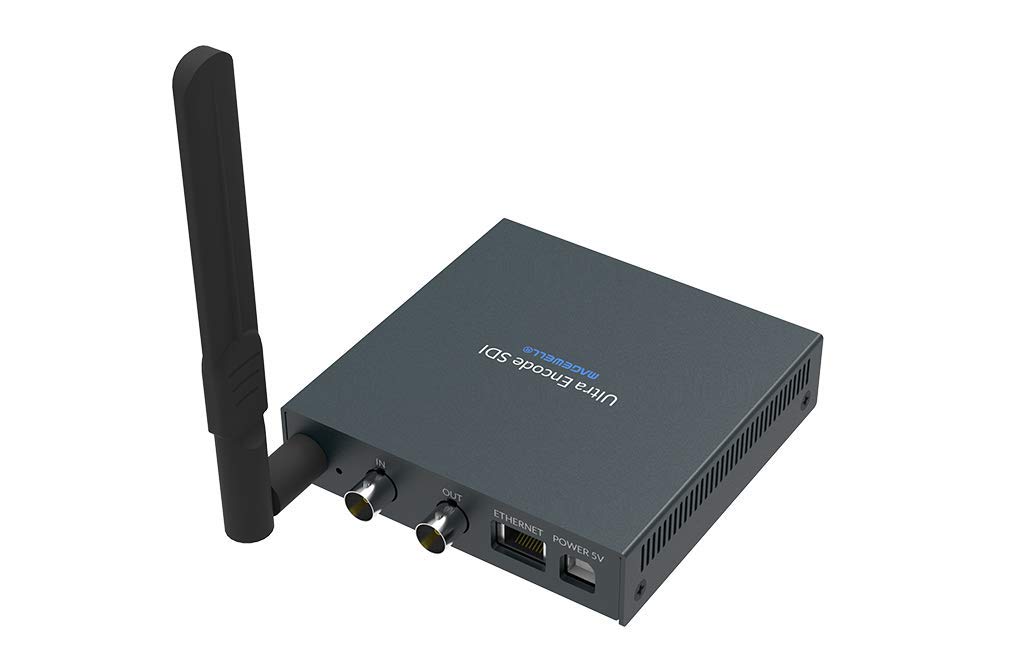
Figure 1.1: Magewell Ultra Encode SDI (Model 53050) device.
2. Package Ynhâld
Please verify that all items listed below are included in your package. If any items are missing or damaged, contact your vendor or Magewell support.
- Magewell Ultra Encode SDI (Model 53050) Unit
- Power Adapter (with regional plugs)
- USB 2.0 Type B cable
- Wi-Fi-antenne
- T-bracket
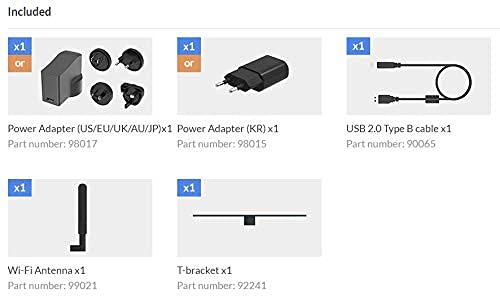
Figure 2.1: Included accessories with the Ultra Encode SDI.
3. Produkt Overview
The Ultra Encode SDI features various ports and indicators for connectivity and status monitoring. Familiarize yourself with these components before setup.
3.1 Front/Side Panel

Figure 3.1: Front/Side panel with audio ports, status LEDs, and USB port.
- LINE OUT: 3.5 mm audio útfier.
- LINE IN: 3.5mm audio-ynput.
- PWR LED: Power indicator.
- IN LED: Input signal status.
- LIVE LED: Streaming status.
- ETH LED: Ethernet connection status.
- Wi-Fi LED: Wi-Fi ferbining status.
- OPSJE: USB port for optional accessories or configuration.
3.2 Rear Panel

Figure 3.2: Rear panel with video, network, and power connections.
- IN (SDI): SDI/3G video input.
- OUT (SDI): SDI/3G loop-through output.
- ETHERNET: RJ45 port for wired network connection.
- POWER 5V: Power ynfier haven.
3.3 Port Diagram

Figure 3.3: Comprehensive port and indicator diagram.
4. Opsette
Follow these steps to set up your Magewell Ultra Encode SDI device.
4.1 Fysike ferbiningen
- Ferbine macht: Plug the provided power adapter into the POWER 5V port on the rear panel and then into a power outlet. The PWR LED on the front panel should illuminate.
- Ferbine fideo-ynfier: Connect your SDI/3G video source to the IN (SDI) port on the rear panel. If you need to loop the signal through, connect a cable from the OUT (SDI) port to your monitoring device.
- Audio ferbine (opsjoneel): If using analog audio, connect your audio source to the LINE IN port and your audio monitoring device to the LINE OUT haven.
- Netwurk ferbine:
- Wired: Connect an Ethernet cable from your network router or switch to the Ethernet port on the rear panel. The ETH LED should illuminate.
- Wireless: Screw the provided Wi-Fi antenna onto the antenna socket. You will configure the Wi-Fi connection via the web ynterface. De Wi-Fi LED will indicate connection status.
4.2 Inisjele konfiguraasje (Web Ynterface)
The Ultra Encode SDI is configured via a web-based interface. To access it:
- Ensure your computer is on the same network as the Ultra Encode SDI.
- Use a network scanning tool or check your router's connected devices list to find the IP address of the Ultra Encode SDI. Alternatively, some devices may have a default IP or a discovery tool.
- Iepenje a web browser en fier it IP-adres fan it apparaat yn 'e adresbalke yn.
- Log in using the default credentials (refer to the device's quick start guide or Magewell documentation for default username and password).
- Fan de web interface, you can configure network settings (including Wi-Fi), video/audio input parameters, encoding settings, and streaming destinations.
5. Bedriuwsinstruksjes
The Ultra Encode SDI offers flexible encoding and streaming capabilities.
5.1 Kodearring Ynstellings
- The device supports H.264 and H.265 (HEVC) video encoding. Select the desired codec and adjust parameters such as bitrate (up to 16Mbps), resolution, and frame rate via the web ynterface.
- Audio encoding options are also available for optimal quality and compatibility.
5.2 Streaming Protocols
The Ultra Encode SDI supports various streaming protocols:
- RTMP/RTMPS: Commonly used for live streaming to platforms like YouTube, Facebook, and Twitch. Configure the server URL and stream key in the web ynterface.
- HLS: HTTP Live Streaming for adaptive bitrate delivery.
- SRT: Secure Reliable Transport protocol for low-latency, high-quality video transport over unreliable networks.
- NDI|HX: NewTek's NDI|HX encoding for IP production workflows. Enable and configure NDI|HX output in the web ynterface.
5.3 Configurable Presets
The device includes configurable presets for easy streaming to popular platforms:
- Access the presets section in the web ynterface.
- Select a platform (e.g., Facebook, Twitch, YouTube) and enter your stream key or login details as prompted.
- Activate the preset to begin streaming.
6. Underhâld
Proper maintenance ensures the longevity and optimal performance of your Ultra Encode SDI.
- Reiniging: Brûk in sêfte, droege doek om de bûtenkant fan it apparaat skjin te meitsjen. Foarkom floeibere reinigingsmiddels of abrasive materialen.
- Ventilaasje: Soargje derfoar dat it apparaat yn in goed fentilearre romte pleatst wurdt om oerferhitting te foarkommen. Blokkearje de fentilaasje-iepeningen net.
- Firmware -updates: Periodically check the Magewell official website for firmware updates. Updating the firmware can provide new features, performance improvements, and bug fixes. Follow the instructions provided by Magewell for safe firmware updates.
- Opslach: As it apparaat foar langere perioaden net brûkt wurdt, bewarje it dan op in koel, droech plak, fuort fan direkt sinneljocht en ekstreme temperatueren.
7. Probleemoplossing
Dizze seksje behannelet faak foarkommende problemen dy't jo tsjinkomme kinne.
- Gjin macht:
- Soargje derfoar dat de stroomadapter feilich ferbûn is mei it apparaat en in wurkjend stopkontakt.
- Verify the power adapter is the correct one supplied with the device.
- Gjin fideo-ynfier:
- Check the SDI cable connection between the source and the device's IN (SDI) haven.
- Confirm the video source is active and outputting a compatible SDI signal.
- Kontrolearje de IN LED status.
- Gjin netwurkferbining:
- For wired connection, ensure the Ethernet cable is properly connected and the ETH LED is active.
- For Wi-Fi, ensure the antenna is attached, and Wi-Fi settings are correctly configured in the web interface. Check the Wi-Fi LED.
- Verify your network router is functioning correctly.
- Kin gjin tagong krije Web Ynterface:
- Ensure your computer is on the same network as the encoder.
- Verify the IP address of the encoder.
- Besykje de cache fan jo browser te wiskjen of brûk in oare browser.
- Streaming Issues (Buffering, Disconnections):
- Kontrolearje de snelheid en stabiliteit fan jo ynternetferbining.
- Reduce the encoding bitrate in the web interface if your network bandwidth is limited.
- Verify streaming server URL and stream key are correct.
- Kontrolearje de LIBJE LED status.
For further assistance, refer to the Magewell support website of nim kontakt op mei harren technyske stipe team.
8. Spesifikaasjes
| Eigenskip | Spesifikaasje |
|---|---|
| Merk | Magewell |
| Model | 53050 |
| Produkt Ofmjittings | 10.5 x 10.6 x 2.5 sm |
| Item Gewicht | 596 g (0.6 kilogram) |
| Fideo-ynfier | SDI/3G Input |
| Video Output | SDI/3G Loop |
| Audio Ynfier | Line-In (3.5mm) |
| Audio útfier | Line-Out (3.5mm) |
| Kodearring Formaten | H.264, H.265 (HEVC), NDI|HX |
| Max Bitrate | Oant 16 Mbps |
| Streaming protokollen | RTMP, RTMPS, HLS, SRT |
| Netwurk Konnektivität | Ethernet (RJ45), Wi-Fi (802.11ac) |
| Streamtafier | 12 Volt (DC) |
| Kompatibele apparaten | Laptop (foar konfiguraasje) |
| Special Features | Wireless connectivity, Configurable presets for streaming platforms |
9. Garânsje en stipe
For information regarding product warranty, technical support, and service, please refer to the official Magewell website or contact your authorized Magewell dealer. Keep your purchase receipt as proof of purchase for warranty claims.
Magewell Official Website: www.magewell.com