
1. Ynlieding
This manual provides comprehensive instructions for the installation, programming, and operation of the Finder 12.A4.8.230.0010 NFC Weekly Time Clock. This electronic astronomical time switch features a weekly program, an analog output, and can be programmed via a joystick or an NFC-enabled smartphone using the Finder Toolbox app.
2. Safety Information
Lês dizze feilichheidsynstruksjes goed troch foardat jo it apparaat ynstallearje en brûke. It net neifolgjen fan dizze ynstruksjes kin liede ta elektryske skokken, brân of skea oan it apparaat.
- Ynstallaasje moat útfierd wurde troch in kwalifisearre elektricien yn oerienstimming mei lokale bedradingsregeljouwing.
- Soargje derfoar dat de stroomfoarsjenning loskeppele is foardat jo ynstallaasje- of ûnderhâldswurk dogge.
- Stel it apparaat net bleat oan focht, ekstreme temperatueren of korrosive omjouwings.
- It apparaat is ûntwurpen foar gebrûk binnen.
3. Produkt Overview
The Finder 12.A4.8.230.0010 is an electronic time switch designed for DIN rail mounting. It offers precise time control with a weekly program and astronomical function.

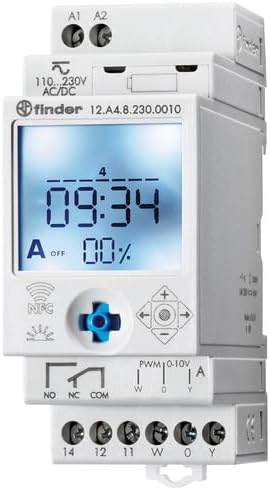
figuer 1: Front view of the Finder 12.A4.8.230.0010 Time Clock, showing the LCD display, joystick, and NFC symbol.
Key Features:
- Weekly program for flexible scheduling.
- 1 analog output: 0-10 V or PWM.
- 1 changeover contact for 16 A / 250 V AC (AC1).
- Oanbod voltage: 110-230 V AC/DC.
- LCD display for clear information.
- Programming via joystick or NFC-enabled smartphone with Finder Toolbox app (Android and iOS).
- Astronomical time control: automatic switching at sunrise and sunset based on postcode or coordinates.
- Adjustable time offset for sunrise/sunset.
4. Opset en ynstallaasje
This device is designed for DIN rail mounting. Follow these steps for proper installation:
- Power Disconnection: Ensure the main power supply to the installation area is completely disconnected before proceeding.
- Montage: Befestigje de tiidschakelaar feilich op in standert DIN-rail.
- Wiring: Connect the power supply (110-230 V AC/DC) to terminals A1 and A2. Connect the load to the changeover contact terminals (NO, NC, COM) and the analog output (W, O, Y) as required. Refer to the wiring diagram below.
figuer 2: Detailed view of the wiring terminals for power input (A1, A2), relay output (NO, NC, COM), and analog output (W, O, Y).
Noat: The device features safe separation between the power supply and contacts.
5. Bedriuwsinstruksjes
5.1 Initial Power-Up
Once wired, restore power. The LCD display will illuminate. You may need to set the current date and time if it's the first use or after a prolonged power outage.
5.2 Programming via Joystick
The integrated joystick allows for direct programming on the device:
- Navigaasje: Use the joystick to move through menu options (up, down, left, right).
- Seleksje/Befêstiging: Druk de joystick nei binnen om in opsje te selektearjen of in ynstelling te befêstigjen.
- Follow the on-screen prompts to set the current time, date, weekly program, and astronomical functions.
5.3 Programming via NFC (Finder Toolbox App)
For maximum flexibility, program the time switch using an NFC-enabled smartphone and the Finder Toolbox app:
- Download app: Download the "Finder Toolbox" app from the Google Play Store (Android) or Apple App Store (iOS).
- Create/Load Program: Open the app and create a new program or load an existing one. The app allows for detailed configuration of weekly schedules, astronomical settings, and special functions.
- Oerdracht gegevens: To transfer the program, hold your smartphone close to the NFC symbol on the time switch. The app will guide you through the data transfer process.
- Read Program: You can also read an existing program from the time switch to your smartphone for editing or backup.
5.4 Astronomical Time Control
The device can automatically switch based on sunrise and sunset times:
- Lokaasje ynstelling: Set your location by entering a postcode or geographical coordinates in the programming menu (via joystick or app).
- Offset: You can set a selectable time offset for both sunrise and sunset times to adjust switching points.
- Astro ON/OFF: Configure specific ON/OFF times during the astronomical ON period if needed.
6. Underhâld
The Finder 12.A4.8.230.0010 is designed for maintenance-free operation. However, periodic checks are recommended:
- Reiniging: Meitsje it apparaat skjin mei in droege, sêfte doek. Brûk gjin abrasive reinigingsmiddels of oplosmiddels.
- Ferbinings: Periodically check terminal connections to ensure they are secure.
- Firmware -updates: Check the Finder website or app for any available firmware updates for improved functionality or bug fixes.
7. Probleemoplossing
| Probleem | Mooglike oarsaak | Oplossing |
|---|---|---|
| Apparaat net ynskeakele. | Gjin stroomfoarsjenning of ferkearde bedrading. | Check power connections (A1, A2) and ensure power is supplied. Verify wiring against the diagram. |
| Program not executing. | Incorrect program settings or manual override active. | Review program settings via joystick or app. Check for any active manual override functions. Ensure current date/time is correct. |
| NFC transfer fails. | Smartphone not NFC-enabled, app not open, or poor contact. | Ensure your smartphone has NFC enabled. Open the Finder Toolbox app. Hold the phone directly over the NFC symbol on the device. |
| Astronomical function inaccurate. | Incorrect location (postcode/coordinates) or time zone setting. | Verify the entered postcode or coordinates. Check the time zone setting. |
If the problem persists, please contact Finder technical support.
8. Technyske spesifikaasjes
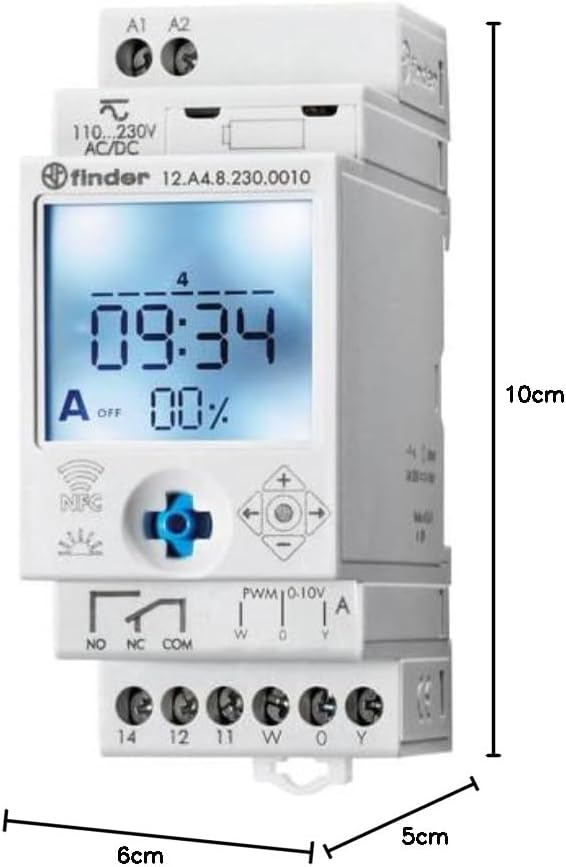
Figure 3: Dimensions of the Finder 12.A4.8.230.0010 Time Clock, showing approximate measurements of 10cm height, 6cm width, and 5cm depth.
| Eigenskip | Detail |
|---|---|
| Merk | Finder |
| Model Number | 12.A4.8.230.0010 |
| Ofmjittings (H x B x D) | 10 x 6 x 5 sm |
| Gewicht | 70 g |
| Supply Voltage | 110-230 V AC / DC |
| Utfierkontakt | 1 changeover contact, 16 A / 250 V AC (AC1) |
| Analoge útfier | 0-10 V or PWM |
| Kontakt Materiaal | AgSnO2 |
| Max. Inrush Current | 120A foar 5 ms |
| Min. Switching Time | 1 minút |
| Max. Switching Power (230 V AC1) | 4000 VA |
| Human Interface Ynfier | Buttons (Joystick) |
| Batterijen nedich | Nee |
| Kompatibel mei | Power supplies/ballasts with 0-10 V or PWM inputs, or Slave dimmers Type 15.11 |
9. Garânsje en stipe
Foar garânsje-ynformaasje en technyske stipe, ferwize jo nei de offisjele Finder webside of nim kontakt op mei jo lokale distributeur. Bewarje jo oankeapbewiis as bewiis fan oankeap.
Fabrikant: Finder
Product on Amazon.es since: 24 mei 2021