
Ynlieding
This manual provides detailed instructions for the setup, operation, and maintenance of your Brydge 11 MAX+ Wireless Keyboard Case. Designed to enhance your iPad experience, this keyboard case features a multi-touch trackpad, a magnetic SnapFit case, and Bluetooth 5.0 connectivity for seamless integration.
Wat is yn 'e doaze
- 1 x Brydge 11 MAX+ Keyboard Case
- 1 x User Manual
- Charging Cable (USB-C, may be included depending on region/bundle)

Soargje derfoar dat alle items oanwêzich binne foardat jo trochgean mei de ynstelling.
Kompatibiliteit
The Brydge 11 MAX+ Wireless Keyboard Case is compatible with the following iPad models:
- iPad Pro 11-inch (1st, 2nd, 3rd, & 4th generations)
- iPad Air 11-inch (4th, 5th generations, & M2)
Noat: This keyboard case is not designed for use with the 11-inch iPad Pro (M4).
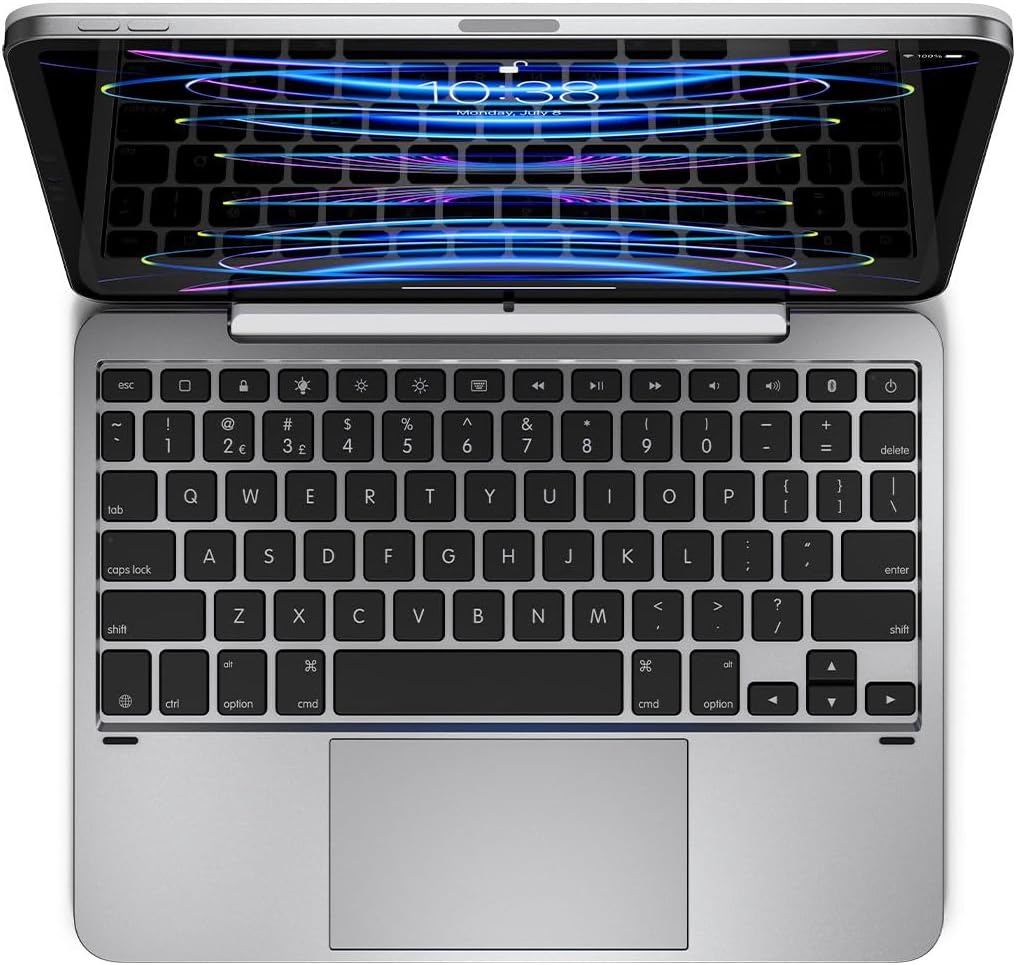
Opsette
1. Dyn iPad oanslute
- Align your iPad with the magnetic back cover of the Brydge 11 MAX+ case.
- The iPad will securely snap into place due to the integrated magnets.
- Ensure the iPad is firmly attached before use. The magnetic connection allows for easy attachment and removal, enabling quick transitions between laptop and tablet modes.

2. Bluetooth-keppeling
- Turn on your Brydge 11 MAX+ keyboard.
- Gean op jo iPad nei Ynstellings > Bluetooth.
- Select "Brydge 11.0 MAX+" from the list of available devices.
- Befêstigje de koppelingskoade as jo dêrom frege wurde.

3. Firmware Updates
To ensure optimal performance and access to the latest features, regularly check for firmware updates using the Brydge Connect app. Download the app from the App Store on your iPad.
Operating Instructions
1. Using the Multi-Touch Trackpad
The integrated multi-touch trackpad supports various iPadOS gestures for efficient navigation. Refer to your iPad's iPadOS settings for a complete list of supported gestures and customization options.

2. Adjusting Backlit Keys
The keyboard features adjustable backlit keys with three brightness levels. Use the dedicated backlight keys on the top row of the keyboard to cycle through the brightness settings or turn the backlight off.

3. Batterijlibben en opladen
The Brydge 11 MAX+ offers extended battery life, providing up to 3 months of use on a single charge. When the backlight is used consistently, battery life is approximately 40 hours. To charge the keyboard, connect a USB-C cable to the charging port located on the side of the keyboard.

4. Oanpasse Viewyn hoeken
The keyboard case allows for a 135° screen rotation, providing flexible viewing angles for various tasks, from typing to media consumption.

Ûnderhâld
To maintain your Brydge 11 MAX+ Wireless Keyboard Case, follow these guidelines:
- Wipe de bûtenste oerflakken mei in sêft, damp doek. Foarkom skealike gemikaliën of skuurmiddels.
- Keep the keyboard free from dust and debris. Use compressed air to clean between keys if necessary.
- Foarkom it bleatstellen fan it apparaat oan ekstreme temperatueren of direkte sinneljocht foar langere perioaden.
Troubleshooting
If you encounter issues with your Brydge 11 MAX+ keyboard case, consider the following:
- Toetseboerd ferbynt net: Ensure Bluetooth is enabled on your iPad and the keyboard is powered on. Try unpairing and re-pairing the keyboard.
- Trackpad reagearret net: Check that the keyboard is fully charged. Restart your iPad and the keyboard. Ensure no settings are disabling trackpad functionality in iPadOS.
- Kaaien wurkje net: Verify the keyboard is charged and connected. If specific keys are unresponsive, try cleaning around them.
- Batterij drain fluch: Reduce backlight brightness or turn it off when not needed. Ensure the keyboard is fully charged before use.
For further assistance, refer to the official Brydge support resources.
Spesifikaasjes
| Produkt Ofmjittings | 9.75 x 7.34 x 0.66 inch (9.8"L x 7.3"B x 0.7"H) |
| Item Gewicht | 1.65 pyk |
| Fabrikant | Brydge |
| Item Model Number | BRY4033 |
| Batterijen | 1 Lithium Ion batterij fereaske (ynbegrepen) |
| Konnektivität Technology | Bluetooth 5.0 |
| Special Features | Backlit, Multi-Touch Trackpad |
| Keyboard Backlighting Color Support | Single Color (3 brightness levels) |
| Screen Rotation | Oant 135° |
Garânsje & Support
The Brydge 11 MAX+ Wireless Keyboard Case comes with a 1-year limited hardware warranty. For detailed warranty information, product support, FAQs, and contact options, please visit the official Brydge website.
Offisjele produktfideo: