
1. Ynlieding
The ION Audio Boombox Deluxe Stereo is a versatile audio system designed to provide a range of listening experiences. It combines classic audio playback options with modern connectivity, featuring an AM/FM radio, a cassette player, Bluetooth streaming, and USB/Micro SD card playback. This manual provides detailed instructions for setting up, operating, and maintaining your device.

figuer 1: Front view of the ION Audio Boombox Deluxe Stereo, showcasing its dual speakers, cassette deck, and radio tuner display.
2. Wat sit der yn 'e doaze
- Boombox Deluxe Unit
- Power Kabel
- Fluchstartgids
3. Opsette
3.1 It apparaat oandriuwe
The Boombox Deluxe can be powered using the included AC power cable or by batteries for portable use. Insert the AC power cable into the AC IN port on the back of the unit and plug it into a standard wall outlet. For battery operation, open the battery compartment (typically on the bottom or back) and insert the required D-cell batteries (not included), ensuring correct polarity.
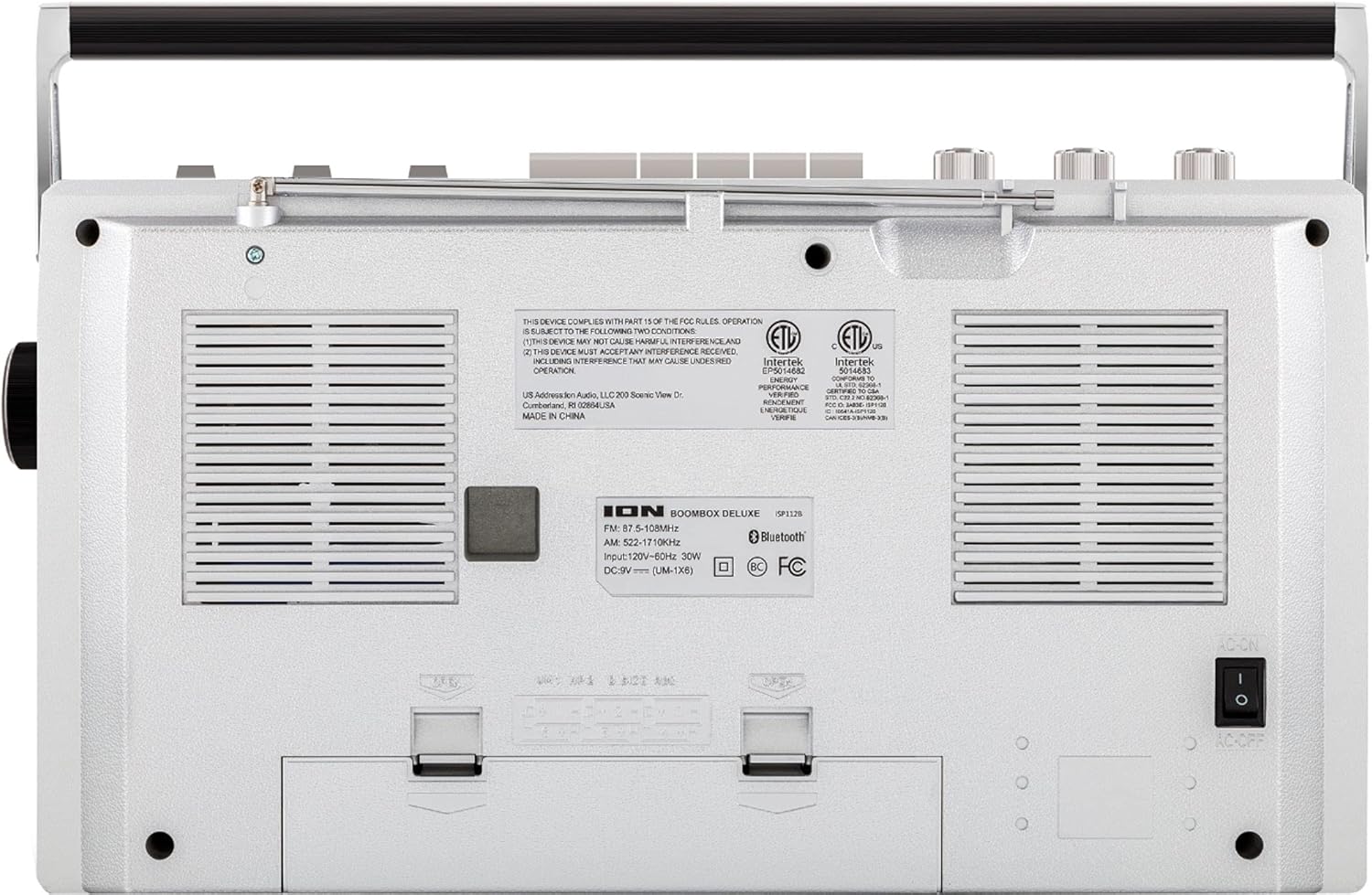
Figure 2: Rear panel of the Boombox Deluxe, highlighting the AC power input and battery compartment location.
3.2 Antenne-oanpassing
For optimal AM/FM radio reception, extend the telescopic antenna located on the top of the unit. Adjust its position for the clearest signal.
4. Bedriuwsinstruksjes
4.1 Algemiene kontrôles
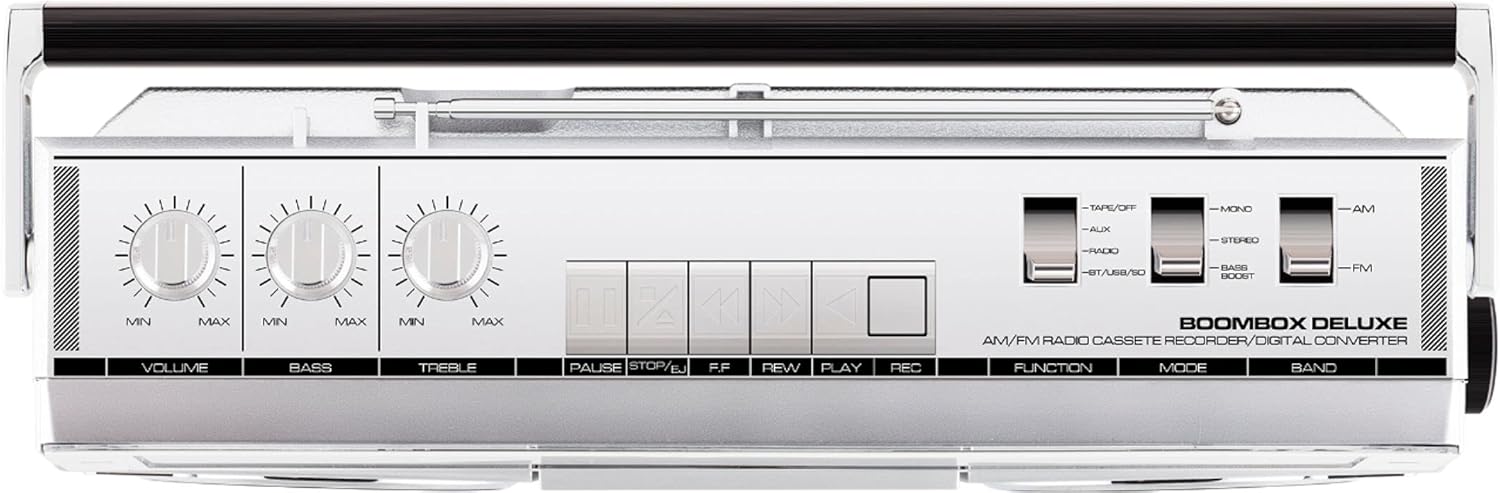
Figure 3: Top panel controls, including Volume, Bass, Treble knobs, and cassette playback buttons.
- Volume knop: Past it algemiene lûdsútfiernivo oan.
- Bas knop: Past de leechfrekwinsje audio-útfier oan.
- Treble knop: Past de útfier fan hege frekwinsje-audio oan.
- Funksje Switch: Selects between Tape/Off, Aux, Radio, and BT/USB/SD modes.
- Mode Switch: Selects between Mono, Stereo, and Bass Boost audio modes.
- Bandwiksel: Selects between AM and FM radio bands.
4.2 Radio Operaasje
- Stel de Funksje Switch to 'Radio'.
- Stel de Band Switch to 'AM' or 'FM'.
- Brûk de Tuning knop to select your desired radio station. The frequency will be displayed on the tuner scale.
4.3 Bediening fan de kassettespiler
- Stel de Funksje Switch to 'Tape/Off'.
- Druk op de Stopje / útsmite knop om it cassettefak te iepenjen.
- Insert a cassette tape with the open edge facing upwards. Close the compartment.
- Druk op de Toanielstik knop om it ôfspieljen te begjinnen.
- Gebrûk Rewind (REW) en Fluch foarút (FF) knoppen om troch de tape te navigearjen.
- Parse Skoftsje to temporarily stop playback. Press again to resume.
- Parse Stopje / útsmite om it ôfspyljen te stopjen en de tape út te werpen.
- To record, ensure the Funksje Switch is set to 'Tape/Off' and press the Record (REC) knop tagelyk mei de Toanielstik knop.
4.4 Bluetooth-ferbining

Figure 4: Side panel with USB and Micro SD card slots, and playback controls for digital media.
- Stel de Funksje Switch to 'BT/USB/SD'. The unit will enter Bluetooth pairing mode, indicated by a flashing LED.
- On your Bluetooth-enabled device (e.g., smartphone, tablet), search for 'ION Boombox Deluxe' in the Bluetooth settings.
- Select 'ION Boombox Deluxe' to pair. Once connected, a confirmation tone will sound, and the LED will stop flashing.
- You can now stream audio from your device to the Boombox Deluxe. Use your device's controls or the boombox's playback buttons (Play/Pause, Next/Previous Track) for media control.
4.5 USB/Micro SD-ôfspieljen
- Stel de Funksje Switch to 'BT/USB/SD'.
- Insert a USB flash drive or Micro SD card (with compatible audio files) into the respective slot on the side of the unit.
- The unit will automatically detect and begin playing audio files.
- Use the playback control buttons (Play/Pause, Next/Previous Track, Delete) on the side panel to manage your music.
4.6 Auxiliary Input

Figure 5: Side panel with headphone output and auxiliary input jacks.
- Stel de Funksje Switch to 'Aux'.
- Ferbine in ekstern audio-apparaat (bygelyks MP3-spieler, CD-spieler) mei de AUX YN jack mei in 3.5mm audiokabel (net ynbegrepen).
- Audio from the connected device will play through the boombox speakers. Control playback from your external device.
5. Features
- Integrated Stereo System with Dual Speakers
- Bluetooth Wireless Streaming
- AM/FM Radio Tuner
- Cassette Player/Recorder
- USB en Micro SD Card Playback
- Auxiliary Input for External Devices
- Adjustable Bass and Treble Controls
- Draachber ûntwerp mei draachgreep
6. Spesifikaasjes
| Spesifikaasje | Detail |
|---|---|
| Merk | ION Audio |
| Model | Boombox Deluxe |
| Konnektivität Technology | Bluetooth, USB |
| Speaker Type | Stereo |
| Power Boarne | Battery Powered (D-cell), AC Power |
| Kleur | Swart, Sulver |
| Item Gewicht | 8.93 pyk |
| Package Ofmjittings | 18.1 x 11.1 x 7.6 inch |
7. Probleemoplossing
- Gjin macht:
Ensure the AC power cable is securely connected to both the unit and a working power outlet. If using batteries, check that they are inserted correctly and are not depleted. - Minne radio-ûntfangst:
Fully extend the telescopic antenna and adjust its position. Try relocating the unit to an area with better signal reception, away from potential interference sources like other electronic devices. - Cassette Tape Not Playing/Recording:
Ensure the tape is inserted correctly and the cassette compartment is fully closed. Check that the tape is not tangled or damaged. For recording, ensure both Play and Record buttons are pressed simultaneously. - Bluetooth net ferbine:
Make sure the Boombox Deluxe is in 'BT/USB/SD' mode and in pairing mode (flashing LED). Ensure Bluetooth is enabled on your external device and it is within range (typically 30 feet). Try unpairing and re-pairing the device. - No Sound from USB/Micro SD:
Verify that the USB drive or Micro SD card is inserted correctly and contains compatible audio files (e.g., MP3). Ensure the volume is turned up on the boombox.
8. Underhâld
- Reiniging: Brûk in sêfte, droege doek om de bûtenkant fan it apparaat skjin te meitsjen. Brûk gjin floeibere reinigings- of oplosmiddels.
- Soarch foar kassettedek: Meitsje de tapekoppen en knyprollers periodyk skjin mei in wattenstaafke.ampened with isopropyl alcohol to ensure optimal playback and recording quality.
- Batterij opslach: As it apparaat foar in langere perioade net brûkt wurdt, ferwiderje dan de batterijen om lekkage en skea te foarkommen.
9. Garânsje en stipe
This product is offered as an Amazon Renewed item. Amazon Renewed products are professionally inspected and tested to work and look like new. If you are not satisfied with your purchase, renewed products are eligible for replacement or refund under the Amazon Renewed Guarantee. For specific details regarding the Amazon Renewed Guarantee, please refer to the Amazon Renewed program terms and conditions on the Amazon website.
For further assistance or technical support, please contact ION Audio customer service or refer to their official webside foar stipe boarnen.