
Ynlieding
The FreedConn T-COMVB Bluetooth Helmet Headset is designed to provide wireless communication for motorcyclists. This system allows for hands-free phone calls, music listening, FM radio, GPS voice prompts, and intercom communication between riders. It features Bluetooth 5.0 technology, noise cancellation, and a waterproof design for various riding conditions.
Wat is yn 'e doaze
Kontrolearje oft alle ûnderdielen yn jo pakket oanwêzich binne:
- FreedConn T-COMVB Bluetooth Headset Unit (x2 for 2-pack)
- Stereo sprekkers
- Boom Microphone (for open-face/modular helmets)
- Soft-Wire Microphone (for full-face helmets)
- Helmet Mount Bracket (clip-on and adhesive options)
- USB-oplaadkabel
- User Manual
- Klittenbandpads foar sprekkers en mikrofoan
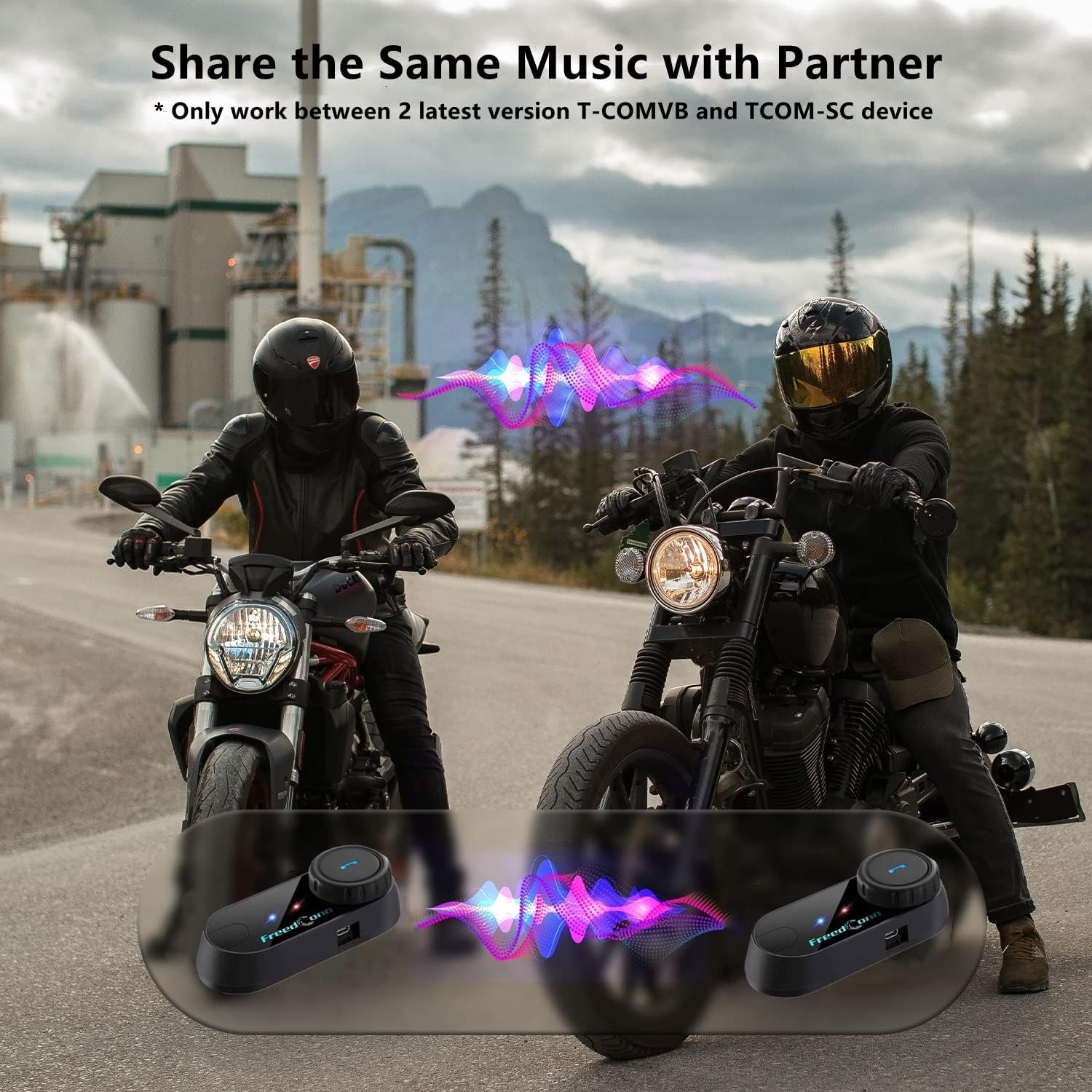
Image: Package contents for the FreedConn T-COMVB Bluetooth Helmet Headset 2-pack, showing all included accessories.
Opsette
1. It opladen fan it apparaat
Before first use, fully charge the T-COMVB unit. Connect the USB charging cable to the headset's charging port and a USB power source. The indicator light will show charging status.
- Oplaadtiid: Likernôch 3-4 oeren.
- Batterij libben: Up to 7-8 hours of intercom, 10 hours of phone calls/music, 300 hours standby.

Image: Visual representation of the 400mAh battery capacity and estimated usage times for intercom, phone calls, and standby.
2. Microphone Selection
Kies de juste mikrofoan foar jo helmtype:
- Boommikrofoan: Recommended for open-face, half, and modular flip-up helmets.
- Soft-Wire Microphone: Recommended for full-face and off-road helmets.
Connect the chosen microphone and speakers to the corresponding ports on the headset unit.
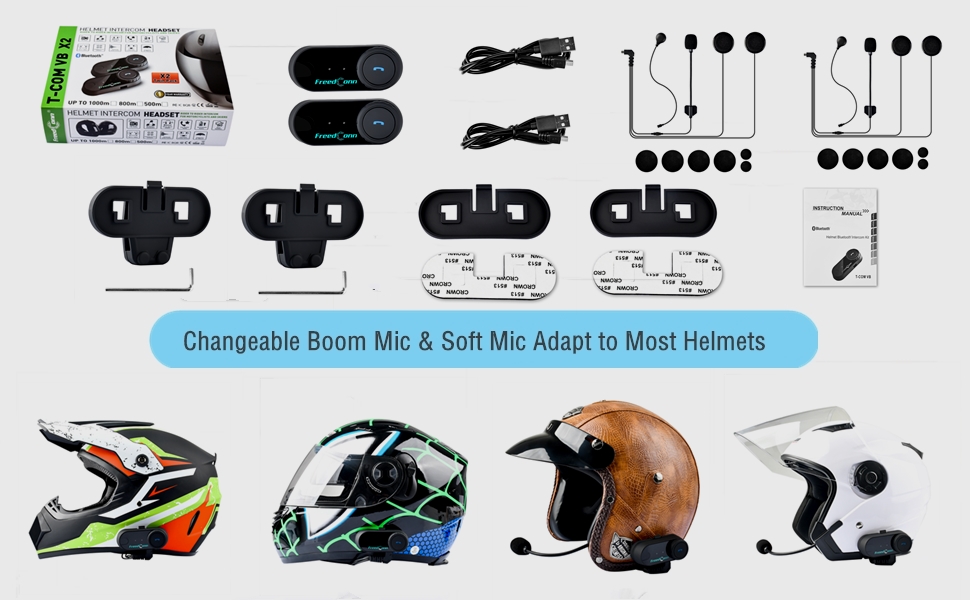
Image: Illustration demonstrating the compatibility of boom and soft-wire microphones with various helmet styles.
3. Helm ynstallaasje
Mount the T-COMVB unit to the side of your helmet using either the clip-on bracket or the adhesive bracket. Ensure the unit is securely attached and the speakers are positioned correctly inside the helmet for optimal audio.

Image: A FreedConn T-COMVB unit securely installed on the exterior of a motorcycle helmet.
Operating Instructions
1. Power On / Off
- Power On: Press and hold the Power button until the indicator light flashes.
- Útskeakelje: Druk op de oan/út-knop en hâld dy yndrukt oant it yndikatorljocht útgiet.
2. Bluetooth Pairing (with Phone/GPS)
To connect your T-COMVB to a Bluetooth-enabled device (phone, GPS):
- Ensure the T-COMVB is off.
- Druk de oan/út-knop sawat 5-7 sekonden yn oant it yndikatorljocht om beurten read en blau knippert, wat de koppelingsmodus oanjout.
- Skeakelje Bluetooth yn op jo tillefoan of GPS en sykje nei beskikbere apparaten.
- Select "FreedConn T-COMVB" from the list. If prompted, enter "0000" as the PIN.
- Sadree't it keppele is, sil it yndikatorljocht stadich blau knipperje.

Image: The T-COMVB headset demonstrating its Bluetooth 5.0 and universal connectivity with different devices and helmet types.
3. Intercom Communication (Rider to Rider)
The T-COMVB supports intercom communication with other T-COMVB or TCOM-SC units.
- Ensure both units are powered on and not connected to other Bluetooth devices.
- On one unit, press and hold the Intercom button until the indicator light flashes red and blue alternately.
- On the second unit, press the Intercom button once.
- De ienheden sille automatysk sykje en keppelje. Sadree't se ferbûn binne, sille de yndikatorljochten stadich blau knipperje.
- To initiate intercom, press the Intercom button once. To end, press it again.
4. Muzykôfspyljen en dielen
Once paired with your phone, you can play music. Music sharing is supported between two latest version T-COMVB and TCOM-SC devices.
- Spylje / Pauze: Druk ien kear op de multyfunksjonele knop.
- Folgjende track: Rotate the Multi-function button clockwise.
- Foarige spoar: Rotate the Multi-function button counter-clockwise.
- Muzyk dielen: While music is playing, press and hold the Intercom button on both units to initiate music sharing.

Image: Two riders sharing music through their FreedConn T-COMVB headsets, highlighting the music sharing feature.
5. FM Radio
To activate the built-in FM radio:
- Turn On FM: Press the FM button once.
- Scan kanalen: Rotate the Multi-function button to scan for stations.
- Turn Off FM: Press the FM button again.
6. Telefoantsjes
When paired with your phone, the T-COMVB allows for hands-free calls.
- Oprop antwurdzje: Druk ien kear op de multyfunksjonele knop.
- Oprop einigje: Druk ien kear op de Multifunksjeknop tidens in oprop.
- Oprop ôfwize: Druk en hâld de Multi-funksje knop foar 2 sekonden.
- Lêste nûmer opnij kieze: Druk dûbel op de knop Multyfunksje.
- Voice Assistant (Siri/Google Voice): Press the Voice Assistant button to activate your phone's voice assistant.

Image: Icons representing voice assistant activation (Siri, Google Voice) for hands-free calling functionality.
Ûnderhâld
- Reiniging: Brûk in sêft, damp cloth to clean the unit. Do not use harsh chemicals or solvents.
- Wetter Resistance: The unit is waterproof, but avoid submerging it in water. Ensure all ports are securely closed when exposed to rain.
- Batterij soarch: If the device is not used for an extended period, charge it at least once a month to preserve battery life.

Image: The FreedConn T-COMVB headset on a helmet, illustrating its waterproof feature in rainy conditions.
Troubleshooting
- Gjin macht: Soargje derfoar dat it apparaat folslein opladen is. Ferbine it mei in stroomboarne en kontrolearje de oplaadindikator.
- Kin Bluetooth net keppelje: Ensure the unit is in pairing mode (red and blue flashing light). Make sure other Bluetooth devices are disconnected. Try restarting both the headset and your phone/GPS.
- Gjin lûd út sprekkers: Check that the speakers are securely plugged into the headset unit. Ensure volume is not set to minimum.
- Ynterkom ferbynt net: Ensure both units are T-COMVB or TCOM-SC models and are in intercom pairing mode. Keep units within range (up to 800 meters).
- Minne audiokwaliteit/lûd: Ensure the microphone is positioned correctly, close to your mouth. The T-COMVB features advanced noise cancellation technology.

Image: A visual representation of the advanced noise cancellation technology, demonstrating its effect on sound quality.
Spesifikaasjes
| Model | T-COMVB |
| Bluetooth Ferzje | 5.0 + EDR |
| Intercom Range | Oant 800 meter (2-3 riders) |
| Batterij Kapasiteit | 400 mAh |
| Oplaadtiid | 3-4 oeren |
| Intercom Tiid | 7-8 oeren |
| Phone Call/Music Time | 10 oeren |
| Standby tiid | 300 oeren |
| Wetter Resistance | Wetterdicht |
| Control Metoade | Voice, Manual Buttons |
| Special Features | Microphone Included, Noise Cancellation, FM Radio |
| Materiaal | Polymer |
| Item Gewicht | Approximately 1.15 pounds (for 2 units) |
Garânsje en stipe
For warranty information, technical support, or service inquiries, please refer to the contact details provided with your purchase or visit the official FreedConn webside. Bewarje jo bewiis fan oankeap foar garânsjeclaims.