
Ynlieding
Thank you for choosing the Audizio SB85 Soundbar with Subwoofer. This manual provides essential information for the safe and correct operation of your new audio system. Please read it thoroughly before use and retain it for future reference. The SB85 is designed to enhance your television's audio, providing a rich, immersive sound experience for movies, games, and music, complete with a dedicated subwoofer for powerful bass.
Safety Ynstruksjes
- Lês alle ynstruksjes foarsichtich foardat jo it apparaat brûke.
- Keep the unit away from water, moisture, and heat sources.
- Net blokkearje gjin fentilaasje iepeningen.
- Brûk allinne taheaksels / accessoires spesifisearre troch de fabrikant.
- Skeakelje it apparaat út by bliksemstoarmen of as it foar lange perioaden net brûkt wurdt.
- Ferwize alle service oan kwalifisearre servicepersoniel.
- Do not expose the battery (if applicable) to excessive heat such as sunshine, fire, or the like.
Pakketynhâld
Soargje derfoar dat alle items yn 'e doaze oanwêzich binne:
- Audizio SB85 Soundbar
- Wired Subwoofer
- Remote Control
- Optical Cable (Toslink)
- AUX kabel
- Stromadapter
- User Manual
Produkt oerview
The Audizio SB85 system consists of a soundbar and a separate wired subwoofer, designed to deliver a powerful and clear audio experience.
Soundbar Features
- Integrated 150W speaker system with 4 speakers (2x 2cm range, 2x 2cm tweeter).
- Front LED display for status indication.
- Control buttons on the side panel.
- Multiple input options: HDMI (ARC), USB, Line In (AUX), Coaxial, Optical.
- Bluetooth 5.0 foar draadloze audiostreaming.

Image: Close-up of the Audizio SB85 Soundbar's control panel and its remote control, highlighting Bluetooth 5.0 and ease of use.

Ofbylding: Yntern view of the Audizio SB85 Soundbar's full-range speaker, emphasizing its 150W speaker system for an immersive audio experience.
Subwoofer Features
- 5.25-inch wired subwoofer for enhanced bass response.

Image: Close-up of the Audizio SB85 wired subwoofer, designed to amplify bass frequencies.
Opsette
1. Pleatsing
Place the soundbar centrally below your television. The subwoofer can be placed on the floor near the soundbar, ideally in a corner for optimal bass reflection, but ensure it is not obstructed.

Image: Audizio SB85 Soundbar and Subwoofer setup in a living room, demonstrating room-filling sound and clean design.

Image: Audizio SB85 Soundbar placed below a television, illustrating its universal compatibility with any TV.
2. Ferbine mei Power
Connect the power adapter to the DC IN port on the soundbar and then plug it into a wall outlet (230 Vac/50 Hz).
3. Ferbine de Subwoofer
Connect the wired subwoofer to the dedicated subwoofer output port on the soundbar.
4. Ferbine mei audioboarnen
The SB85 offers several connection options:
- HDMI (ARC): For the best audio quality and control, connect an HDMI cable from the HDMI (ARC) port on the soundbar to the HDMI ARC port on your TV. This allows the TV to send audio to the soundbar and often enables TV remote control of the soundbar's volume.
- Optysk (Toslink): Connect the included optical cable from the OPTICAL port on the soundbar to the Optical Digital Audio Out port on your TV or other audio source.
- Line In (AUX): Use the included AUX cable to connect the LINE IN port on the soundbar to the headphone jack or audio output of your device (e.g., smartphone, MP3 player).
- Koaksiaal: Connect a coaxial cable (not included) from the COAXIAL port on the soundbar to the Coaxial Digital Audio Out port on your TV or other audio source.
- USB: Insert a USB flash drive into the USB port for MP3 playback.
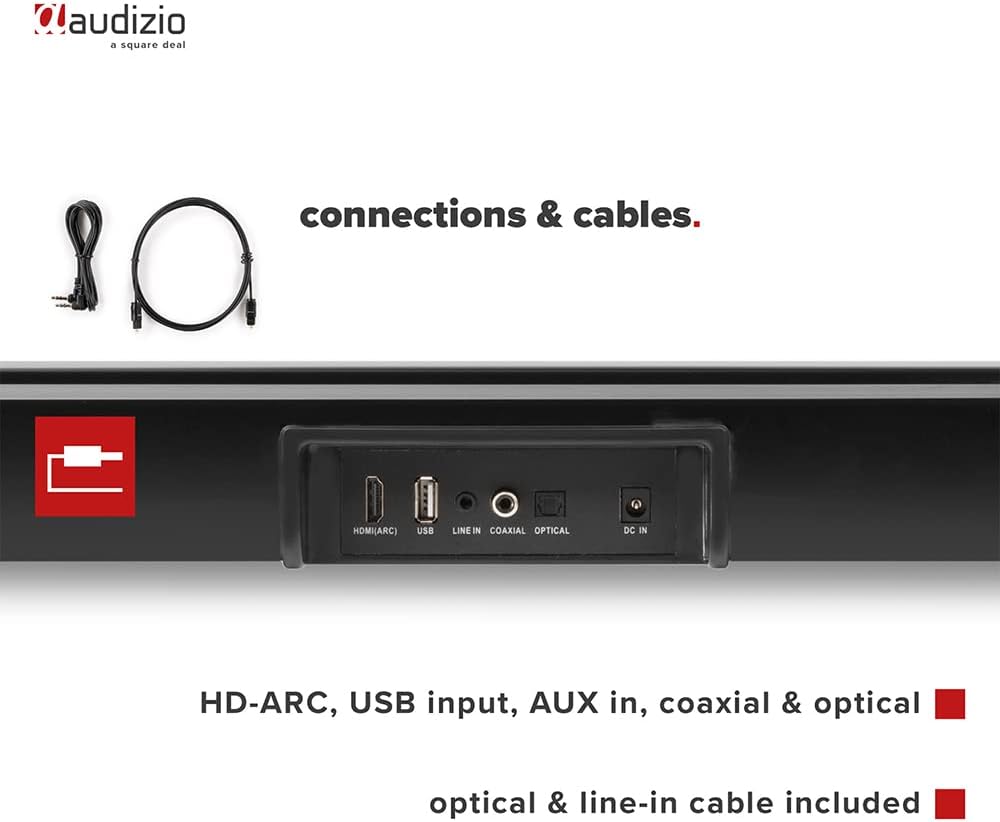
Ofbylding: Efterkant view of the Audizio SB85 Soundbar showing various connection ports: HDMI (ARC), USB, Line In, Coaxial, and Optical. Includes optical and line-in cables.
Operating Instructions
1. Power On / Off
Druk op de oan/út-knop op 'e soundbar of de ôfstânsbetsjinning om it apparaat oan of út te skeakeljen.
2. Ynput Boarne Seleksje
Press the 'MODE' button on the soundbar or the remote control repeatedly to cycle through the available input sources: HDMI (ARC), Optical, Coaxial, AUX, USB, and Bluetooth. The selected input will be shown on the front LED display.
3. Volume Control
Use the 'VOL+' and 'VOL-' buttons on the soundbar or the remote control to adjust the volume. The 'MUTE' button on the remote control will temporarily silence the audio.
4. Bluetooth-keppeling
- Switch the soundbar to Bluetooth mode using the 'MODE' button. The LED display will show 'BT'.
- Aktivearje Bluetooth op jo smartphone of tablet en sykje nei beskikbere apparaten.
- Select 'Audizio SB85' from the list of devices.
- Once paired, the soundbar will indicate a successful connection, and you can stream audio wirelessly.
5. USB Wiedergabe
Doch in USB-stick yn mei MP3-audio files into the USB port. The soundbar will automatically switch to USB mode and begin playing the music. Use the remote control to navigate tracks (play/pause, next/previous).
6. Funksjes foar ôfstânsbetsjinning
The remote control provides full functionality for the soundbar, including power, mode selection, volume, mute, and playback controls for USB and Bluetooth modes.
Ûnderhâld
Cleaning
Wipe the soundbar and subwoofer surfaces with a soft, dry cloth. Do not use abrasive cleaners, waxes, or solvents as they may damage the finish. Ensure the device is unplugged before cleaning.
Opslach
If storing the unit for an extended period, unplug it from the power outlet and store it in a cool, dry place, away from direct sunlight and extreme temperatures.
Troubleshooting
| Probleem | Mooglike oarsaak | Oplossing |
|---|---|---|
| Gjin macht | Stroomkabel net oansletten; Stopkontakt defekt | Kontrolearje de ferbining fan 'e stroomkabel; Besykje in oar stopkontakt. |
| Gjin lûd | Incorrect input selected; Volume too low; Mute activated; Cable connection loose | Select correct input source; Increase volume; Deactivate mute; Check all audio cable connections. |
| Bluetooth makket gjin ferbining | Soundbar not in Bluetooth mode; Device too far; Device already connected to another unit | Switch soundbar to BT mode; Move device closer; Disconnect from other devices and try again. |
| Remote control wurket net | Batterijen leech; Obstruksje tusken ôfstânsbetsjinning en soundbar | Ferfange batterijen; Ferwiderje alle obstakels. |
Spesifikaasjes
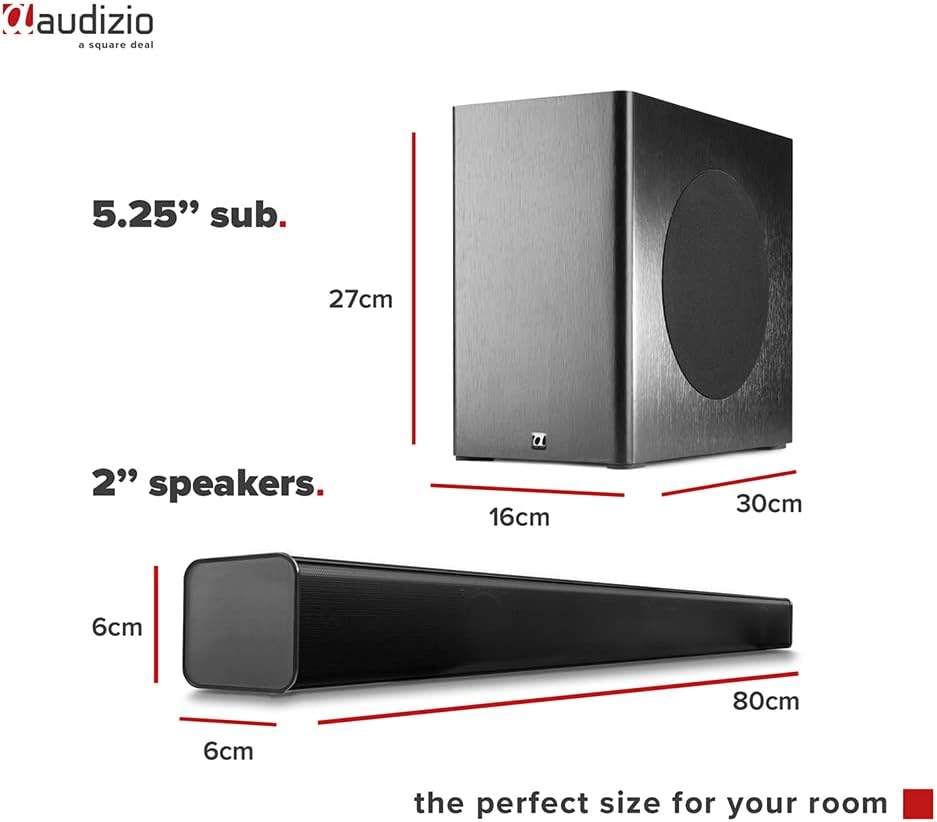
Image: Diagram showing the dimensions of the Audizio SB85 Soundbar and its subwoofer.
- Power Output: 150W (max)
- Speaker konfiguraasje: 4 speakers (2x 2cm range, 2x 2cm tweeter)
- Subwoofergrutte: 5.25 ynf
- Frekwinsjeberik: 50 Hz - 16,000 Hz
- Max SPL: 125 dB
- Konnektivität: Bluetooth 5.0, HDMI (ARC), USB, Line In (AUX), Coaxial, Optical
- Audioútfiermodus: Stereo
- Kompatibele apparaten: MP3 Player, Smartphone, TV
- Power Boarne: 230 Vac/50 Hz (via electric cable)
- Ofmjittings fan 'e soundbar (L x B x H): 80 x 6 x 6 sm
- Subwooferôfmjittings (L x B x H): 16 x 30 x 27 sm
- Totaal gewicht: 3.9 kg
- Model Oantal: 100.292
Garânsje en stipe
Foar ynformaasje oer garânsje of technyske stipe, rieplachtsje de dokumintaasje dy't by oankeap levere is of nim kontakt op mei jo winkelier. Bewarje jo bewiis fan oankeap foar alle garânsjeclaims.