
ELEFOCUS RC-815S, TX-8030, RC-816S, RC-903S, RC-904S, TX-8160, TX-8050, TX-8140
ELEFOCUS Replacement Remote Control User Manual
For Onkyo RC-815S, TX-8030, RC-816S, RC-903S, RC-904S, TX-8160, TX-8050, TX-8140 Network Audio/Video AV Stereo Receivers
Ynlieding
This manual provides essential information for the proper use and maintenance of your ELEFOCUS replacement remote control. This remote is designed as a direct replacement for various Onkyo Network Audio/Video AV Stereo Receivers, including models RC-815S, TX-8030, RC-816S, RC-903S, RC-904S, TX-8160, TX-8050, and TX-8140.
Please note that this is a replacement item and while it functions out of the box with compatible models, some advanced or specific functions of your original remote may not be fully supported. No complex programming is required; simply insert batteries to begin use.
Opsette
1. Batterij Ynstallaasje
De ôfstânsbetsjinning hat twa (2) AAA-batterijen nedich (net ynbegrepen). Folgje dizze stappen om se te ynstallearjen:
- Sykje it batterijfak op 'e efterkant fan' e ôfstânsbetsjinning.
- Druk op it ljepblêd en skuif it batterijdeksel nei ûnderen om it te iepenjen.
- Doch twa AAA-batterijen yn 'e batterijen, en soargje derfoar dat de positive (+) en negative (-) polen goed oerienkomme mei de markeringen yn it fak.
- Slide de batterij cover werom yn plak oant it klikt feilich.
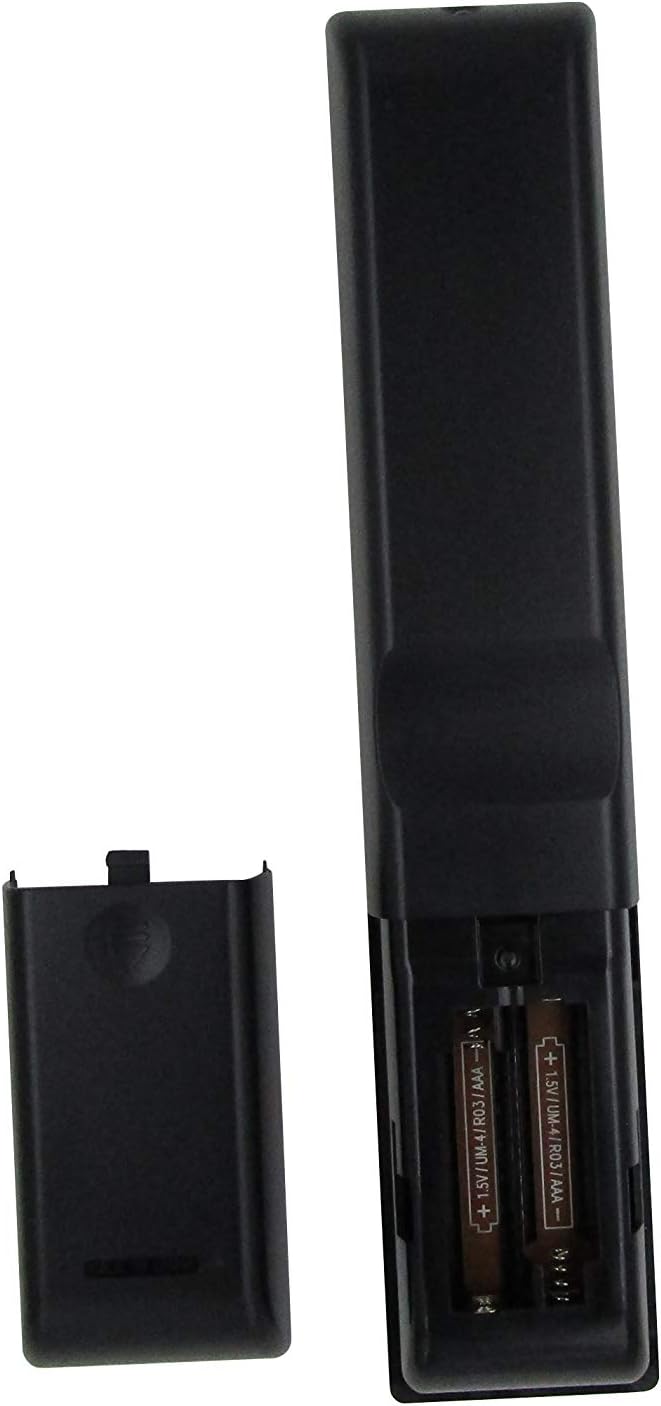
Ofbylding 1: Battery compartment with AAA batteries. Ensure correct polarity when inserting batteries.
Once batteries are installed, the remote is ready for use. No additional programming or setup is typically required for compatible Onkyo receiver models.
Operating Instructions
This replacement remote control provides essential functions for your Onkyo receiver. Point the remote directly at the receiver's infrared (IR) sensor for optimal performance.

Ofbylding 2: Oerview of the remote control layout.
Key Funksjes:
- Power knop (⏻): Skeakelt de ûntfanger oan of út.
- Input Selector Buttons (BD/DVD, CBL/SAT, PC, Game, TV/Tape, CD, Phono, Tuner, NET, Bluetooth): Selektearret de winske audio/fideo-ynfierboarne.
- Volume omheech / omleech (▲ / ▼): Past it mastervolumenivo oan.
- Muting: Dempt of undempt de audioútfier.
- Navigaasjepad (omheech, omleech, lofts, rjochts, Enter): Used to navigate menus and confirm selections on your receiver's display.
- Menu: Jout tagong ta it haadmenu fan 'e ûntfanger.
- Opsette: Enters the setup menu for configuration.
- Weromkomme: Gean werom nei it foarige menu of skerm.
- Audio: Cycles through audio modes or settings.
- Playback Controls (Rewind, Play/Pause, Fast Forward, Stop, Previous Track, Play, Next Track): Controls media playback for connected devices.
- Werhelje: Toggles repeat playback mode.
- Willekeurich: Toggles random/shuffle playback mode.
- Sprekker A/B: Selects speaker output groups.
- Numeryk toetseboerd (0-9): For direct input of numbers, such as radio frequencies or track numbers.
- Caps: Functionality may vary by receiver model.
- > 10: For entering numbers greater than 9 on some systems.
- D.TUN: Direct tuning for radio.
- Skerm: Changes display information on the receiver.
- Dimmers: Past de helderheid fan it display fan 'e ûntfanger oan.
- Sliep: Sets a sleep timer for the receiver.
- CLR: Wisket aktuele ynfier of seleksje.
Wichtige opmerking:
As a replacement remote, some advanced or specific functions present on your original Onkyo remote may not be replicated or fully functional. This remote is designed to cover the primary and most commonly used features.
Ûnderhâld
1. Batterij ferfanging
Replace batteries when the remote's response becomes sluggish or stops working. Always replace both batteries at the same time with new AAA batteries. Do not mix old and new batteries, or different types of batteries.
2. Cleaning
Brûk in sêfte, droege doek om de ôfstânsbetsjinning skjin te meitsjen. Foar hardnekkich smoargens, brûk in bytsjeampMeitsje de doek skjin mei wetter of in mylde, net-skurende reiniger. Brûk gjin agressive gemikaliën, oplosmiddels of skurende skjinmaaksponsjes, om't dizze it oerflak of de ynterne komponinten fan 'e ôfstânsbetsjinning kinne beskeadigje.
3. Opslach
When not in use for extended periods, it is recommended to remove the batteries to prevent leakage, which can damage the remote. Store the remote in a cool, dry place away from direct sunlight and extreme temperatures.
Troubleshooting
| Probleem | Mooglike oarsaak | Oplossing |
|---|---|---|
| De ôfstânsbetsjinning wurket hielendal net. |
|
|
| Guon funksjes wurkje net. |
|
|
| De ôfstânsbetsjinning wurket mei tuskenskoften. |
|
|
If your specific Onkyo receiver model is not listed in the product title (RC-815S, TX-8030, RC-816S, RC-903S, RC-904S, TX-8160, TX-8050, TX-8140), this remote may not be compatible. Please verify compatibility before purchase.
Spesifikaasjes
- Merk: ELEFOKUS
- Kompatibele apparaten: Onkyo Network Audio/Video AV Stereo Receivers (Models: RC-815S, TX-8030, RC-816S, RC-903S, RC-904S, TX-8160, TX-8050, TX-8140)
- Konnektivität technology: Ynfraread (IR)
- Power Boarne: 2 x AAA-batterijen (net ynbegrepen)
- Spesjale funksje: Ergonomysk ûntwerp
- Maksimaal oantal stipe apparaten: 1 (specific Onkyo receiver)
Warranty Information
Specific warranty details for this ELEFOCUS replacement remote control are not provided in the product information. Please refer to the seller's return policy or contact the seller directly for information regarding warranty coverage and terms.
Klant Support
For further assistance or inquiries regarding your ELEFOCUS replacement remote control, please contact the seller directly through the platform where the purchase was made. As this is a third-party replacement product, direct manufacturer support may not be available.
For general information about your Onkyo receiver, please refer to the original user manual provided with your receiver or visit the official Onkyo support website.
Oanfoljende produkt Views

Ofbylding 3: Angled view fan de ôfstânsbetsjinning.

Ofbylding 4: Close-up of the upper section of the remote, showing input and media controls.
Offisjele produktfideo's
No official product videos from the seller were provided for this item.
Ask a question about this manual
Ask about setup, troubleshooting, compatibility, parts, safety, or missing instructions. Manuals+ will review the question and use this page’s manual context to help answer it.