
Ynlieding
This manual provides comprehensive instructions for the use and care of your new Remote brand compatible remote control. This remote is specifically designed to function seamlessly with Nordmende ND40S3000J SMART televisions, offering full functionality without the need for complex programming.
Please read this manual carefully to ensure proper setup and operation of your remote control.
Opsette
1. Batterij Ynstallaasje
The remote control requires alkaline batteries (not included). Follow these steps to install them:
- Sykje de dekking fan it batterijfak op 'e efterkant fan' e ôfstânsbetsjinning.
- Skow de deksel nei ûnderen of druk op de fergrendel om it te iepenjen.
- Insert two new alkaline batteries, ensuring the positive (+) and negative (-) terminals match the diagrams inside the compartment.
- Doch it deksel fan it batterijfak werom op syn plak, en skow it werom oant it feilich klikt.
Belangryk: Always use new alkaline batteries for optimal performance. Do not mix old and new batteries, or different types of batteries.
2. Initial Use (No Programming Required)
This compatible remote control is pre-programmed for the Nordmende ND40S3000J SMART TV model. No additional programming or setup steps are required. Once batteries are installed, the remote is ready for immediate use with your television.
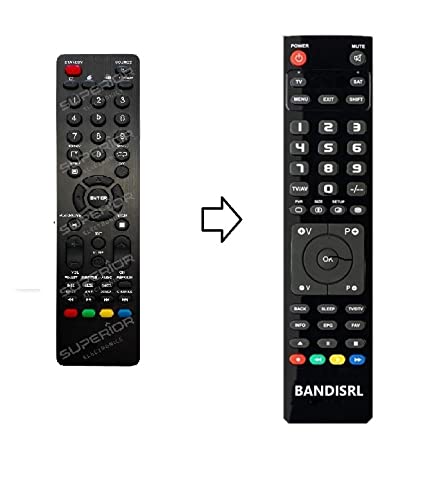
Ofbylding 1: The Remote compatible remote control. This image displays the layout of the buttons and the overall design of the remote, ready for use with your Nordmende TV.
Operating Instructions
To operate your Nordmende ND40S3000J SMART TV with this remote control, point the remote directly at the television's infrared receiver. Ensure there are no obstructions between the remote and the TV.
- Power knop: Druk op om de TV oan of út te setten.
- Volume omheech / omleech: Past it audiovolume oan.
- Kanaal omheech / omleech: Wikselet tv-kanalen sekwinsjeel.
- Siferknoppen (0-9): Directly select TV channels.
- Navigation Buttons (Arrow Keys, OK): Navigearje troch menu's en selektearje opsjes.
- Smart TV-knoppen: Access specific Smart TV functions or applications (e.g., Home, Apps, Netflix, YouTube, etc., depending on the remote's layout and TV's features).
- Mute knop: Stilet it lûd fan 'e tv.
- Boarne/Ynfierknop: Sykje troch beskikbere ynfierboarnen (HDMI, AV, ensfh.).
Refer to your Nordmende TV's original user manual for specific details on its menu structure and Smart TV functionalities.
Ûnderhâld
Reiniging fan de Remote Control
Om jo ôfstânsbetsjinning skjin te meitsjen, brûk in sêfte, droege doek. Foar koppich smoargens, in bytsje dûsjeampen the cloth with water. Do not use abrasive cleaners, alcohol, or solvents, as these can damage the remote's surface and internal components.
Batterij ferfanging
Replace batteries when the remote control's response becomes sluggish or stops working. Always replace both batteries simultaneously with new alkaline batteries. Dispose of used batteries according to local regulations.
Opslach
Bewarje de ôfstânsbetsjinning op in koel, droech plak, fuort fan direkt sinneljocht en ekstreme temperatueren. As de ôfstânsbetsjinning foar in langere perioade net brûkt wurdt, is it oan te rieden om de batterijen te ferwiderjen om lekkage te foarkommen.
Troubleshooting
- Ofstânsbetsjinning wurket net:
- Kontrolearje oft de batterijen goed ynfoege binne mei de juste polariteit (+/-).
- Replace the batteries with new alkaline batteries.
- Soargje derfoar dat der gjin obstakels binne tusken de ôfstânsbetsjinning en de ynfrareadûntfanger fan 'e tv.
- Make sure you are pointing the remote directly at the TV.
- Verify that the TV is powered on.
- Some buttons are not responding:
- This remote is designed for the Nordmende ND40S3000J SMART TV. If you are using it with a different model, some advanced functions may not be compatible.
- Soargje derfoar dat de knoppen skjin en frij fan smoargens binne.
- TV responds intermittently:
- Batterijen kinne leech wêze; ferfange se.
- Ensure a clear line of sight to the TV's infrared sensor.
- Avoid strong light sources (like direct sunlight) that might interfere with the infrared signal.
As de stappen foar probleemoplossing it probleem net oplosse, sjoch dan nei de seksje Stipe.
Spesifikaasjes
| Merk: | Remote (Manufacturer: Bandisrl) |
| Kompatibele apparaten: | Nordmende ND40S3000J SMART Television |
| Konnektivität technology: | Ynfraread (IR) |
| Spesjale funksje: | Gjin programmearring nedich |
| Batterij Type: | Alkaline |
| Batterijen ynbegrepen: | Nee |
| Kleur: | Swart |
| Oantal knoppen: | 25 |
| Controller Type: | Knop Kontrôle |
Garânsje en stipe
Warranty Information
Specific warranty details for this compatible remote control are not provided in this manual. Please refer to the purchase documentation or contact the seller/manufacturer (Bandisrl) for information regarding warranty coverage and terms.
Klant Support
For further assistance, technical support, or inquiries regarding compatibility with other TV models, please contact the manufacturer, Bandisrl. Contact information can typically be found on the product packaging or the seller's website.
If you own a different TV model than the Nordmende ND40S3000J SMART, it is recommended to contact Bandisrl to confirm compatibility before purchase or use.