
1. Ynlieding
Tankewol foar de oankeapasing the ICQN 20 Liter Electric Oven. This compact and versatile appliance is designed to assist you with various cooking tasks, from baking and roasting to grilling. To ensure safe and efficient operation, please read this manual thoroughly before first use and keep it for future reference.
This manual provides detailed instructions on the oven's features, setup, operation, maintenance, and troubleshooting.
2. Safety Ynstruksjes
Please observe the following safety precautions to prevent personal injury or damage to the appliance:
- Elektryske feiligens: Soargje de voltage indicated on the appliance matches your local power supply. Do not immerse the appliance, cord, or plug in water or other liquids. Always unplug the oven when not in use, before cleaning, or during maintenance.
- Warskôging foar waarmte: The oven surfaces become very hot during operation. Use oven mitts or gloves when handling hot parts, food, or accessories. Do not touch hot surfaces directly.
- Pleatsing: Place the oven on a stable, heat-resistant surface, away from walls and other appliances to allow for proper ventilation. Do not place near flammable materials.
- Tafersjoch: Nauwe tafersjoch is nedich as elk apparaat wurdt brûkt troch of tichtby bern.
- Ventilaasje: Do not block any ventilation openings. Ensure adequate space around the oven for air circulation.
- Bedoeld gebrûk: Dit apparaat is allinich foar húshâldlik gebrûk. Brûk net bûten of foar kommersjele doelen.
- Beskeadige snoer/stekker: Do not operate the oven with a damaged cord or plug. Contact qualified service personnel for repair.
- Bûtenlânske objekten: Do not insert any objects into the oven's ventilation slots or openings.
3. Produkt Overview
The ICQN 20 Liter Electric Oven features a compact design with intuitive controls and essential accessories for various cooking needs.

figuer 3.1: Front view of the ICQN 20 Liter Electric Oven, showing the main unit with food cooking inside.
Komponinten en kontrôles
- Temperatuer kontrôle knop: Used to set the desired cooking temperature (80°C to 250°C).
- Funksjeselektorknop: Used to select one of the five cooking modes or the defrost function.
- Timerknop: Used to set the cooking time (0-90 minutes) or continuous operation.
- Dûbele glêzen doar: Biedet isolaasje en makket it mooglik viewit oanreitsjen fan iten tidens it koken.
- Ferwaarming eleminten: Located at the top and bottom of the oven cavity.
- Fan fan: Circulates hot air for even cooking (available in specific functions).
- Ynterne ljocht: Ferljochtet de binnenkant fan 'e oven.
- Non-slip fuotten: Ensures stability on the countertop.

figuer 3.2: Detailed view of the control panel, illustrating the function selector, timer, and temperature knobs.
Ynbegrepen Accessories
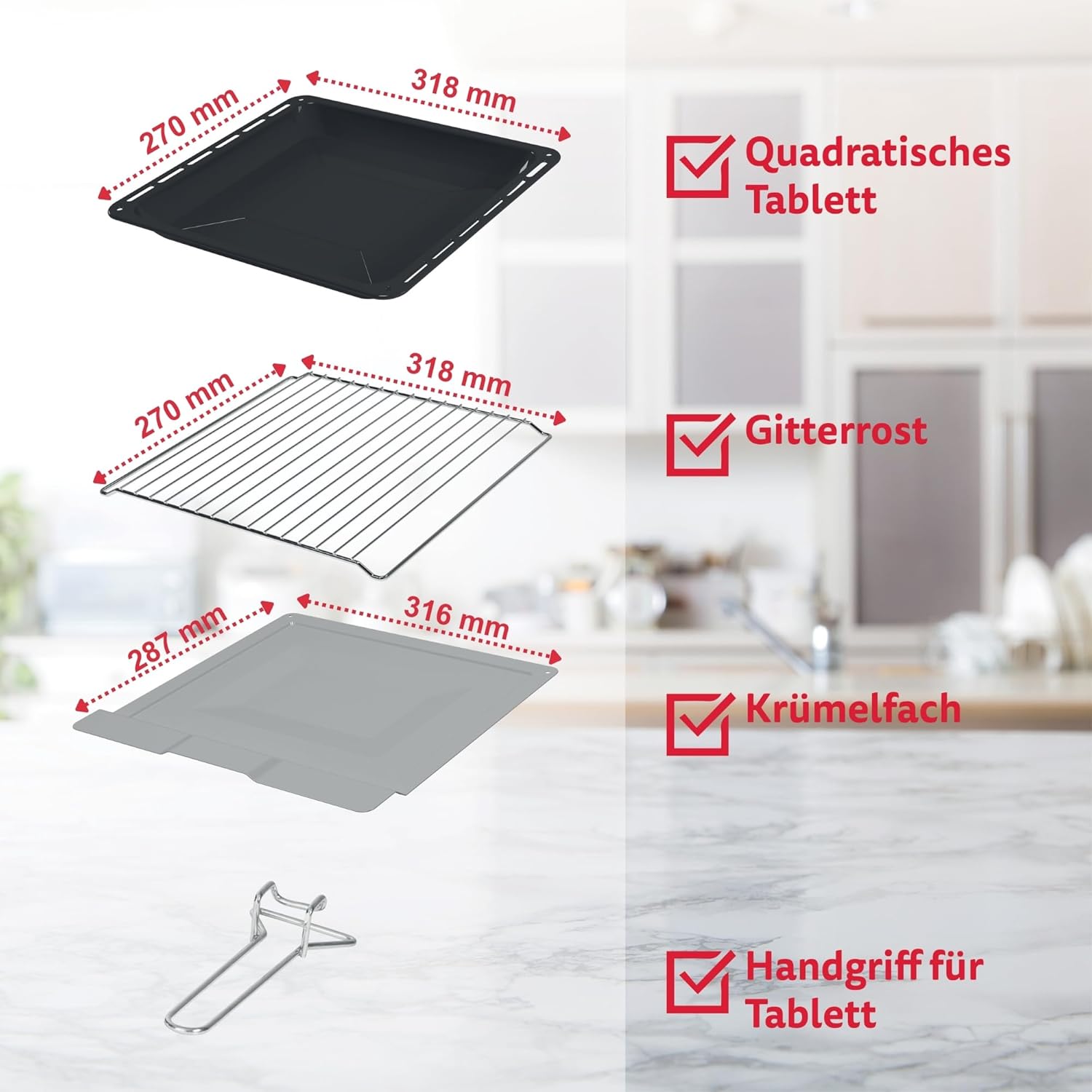
Figure 3.3: The standard accessories provided with the oven.
- Bakbak: For baking, roasting, and collecting drips. Dimensions: 31.8 x 26.6 cm.
- Grill Rack: For grilling, toasting, or placing dishes. Dimensions: 31.8 x 27 cm.
- Útnimbere krummelbak: Located at the bottom, collects crumbs and food debris for easy cleaning. Dimensions: 31.6 x 28.7 cm.
- Ladehannel: For safe insertion and removal of hot trays and racks.
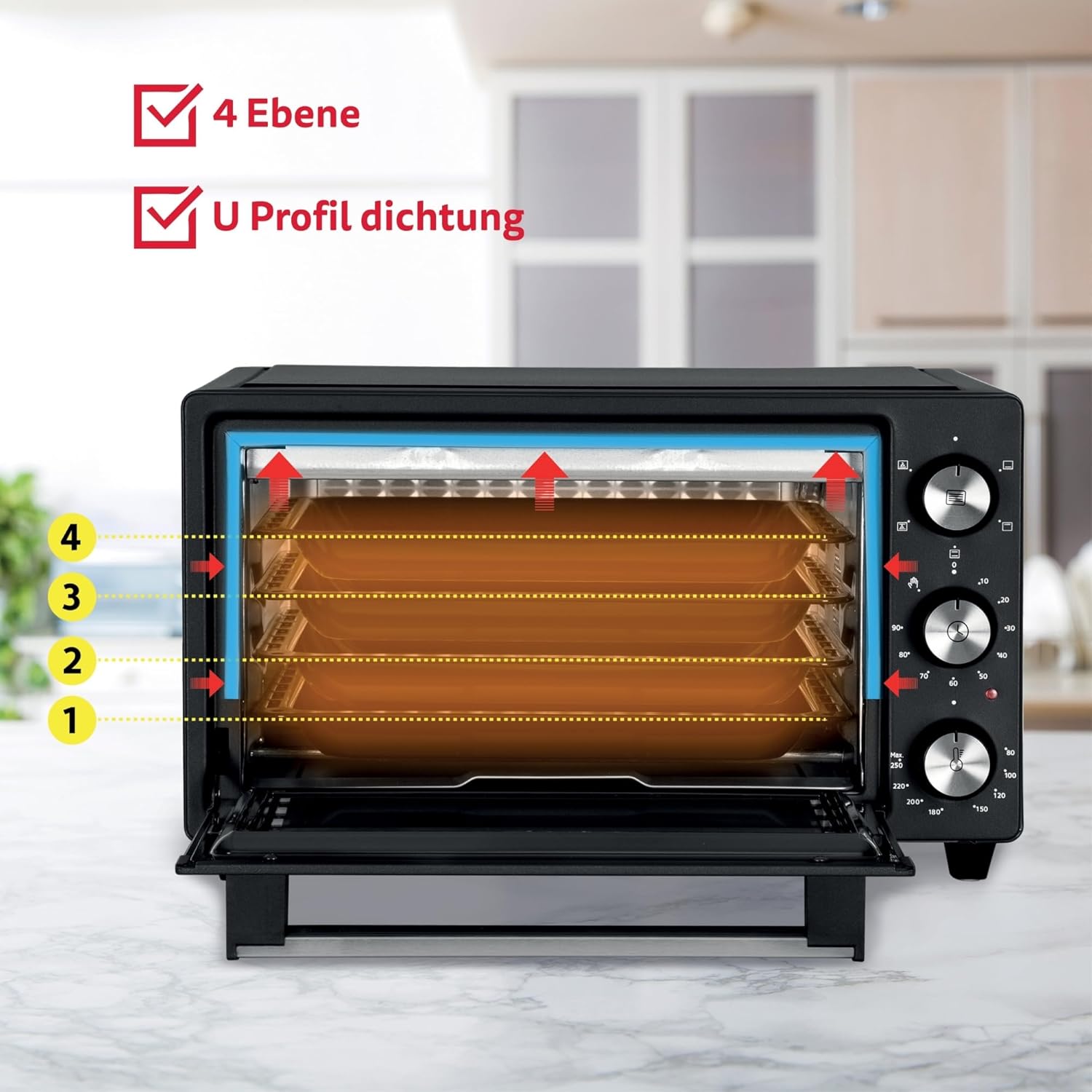
Figure 3.4: The oven interior features four distinct insertion levels for flexible cooking.
4. Opsette
- Utpakke: Helje de oven en alle accessoires foarsichtich út 'e ferpakking. Bewarje de ferpakking foar takomstich ferfier as it nedich is.
- Pleatsing: Place the oven on a flat, stable, and heat-resistant surface. Ensure there is at least 10-15 cm of clear space on all sides (back, top, and sides) for proper ventilation. Do not place the oven directly against a wall or under cabinets that are not heat-resistant.
- Earste reiniging: Foar it earste gebrûk, feie de binnen- en bûtenkant fan 'e oven ôf mei advertinsjes.amp cloth. Wash the baking tray, grill rack, and crumb tray with warm, soapy water, then rinse and dry thoroughly.
- First Use Burn-off: To eliminate any manufacturing odors, operate the empty oven for approximately 15 minutes at the maximum temperature (250°C) using the Top and Bottom Heating function. Ensure the room is well-ventilated during this process. A slight odor or smoke is normal during this initial burn-off.
5. Bedriuwsinstruksjes
Foarferwaarming
For best cooking results, it is recommended to pre-heat the oven to the desired temperature before placing food inside. This typically takes 5-10 minutes, depending on the selected temperature.
Cooking Funksjes
The oven offers 5 cooking functions, selected using the Function Selector Knob:

Figure 5.1: Visual representation of the oven's heating functions.
- Boppeste ferwaarming: Activates only the upper heating elements. Ideal for browning, grilling, or finishing dishes.
- Underferwaarming: Activates only the lower heating elements. Suitable for gentle cooking, reheating, or crisping the bottom of dishes.
- Boppe- en ûnderferwaarming: Activates both upper and lower heating elements. Standard function for baking cakes, bread, and roasting meats.
- Top Heating + Convection: Combines upper heating with the convection fan. Good for achieving a crispy top while circulating heat.
- Top and Bottom Heating + Convection: Activates both heating elements and the convection fan. Provides fast and even cooking, ideal for pizza, roasted vegetables, and multiple items on different racks.
Additionally, the oven features a Defrost Funksje, which uses the convection fan without heat to gently thaw frozen foods.
Temperatuer oanpassing
Turn the Temperature Control Knob to set the desired temperature between 80°C and 250°C. The oven will begin heating once a function and time are selected.
Mei help fan de timer
Turn the Timer Knob clockwise to set the desired cooking time, up to 90 minutes. The oven will automatically switch off and emit a bell sound when the set time has elapsed. For continuous operation, turn the timer knob counter-clockwise to the 'Stay On' position (indicated by a hand icon or similar). In this mode, the oven will remain on until manually switched off.
Rack Posysjes
The oven has four insertion levels. Choose the appropriate level based on the food type and desired cooking outcome. For example, use higher levels for grilling and lower levels for baking items that require more bottom heat.
6. Underhâld en Cleaning
Regelmjittich skjinmeitsjen soarget foar optimale prestaasjes en ferlingt de libbensdoer fan jo oven. Doch altyd de stekker út it stopkontakt en lit de oven folslein ôfkuolje foardat jo him skjinmeitsje.
- Ynterieurreiniging: Wiskje it ynterieur mei adamp cloth and mild detergent. For stubborn stains, use a non-abrasive oven cleaner suitable for mini ovens. Avoid harsh chemicals or abrasive pads that can damage surfaces.
- Eksterne reiniging: Wipe de bûtenste oerflakken mei adamp doek. Brûk gjin abrasive cleaners.
- Krummelade: The removable crumb tray should be emptied and cleaned regularly. Pull it out from the bottom front of the oven, wash with warm, soapy water, rinse, and dry thoroughly before reinserting.
- Accessories: Wash the baking tray, grill rack, and tray handle with warm, soapy water. They are generally not dishwasher safe unless specified.
- Glêzen doar: Meitsje de dûbele glêzen doar skjin mei in glêsreiniger of in advertinsjeamp cloth. Avoid scratching the glass.
7. Probleemoplossing
If you encounter issues with your ICQN Electric Oven, refer to the following common problems and solutions:
| Probleem | Mooglike oarsaak | Oplossing |
|---|---|---|
| Oven giet net oan. | Net ynstutsen; stroom úttage; defekt stopkontakt. | Ensure the oven is securely plugged into a working outlet. Check your circuit breaker. |
| Oven wurdt net waarm. | Temperature or function not set; timer not engaged. | Ensure both the temperature and function knobs are set correctly. Turn the timer knob past 0 to activate heating. |
| It iten kookt ûngelyk. | Incorrect rack position; overcrowding; pre-heating insufficient. | Adjust rack position. Avoid overcrowding the oven. Always pre-heat the oven to the desired temperature. Consider using convection functions for more even heat distribution. |
| Oven takes too long to reach temperature. | Normal for initial heating; external factors. | Allow sufficient time for pre-heating. Ensure the oven door is properly closed and the seal is intact. |
| Rook of geur by it earste gebrûk. | Produksjeresten ferbaarne. | This is normal for the first use. Ensure good ventilation. It should dissipate after the initial burn-off. |
As it probleem nei it kontrolearjen fan dizze punten oanhâldt, nim dan kontakt op mei de klanttsjinst.
8. Spesifikaasjes

Figure 8.1: Key dimensions and technical specifications of the oven.
| Eigenskip | Spesifikaasje |
|---|---|
| Merk | ICQN |
| Model | IQ M2051R02N 1AA |
| Kleur | Anthracite (Black) |
| Kapasiteit | 20 liter |
| Krêft | 1500 W |
| Voltage | 230 V |
| Temperatuerberik | 80°C - 250°C |
| Timer | 0-90 minutes with 'Stay On' function |
| Cooking Funksjes | 5 (Top, Bottom, Top+Bottom, Top+Convection, Top+Bottom+Convection) + Defrost |
| Eksterne ôfmjittings (B x D x H) | 43.5 x 38 x 26.5 sm |
| Ynterne ôfmjittings (B x D x H) | 32 x 30.5 x 21 sm |
| Gewicht | 7 kg |
| Special Features | Double glass door, 4 insertion heights, removable crumb tray, automatic shut-off. |
9. Garânsje en stipe
This ICQN Electric Oven is covered by a standard manufacturer's warranty. Please refer to the warranty card included with your purchase for specific terms and conditions, including the warranty period and coverage details.
For technical assistance, troubleshooting beyond this manual, or warranty claims, please contact ICQN customer support through the retailer where you purchased the product or visit the official ICQN website foar kontakt ynformaasje.