
Ynlieding
Thank you for choosing the NORTH EDGE APACHE Digital Sport Watch. This manual provides comprehensive instructions for the proper setup, operation, and maintenance of your watch. Please read this manual carefully to ensure optimal performance and longevity of your device.
The NORTH EDGE APACHE is a multi-functional outdoor watch designed for various activities, featuring an altimeter, barometer, compass, stopwatch, countdown timer, dual time, and 50-meter water resistance.

Image: NORTH EDGE APACHE Multi-Function Outdoor Watch. This image displays the watch face with icons indicating its various functions: altitude monitoring, temperature display, compass, 5ATM waterproof rating, time/date, stopwatch, countdown timer, auto calendar, alarm function, and EL backlight.
Opsette
Inisjele ynskeakeling en tiidynstelling
- Power On: The watch is typically powered on from the factory. If the display is blank, press and hold the WIZE button (usually bottom left) for a few seconds.
- Tiidsône en tiidynstelling:
- Yn Tiidmodus, druk en hâld de SET button (usually top left) until the seconds start flashing.
- Druk op de WIZE button to cycle through settings: Seconds → Hours → Minutes → Year → Month → Day → 12/24 Hour Format.
- Brûk de AANPASJE button (usually top right) to change the flashing value.
- Parse SET nochris om te befêstigjen en de ynstellingsmodus te ferlitten.
- Dual Time Setting: The watch supports dual time. Refer to the "Operating" section for detailed instructions on setting the second time zone.
Kompas kalibraasje
For accurate compass readings, calibration is essential, especially after significant travel or magnetic interference.
- Enter Compass Mode.
- Druk en hâld de SET knop om de kalibraasjemodus yn te gean.
- Follow the on-screen prompts, usually involving rotating the watch horizontally in a full circle (360 degrees) slowly and steadily.
- Once calibration is complete, the watch will return to normal compass display.

Image: Compass Function Display. This image shows the watch displaying a compass reading, indicating direction (NW) and degrees (316°). It highlights the watch's ability to provide precise directional information.
Operating Instructions
Your NORTH EDGE APACHE watch features multiple modes accessible via the WIZE button. The primary buttons are typically:
- SET/LIGHT: Top Left button. Used to enter/exit setting modes and activate backlight.
- ADJUST: Top Right button. Used to adjust values in setting modes or start/stop functions.
- WIZE: Bottom Left button. Used to switch between different watch modes.
- VIEW/RESET: Bottom Right button. Used to view different data or reset functions.
Modusnavigaasje
Druk op de WIZE knop werhelle om troch de folgjende modi te blêdzjen:
- Time Mode (main display)
- Altimeter modus
- Barometer modus
- Kompasmodus
- Stopwatch modus
- Timermodus foar countdown
- Alarmmodus
- Stappentellermodus
- Dual Time Mode
Altimeter Function
The altimeter measures current altitude, displays altitude trend, and can provide sea level altitude reference.
- Enter Altimeter Mode. The watch will display current altitude and temperature.
- To set a reference altitude (e.g., known altitude of your current location), press and hold SET. Gebrûk AANPASJE te feroarjen de wearde en WIZE to move between digits. Press SET te befêstigjen.
- The watch will track altitude changes relative to this reference or based on absolute barometric pressure.

Image: Altimeter Function Display. This image shows the watch displaying altitude (186m) and temperature (25.7°C), along with an altitude trend chart. It illustrates the watch's capability to monitor real-time elevation and track changes.
Barometer Function
The barometer measures atmospheric pressure and can help predict weather changes.
- Enter Barometer Mode. The watch will display current atmospheric pressure (hPa) and temperature.
- The watch may display a pressure trend graph, indicating rising or falling pressure, which can suggest improving or worsening weather.
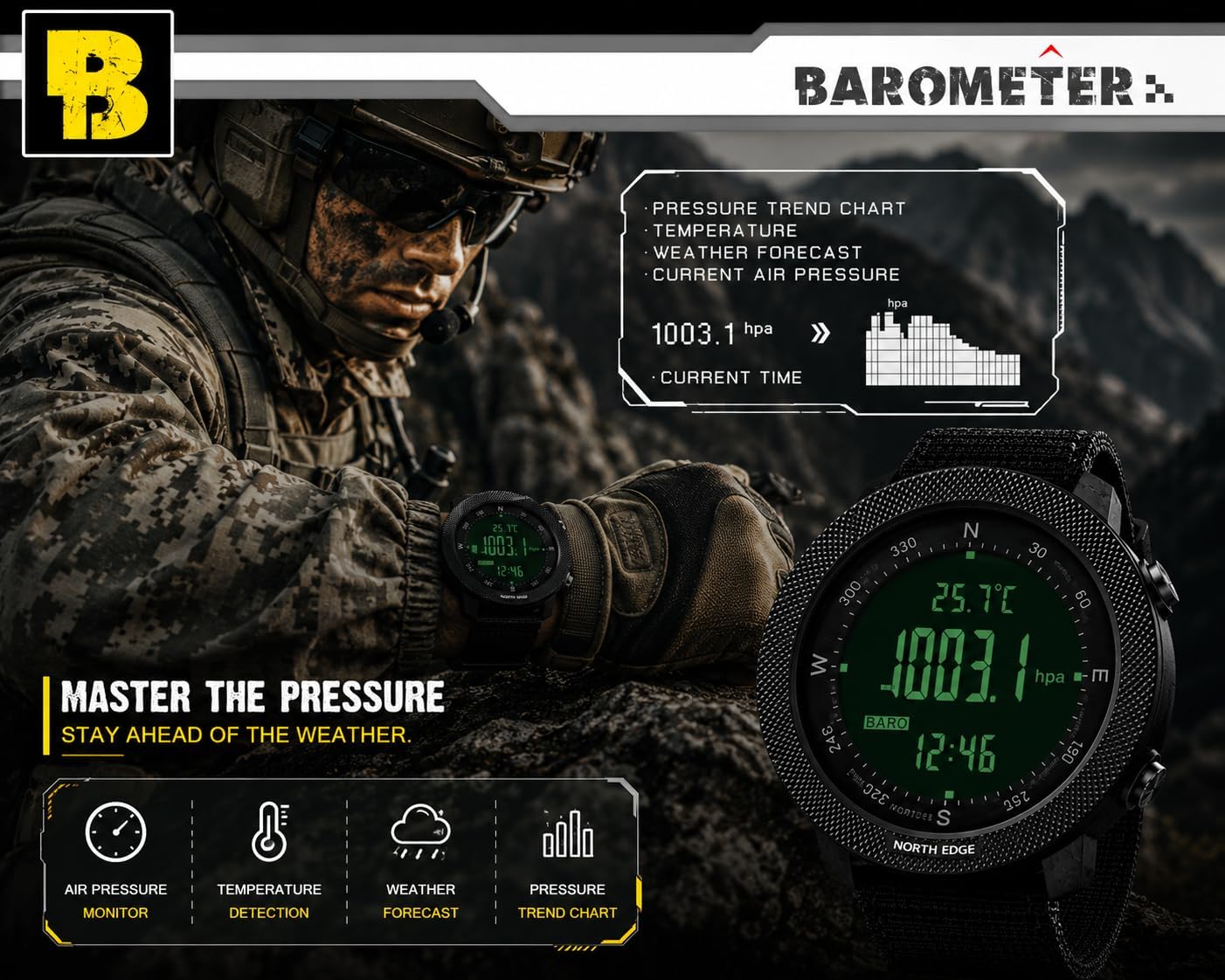
Image: Barometer Function Display. This image shows the watch displaying current atmospheric pressure (1003.1 hPa) and temperature (25.7°C), along with a pressure trend chart. It demonstrates the watch's ability to monitor air pressure and assist in weather forecasting.
Kompasfunksje
Provides directional information. Ensure proper calibration as described in the "Setup" section.
- Enter Compass Mode.
- Hold the watch horizontally and steady. The display will show the current direction (e.g., N, NE, SW) and degrees.
- Magnetic declination can be adjusted if needed for your specific location. Refer to the watch's detailed menu for this advanced setting.
Stopwatch en Countdown Timer
- Stopwatch:
- Fier de stopwatchmodus yn.
- Parse AANPASJE om de stopwatch te starten/stoppen.
- Parse VIEW/RESET to reset to zero.
- Countdown timer:
- Enter Countdown Timer Mode.
- Druk en hâld SET to set the desired countdown time (up to 23 hours, 59 minutes, 59 seconds). Use AANPASJE om wearden te feroarjen en WIZE om tusken ienheden te bewegen.
- Parse SET te befêstigjen.
- Parse AANPASJE to start/pause the countdown.
- In alarm sil ôfgean as de ôftelling nul berikt.
Alarm Funksje
The watch supports daily alarms and an hourly klokkespul.
- Enter Alarm Mode.
- Druk en hâld SET om de wekkertiid yn te stellen. Brûk AANPASJE om wearden te feroarjen en WIZE om tusken oeren en minuten te bewegen.
- Parse SET te befêstigjen.
- Gebrûk AANPASJE to toggle the alarm ON/OFF or to activate/deactivate the hourly klokkespul.
Pedometer and Calorie Tracking
The watch can track your steps and estimate calories burned.
- Enter Pedometer Mode.
- Ensure your personal data (stride length, weight) is set correctly in the watch's settings for accurate readings. Refer to the full manual for detailed personal data input.
- The watch will display your step count and estimated calories.
Backlight
Druk op de YNSTELLE/LJOCHT button (top left) to activate the EL backlight for visibility in low-light conditions.
Image: Watch Display Clear at Night with Backlight. This image demonstrates the watch's EL backlight feature, making the digital display clearly visible in dark environments.
Detailed Mode Analysis Diagram
The following diagram illustrates the button functions for Altimeter, Barometer, and Compass modes.

Image: Altimeter, Barometer, and Compass Mode Analysis Diagram. This diagram provides a visual guide to the watch's various modes, including Altimeter, Barometer, and Compass, detailing the information displayed and button interactions for each. It also lists general specifications like dimensions, weight, display type, strap material, water resistance, and supported functions.
Ûnderhâld
Cleaning
- Feie de horloazjekast en it riemke ôf mei in sêfte, damp doek.
- Brûk foar koppich smoargens in mylde sjippeoplossing en spielje goed ôf mei skjin wetter.
- Ensure the watch is completely dry before wearing or storing.
- Avoid using chemical cleaners, solvents, or abrasive materials, as these can damage the watch's finish or seals.
Wetter Resistance
The NORTH EDGE APACHE watch is water-resistant to 50 meters (164 feet). This rating means it is suitable for:
- Daily use and splashes.
- Swimming in shallow water.
- Cold showers.
Wichtige foarsoarchsmaatregels:
- Druk gjin knoppen ûnder wetter.
- Avoid exposure to hot water, steam, or saunas, as this can compromise the watch's seals.
- Not suitable for prolonged underwater activities such as diving or snorkeling.
Batterij ferfanging
The watch uses a 1 C battery (CR2032, as seen on the watch back image). When the low power indicator appears, it is recommended to replace the battery promptly.
- Battery replacement should ideally be performed by a qualified watch technician to ensure the water resistance seal is properly maintained.
- If replacing yourself, carefully open the back case, replace the CR2032 battery, and ensure the gasket is correctly seated before securely closing the case.
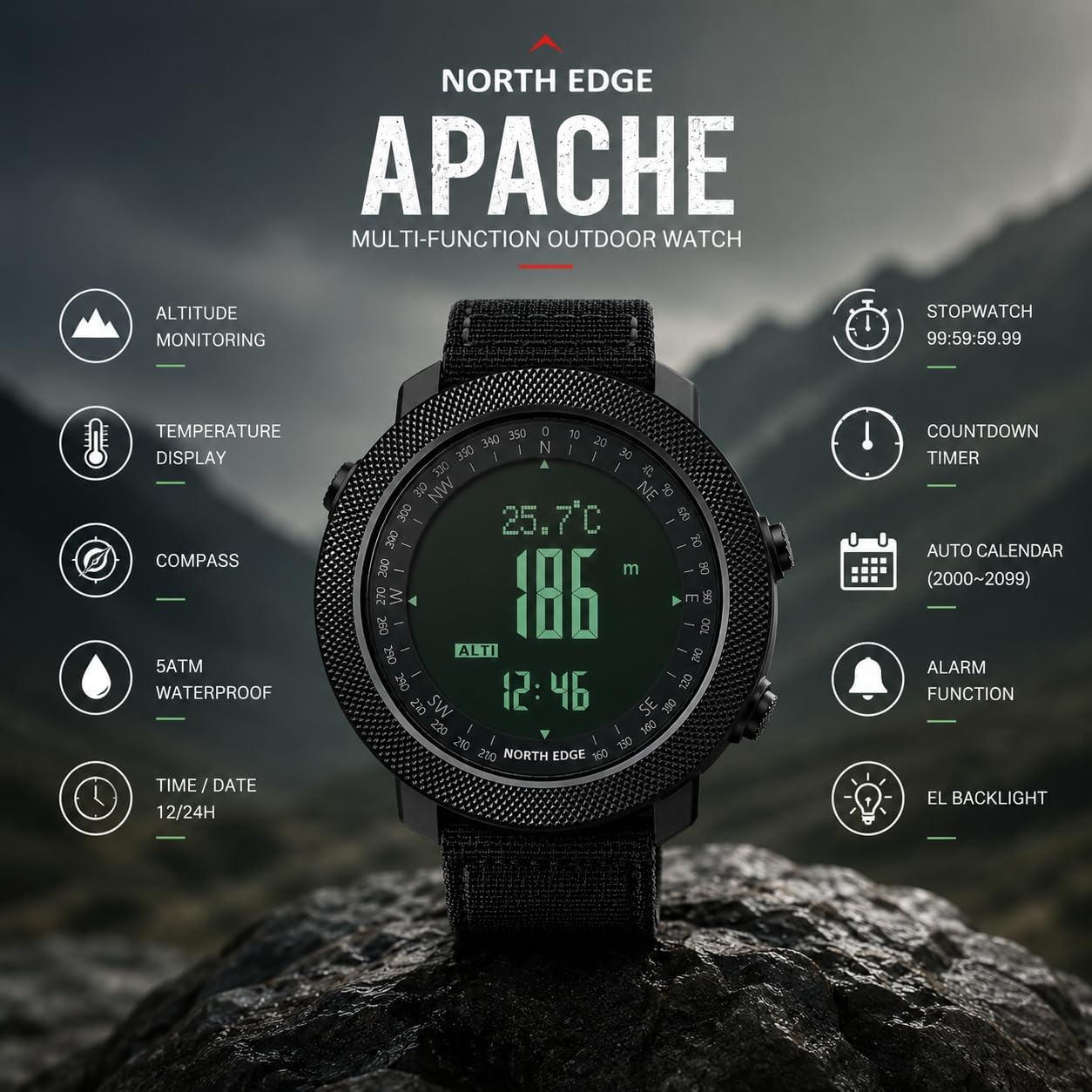
Image: NORTH EDGE Apache Watch Back with Engravings. This image shows the stainless steel back of the watch, engraved with the brand "NORTH EDGE", model "Apache", water resistance rating "WR 50m/164ft", and battery type "CR2032". It also displays the serial number T163500717.
Troubleshooting
| Probleem | Mooglike oarsaak | Oplossing |
|---|---|---|
| It horloazjeskerm is leech. | Low battery or watch is off. | Druk en hâld de WIZE button to power on. If still blank, replace the battery. |
| Inaccurate time. | Tiid net goed ynsteld of batterij is leech. | Reset the time as per "Initial Power On and Time Setting". Replace battery if necessary. |
| Inaccurate compass reading. | Not calibrated or magnetic interference. | Perform compass calibration away from strong magnetic fields (e.g., electronics, metal structures). |
| Altimeter/Barometer readings are inconsistent. | Sensor obstruction or rapid weather changes. | Ensure the sensor port (if visible) is clean. Calibrate altimeter with a known reference altitude. Note that barometric altimeters are affected by weather changes. |
| Knoppen reagearje net. | Watch might be frozen or low battery. | Try a soft reset (refer to full manual if available). Replace battery if low. Avoid pressing buttons underwater. |
Spesifikaasjes
| Model Namme: | APACHE |
| Merk: | NORTH EDGE |
| Display Type: | Digitaal |
| Beweging: | Quartz (batterij oandreaun) |
| Materiaal koffer: | Alloy Staal |
| Materiaal fan it finster: | Mineral Glass |
| Kast Diameter: | 50 mm |
| Kast dikte: | 16 mm |
| Band Materiaal: | Rubber |
| Bandbreedte: | 24 mm |
| Soart sluiting: | Gesp |
| Item Gewicht: | 112.04g wy |
| Wetter Resistance: | 50 meter (164 feet) |
| Batterij Type: | CR2032 (1 C battery) |
| Spesjale eigenskippen: | Altimeter, Barometer, Compass, Thermometer, Pedometer, Stopwatch, Countdown Timer, Dual Time, Alarm, EL Backlight, Automatic Calendar. |

Image: Wrist Size Guide and Watch Dimensions. This image provides detailed dimensions of the watch, including a diameter of 50mm, thickness of 16mm, and band width of 24mm. It also includes a wrist size range guide, recommending wrist sizes between 170mm and 220mm for optimal comfort.
Garânsje en stipe
Warranty Information
Your NORTH EDGE APACHE Digital Sport Watch comes with a 12-moanne beheinde garânsje fanôf de datum fan oankeap. Dizze garânsje dekt produksjefouten yn materialen en fakmanskip ûnder normaal gebrûk.
De garânsje dekt net:
- Damage caused by improper use, abuse, or neglect.
- Normal wear and tear, including scratches on the case or crystal, or degradation of the strap.
- Skea feroarsake troch net autorisearre reparaasjes of modifikaasjes.
- Batterij ferfanging.
- Water damage if the watch was exposed to conditions beyond its 50m water resistance rating (e.g., hot water, pressing buttons underwater).
To claim warranty service, please retain your proof of purchase and contact NORTH EDGE customer support.
Klant Support
For any questions, technical assistance, or warranty claims, please contact NORTH EDGE customer support. You can typically find contact information on the official NORTH EDGE webwebside of fia jo winkelier.
NORTH EDGE aims to provide a satisfactory solution within 24 hours for any issues you may encounter.