
Ynlieding
This manual provides detailed instructions for the safe installation, operation, and maintenance of your bimar Wi-Fi Ceiling Fan, Model 1 (Ø 132). Please read this manual thoroughly before using the product and retain it for future reference.
Bedoeld gebrûk: This high-performance ceiling fan is designed for ventilation in indoor domestic environments. Any other use is considered improper and potentially hazardous. The manufacturer cannot be held responsible for any damages resulting from improper use or repairs performed by unqualified personnel.
Wichtige Safety Ynstruksjes
Om it risiko fan brân, elektryske skok of ferwûnings oan persoanen te ferminderjen, folgje de folgjende:
- Lês alle ynstruksjes foardat jo de fentilator ynstallearje.
- De ynstallaasje moat útfierd wurde troch in kwalifisearre elektricien yn oerienstimming mei alle lokale en nasjonale elektryske foarskriften.
- Ensure the installation site can support the fan's weight (approximately 6.2 kg).
- Skakel altyd de stroom út by de haadstroomûnderbrekker foardat jo ynstallaasje of ûnderhâld dogge.
- Brûk de fentilator net mei in beskeadige netsnoer of stekker.
- Keep hands, hair, and clothing away from moving blades.
- Do not insert any objects into the fan blades while it is operating.
- Dit apparaat is net bedoeld foar gebrûk troch persoanen (ynklusyf bern) mei fermindere fysike, sintúchlike of mentale kapasiteiten, of gebrek oan ûnderfining en kennis, útsein as se hawwe krigen tafersjoch of ynstruksje oangeande it brûken fan it apparaat troch in persoan ferantwurdlik foar harren feiligens.
- Bern moatte tafersjoch wurde om te soargjen dat se net mei it apparaat boartsje.
Wat is yn 'e doaze
Your bimar Wi-Fi Ceiling Fan package includes the following components:
- bimar Wi-Fi Ceiling Fan unit (with 3 blades)
- Remote Control
- Mounting hardware (screws, brackets, etc.)
- Ynstruksjehânlieding (dit dokumint)

Image: The bimar Wi-Fi Ceiling Fan, featuring three light-colored wooden blades and a brushed metal motor housing and downrod.
Opset en ynstallaasje
1. Fan Ynstallaasje
Profesjonele ynstallaasje troch in kwalifisearre elektricien wurdt sterk oanrikkemandearre. Ensure the ceiling structure can safely support the fan's weight and that all wiring complies with local electrical codes.
- Bereid de montagelokaasje: Turn off power at the circuit breaker. Securely attach the mounting bracket to a ceiling joist or a fan-rated outlet box.
- Set de Downrod en Motor yninoar: Attach the downrod to the fan motor housing.
- Hang the Fan: Til de fentilator foarsichtich op en hingje it oan 'e montagebeugel.
- Bedrading fan 'e fan: Connect the electrical wires (live, neutral, ground) from the ceiling to the fan's wiring, following the wiring diagram provided in the separate installation guide (if applicable).
- Befestigje de blêden: Securely fasten the three blades to the motor housing.
- Befeiligje de luifel: Raise the canopy to cover the wiring and mounting bracket, securing it in place.

Ofbylding: Side view of the bimar ceiling fan, illustrating the angle of the light wood blades and the connection to the downrod.
2. Wi-Fi and App Connection
The bimar Wi-Fi Ceiling Fan is compatible with the Bimar Live Smart app for advanced control and scheduling.
- Download de app: Sykje nei "Bimar Live Smart" in your smartphone's app store (iOS or Android) and install it.
- Meitsje in akkount: Iepenje de app en folgje de ynstruksjes op it skerm om in nij brûkersaccount oan te meitsjen of yn te loggen as jo al ien hawwe.
- Apparaat taheakje: Power on the ceiling fan. In the Bimar Live Smart app, tap "Add Device" or the "+" icon. Select "Ceiling Fan" or the appropriate device type.
- Ferbine mei Wi-Fi: Follow the app's instructions to put the fan into pairing mode (usually by pressing a button on the fan or remote for a few seconds). Connect the fan to your home 2.4GHz Wi-Fi network.
- Neam it apparaat: Once connected, you can name your fan for easy identification within the app.

Image: A modern living room featuring the bimar ceiling fan installed, with a smartphone displaying the Bimar Live Smart app interface, indicating Wi-Fi and voice control capabilities.
Operating Instructions
Your bimar Wi-Fi Ceiling Fan offers multiple control options for convenience.
1. Remote Control Operaasje
The included remote control allows direct access to all fan functions.
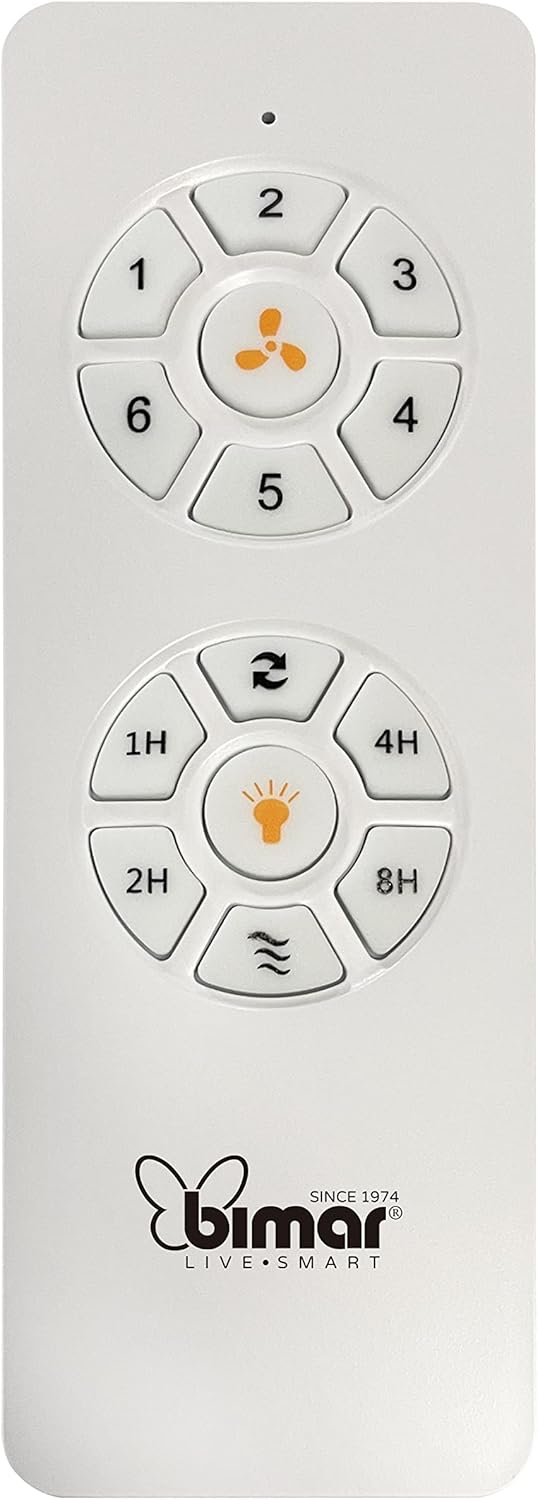
Image: The white remote control for the bimar ceiling fan, showing buttons for fan speed (1-6), fan on/off, timer (1H, 2H, 4H, 8H), mode selection, and reverse function.
- Power On/Off: Druk op de knop mei it fentilatorikoantsje om de fentilator oan of út te skeakeljen.
- Faasje oanpassing: Use buttons 1-6 to select one of the six available fan speeds.
- Timer funksje: Press 1H, 2H, 4H, or 8H to set the fan to automatically turn off after the selected duration.
- Modus seleksje: Use the mode button (often represented by waves or arrows) to cycle through Normal, Natural, Sleep, and Breeze modes.
- Simmer/wintermodus: The reverse button (often two arrows forming a circle) changes the blade rotation direction.
2. App Control (Bimar Live Smart)
Once connected to the Bimar Live Smart app, you can access enhanced features:
- Fern Operaasje: Control all fan functions from anywhere with an internet connection.
- Planning: Program daily and weekly on/off times for automated operation.
- Timer: Adjust the timer from 1 to 8 hours.
- Mode and Speed Selection: Easily switch between the 6 speeds and 4 operating modes.
3. Stim Control
The bimar Wi-Fi Ceiling Fan is compatible with popular voice assistants like Amazon Alexa and Google Assistant. After connecting the fan to the Bimar Live Smart app, link your Bimar account to your voice assistant app (e.g., Alexa app or Google Home app).
Example Stimkommando's:
- "Alexa, turn on the ceiling fan."
- "Hey Google, set ceiling fan speed to 3."
- "Alexa, turn off the ceiling fan in 1 hour."
4. Operating Modes and Speeds
- 6 Ventilation Speeds: Adjust the airflow intensity to your preference.
- Normale modus: Consistent airflow at the selected speed.
- Natuerlike modus: Simulearret natuerlike wyn troch de fentilatorsnelheid te fariearjen.
- Sliepmodus: Wurket op in legere, stiller snelheid foar ûnfersteurde rêst.
- Breeze Mode: Provides a gentle, intermittent airflow.
5. Summer/Winter Function
The reversible blade function allows for year-round use:
- Simmermodus (rotaasje tsjin de klok yn): Makket in nei ûnderen gerichte luchtstream, wêrtroch in koeljende wyn ûntstiet.
- Wintermodus (rotaasje mei de klok mei): Creates an upward airflow, circulating warm air trapped near the ceiling, improving heating efficiency.

Image: A diagram illustrating the airflow patterns for summer (indirect ventilation, pushing air upwards) and winter (direct ventilation, pulling air downwards) modes of a ceiling fan.
Ûnderhâld
Regelmjittich ûnderhâld soarget foar optimale prestaasjes en in lange libbensdoer fan jo plafondventilator.
- Reiniging: Before cleaning, ensure the fan is turned off and power is disconnected at the circuit breaker. Use a soft, damp doek om de messen en motorbehuizing ôf te feegjen. Brûk gjin skurende reinigingsmiddels of oplosmiddels.
- Blade ynspeksje: Periodically check the blades for any signs of damage or warping. Ensure all blade screws are tight.
- Motor lubrication: The fan's DC motor is designed for maintenance-free operation and does not require lubrication.
- Fasteners oanmeitsje: Over time, some fasteners may become loose. Check and tighten all screws and connections annually.

Ofbylding: In close-up view of the bimar ceiling fan's brushed metal motor housing and the attachment points for the light wood blades, highlighting areas for cleaning and inspection.
Troubleshooting
| Probleem | Mooglike oarsaak | Oplossing |
|---|---|---|
| Fan start net | Gjin stroomfoarsjenning; Batterij ôfstânsbetsjinning leech; Ferkearde bedrading. | Check circuit breaker and wall switch. Replace remote batteries. Verify wiring connections (consult electrician). |
| Fan wibbelt | Losse messen of montagemateriaal; Unbalansearre messen. | Ensure all blade screws and mounting screws are tight. Use a balancing kit (not included) if necessary. |
| Remote control wurket net | Low battery; Obstruction between remote and receiver; Remote not paired. | Replace remote batteries. Ensure clear line of sight. Refer to pairing instructions in the full manual. |
| Wi-Fi ferbining problemen | Ferkeard Wi-Fi-wachtwurd; Router te fier fuort; 5GHz-netwurk selektearre. | Verify Wi-Fi password. Move router closer or use a Wi-Fi extender. Ensure you are connecting to a 2.4GHz network. Reset fan and re-attempt pairing. |
| Fan is lawaaierich | Loose screws; Blades hitting an obstruction; Motor issue. | Check and tighten all screws. Ensure nothing is obstructing the blades. If noise persists, contact customer support. |
Spesifikaasjes
| Eigenskip | Detail |
|---|---|
| Merk | bimar |
| Model Number | 1 |
| Produkt Ofmjittings | 132 x 132 x 27.5 cm (Diameter x Diameter x Height) |
| Gewicht | 6.2 kg |
| Oantal Blades | 3 |
| Materiaal | Bosk |
| Kleur | Black (Note: Blades are light wood finish as shown in images) |
| Motor Type | DC (Brushless, energy-saving) |
| Stromferbrûk | 35W |
| Control Metoaden | Remote Control, Bimar Live Smart App, Voice Control (Amazon Alexa, Google Assistant) |
| Fan Speeds | 6 |
| Operating Modes | Normal, Natural, Sleep, Breeze |
| Timer | 1 oan 8 oeren |
| Oanfoljende funksjes | Silent operation, Summer/Winter mode (reversible blades) |
| Power Boarne | Elektrysk |
| Ynstallaasje Type | Plafond Mount |

Image: The three light wood fan blades, detached and laid flat, showcasing their design and texture.


Ofbylding: Twa views of the bimar ceiling fan, illustrating different downrod lengths: one with a 25 cm downrod and another with a 13 cm downrod, affecting the overall height of the fan.
Garânsje en stipe
For warranty information, technical support, or service inquiries, please refer to the warranty card included with your product or visit the official bimar webside. Bewarje jo bewiis fan oankeap foar garânsjeclaims.
Fabrikant: Bimar S.r.l.
Kontakt: Besykje asjebleaft the bimar store on Amazon or the official bimar webside foar kontaktgegevens.