
1. Ynlieding
Thank you for choosing SUPERNIGHT LED Strip Lights. This manual provides essential information for the safe and effective use of your 32.8 FT (10M) SMD 5050 RGB LED Strip. This flexible LED strip is designed for indoor use, offering vibrant color-changing capabilities to enhance various environments such as bedrooms, TV backlighting, and decorative lighting for holidays like Christmas and Halloween. Please read these instructions carefully before installation and operation.

Image 1.1: SUPERNIGHT LED Strip Lights packaging and product reel.
2. Package Ynhâld
Your SUPERNIGHT LED Strip Lights package includes:
- 1 x 32.8 FT (10M) SMD 5050 RGB LED Strip
Note: A DC 24V power adapter and a controller (remote or smart) are NOT included in this package and must be purchased separately for operation.

Image 2.1: Illustration of components not included with the LED strip.
3. Safety Information
- This LED strip requires a DC 24V Netzteil. Using a 12V power supply will result in incorrect operation, typically displaying only red light.
- The LED strip is IP65 waterproof, meaning it is protected against multi-directional, low-pressure water jets. It is designed for allinnich binnen gebrûk. Do not submerge in water.
- Soargje derfoar dat de stroomfoarsjenning is loskeppele foar ynstallaasje of ûnderhâld.
- Do not bend the strip sharply or apply excessive force, as this may damage the LEDs or circuit board.
- Hâld bûten it berik fan bern.

Image 3.1: Visual reminder of the 24V power supply requirement.
4. Opset en ynstallaasje
- Tariede it oerflak: Ensure the installation surface is clean, dry, and smooth. Dust, dirt, or moisture can affect the adhesive.
- Rôlje de strip út: Carefully unroll the LED strip from its reel.
- Mjitte en snije (opsjoneel): If a shorter length is desired, locate the scissor marks along the strip. Cut only at these designated points.
- Peel lijm efterkant: Peel off a small section of the double-sided adhesive tape from the back of the PCB.
- Befestigje de strip: Press the exposed adhesive firmly onto the desired surface, gradually peeling off more backing as you go. Ensure even pressure along the entire length.
- Connect to Controller and Power Supply: The LED strip features a 4-pin connector. Connect this to a compatible RGB LED controller (not included). Then, connect the controller to a DC 24V Netzteil (net ynbegrepen).

Image 4.1: Key features of the LED strip, including the 24V requirement and cutting points.

Image 4.2: Cutting the LED strip at the marked intervals.
5. Operating the LED Strip
Once properly installed and connected to a 24V power supply and a compatible controller (e.g., an RGB remote controller), you can operate your LED strip. The SMD 5050 LEDs allow for a wide range of colors and effects.
- Kleur feroarje: Use your controller to select various colors such as red, green, blue, white, purple, yellow, pink, orange, and other colorful combinations.
- Oanpassing fan helderheid: Most controllers allow you to adjust the brightness of the lights.
- Ljochtmodi: Depending on your controller, various lighting modes (e.g., flash, fade, strobe) may be available.
- Applikaasjes: These lights are ideal for creating ambient lighting in bedrooms, kitchens, TV backlighting, under cabinet lighting, car interiors, aquariums, and E-sports rooms. They are also perfect for holiday decorations, including Halloween and Christmas.

Ofbylding 5.1: Eks.amples of various colors achievable with the LED strip.

Image 5.2: LED strip lights enhancing a party atmosphere.
Video 5.3: Demonstration of the LED strip's color-changing capabilities and flexibility. This video showcases the strip being unboxed, its adhesive backing, and various colors it can produce, highlighting its versatility for different lighting needs.
6. Underhâld
- Reiniging: To clean the LED strip, gently wipe it with a dry, soft cloth. Do not use harsh chemicals or abrasive cleaners.
- Adhesive: The strip comes with double-sided adhesive tape for easy installation. If the adhesive loses its stickiness over time, additional mounting clips or stronger adhesive tape may be required.
- Opslach: If storing the strip, ensure it is coiled neatly and kept in a dry, cool environment away from direct sunlight and extreme temperatures.
7. Probleemoplossing
| Probleem | Mooglike oarsaak | Oplossing |
|---|---|---|
| LED strip only lights up red or colors are incorrect. | Ferkearde Netzteil voltage (e.g., 12V instead of 24V). | Soargje derfoar dat jo brûke in DC 24V Netzteil. This strip is designed specifically for 24V. |
| LED strip does not light up at all. | No power, loose connection, or faulty power supply/controller. | Check all connections are secure. Verify the power supply is plugged in and functioning. Test with a known working 24V power supply and controller if possible. |
| Adhesive is not sticking well. | Surface is dirty, dusty, or not smooth. Adhesive may have lost tackiness. | Clean the surface thoroughly before application. For existing installations, use additional mounting clips or stronger double-sided tape. |
| Some sections of the strip are not lighting up. | Damage to the circuit or LEDs in that section. | If the damage is at a cutting point, you may cut the faulty section and re-connect the remaining parts using appropriate connectors (not included). If damage is elsewhere, the strip may need replacement. |
8. Spesifikaasjes
- Merk: SUPERNIGHT
- Model: st-ting-l263
- Lingte: 32.8 FT (10 Meters)
- LED Type: SMD 5050 RGB
- Oantal LED's: 600 leds
- Kleur: RGB (Red, Green, Blue) - Multicolor
- Voltage: 24 Volt (DC)
- Wattage: 120 watt
- Water Resistance Level: IP65 (allinich gebrûk binnen)
- Spesjale funksje: Color Changing, Flexible, Cuttable, Adhesive Backing
- Materiaal: Resin
- Item Gewicht: 13.7 oz
- Produkt Ofmjittings: 5.71 x 3.35 x 6.1 inch (ynpakt)
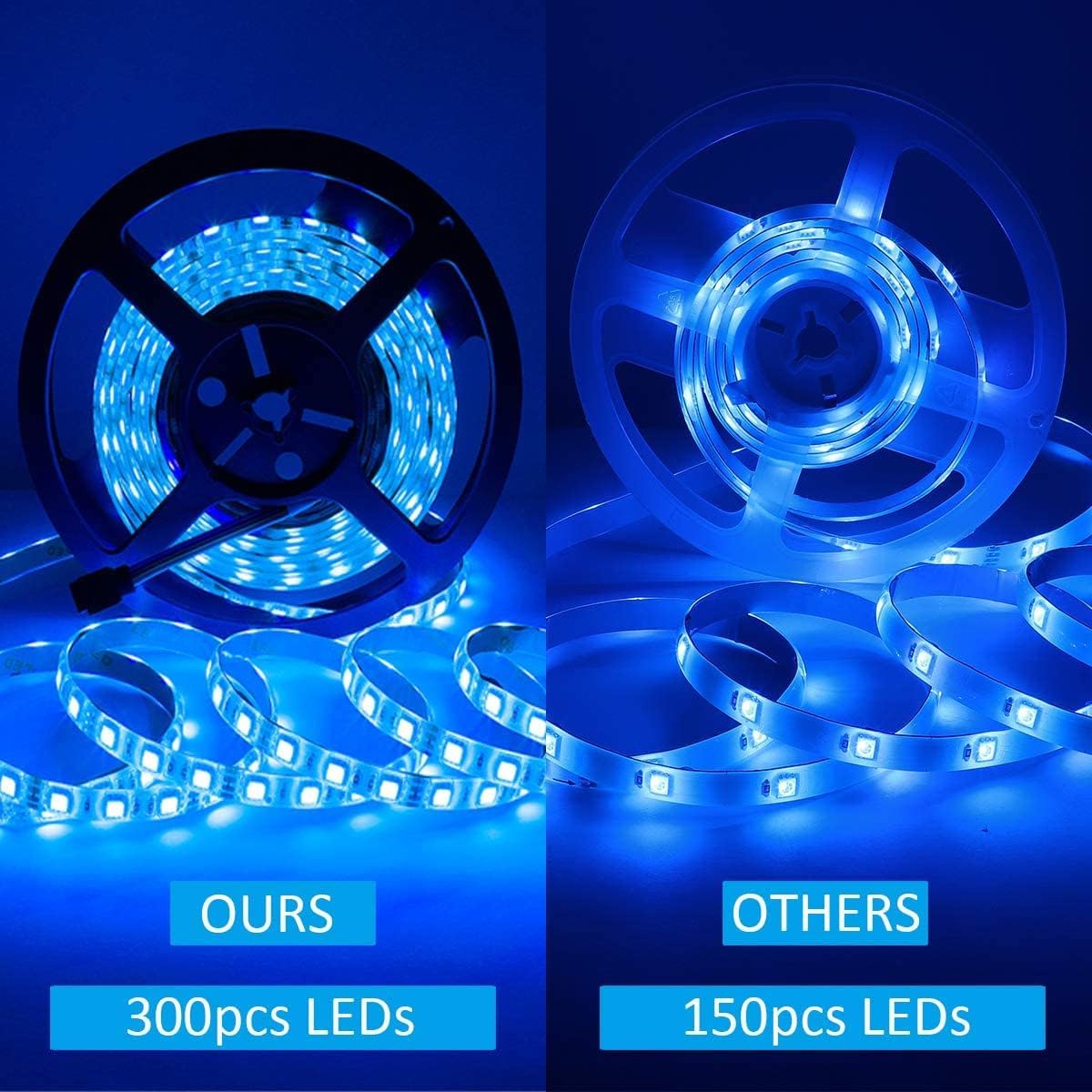
Image 8.1: Visual comparison of LED density on the strip.
9. Garânsje en stipe
For warranty information or technical support, please refer to the contact details provided with your purchase or visit the official SUPERNIGHT website. Ensure you have your product model number (st-ting-l263) and purchase details available when contacting support.