
Contixo E9
Contixo E9 Smart Floodlight Security Camera User Manual
Model: E9
1. Ynlieding
The Contixo E9 Smart Floodlight Security Camera is designed to provide comprehensive outdoor surveillance with advanced features. This manual will guide you through the installation, setup, and operation of your new security camera, ensuring optimal performance and security for your property.
Key Features:
- 2.5K (3MP) Full HD Video: High-resolution live streaming and recording.
- Adjustable Bright Floodlight: Up to 1000 Lumens for enhanced visibility and deterrence.
- Colored & Infrared Night Vision: Clear surveillance even in low-light conditions.
- Twa-wei audio: Kommunisearje mei besikers of skrik yndringers op ôfstân ôf.
- PIR Motion Detection: Accurate detection with customizable sensitivity.
- Sirene Alarm: Deter unwanted activity with an audible alarm.
- IP65 Waarbestindich: Duorsum ûntwerp foar bûtengebrûk yn ferskate waarsomstannichheden.
- Cloud/SD Card Storage: Flexible options for video footage opslach.
- Smart App Control: Manage settings and view feeds via the Xodo Smart App.
- Voice Assistant Yntegraasje: Kompatibel mei Amazon Alexa en Google Assistant.
2. Wat sit der yn 'e doaze
Kontrolearje asjebleaft de ynhâld fan jo pakket om te soargjen dat alle items oanwêzich binne en yn goede steat binne.
- 1x Contixo E9 Smart Floodlight Security Camera
- 1x brûkershantlieding (dit dokumint)
- 4x montageschroeven
- 1x USB kabel
- 1x Stromadapter
3. Opset en ynstallaasje
Follow these steps to install and set up your Contixo E9 camera.
3.1 Checklist foar foarynstallaasje
- Ensure you have a 2.4GHz Wi-Fi network available at the installation location. The camera does not support 5GHz Wi-Fi.
- Identify a suitable outdoor location with access to a power outlet. The camera requires a wired power connection and is not battery-operated.
- Download de Xodo Smart App fan 'e appwinkel fan jo smartphone (iOS of Android).
3.2 Fysike ynstallaasje
- Kies in montagelokaasje: Kies in lokaasje dy't de winske biedt viewing angle and is within reach of a power outlet. The camera is IP65 weatherproof, suitable for outdoor environments.
- Mount de kamera: Use the provided screws to securely mount the camera to a wall or suitable surface. Ensure the mounting is stable.
- Ferbine macht: Plug the USB cable into the camera and connect the power adapter to a nearby electrical outlet. The camera will power on.

Image: The Contixo E9 camera showing its USB power cable and plug adapter, highlighting the easy DIY installation process. A power socket is required for operation.
3.3 App-ynstelling en koppeling
- Open Xodo Smart App: Launch the Xodo Smart App on your smartphone. If you are a new user, register an account.
- Apparaat taheakje: Tap the "+" icon or "Add Device" to begin the pairing process. Select "Security Camera" or "Smart Floodlight Camera" from the device list.
- Folgje de oanwizings op it skerm: The app will guide you through connecting the camera to your 2.4GHz Wi-Fi network. This typically involves scanning a QR code displayed on your phone with the camera lens.
- Neam dyn kamera: Once connected, assign a name to your camera (e.g., "Front Yard Camera," "Back Door Floodlight").

Image: A smartphone screen showing the Xodo Smart App, illustrating the various controls available for the camera, including live view, dimming, siren activation, and real-time notifications.
4. Bedriuwsinstruksjes
Learn how to use the various functions of your Contixo E9 camera.
4.1 Live View en opname
- Tagong ta live feed: Open the Xodo Smart App and select your camera to view the live 2.5K HD video stream.
- Manual Recording/Snapshots: Use the controls within the app to manually record video or take still images from the live feed.
- Wiedergabe: Tagong opnommen footage from the cloud storage (subscription required) or a locally inserted Micro SD card (not included).

Image: The Contixo E9 camera mounted on a building, with a smartphone showing its live 2.5K Full HD video feed, demonstrating real-time monitoring.
4.2 Twa-wei audio
De kamera hat in ynboude mikrofoan en sprekker foar twa-wei kommunikaasje.
- Begjinne petear: Wylst viewing the live feed, tap the microphone icon in the app to speak through the camera's speaker.
- Harkje: The camera's microphone will pick up audio from its surroundings, allowing you to hear what's happening.
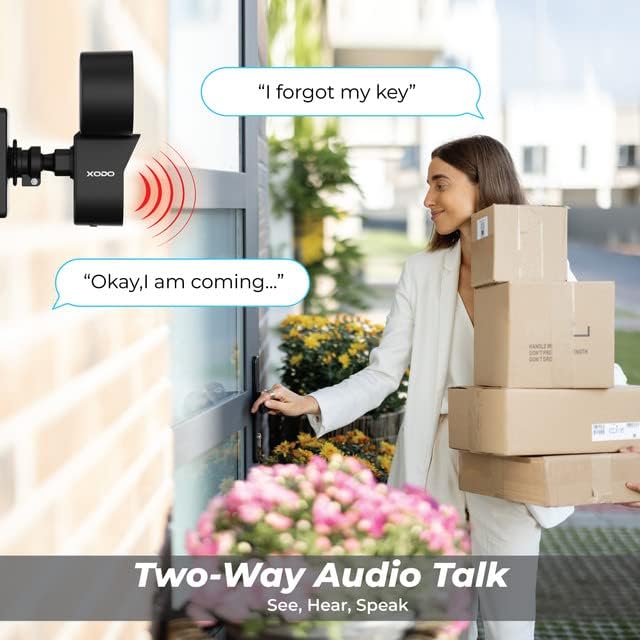
Image: A visual representation of the two-way audio feature, showing a user communicating with a delivery person via the camera.
4.3 Bewegingsdeteksje en warskôgings
The E9 camera uses PIR motion detection to identify activity and send alerts.
- Ynskeakelje / útskeakelje: Adjust motion detection settings within the Xodo Smart App.
- Gefoelichheid: Customize the PIR sensitivity to reduce false alarms (e.g., from passing cars or small animals).
- Notifikaasjes: Untfang direkte push-notifikaasjes op jo smartphone as der beweging wurdt ûntdutsen.
- Sirene Alarm: Activate the built-in siren manually or set it to trigger automatically upon motion detection via the app.

Image: The Contixo E9 camera detecting a figure at night, with icons indicating flashlight alarm, siren alert, and motion detection notifications, highlighting its security capabilities.
4.4 Night Vision and Floodlight Control
The E9 camera offers versatile night vision options and an adjustable floodlight.
- Colored Night Vision: The floodlight can illuminate the area to provide full-color video at night.
- Infrared Night Vision: For discreet monitoring, the camera can use infrared LEDs for black and white night vision without the floodlight.
- Helderheid fan floedljocht: Adjust the floodlight brightness (800lm-1000lm) and schedule its operation through the Xodo Smart App.

Image: Comparison of Smart Mode, Color Light Mode, and Infrared Mode for night vision, illustrating the camera's ability to provide clear footage yn ferskate ljochtomstannichheden.
4.5 Smart Assistant Integration
Integrate your Contixo E9 camera with Amazon Alexa or Google Assistant for voice control.
- Connect Accounts: Link your Xodo Smart account to your Alexa or Google Home app.
- Stim kommando's: Use commands like "Alexa, show me the backyard" or "Hey Google, show the front door camera" to view your live feed on compatible smart displays.

Image: A user interacting with a smart assistant to view the camera feed, highlighting compatibility with Amazon Alexa and Google Assistant.
5. Underhâld
Goed ûnderhâld soarget foar de lange libbensdoer en optimale prestaasjes fan jo kamera.
- Reiniging: Periodically clean the camera lens and floodlight cover with a soft, damp doek om stof en pún te ferwiderjen. Brûk gjin agressive gemikaliën.
- Firmware -updates: Regularly check the Xodo Smart App for available firmware updates. Updates often include performance improvements and security enhancements.
- Power Connection: Ensure the power cable remains securely connected and free from damage.
6. Probleemoplossing
If you encounter issues with your Contixo E9 camera, refer to the following common solutions.
| Probleem | Mooglike oplossing |
|---|---|
| Kamera makket gjin ferbining mei Wi-Fi. |
|
| Gjin live view of opname. |
|
| Motion detection is too sensitive/not sensitive enough. |
|
| Twa-wei audio is ûndúdlik of wurket net. |
|
If these solutions do not resolve your issue, please contact Contixo customer support.
7. Spesifikaasjes
| Eigenskip | Detail |
|---|---|
| Model Namme | E9 |
| Video Resolúsje | 2.5K (3MP), 2304 pixels |
| Konnektivität | Wired Power, Wi-Fi (2.4GHz only) |
| Nachtfisy | Colored & Infrared Night Vision |
| Floodlight Brightness | 800lm-1000lm (Adjustable) |
| Audio | 2-wei audio (mikrofoan en sprekker) |
| Motion Detection | PIR Bewegingssensor |
| Opslach opsjes | Cloud Storage (subscription), Micro SD Card (not included) |
| Wetterproof Rating | IP65 |
| Kompatibele apparaten | Smartphone (iOS/Android), Amazon Alexa, Google Assistant |
| Power Boarne | Corded elektryske |
| Item Ofmjittings | 7.1 x 4.7 x 5.5 inch |
| Item Gewicht | 1.4 pûn sterling |
8. Garânsje en stipe
8.1 Warranty Information
Contixo products are covered by a limited warranty. For specific details regarding your product's warranty period and terms, please refer to the warranty card included in your product packaging or visit the official Contixo website.
8.2 Customer Support
If you require further assistance, technical support, or have questions not covered in this manual, please contact Contixo customer support:
- Online stipe: Besykje de Contixo Store on Amazon of harren offisjele webside foar FAQ's en stipeboarnen.
- Kontakt ynformaasje: Refer to your product packaging or the Contixo webside foar de meast aktuele kontaktgegevens (tillefoan, e-post).
Ask a question about this manual
Ask about setup, troubleshooting, compatibility, parts, safety, or missing instructions. Manuals+ will review the question and use this page’s manual context to help answer it.