
1. Ynlieding
Thank you for choosing the Cecotec Bolero Hexa AF316000 Multifunction Built-in Oven. This manual provides essential information for the safe and efficient operation, installation, and maintenance of your new appliance. Please read this manual thoroughly before using the oven and keep it for future reference.

figuer 1.1: Front view of the Cecotec Bolero Hexa AF316000 oven.
2. Safety Information
Folgje altyd de folgjende feilichheidsmaatregels om persoanlik letsel of skea oan it apparaat te foarkommen.
- Soargje derfoar dat de oven goed ynstalleare is troch in kwalifisearre technikus foardat jo it brûke.
- Rekje gjin hjitte oerflakken oan. Brûk altyd ovenwanten of pannenlappen.
- Hâld bern en húsdieren fuort fan 'e oven tidens gebrûk.
- Never use abrasive cleaners or sharp objects to clean the oven interior.
- Skeakelje de stroomfoarsjenning út foardat jo ûnderhâld of skjinmeitsjen útfiere.
- Bewarje gjin brânbere materialen yn of by de oven.
3. Produktfunksjes
The Cecotec Bolero Hexa AF316000 oven is designed with advanced features for versatile cooking.
3.1. Key Features
- Grutte kapasiteit: 81 Liters with 5 shelf positions, offering up to 25% more interior space.
- 11 Kookfunksjes: Convection, Maxi Grill, Fast Cooking, Steam Assist Cooking, Steam EasyClean, Fan Grill, Multicooking, Airfry Master, Pizza Master, 3D Cooking, and Defrost.
- Enerzjy-effisjinsjeklasse A: Designed for reduced energy consumption.
- Sintrale kontrôle: Intuitive electronic control for easy operation.
- X3 Display: Three-zone display for clear viewing and selection of temperature, time, and cooking mode.
- Teleskopyske gidsen: For easy access and control of food during cooking.

Figure 3.1: Visual representation of the oven's spacious 81-liter capacity.

Figure 3.2: The oven's Energy Efficiency Class A rating.

Figure 3.3: Close-up of the intuitive control panel with various function icons.
4. Opset en ynstallaasje
Proper installation is crucial for the safe and efficient operation of your oven. It is recommended that installation be performed by a qualified professional.
4.1. Dimensions and Clearance
Ensure adequate space and ventilation around the oven. Refer to the diagrams below for precise measurements.

figuer 4.1: Side view of the oven with overall dimensions (59.4 cm width, 59.5 cm height, 63.5 cm depth).

Figure 4.2: Diagram illustrating the required cutout dimensions for built-in installation.

Figure 4.3: Diagram illustrating the required cutout dimensions for installation in a tall cabinet.
4.2. Elektryske ferbining
The oven requires a 230 Volts electrical supply with a power rating of 3400 Watts. Ensure the electrical circuit can support this load and is properly grounded. Consult a qualified electrician for connection.
4.3. Initial Cleaning
Before first use, clean the oven interior and accessories with a damp cloth and mild detergent. Run the oven empty at a high temperature (e.g., 200°C) for about 30 minutes to burn off any manufacturing residues. Ensure the kitchen is well-ventilated during this process.
5. Bedriuwsinstruksjes
This section details how to use the various functions of your Cecotec oven.
5.1. Basis Operaasje
- Power On: Turn the central control knob or press the power button to activate the oven.
- Funksje selektearje: Use the function selection buttons or knob to choose your desired cooking mode (e.g., Convection, Grill).
- Ynstelle temperatuer: Adjust the temperature using the dedicated control. The X3 display will show the selected temperature.
- Ynstelle tiid: Use the timer controls to set the cooking duration.
- Begjin koken: Druk op de startknop om it kokenproses te begjinnen.

Figure 5.1: A hand interacting with the oven's control panel to select settings.
5.2. Spesjale funksjes
- Airfryer Master: This function uses forced hot air convection for healthier frying with minimal oil. Place food in the included SS Airfry Basket for best results.
- Pizzamaster: Achieve authentic stone-baked pizzas. Use the included Pizza Stone XXL (35 cm diameter) for professional results.
- Steam Assist Cooking: Add water to the designated area to create steam, ensuring dishes are crispy on the outside and juicy on the inside.
- 3D Cooking: Ensures homogeneous heat distribution throughout the oven cavity for perfect cooking results on multiple levels.

Figuer 5.2: Examples of dishes prepared using Airfryer, Pizza Master, and Steam Assist functions.

Figure 5.3: The Pizza Master function in action, utilizing the special pizza stone.

Figure 5.4: Illustrating the Steam Assist function, where water is added to generate steam for cooking.
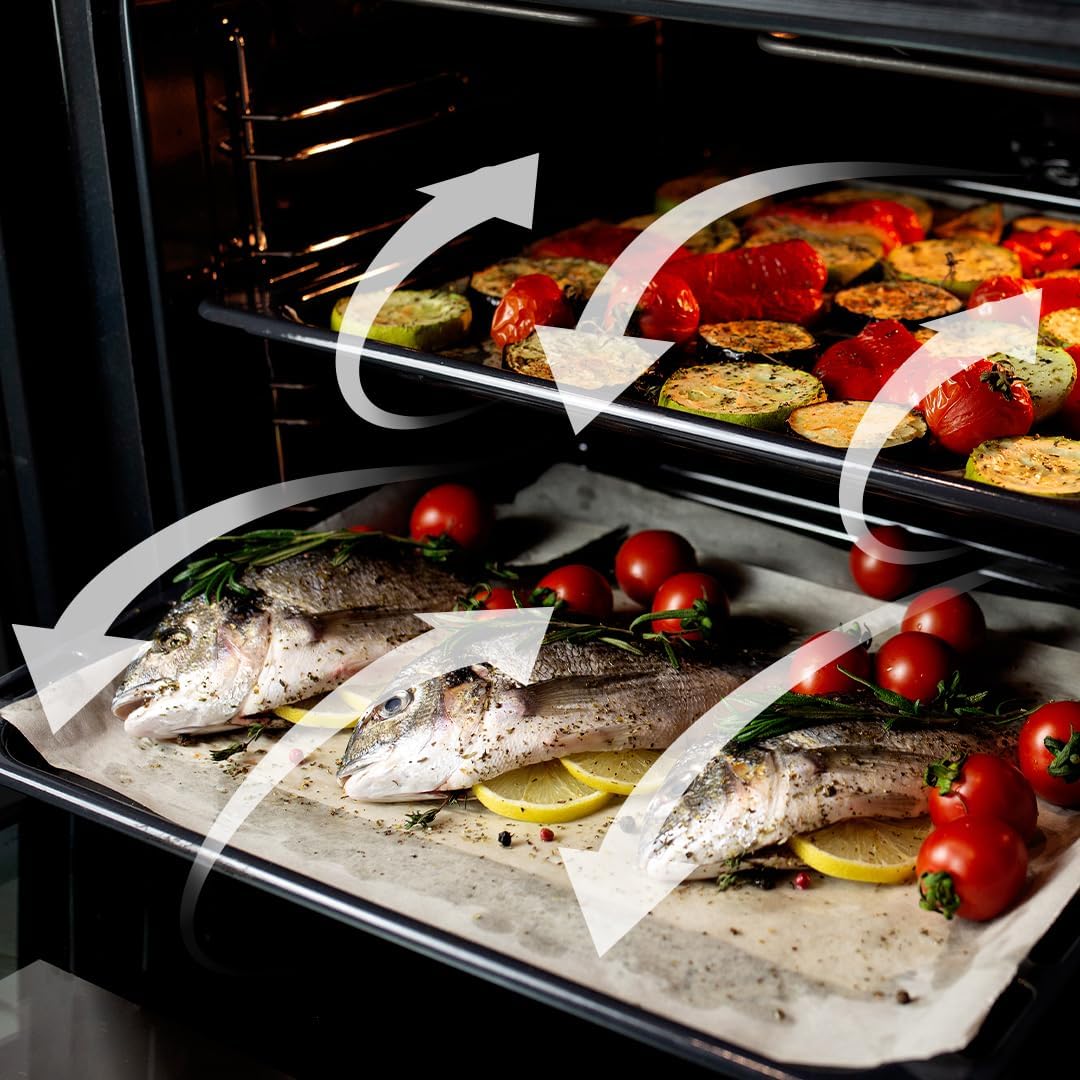
Figure 5.5: Visual representation of the 3D Cooking function's homogeneous airflow.
6. Cleaning en ûnderhâld
Regelmjittich skjinmeitsjen en ûnderhâld sil de libbensdoer fan jo oven ferlingje en optimale prestaasjes garandearje.
6.1. Steam EasyClean-funksje
This function uses steam to loosen dirt and food residues, making cleaning easier. Add water to the designated area and activate the Steam EasyClean function. After the cycle, wipe the interior with a soft cloth.

Figure 6.1: Comparison showing the effectiveness of the Steam EasyClean function.
6.2. Algemiene Cleaning
- Skjinmeitsje de bûtenkant mei adamp doek en myld detergent. Avoid abrasive cleaners.
- Helje de ovenrekken en accessoires derút en meitsje se apart skjin mei waarm sjippewetter.
- Soargje derfoar dat de oven koel is foardat jo him skjinmeitsje.
7. Probleemoplossing
If you encounter issues with your oven, refer to the table below for common problems and solutions.
| Probleem | Mooglike oarsaak | Oplossing |
|---|---|---|
| Oven giet net oan | Gjin stroomfoarsjenning | Kontrolearje it netsnoer, de stroomûnderbrekker en it stopkontakt. |
| Oven net ferwaarme | Incorrect function/temperature setting | Verify selected function and temperature. |
| Ungelikens koekje | Improper rack position or overloaded oven | Use recommended rack positions; avoid overcrowding. Utilize 3D Cooking function. |
| Smoke/odor during first use | Produksjeresten ferbaarne | This is normal. Ensure good ventilation. It will dissipate after initial use. |
As it probleem oanhâldt nei it besykjen fan dizze oplossingen, nim dan kontakt op mei de klanttsjinst fan Cecotec.
8. Spesifikaasjes
Detailed technical specifications for the Cecotec Bolero Hexa AF316000 oven.
| Spesifikaasje | Wearde |
|---|---|
| Merk | Cecotec |
| Model Number | AF316000 (02814) |
| Kapasiteit | 81 liter |
| Ofmjittings (L x B x H) | 59.4 x 63.5 x 59.5 sm |
| Gewicht | 32.3 kilogram |
| Krêft | 3400 watt |
| Voltage | 230 Volt |
| Enerzjy-effisjinsje | Klasse A |
| Ynstallaasje Type | Muurbefestiging (Ynboud) |
| Cooking Modes | 11 Functions (Convection, Maxi Grill, Fast Cooking, Steam Assist, Steam EasyClean, Fan Grill, Multicooking, Airfry Master, Pizza Master, 3D Cooking, Defrost) |
| Ynbegrepen komponinten | 1 Integrated Air Fryer Oven, 1 Airfryer Basket, 1 User Manual, 1 Pizza Stone XXL |
| Spare Parts Beskikberens | 10 jier |
9. Garânsje en stipe
Cecotec products are manufactured to high-quality standards. This product comes with a standard manufacturer's warranty. For specific warranty terms and conditions, please refer to the warranty card included with your product or visit the official Cecotec website.
For technical support, spare parts, or service inquiries, please contact Cecotec customer service through their official channels. When contacting support, please have your model number (AF316000 or 02814) and purchase date available.
You can find more information and support at the official Cecotec website: www.cecotec.com