
Be Cool BC121TU2201F
Be Cool 121 cm Tower Fan User Manual
Model: BC121TU2201F
Ynlieding
Thank you for choosing the Be Cool 121 cm Tower Fan. This manual provides important information regarding the safe operation, assembly, maintenance, and troubleshooting of your new appliance. Please read this manual thoroughly before use and keep it for future reference.

Ofbylding: Front view of the Be Cool 121 cm Tower Fan in white, showcasing its sleek design and tall profile.
Wichtige feiligens ynformaasje
- Soargje der altyd foar dat de fentilator op in stabyl, flak oerflak pleatst wurdt om te foarkommen dat er omfalt.
- Do not insert fingers or any objects into the fan grilles.
- Lûk de stekker fan 'e fentilator út it stopkontakt foardat jo skjinmeitsje of ûnderhâld útfiere.
- Hâld de fentilator fuort fan wetter en omjouwings mei hege fochtigens.
- Do not operate the fan with a damaged cord or plug. Contact qualified service personnel for repair.
- Dit apparaat is allinich foar gebrûk binnen.
Pakketynhâld
Kontrolearje de ynhâld fan it pakket by it iepenjen om der wis fan te wêzen dat alle items oanwêzich en ûnbeskeadige binne:
- Be Cool 121 cm Tower Fan Unit
- Base (two halves)
- Ofstânsbetsjinning (mei 1 CR2430 batterij ynbegrepen)
- User Manual
- Mounting Screws for Base
Opset en gearkomste
Follow these steps to assemble your Be Cool Tower Fan:
- Carefully remove all packaging materials from the fan unit and its components.
- Take the two halves of the base and align them. They should snap together or fit snugly.
- Place the main fan unit onto the assembled base, ensuring the alignment tabs or slots match.
- Secure the fan unit to the base using the provided screws. Typically, these are tightened from the underside of the base.
- Place the assembled fan on a firm, level surface.
- Insert the CR2430 battery into the remote control if not already pre-installed.
- Stek it netsnoer yn in standert stopkontakt (220V).

Ofbylding: Side view of the Be Cool Tower Fan, illustrating its slim profile and stable circular base.
Operating Instructions
Your Be Cool Tower Fan can be operated using the touch control panel on top of the unit or the included remote control.
Control Panel en LED Display
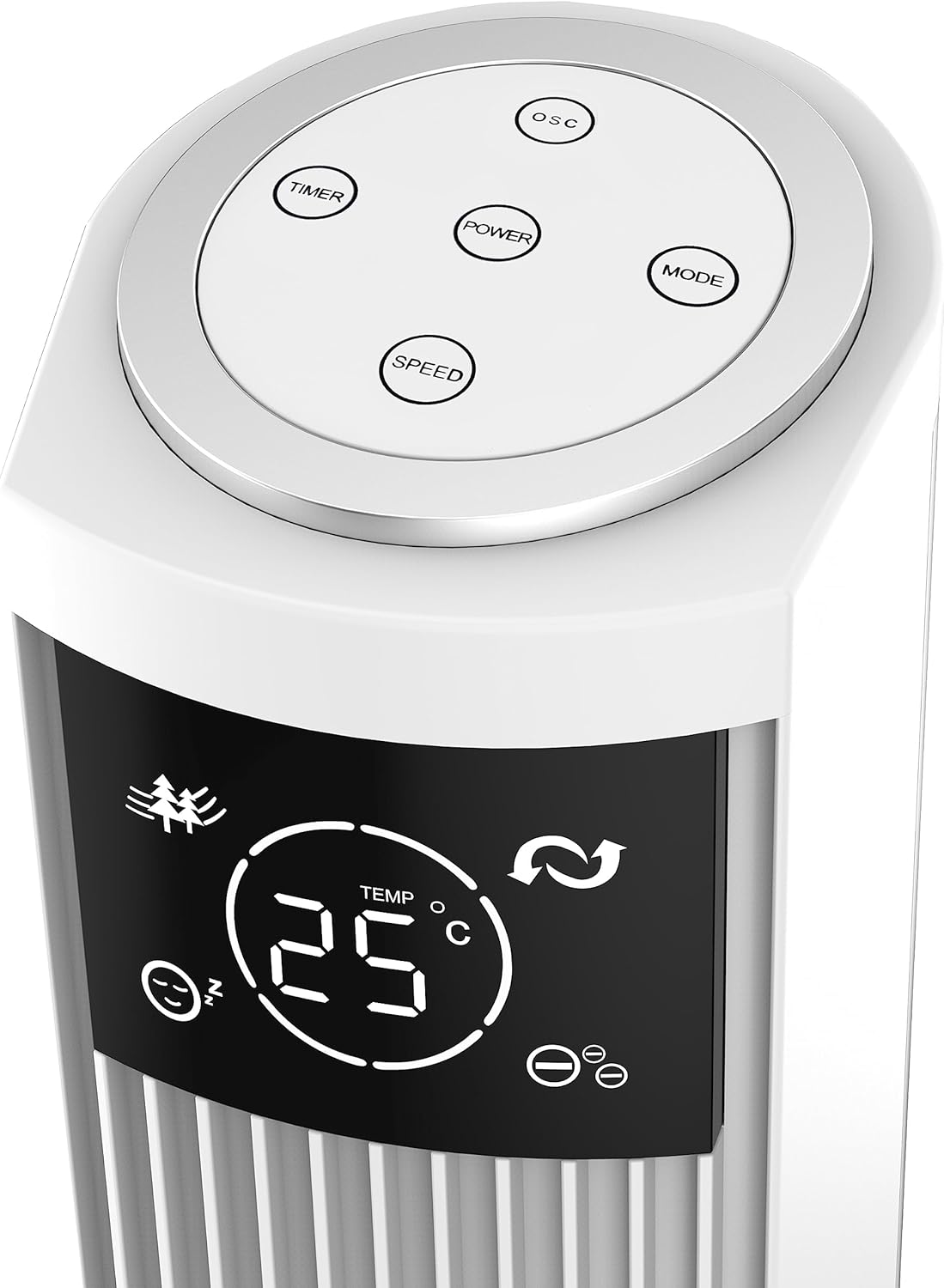
Image: Close-up of the fan's top control panel, showing the touch buttons for Power, Speed, Timer, Oscillation, and Mode.
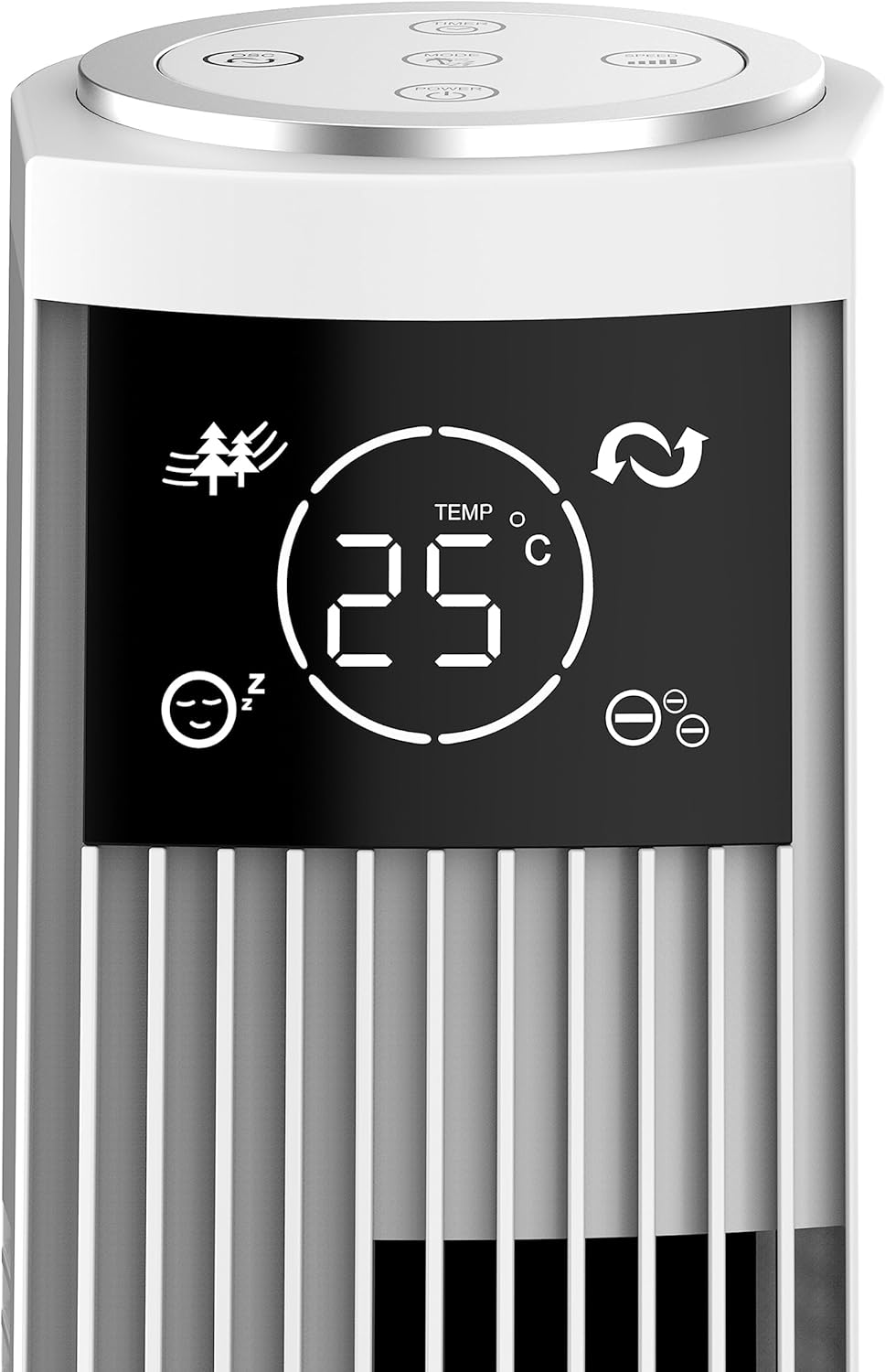
Ofbylding: Detaillearre view of the fan's LED display, showing temperature, mode icons (Nature, Sleep), and oscillation indicator.
The LED display shows the current room temperature and active settings. The touch-sensitive buttons allow for easy control of all functions.
Remote Control

Image: The remote control for the Be Cool Tower Fan, featuring buttons for Power, Speed, Oscillation, Ionizer, Timer, and Mode.
De ôfstânsbetsjinning biedt maklike tagong ta alle fentilatorfunksjes fan in ôfstân.
- KRÊFT: Skeakelt de fentilator oan of út.
- FAASJE: Syklearret troch fansnelheden: Leech, Middel, Heech.
- OSC (Ossillaasje): Activates or deactivates the oscillating function, allowing the fan to rotate from side to side to distribute air.
- ION (Ionizer): Turns the ionizer function On or Off. The ionizer helps to purify the air by releasing negative ioanen.
- TIMER: Sets the automatic shut-off timer. Press repeatedly to cycle through 1-hour increments, up to 12 hours.
- WIZE: Cycles through different wind modes:
- Normale modus: Konstante luchtstream op 'e selektearre snelheid.
- Natuermodus: Simulearret natuerlike wyn troch de fentilatorsnelheid te fariearjen.
- Sliepmodus: Ferleget stadichoan de fentilatorsnelheid oer tiid foar stille wurking tidens sliep.
Ûnderhâld
Regelmjittich ûnderhâld soarget foar optimale prestaasjes en in lange libbensdoer fan jo ventilator.
Cleaning
- Skeakelje de fan altyd út foar it skjinmeitsjen.
- Brûk in sêft, damp doek om de bûtenste oerflakken fan 'e fentilator ôf te feegjen. Brûk gjin abrasive reinigingsmiddels of oplosmiddels.
- Brûk in stofzuiger mei in boarsteltaheaksel om stof foarsichtich fan 'e loftynlaat- en útlaatroosters skjin te meitsjen.
- Dompelje de fan net yn wetter of lit wetter yn 'e motorbehuizing dripke.
Opslach
As de fentilator foar langere perioaden net yn gebrûk is, bewarje it dan op in koel, droech plak, leafst yn 'e orizjinele ferpakking, om it te beskermjen tsjin stof en skea.
Troubleshooting
As jo problemen hawwe mei jo fan, sjoch dan nei de folgjende faak foarkommende problemen en oplossingen:
| Probleem | Mooglike oarsaak | Oplossing |
|---|---|---|
| De fentilator giet net oan. | Gjin stroomfoarsjenning; netsnoer net ynstutsen; stopkontakt defekt. | Ensure the fan is properly plugged into a working electrical outlet. Check the circuit breaker. |
| Swakke luchtstream. | Fan speed set too low; air inlets/outlets blocked by dust. | Increase the fan speed. Clean the air grilles as per maintenance instructions. |
| De fentilator makket ûngewoan lûd. | Fan not on a stable surface; foreign object inside; internal component issue. | Place the fan on a stable, flat surface. Unplug and check for any obstructions. If noise persists, contact customer support. |
| Remote control wurket net. | Batterij leech of ferkeard ynfoege; ôfstânsbetsjinning bûten berik. | Replace the battery (CR2430). Ensure the remote is pointed towards the fan's receiver and within range. |
If the problem persists after trying these solutions, please contact Be Cool customer support for assistance.
Spesifikaasjes
| Eigenskip | Detail |
|---|---|
| Merk | Wês Cool |
| Model Number | BC121TU2201F |
| Kleur | Wyt |
| Ofmjittings (produkt) | 31.5D x 31.5B x 121H sm |
| Gewicht | 3.5 kilogram |
| Krêft | 45 watt |
| Voltage | 220V |
| Materiaal | Plestik |
| Oantal snelheden | 3 (Leech, Medium, Heech) |
| Special Features | Ionizer, LED Display, Oscillation, Timer (up to 12h), Remote Control |
| Controller Type | Ofstânsbetsjinning, oanraakpaniel |
| Power Boarne | Mains Power |
Garânsje en stipe
Your Be Cool Tower Fan comes with a manufacturer's warranty. Please refer to the warranty card included with your product for specific terms and conditions. For technical support, spare parts, or any inquiries not covered in this manual, please contact Be Cool customer service through their official webside of de kontaktgegevens dy't op jo oankeapbewiis steane.
Ask a question about this manual
Ask about setup, troubleshooting, compatibility, parts, safety, or missing instructions. Manuals+ will review the question and use this page’s manual context to help answer it.