
Ynlieding
This manual provides essential information for setting up, operating, and maintaining your Beelink SER3 Mini PC. Please read it thoroughly before use to ensure proper functionality and safety.
The Beelink SER3 Mini PC is a compact and powerful computer featuring an AMD Ryzen 3 3200U processor, 16GB DDR4 RAM, and a 500GB NVMe SSD, designed for various computing tasks from office work to media streaming.
Pakketynhâld
Ensure all items listed below are present in your package.
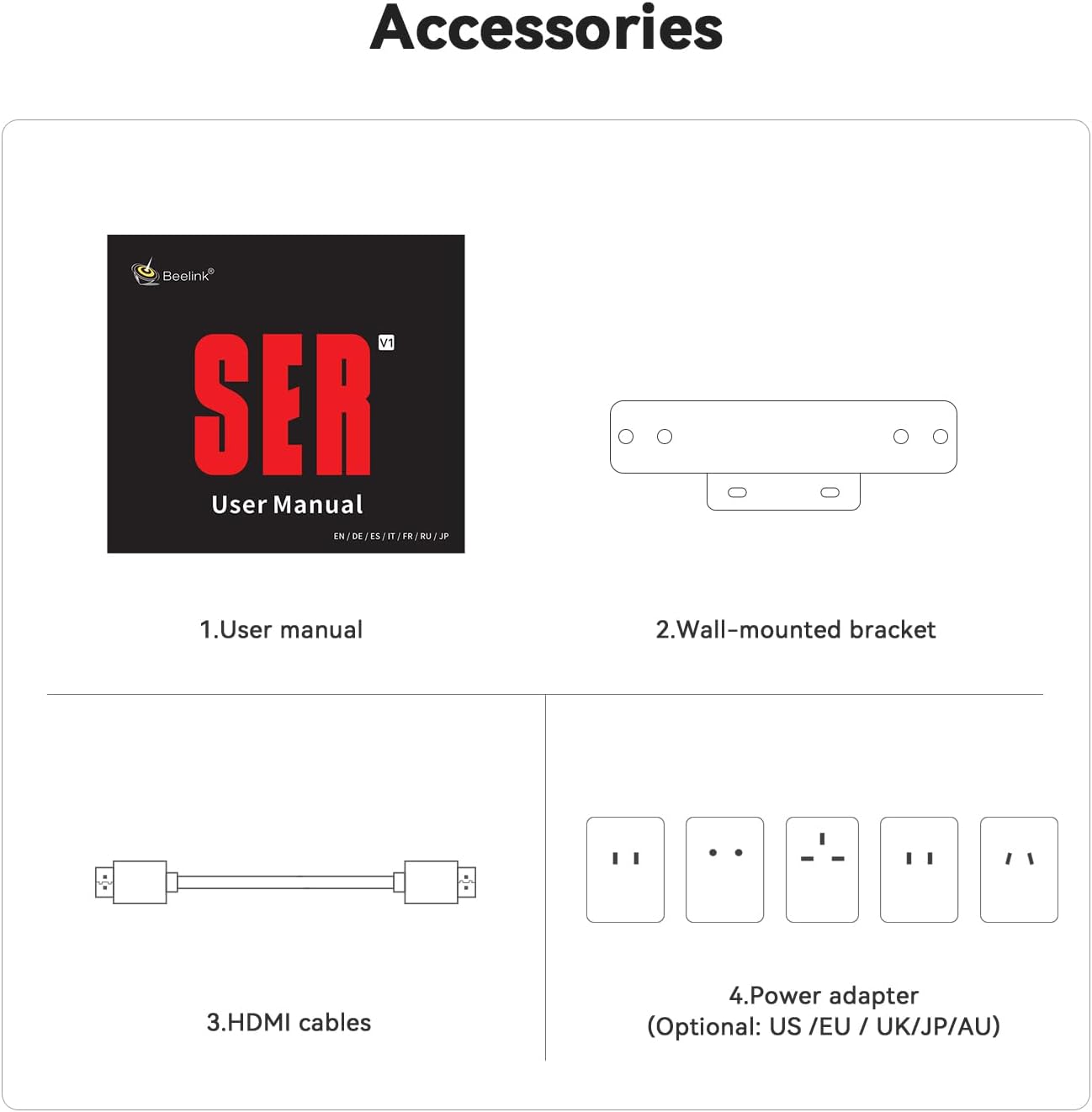
Image: Contents of the Beelink SER3 Mini PC package, showing the user manual, a wall-mounted bracket, two HDMI cables, and a power adapter with various regional plugs.
- Beelink SER3 Mini PC Unit
- User Manual
- Wall-fêstmakke Bracket
- HDMI Cables (x2)
- Power Adapter (with regional plugs)
Produkt oerview
Foar- en efterkant Panel Layout
The following diagrams illustrate the ports and buttons on your Beelink SER3 Mini PC.
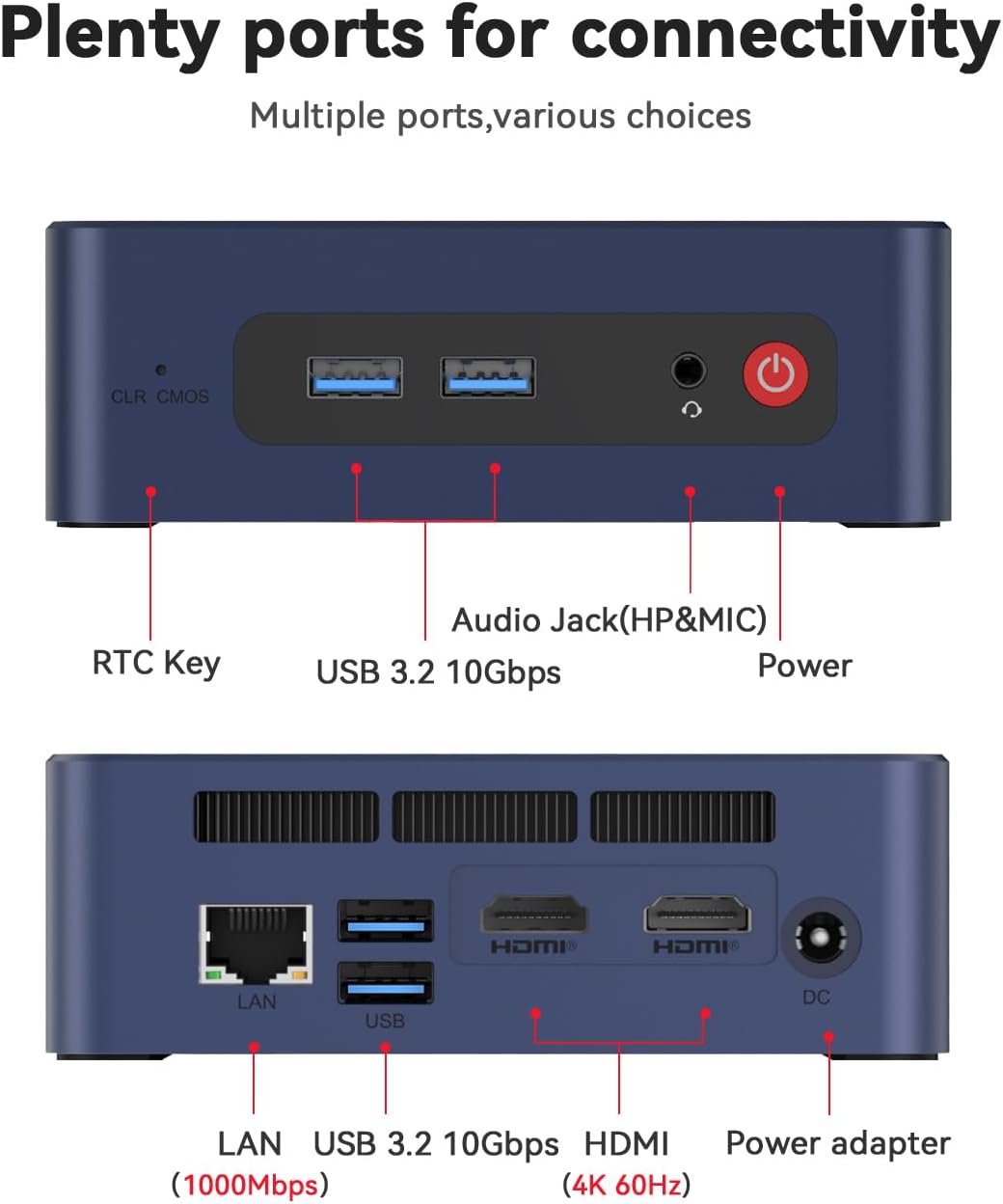
Image: Top panel of the Beelink SER3 Mini PC showing the CLR CMOS button, two USB 3.2 10Gbps ports, an Audio Jack (HP&MIC), and the Power button. The bottom panel shows the LAN port (1000Mbps), two USB 3.2 10Gbps ports, two HDMI (4K 60Hz) ports, and the DC power adapter input.
- Foarside Panel:
- CLR CMOS Key: Button to clear CMOS settings.
- USB 3.2 10Gbps Ports (x2): For high-speed data transfer and peripheral connections.
- Audio Jack (HP&MIC): Foar koptelefoan en mikrofoan.
- Power knop: Om it apparaat oan/út te skeakeljen.
- Efterpaniel:
- LAN Port (1000Mbps): Foar bedrade netwurkferbining.
- USB 3.2 10Gbps Ports (x2): Ekstra hege-snelheid USB-poarten.
- HDMI Ports (x2, 4K 60Hz): Foar it ferbinen fan skermen, stipe foar it ynstellen fan dûbele monitors.
- DC Jack: Stroomynfier foar de adapter.
Ynterne komponinten
In eksplodearre view of the Beelink SER3 Mini PC's internal structure.
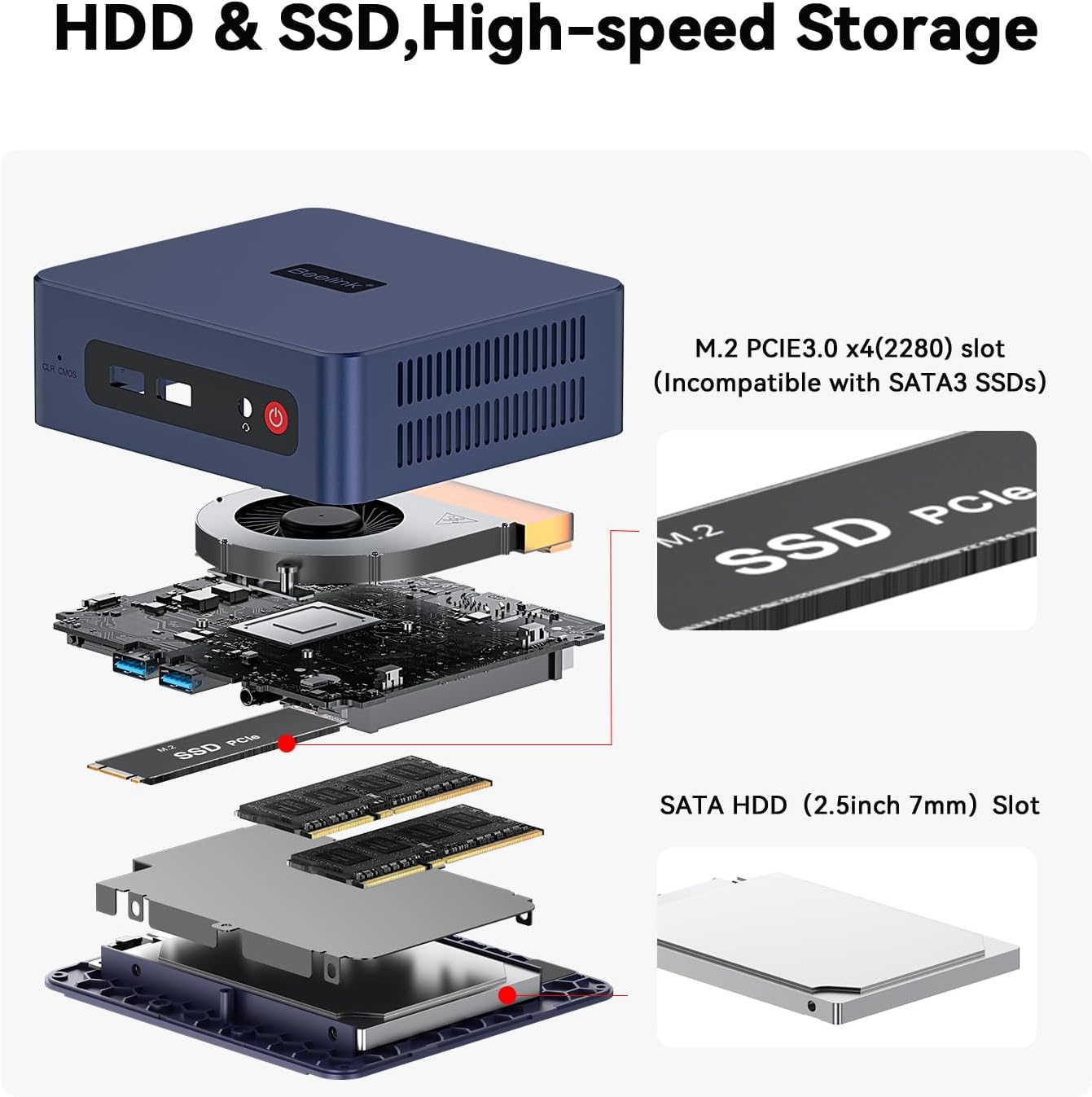
Image: An exploded diagram of the Beelink SER3 Mini PC, illustrating its components: plastic case, cooling fan, CPU, motherboard, M.2 2280 PCIe SSD, SO-DIMM DDR4 2400MT/s RAM, shielding can, and 2.5-inch HDD (7mm) bay, along with the plastic bottom panel.
- Plastic Case: External housing.
- Cooling Fan: Dissipates heat from internal components.
- CPU (AMD Ryzen 3 3200U): Sintrale Processing Unit.
- Motherboard: Main circuit board connecting all components.
- M.2 2280 PCIe SSD: Primary storage drive.
- SO-DIMM DDR4 RAM: System memory (16GB installed, expandable).
- Shielding Can: Provides electromagnetic shielding.
- 2.5-inch HDD (7mm) Bay: Slot for additional SATA HDD/SSD storage.
- Plastic Bottom Panel: Base cover of the unit.
Opsette
Folgje dizze stappen om jo Beelink SER3 Mini PC yn te stellen:
- Ferbine mei Power: Plug the power adapter into the DC Jack on the rear panel of the Mini PC, then connect the adapter to a power outlet.
- Ferbine mei skerm: Use an HDMI cable to connect one or both HDMI ports on the Mini PC to your monitor(s) or TV.
- Perifeare apparaten ferbine: Connect your keyboard, mouse, and other USB devices to the available USB 3.2 ports.
- Netwurkferbining (opsjoneel): For a wired internet connection, connect an Ethernet cable from your router to the LAN port on the rear panel. For wireless, ensure Wi-Fi is enabled in the operating system settings after initial setup.
- Power On: Press the Power button on the front panel to turn on the Mini PC.
Operating Instructions
Basic operational guidelines for your Mini PC:
- Earste boot: Upon first power-on, the system may guide you through the Windows 11 Pro setup process. Follow the on-screen instructions to configure your operating system.
- Power On/Off:
- Om oan te setten: Druk op de Power knop.
- Om ôfslute: Klik op de Startknop yn Windows, en selektearje dan Oan/út > Útskeakelje.
- Om opnij te begjinnen: Klik op de Startknop yn Windows, en selektearje dan Oan/út > Op 'e nij starte.
- Om te sliepen: Klik op de Startknop yn Windows, en selektearje dan Enerzjy > Sliep.
- Ferbine mei Wi-Fi: In Windows, click the Wi-Fi icon in the taskbar, select your network, enter the password, and click Connect.
- Dual Display Setup: Connect two monitors to the HDMI ports. Windows should automatically detect both displays. You can configure display settings (extend, duplicate) via Display Settings in Windows.
- Opslachútwreiding: The Mini PC supports storage expansion. Refer to the "Maintenance" section for instructions on installing additional RAM or a 2.5-inch SATA HDD/SSD.
Ûnderhâld
Regelmjittich ûnderhâld helpt de lange libbensdoer en optimale prestaasjes fan jo Mini PC te garandearjen.
Cleaning
- Eksterieur: Use a soft, dry cloth to clean the exterior of the Mini PC. Avoid liquid cleaners.
- Ventilaasje: Ensure the ventilation holes are clear of dust and obstructions to prevent overheating. Use compressed air to gently clear dust from vents if necessary.
Hardware Upgrades
The Beelink SER3 Mini PC allows for RAM and storage upgrades.

Image: Diagram illustrating the storage expansion options for the Beelink SER3 Mini PC, including the M.2 PCIe 3.0 x4 (2280) slot for NVMe SSDs (up to 2TB) and the SATA HDD (2.5-inch 7mm) slot for additional storage (500GB~2TB).
- RAM-upgrade: The device supports up to 32GB DDR4 RAM (2*16G). To upgrade, carefully open the case, locate the SO-DIMM slots, and install compatible RAM modules.
- NVMe SSD Upgrade: The M.2 2280 PCIe 3.0 SSD can be upgraded up to 2TB.
- 2.5-inch SATA HDD/SSD Installation: An additional 2.5-inch SATA HDD/SSD (500GB~2TB) can be installed in the dedicated bay.
Noat: Always power off and disconnect the Mini PC from the power source before performing any hardware maintenance or upgrades. Consult a professional if you are unsure about any steps.
Troubleshooting
Algemiene problemen en oplossings
- No Power / System Does Not Turn On:
- Soargje derfoar dat de stroomadapter goed ferbûn is mei sawol de Mini PC as in wurkjend stopkontakt.
- Kontrolearje oft it stopkontakt wurket troch it mei in oar apparaat te testen.
- Try pressing the Power button firmly.
- Gjin werjefte / swart skerm:
- Check that the HDMI cable(s) are securely connected to both the Mini PC and the monitor.
- Soargje derfoar dat de monitor oan is en ynsteld is op de juste ynfierboarne (HDMI 1, HDMI 2, ensfh.).
- Try connecting to a different monitor or using a different HDMI cable.
- Gjin ynternetferbining:
- Wired: Check the Ethernet cable connection to both the Mini PC and your router. Verify router functionality.
- Wireless: Ensure Wi-Fi is enabled in Windows settings. Check if other devices can connect to your Wi-Fi network. Restart your router if necessary.
- System Slowdown / Performance Issues:
- Slút ûnnedige applikaasjes dy't op 'e eftergrûn rinne.
- Kontrolearje op beskikbere Windows-updates en ynstallearje se.
- Soargje foar genôch fentilaasje om oververhitting te foarkommen.
- Consider upgrading RAM or storage if consistently experiencing performance issues with demanding tasks.
Spesifikaasjes
De folgjende tabel jout details oer de technyske spesifikaasjes fan 'e Beelink SER3 Mini PC.

Image: A detailed table outlining the product specifications of the Beelink SER3 Mini PC, including dimensions, CPU, graphics, system disk, internal slots, interfaces, wireless LAN, power details, operating/storage environment, and accessories.
| Eigenskip | Detail |
|---|---|
| Merk | Beelink |
| Model | SER/3200U/16G/500G |
| CPU Model | AMD Ryzen 3 3200U (2C/4T, up to 3.5 GHz) |
| Grafiken | AMD Radeon Vega 3 Graphics (3 core, 1200 MHz) |
| RAAM | 16GB DDR4 (útwreidzjen nei 32GB) |
| Opslach | 500GB M.2 2280 PCIe 3.0 SSD (expandable to 2TB NVMe M.2 SSD, plus 2.5-inch SATA HDD/SSD slot) |
| Bestjoeringssysteem | Windows 11 Pro |
| Triedleaze ferbining | WiFi 5 (802.11ac), Bluetooth 5.0 |
| Ethernet | 1000M RJ45 Port |
| Video Output | 2 x HDMI (4K 60Hz), supports dual display |
| USB Ports | 4 x USB 3.2 Gen2 (10Gbps) |
| Audio | 1 x Audio Jack (HP&MIC) |
| Ofmjittings | Approximately 4.96 x 4.45 x 1.65 inches (124 x 113 x 42mm) |
| Power Ynfier | 19V-3.42A (Input: 100-240V AC, 50/60Hz) |
| Bedriuwsomjouwing | -10°C~45°C, 30%~90% Feuchte |
| Storage Miljeu | -20°C~60°C, 10%~90% Feuchte |
Garânsje en stipe
The Beelink SER3 Mini PC comes with a 1-jierrige garânsje fan 'e datum fan oankeap, dy't produksjefouten dekt.
Beelink provides lifetime technical support, 30 days free return, and 7 days / 24 hours service. For technical assistance, warranty claims, or any questions regarding your product, please contact Beelink customer support through their official channels or the retailer where the product was purchased.
All Beelink products have obtained FCC, CE, and RoHS certifications, ensuring compliance with safety and environmental standards.