
1. Ynlieding
Thank you for choosing the Maxcom FW36 Aurum SE Smartwatch. This manual provides detailed instructions to help you set up, operate, and maintain your device, ensuring optimal performance and longevity. Please read this manual carefully before using your smartwatch.

figuer 1: Front view of the Maxcom FW36 Aurum SE Smartwatch, displaying time and health metrics.
2. Opsette
2.1 Útpakken en earste ynspeksje
Upon opening the package, verify that all components are present: Maxcom FW36 Aurum SE Smartwatch, charging cable, and this user manual. Inspect the device for any visible damage.
2.2 De smartwatch oplade
Before first use, fully charge your smartwatch. Connect the charging cable to the charging port on the back of the watch and to a standard USB power adapter (not included). The battery icon on the screen will indicate charging status. A full charge typically takes approximately 2 hours.
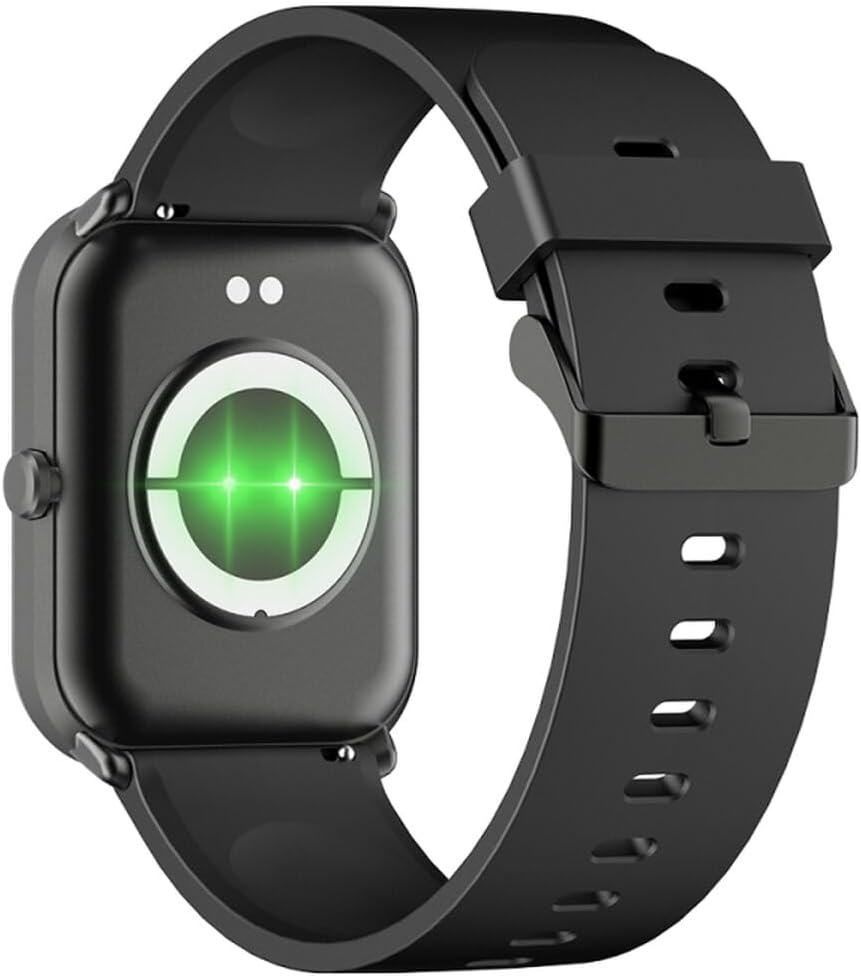
figuer 2: Rear view of the smartwatch, highlighting the charging contacts and health sensors.
2.3 Power On / Off
- Power On: Druk de sydknop in pear sekonden yn en hâld dy fêst oant it skerm opljochtet.
- Útskeakelje: From the watch face, swipe down to access quick settings, then tap the power icon, or navigate to "Settings" > "System" > "Power Off". Confirm your selection.
2.4 App-ynstallaasje en koppeling
- Download de app: Scan the QR code in the manual (if provided) or search for "GLORY FIT" in your smartphone's app store (Google Play Store for Android, Apple App Store for iOS).
- Registrearje/Ynlogge: Open the GLORY FIT app and follow the on-screen instructions to create an account or log in.
- Pairing:
- Soargje derfoar dat Bluetooth ynskeakele is op jo smartphone.
- Open the GLORY FIT app, go to "Device" or "My Device", and tap "Add Device".
- The app will search for nearby devices. Select "FW36 Aurum SE" from the list.
- Befêstigje it koppelingsfersyk op sawol jo smartphone as de smartwatch.
Once paired, the smartwatch will synchronize data with your phone, including time and date settings.
3. Bedriuwsinstruksjes
3.1 Basisnavigaasje
- Touchscreen: Swipe left/right to navigate between main functions (e.g., activity, heart rate). Swipe up to view notifikaasjes. Swipe nei ûnderen om tagong te krijen ta snelle ynstellings.
- Side knop: Press once to return to the watch face or wake the screen. Press and hold for power options.

figuer 3: Side view of the smartwatch, illustrating the physical button and strap design.
3.2 Health Monitoring
The Maxcom FW36 Aurum SE Smartwatch features several health monitoring functions:
- Heart Rate Monitor: Swipe to the heart rate interface and wait for the measurement to complete. Ensure the watch is snug on your wrist.
- Bloedsoerstofsensor: Similar to heart rate, navigate to the SpO2 interface for measurement.
- Bloeddrukmonitor: Access this function from the main menu or by swiping to its dedicated screen.
- Monitoring fan sliepkwaliteit: The watch automatically tracks your sleep patterns when worn during sleep. View detailed reports in the GLORY FIT app.
- Pedometer: Tracks your daily steps, distance, and calories burned automatically.
Belangryk: De sûnensgegevens dy't troch dit apparaat levere wurde, binne allinich foar referinsje en moatte net brûkt wurde foar medyske diagnoaze of behanneling.
3.3 Multi-Sport Mode
Access the multi-sport mode from the main menu to select various activities such as running, walking, cycling, etc. The watch will track specific metrics relevant to your chosen activity.
3.4 Notifikaasjes
Once paired with your smartphone and notification permissions are granted in the GLORY FIT app, your smartwatch will display incoming calls, messages, and app notifications. Swipe up from the watch face to view your notification history.
4. Underhâld
4.1 Cleaning
Regularly clean your smartwatch and strap with a soft, dry cloth. For stubborn dirt, use a slightly damp doek en lit it dan goed droegje. Foarkom it brûken fan hurde gemikaliën of abrasive materialen.
4.2 Wetter- en stofbestindich
The Maxcom FW36 Aurum SE Smartwatch is designed to be dust resistant and water resistant. This means it can withstand splashes, rain, and brief immersion in shallow water. However, it is not suitable for hot showers, saunas, diving, or high-speed water sports. Avoid pressing buttons underwater.
4.3 Batterij Soarch
To prolong battery life, avoid fully discharging the battery frequently. Charge the device regularly, even if not in use for extended periods. Store the device in a cool, dry place.
5. Probleemoplossing
- Smartwatch giet net oan: Ensure the device is fully charged. Press and hold the side button for an extended period (10-15 seconds).
- Kin net keppele wurde mei smartphone:
- Ensure Bluetooth is enabled on your phone and the smartwatch is within range.
- Start sawol jo smartphone as de smartwatch opnij op.
- Check if the GLORY FIT app has necessary permissions.
- As it earder keppele is, besykje it apparaat te ûntkoppelen en opnij te koppelen.
- Unkrekte sûnensmjittingen: Ensure the watch is worn snugly on your wrist, not too tight or too loose. Clean the sensors on the back of the watch. Avoid excessive movement during measurement.
- Notifikaasjes net ûntfongen: Verify that notification permissions are enabled for the GLORY FIT app in your phone's settings. Ensure the app is running in the background.
6. Spesifikaasjes
| Model | FW36 Aurum SE |
| Merk | Maxcom |
| Bestjoeringssysteem | Android |
| Skerm | 1.69" (4.29 cm) Color Touchscreen, 240 x 280 pixels, Digital, Rounded Corners |
| Batterij Kapasiteit | 220 mAh Lithium-ion |
| Konnektivität | Bluetooth |
| Sensors | Heart Rate Monitor, Blood Oxygen Sensor, Blood Pressure Monitor, Pedometer |
| Beskerming | Dust Resistant, Water Resistant |
| Kompatibele app | GLORY FIT |
| Dimensions (W x T x D) | 44.6 mm x 1.04 cm x 35 mm |
| GPS -funksjonaliteit | Net beskikber |
7. Garânsje en stipe
The Maxcom FW36 Aurum SE Smartwatch comes with a twa jier garânsje against factory defects. Please retain your proof of purchase for warranty claims.
For technical support, troubleshooting assistance, or warranty inquiries, please contact Maxcom customer service through their official webside of de kontaktgegevens dy't jo by jo oankeapdokumintaasje hawwe krigen.


