
1. Ynlieding
Tankewol foar de oankeapasing the CANYON BSP-8 Bluetooth Speaker. This manual provides essential information for the safe and efficient use of your device. Please read it thoroughly before operation and retain it for future reference.
Key Features:
- 10W audio-útfier: Levert dúdlik en krêftich lûd.
- Bluetooth 5.2: For stable and energy-efficient wireless connection up to 10 meters.
- RGB-efterljochting: Integrated lighting for enhanced ambiance.
- True Wireless Stereo (TWS): Connect two BSP-8 speakers for a full stereo sound experience.
- Meardere ôfspielopsjes: Supports Bluetooth, AUX, USB, and MicroSD card inputs.
- Portable ûntwerp: Compact size with a convenient hanger for easy transport.
- Lange batterijlibben: Oant 3 oeren spieltiid op ien lading.
2. Safety Information
- Stel de sprekker net bleat oan ekstreme temperatueren, direkt sinneljocht of hege fochtigens.
- Meitsje de sprekker te fallen of te ûnderwurpen oan sterke ynfloeden.
- Demontearje of besykje de sprekker net sels te reparearjen. Nim kontakt op mei kwalifisearre servicepersoniel.
- Hâld de sprekker fuort fan wetter en oare floeistoffen. Hy is net wetterdicht.
- Brûk allinich de levere oplaadkabel of in sertifisearre Type-C-kabel foar it opladen.
- Smyt de batterij en sprekker fuort neffens lokale regeljouwing.
3. Package Ynhâld
- CANYON BSP-8 Bluetooth Speaker
- USB Type-C oplaadkabel
- User Manual
4. Produkt Overview
Meitsje josels bekend mei de komponinten en kontrôles fan 'e sprekker.
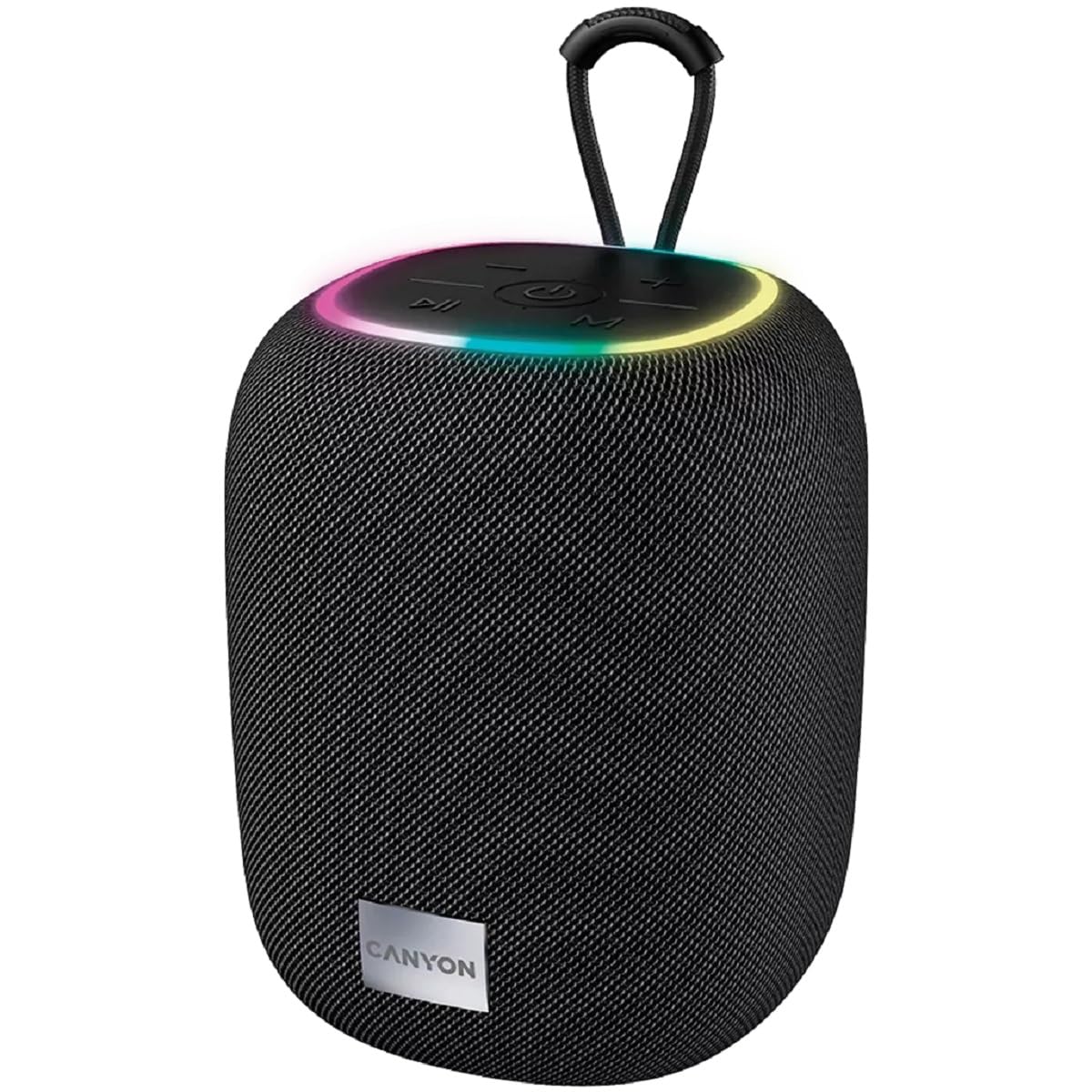
Ofbylding 1: Boppe view of the CANYON BSP-8 speaker, showing the control buttons, RGB backlight, and integrated hanger.
Kontrôleknoppen (boppeste paniel):
- Power knop: Yndrukke en ynhâlde om oan/út te skeakeljen. Koart yndrukke om ôf te spyljen/pauzearje.
- Knop Folume omleech / Foarich nûmer: Koart yndrukke om it folume te ferminderjen. Lang yndrukke foar it foarige nûmer.
- Knop Folume omheech / Folgjende nûmer: Koart yndrukke foar folume omheech. Lang yndrukke foar it folgjende nûmer.
- Modusknop (M): Short press to switch between Bluetooth, AUX, USB, and MicroSD modes.

Ofbylding 2: Efterkant view of the CANYON BSP-8 speaker, illustrating the various input ports including AUX, USB, TF (MicroSD) card slot, and DC5V Type-C charging port.
Input Ports (Rear Panel):
- AUX-poarte: Foar it ferbinen fan eksterne audio-apparaten fia in 3.5mm audiokabel.
- USB-poarte: Foar it ôfspyljen fan audio fan in USB-flashdrive.
- TF-kaartslot (MicroSD): Foar it ôfspyljen fan audio fan in MicroSD-kaart.
- DC5V (Type-C) Port: Foar it opladen fan 'e sprekker.
5. Opsette
5.1 De sprekker oplade
- Connect the provided USB Type-C cable to the DC5V port on the speaker.
- Ferbine it oare ein fan 'e kabel mei in USB-stroomadapter (5V/1A oanrikkemandearre) of de USB-poarte fan in kompjûter.
- It oplaadindikatorljocht sil oangean. It sil útskeakelje of fan kleur feroarje as it folslein opladen is.
Opmerking: Foar optimale batterijlibben, laad de sprekker folslein op foardat jo it foar it earst brûke.

Image 3: Illustration showing the 1800 mAh battery capacity and up to 3 hours of playtime for the CANYON BSP-8 speaker.
5.2 Yn-/útskeakelje
- Om oan te setten: Druk de oan/út-knop sawat 3 sekonden yn. Jo sille in lûdssignaal hearre.
- Om út te skeakeljen: Druk de oan/út-knop sawat 3 sekonden yn. Jo sille in lûdssignaal hearre.
5.3 Bluetooth -keppeling
- Skeakelje de sprekker oan. Hy sil automatysk yn Bluetooth-koppelingsmodus gean, oanjûn troch in knipperjend LED-ljocht.
- Skeakelje Bluetooth yn op jo mobyl apparaat (smartphone, tablet, kompjûter).
- Sykje nei available Bluetooth devices and select "CANYON BSP-8" from the list.
- Sadree't it keppele is, sil it LED-ljocht ophâlde mei knipperjen, en jo sille in befêstigingslûd hearre.
Note: The speaker will automatically reconnect to the last paired device if it is within range and Bluetooth is enabled.

Image 4: Illustration highlighting the stable and energy-efficient Bluetooth 5.2 connection with an operating range of up to 10 meters.
5.4 Echt Draadloze Stereo (TWS) Pairing
To connect two CANYON BSP-8 speakers for a stereo sound experience:
- Soargje derfoar dat beide BSP-8-sprekkers oan binne en net ferbûn binne mei in Bluetooth-apparaat.
- Druk op ien sprekker (dit sil de primêre sprekker wêze) twa kear op de oan/út-knop. It sil de TWS-koppelingsmodus yngean.
- De twa sprekkers sille automatysk nei elkoar sykje en mei elkoar ferbine. Jo sille in befêstigingslûd hearre as de ferbining foltôge is.
- Once TWS is established, connect your mobile device to the primary speaker via Bluetooth as described in section 5.3.
Note: TWS mode only works with two identical CANYON BSP-8 speakers.
6. Bedriuwsinstruksjes
6.1 Audio spielje
- Bluetooth-modus: Nei suksesfolle koppeling sil audio fan jo ferbûne apparaat fia de sprekker ôfspield wurde.
- AUX-modus: Connect a 3.5mm audio cable from your external audio device to the AUX port on the speaker. Press the 'M' button to switch to AUX mode.
- USB-modus: Doch in USB-stick yn 'e USB-poarte. De sprekker sil automatysk oerskeakelje nei USB-modus en begjint mei it ôfspyljen fan audio. files. If not, press the 'M' button.
- MicroSD-kaartmodus: Insert a MicroSD card into the TF card slot. The speaker will automatically switch to MicroSD mode and begin playing audio files. If not, press the 'M' button.
6.2 Playback Control
- Spylje / Pauze: Druk koart op de Power knop.
- Folume omheech: Druk koart op de knop Folume omheech (+).
- Folume omleech: Druk koart op de knop Folume omleech (-).
- Folgjende track: Druk lang op de knop Folume omheech (+).
- Foarige spoar: Druk lang op de knop Folume omleech (-).
6.3 RGB efterljochting
The speaker features an integrated RGB backlight on the top panel. The backlight activates automatically when the speaker is powered on. There are no specific controls for changing the RGB pattern or turning it off/on independently of the speaker's power state.