
1. Produkt Overview
The GOLOZA LA-C337 is a versatile digital alarm clock featuring a 180° rotatable projection, a large curved LED display, and a convenient USB charging port. It is designed for clear time display and easy operation.

Image 1.1: The GOLOZA Digital Projection Alarm Clock, showcasing its curved display and compact design, placed on a nightstand.
2. Package Ynhâld
Kontrolearje asjebleaft it pakket op de folgjende items:
- GOLOZA Digital Projection Alarm Clock (LA-C337)
- Micro USB Kabel
- Stromadapter
- User Manual
3. Produktfunksjes
- Curved LED Display: Large, clear digital time display with adjustable brightness.
- 180° Projection: Projects time onto a wall or ceiling with adjustable brightness and rotation.
- Dûbele alarmen: Set two independent alarms with progressive volume.
- Snooze Funksje: Allows for extra sleep time after the alarm sounds.
- USB-oplaadpoarte: Conveniently charge your mobile devices.
- Unthâld Batterij: Built-in button battery maintains time settings during power outages.
Ofbylding 3.1: In close-up view of the GOLOZA Digital Projection Alarm Clock's clear, blue LED display, showing the time.
4. Initial Setup
4.1 Stromferbining
- Connect the Micro USB cable to the power input port on the back of the alarm clock.
- Plug the other end of the USB cable into the provided power adapter.
- Stek de stroomadapter yn in standert stopkontakt. It klokdisplay sil oanljochtsje.
Noat: The built-in button battery serves as a backup for time and alarm settings during a power interruption. It does not power the main display or projection.
4.2 Tiid en datum ynstelle
Specific button names are not provided, but typically these clocks have 'TIME SET', 'MODE', or similar buttons. Refer to the physical unit for exact button labels.
- Druk en hâld de Tiid ynsteld button (or similar) to enter time setting mode. The hour digits will flash.
- Brûk de +/- or Op/Omleech knoppen om it oere oan te passen.
- Druk op de Tiid ynsteld knop nochris om it oere te befêstigjen en nei de minuten-ynstelling te gean. De minutensifers sille knipperje.
- Brûk de +/- or Op/Omleech knoppen om de minuten oan te passen.
- Druk op de Tiid ynsteld button again to confirm minutes and exit time setting mode.
- Follow similar steps to set the date if your model supports it (usually by pressing the Time Set button multiple times to cycle through year, month, day).
5. Bedriuwsinstruksjes
5.1 Alarms ynstelle
De klok stipet twa ûnôfhinklike alarmen (Alarm 1 en Alarm 2).
- Druk en hâld de Alarm 1 button (or similar) to enter Alarm 1 setting mode. The alarm hour digits will flash.
- Brûk de +/- or Op/Omleech knoppen om de wekker oere oan te passen.
- Druk op de Alarm 1 knop nochris om it oere te befêstigjen en nei de minuten-ynstelling te gean. De minutensifers fan it alarm sille knipperje.
- Brûk de +/- or Op/Omleech knoppen om de alarmminuten oan te passen.
- Druk op de Alarm 1 button again to confirm minutes and select the alarm sound (e.g., Beep, Chord, Bird Song).
- Druk op de Alarm 1 button one more time to activate/deactivate Alarm 1 and exit setting mode. An alarm icon will appear on the display when active.
- Werhelje it proses foar Alarm 2 using the corresponding button.
5.2 De helderheid fan it skerm oanpasse
The main LED display typically has multiple brightness levels.
- Druk op de Helderheid button (or a dedicated dimmer button) repeatedly to cycle through the available brightness levels (e.g., High, Medium, Low, Off).
5.3 Using Projection Feature
De projeksjefunksje lit jo ta view the time on a wall or ceiling.
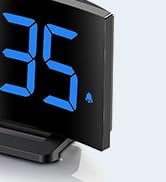
Image 5.1: The GOLOZA Digital Projection Alarm Clock actively projecting the time onto a surface, demonstrating its projection capability.
- Activating/Deactivating Projection: Druk op de Projektor button (or similar) to turn the projection on or off.
- Projektiehelderheid oanpasse: While the projector is on, press the Projector Brightness button (or the same Projector button repeatedly) to cycle through brightness levels (e.g., High, Medium, Low).
- Rotearjende projeksje: The projector lens can be physically rotated 180° to adjust the projection angle. Some models may also have a button to flip the projected image.
5.4 USB Charging Port Usage
The integrated USB port allows you to charge external devices.
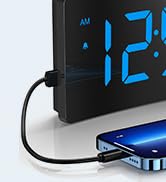
Image 5.2: The GOLOZA Digital Projection Alarm Clock with a smartphone connected to its USB charging port, illustrating its charging capability.
- Connect your device's USB charging cable to the USB output port on the alarm clock.
- Soargje derfoar dat de wekker oan is.
- The clock's USB port provides power to charge your device.
5.5 Snooze -funksje
As der in alarm ôfgiet, druk dan op de Snooze button (often a large button on top) to temporarily silence the alarm. The alarm will sound again after a preset interval (e.g., 9 minutes).
5.6 Oanpassing fan alarmvolume
The alarm volume is progressive, meaning it starts soft and gradually increases. Some models may offer adjustable volume levels.
- As beskikber, druk op de Folume button (or a dedicated switch) to adjust the alarm volume to your preferred level.
6. Underhâld
- Reiniging: Feie de klok ôf mei in sêfte, droege doek. Brûk gjin abrasive reinigingsmiddels of oplosmiddels.
- Pleatsing: Place the clock on a stable, flat surface away from direct sunlight, heat sources, and moisture.
- Batterij: The internal button battery is for memory backup. If the clock consistently loses settings after a power outage, de batterij moat miskien ferfongen wurde troch in kwalifisearre technikus.
7. Probleemoplossing
| Probleem | Mooglike oarsaak | Oplossing |
|---|---|---|
| De klokwerjefte is út. | Gjin macht ferbining. | Soargje derfoar dat de stroomadapter goed yn 'e klok en in wurkjend stopkontakt sit. |
| De projeksje is dof of ûndúdlik. | Incorrect brightness setting; dirty lens; too much ambient light. | Adjust projection brightness. Clean the projector lens with a soft cloth. Reduce ambient light in the room. |
| It alarm giet net ôf. | Alarm is not activated; alarm volume is too low. | Ensure the alarm icon is visible on the display. Check and adjust alarm volume. |
| Tiidynstellingen geane ferlern nei it útskeakeljen fan de stroomtage. | Internal backup battery is depleted or faulty. | The internal button battery may need replacement. Contact customer support. |
| USB-opladen wurket net. | Clock not powered; faulty USB cable; device not compatible. | Ensure the clock is powered. Try a different USB cable. Check device compatibility. |
8. Spesifikaasjes
| Eigenskip | Detail |
|---|---|
| Model Number | LA-C337 |
| Ofmjittings (L x B x H) | 17.7 x 3.81 x 7.8 sm |
| Gewicht | 310 gram |
| Merk | GOLOZA |
| Kleur | Blau |
| Styl | Modern/Elegant/Minimalist |
| Special Features | Integrated Design, Built-in Button Battery (for memory), USB Charging Port, Super Clear Projection, Progressive Volume, Curved Display |
| Power Boarne | Electrical (USB Powered) |
| Foarm | Rectangular, Curved Screen |
| Batterijen ynbegrepen | No (Internal button battery for memory backup is pre-installed but not user-replaceable) |
| UPC/GTIN | 647697054284 |
9. Garânsje en stipe
GOLOZA is committed to providing quality products and customer satisfaction.
- Retourbelied: 6 Months Return period.
- Garânsje: 24 Months Warranty from the date of purchase.
- Stypje: Lifetime Support is provided for this product.
For any questions, technical assistance, or warranty claims, please contact GOLOZA customer service through your purchase platform or the official GOLOZA website.