
1. Ynlieding
This manual provides detailed instructions for the proper use and maintenance of your Arlec Remote SS3136. This remote control is specifically designed to operate the Arlec Wall Fan AWDC001HA, offering convenient and effortless control over your fan's functions. Please read this manual thoroughly before first use to ensure optimal performance and longevity of your device.
2. Produktfunksjes
- Maklike kontrôle: Utilizes Infrared technology for seamless communication with your Arlec Wall Fan AWDC001HA from up to 10 meters away.
- Lang duorjende krêft: Requires 3 alkaline batteries for extended use.
- Slim ûntwerp: Finished in a sophisticated black color.
- Alsidige kompatibiliteit: Designed to control Arlec Wall Fans, specifically model AWDC001HA.
- Ienfâldige operaasje: Features 3 intuitive buttons for easy fan control.
3. Package Ynhâld
Kontrolearje oft alle items yn it pakket oanwêzich binne:
- 1 x Arlec Remote SS3136
- 1 x Wall Mount Holder
- 2 x Mounting Screws
- 2 x muorrepluggen
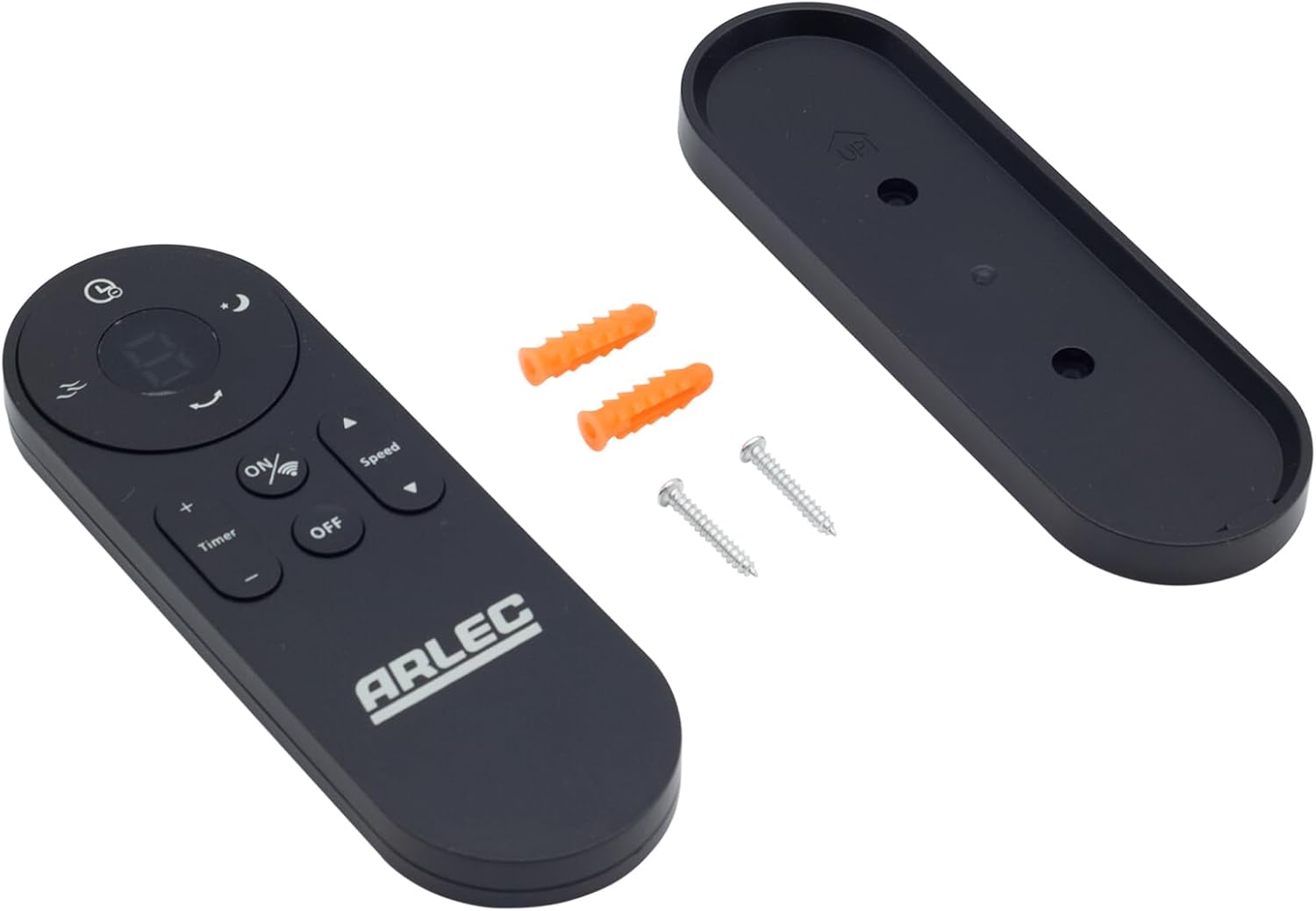
Image: Arlec Remote SS3136 shown with its included wall mount holder, two mounting screws, and two wall plugs, indicating the complete package contents.
4. Opsette
4.1 Batterij Ynstallaasje
- Sykje it batterijfak op 'e efterkant fan' e ôfstânsbetsjinning.
- Iepenje de batterij compartment cover.
- Insert 3 Alkaline batteries (not included) into the compartment, ensuring the correct polarity (+ and -) as indicated inside the compartment. The remote requires 3 Volts (DC).
- Slút it deksel fan it batterijfak feilich.
4.2 Ynstallearje oan muorrebefestiging (opsjoneel)
- Choose a suitable location on a wall for the remote holder.
- Mark the positions for the two mounting screws using the holder as a template.
- Drill pilot holes at the marked positions. Insert the wall plugs if drilling into drywall or masonry.
- Secure the wall mount holder to the wall using the provided screws.
- Place the remote control into the installed holder for convenient storage.
5. Bedriuwsinstruksjes
The Arlec Remote SS3136 features a simple 3-button layout for controlling your Arlec Wall Fan AWDC001HA. Ensure there is a clear line of sight between the remote and the fan's infrared receiver for optimal performance.

Ofbylding: Close-up view of the Arlec Remote SS3136, highlighting its three main control buttons: ON/OFF, Speed, and Timer.
- ON/OFF knop: Druk op dizze knop om de fan oan of út te skeakeljen.
- Snelheidsknop: Use this button to cycle through the available fan speed settings (e.g., Low, Medium, High).
- Timer knop: Press this button to set or adjust the fan's timer function. Refer to your Arlec Wall Fan AWDC001HA manual for specific timer intervals.
The remote operates using Infrared (IR) technology. Point the remote directly towards the fan's IR receiver. The effective operating range is up to 10 meters (approximately 33 feet).
6. Underhâld
- Reiniging: Feie de ôfstânsbetsjinning ôf mei in sêfte, droege doek. Brûk gjin skurende reinigingsmiddels of oplosmiddels.
- Batterij ferfanging: Replace batteries when the remote's performance degrades or it stops responding. Always replace all 3 batteries at the same time with new alkaline batteries.
- Opslach: As de ôfstânsbetsjinning foar in langere perioade net brûkt wurdt, ferwiderje dan de batterijen om lekkage te foarkommen. Bewarje op in koel, droech plak.
7. Probleemoplossing
| Probleem | Mooglike oarsaak | Oplossing |
|---|---|---|
| Remote not responding to fan. |
|
|
| Knoppen binne plakkerich of reagearje net. | Smoargens of pún ûnder de knoppen. | Clean the remote surface with a soft, dry cloth. Avoid liquids. |
8. Spesifikaasjes
| Attribute | Detail |
|---|---|
| Model | SS3136 |
| Fabrikant | Arlek |
| Kompatibele apparaten | Arlec Wall Fan AWDC001HA |
| Konnektivität Technology | Ynfraread (IR) |
| Oantal knoppen | 3 |
| Controller Type | Knop Kontrôle |
| Batterij Type | Alkaline (3 required) |
| Voltage | 3 Volt (DC) |
| Operating Range | Oant 10 meter |
9. Garânsje en stipe
For warranty information and technical support, please refer to the documentation provided with your Arlec Wall Fan AWDC001HA or contact Arlec customer service directly. Keep your purchase receipt as proof of purchase.
Foar fierdere help, besykje de offisjele webside fan 'e fabrikant webside of nim kontakt op mei har klanttsjinstline.