
1. Ynlieding
This manual provides detailed instructions for the installation, operation, and maintenance of your CP PLUS 4MP Wi-Fi Floodlight Camera, model CP-F42A. Please read this manual thoroughly before using the product to ensure proper functionality and safety. This camera combines high-resolution video surveillance with integrated floodlighting for enhanced security.
2. Safety Information
- Ensure the power supply matches the camera's requirements.
- Besykje de kamera net útinoar te heljen of te feroarjen.
- Install the camera in a location where it is protected from extreme weather conditions, although it has an IP54 rating, direct exposure to heavy rain or prolonged submersion is not recommended.
- Keep the camera away from heat sources and direct sunlight.
- Behannelje de kamera mei soarch om fysike skea te foarkommen.
- Consult a qualified electrician for installation if you are unsure about electrical wiring.
3. Package Ynhâld
Kontrolearje oft alle items yn it pakket oanwêzich binne:
- CP PLUS 4MP Wi-Fi Floodlight Camera (CP-F42A)
- Stromadapter
- Montageskroeven en muorrepluggen
- Snelle startgids (net ynbegrepen yn dizze hantlieding)
4. Produkt Overview
The CP-F42A is an outdoor Wi-Fi floodlight camera designed for surveillance and illumination. It features a 4MP sensor for clear video, H.265 video compression for efficient storage, and a 110° viewing angle. The integrated floodlight provides illumination, and the PIR sensor detects motion up to 12 meters.
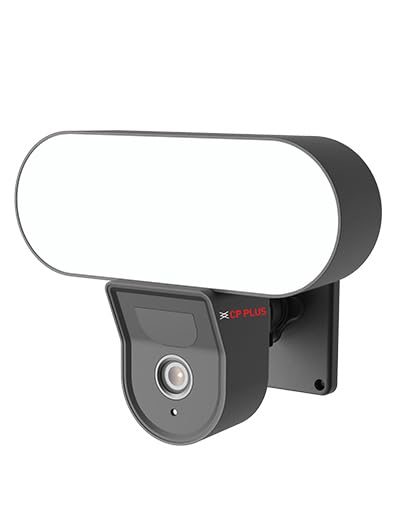
Ofbylding: Front view of the CP PLUS 4MP Wi-Fi Floodlight Camera CP-F42A, showing the camera lens and the integrated floodlight panel.
Key komponinten:
- Kamera Lens: Captures 4MP video.
- Floodlight Panel: Biedet ferljochting.
- PIR-sensor: Detektearret beweging.
- Mikrofoan: Foar audio input.
- Sprekker: Foar twa-wei audio-útfier.
- Montagebeugel: Foar feilige ynstallaasje.
5. Opsette
5.1 Fysike ynstallaasje
- Kies in lokaasje: Select an outdoor location with a clear view of the area you wish to monitor and within Wi-Fi range. Ensure the mounting surface is sturdy.
- Markearje boarpunten: Brûk de montagebeugel as sjabloan om de skroefgatten op 'e muorre te markearjen.
- Boarjen: Boarje foarboargaten op 'e markearre punten. Doch muorrepluggen yn as jo it op stienwurk montearje.
- Mount de kamera: Secure the mounting bracket to the wall using the provided screws. Attach the camera to the bracket.
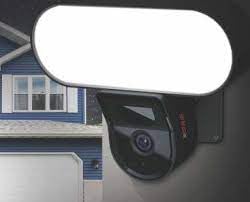
Image: The CP PLUS Floodlight Camera mounted on the exterior of a house, illustrating a typical installation scenario during the day.
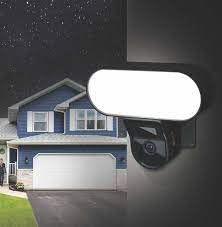
Image: The CP PLUS Floodlight Camera mounted on the exterior of a house at night, with the floodlight illuminated, demonstrating its night-time functionality.
5.2 Stromferbining
Connect the provided power adapter to the camera's power input port and then plug it into a suitable electrical outlet. Ensure the connection is secure and protected from moisture.
5.3 Wi-Fi Connection and App Pairing
- Download de app: Sykje nei the "ezyKam+" app (or the recommended CP PLUS app) on your smartphone's app store (iOS or Android) and install it.
- Meitsje in akkount: Iepenje de app en registrearje foar in nij akkount of meld jo oan as jo al ien hawwe.
- Apparaat taheakje: Follow the in-app instructions to add a new device. Select "Floodlight Camera" or a similar option.
- Ferbine mei Wi-Fi: The app will guide you through connecting the camera to your home Wi-Fi network. This usually involves scanning a QR code on the camera or entering your Wi-Fi credentials.
- Folsleine opset: As de kamera ienris ferbûn is, kinne jo him in namme jaan en de ynstellings oanpasse.
Image: Branding for CP PLUS ezyKam+ Wi-Fi Floodlight Full Color Camera, indicating compatibility with Alexa and Google Home, relevant for app pairing and smart home integration.
6. Bedriuwsinstruksjes
Access all camera functions through the dedicated mobile application.
6.1 Live View
Open the app and select your camera from the device list to view the live video feed. You can pinch to zoom and pan across the image.
6.2 Opname en Wiedergabe
- Hânlieding opname: Tap the record button in the live view to start/stop manual recording.
- Event opname: The camera automatically records when motion is detected. These recordings are stored on the installed microSD card (if any) or cloud storage (subscription may be required).
- Wiedergabe: Tagong opnommen footage through the "Playback" or "History" section in the app.
6.3 Bewegingsdeteksje en warskôgings
Configure motion detection sensitivity and areas within the app settings. When motion is detected, the camera can send push notifications to your phone and trigger recording. The PIR sensor has a detection range of 6-12 meters.
6.4 Floodlight Control
The floodlight can be controlled manually via the app or set to activate automatically upon motion detection during specific times or low-light conditions. Adjust brightness and duration settings in the app.
6.5 Twa-wei audio
Use the microphone and speaker icons in the live view to communicate with visitors or deter intruders. Press and hold the microphone icon to speak, and release to listen.
6.6 Nachtfisy
The camera features infrared (IR) night vision for clear black-and-white video in low-light conditions and can also utilize the floodlight for full-color night vision when activated. The night vision range is up to 12 meters.
7. Underhâld
7.1 Cleaning
Wipe the camera lens and floodlight panel with a soft, damp doek om stof en smoargens te ferwiderjen. Brûk gjin agressive gemikaliën of skuurmiddels.
7.2 Firmware Updates
Periodically check the app for available firmware updates. Keeping your camera's firmware up-to-date ensures optimal performance and security features.
7.3 Storage Management
If using a microSD card, regularly check its status in the app. Format the card periodically to maintain performance. Back up important recordings before formatting.
8. Probleemoplossing
| Probleem | Mooglike oplossing |
|---|---|
| Kamera giet net oan. | Check power adapter connection and ensure the outlet is functional. |
| Kin gjin ferbining meitsje mei Wi-Fi. | Ensure the camera is within Wi-Fi range. Verify Wi-Fi password. Try resetting the camera and router. |
| Min video kwaliteit. | Check Wi-Fi signal strength. Clean the camera lens. Ensure sufficient lighting. |
| Bewegingsdeteksje wurket net. | Adjust motion detection sensitivity and area settings in the app. Ensure there are no obstructions. |
| Floodlight not activating. | Check floodlight settings in the app. Ensure it's set to activate on motion or during low light. |
9. Spesifikaasjes
| Eigenskip | Detail |
|---|---|
| Model Number | CP-F42A |
| Resolúsje | 4MP (Effective Still Resolution: 4 MP) |
| Video kompresje | H.265, MPEG |
| Viewyn hoeke | 110 graden |
| PIR Ofstân | 6 ~ 12 meter |
| Wireless Technology | Wi-Fi |
| Night Vision Range | 12 Meters (Infrared, Night Color) |
| Frame Rate | 20 frames per sekonde |
| Optyske zoom | 3x |
| Ynternasjonale beskerming Rating | IP54 |
| Soart warskôging | Allinnich beweging |
| Power Boarne | Corded elektryske |
| Ynbegrepen komponinten | Adapter |
| Ofmjittings (L x B x H) | 20 x 12 x 10 sintimeter |
| Item Gewicht | 630 g |
| Binnen / bûtengebrûk | Outdoor |
| Foto Sensor Technology | CMOS |
| Oanrikkemandearre Uses | Thúsfeiligens, Nachtfisy |
10. Garânsje en stipe
For warranty information and technical support, please refer to the official CP PLUS webside of nim kontakt op mei harren klanttsjinst. Bewarje jo oankeapbewiis as bewiis fan oankeap foar garânsjeclaims.
CP PLUS Official Website: www.cpplusworld.com